Affordable Medical Imaging Storage: A Guide for Clinics
The lowest upfront price can become the most expensive storage choice over time. Affordable medical imaging storage means matching capacity and access to your clinic’s needs, not simply choosing the cheapest option. As imaging volume grows, unclear requirements and ongoing infrastructure costs can make that decision harder than it needs to be.
A practical plan keeps images available to clinicians and supports responsible data management. This guide explains how to estimate storage needs from study volume and modality mix, compare local, cloud, and hybrid approaches, and account for costs beyond the initial purchase.
Storage planning also involves archive and distribution workflows, as well as image sharing. SMAART-PACS supports medical image archiving and distribution, while SMAART-SHARE provides cloud-based image sharing and collaborative viewing. These products serve different roles. Planning for storage and access together can help your clinic choose a manageable approach without overbuilding or disrupting clinician access.
Key Takeaways
- Assess affordable medical imaging storage by looking beyond upfront expense to capacity, access, and ongoing operational needs.
- Compare local, cloud, and hybrid models against your clinic’s workflow rather than assuming one approach fits every practice.
- Estimate capacity using study volume, modality mix, growth assumptions, retention needs, and access patterns. Validate uncertain inputs internally.
- Keep image archiving and distribution distinct from team sharing when mapping storage workflows and software needs.
- Explore how SMAART-PACS supports archiving and distribution, while SMAART-SHARE supports cloud-based image sharing and collaborative viewing.
What makes medical imaging storage affordable for a clinic?
Affordable medical imaging storage is an approach whose full lifecycle expense fits a clinic’s budget while providing usable capacity, timely image access, and manageable day-to-day operations. The lowest initial quote may not be the best fit if it leaves too little room for growth or adds administrative work that strains staff. Compare what your clinic needs to retain, how clinicians retrieve studies, and how the system fits existing workflows.
Separate two related functions: archiving and distributing clinical images, and sharing images with care teams for collaboration. A Picture Archiving and Communication System (PACS) supports image management in radiology workflows. SMAART-PACS supports medical image archiving and distribution, while SMAART-SHARE provides cloud-based image sharing and collaborative viewing. They address connected needs, but sharing and archiving are distinct parts of an imaging workflow.
Which imaging data creates storage demand?
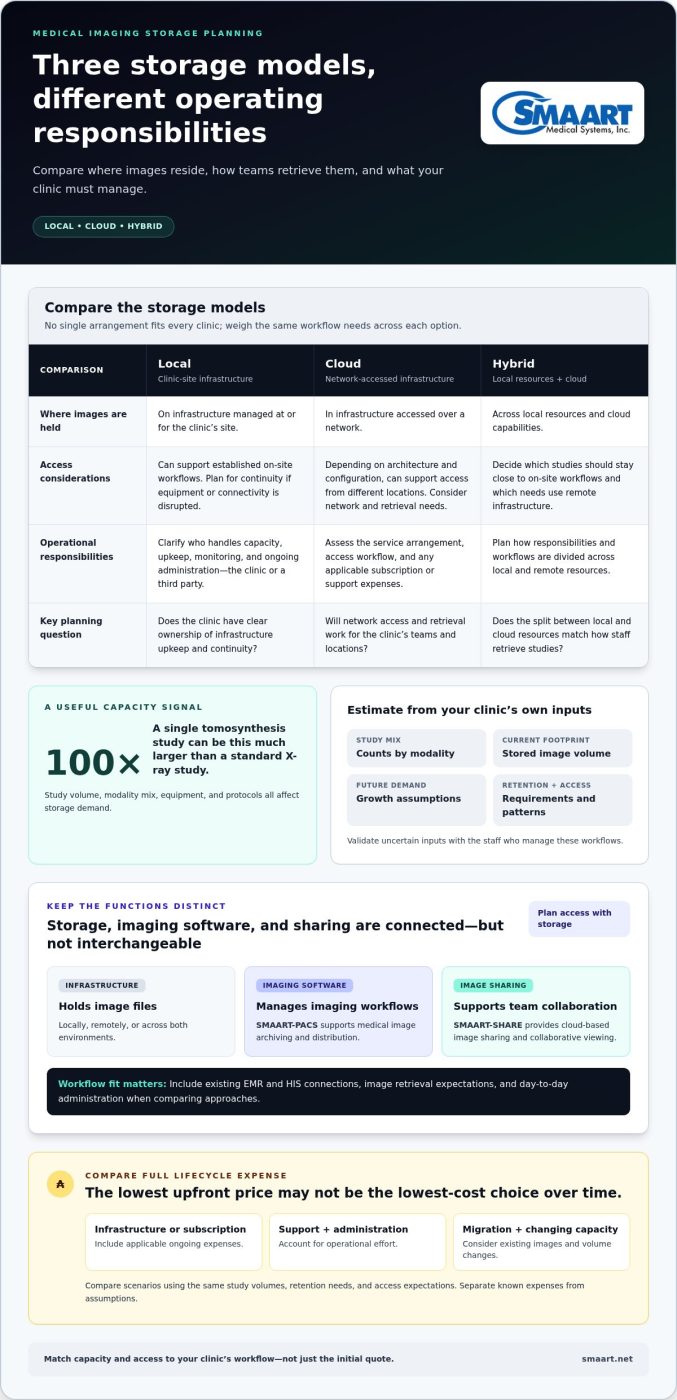
Storage demand depends on the number of studies, their file sizes, and the mix of modalities. A clinic producing many X-rays may have different capacity needs from one performing more advanced exams. The 2026 Guide to Reducing Medical Image Storage Costs notes that a single tomosynthesis study can be 100 times larger than a standard X-ray study. Equipment and protocols can also affect file size within a modality.
DICOM is a common standard for medical imaging data and communication, but it doesn’t mean every clinic has the same study mix or workflow. Start with your own study counts by modality, current stored volume, and applicable retention requirements. These clinic-specific inputs provide a more useful starting point than a generic capacity estimate.
What does affordable storage mean beyond the initial quote?
Compare the full cost of operating each approach over the period you plan to use it, not just the purchase price or subscription. Include applicable infrastructure or subscription expenses, support, system administration, migration, and capacity for changes in study volume. Separate known expenses from assumptions, such as future growth or the effort required to move existing images. Ask staff who manage those workflows to review the estimates.
Access is part of affordability, too. If a study takes longer to retrieve or a storage workflow interrupts routine work, clinicians and administrative staff may spend extra time locating images or adjusting processes. Identify which studies need frequent access, how quickly teams need them, and how the proposed workflow fits existing EMR and HIS platforms. Compare scenarios using the same study volumes, retention needs, and access expectations. This makes trade-offs visible without assuming one model or a universal savings claim applies to every clinic.
How do medical image storage models work?
Clinics can organize image storage locally, through cloud-based services, or with a hybrid arrangement. These models describe where image data is stored and how it’s accessed. They’re separate from software that manages imaging workflows and from tools that let care teams share images. Understanding the difference helps clinics compare options without treating every cloud tool as a complete archive.
Local storage: control and operational responsibilities
In a local model, image data is held on infrastructure managed at or for the clinic’s site. The clinic may own and operate that infrastructure, or use a third party to manage it. Either way, planning should cover capacity, upkeep, monitoring, and continuity if equipment or connectivity is disrupted. Local arrangements can support established on-site workflows, but they require clear responsibility for ongoing administration.
Cloud and hybrid storage: access and workflow considerations
Cloud-based storage places image data in infrastructure accessed over a network. Depending on its architecture and configuration, it can support access from different locations. A hybrid model combines local resources with cloud capabilities. For example, a clinic might keep some studies close to an on-site workflow while using remote infrastructure for other needs. The right arrangement depends on how staff work and how images need to be retrieved.
Think of the components separately:
- Storage infrastructure holds the image files, locally, remotely, or across both environments.
- Imaging software supports tasks such as archiving, retrieving, and distributing studies.
- Image sharing helps authorized care teams view and collaborate around images. It is a distinct function from maintaining a long-term archive.
This distinction matters in practice. SMAART-PACS supports medical image archiving and distribution in radiology workflows. SMAART-SHARE is a cloud-based platform for secure image sharing and collaborative viewing. SMAART solutions are designed to integrate with existing EMR and HIS platforms, so include those connections in workflow planning. Clinics comparing approaches can also consult AHRA’s resources on medical imaging management best practices for broader operational context.
Choose a storage model by matching where images reside and how they’re accessed to your workflow, administration capacity, and growth needs. For example, a clinic that relies on local access can assess how a cloud-based arrangement fits its network and retrieval process. A practice with distributed teams can weigh remote access and collaboration alongside archive requirements. Neither situation makes one model universally right.
For affordable medical imaging storage, compare the workflow as well as the infrastructure: who manages each component, how clinicians retrieve studies, and how the arrangement fits current systems. Explore how SMAART-PACS and SMAART-SHARE support distinct archiving and image-sharing needs within a clinic’s imaging workflow.
How should clinics compare affordable medical imaging storage options?
Compare each approach against the same clinic-specific requirements. A model that suits a clinic with mostly on-site access and internal technical capacity may not suit one with distributed teams and limited administrative resources. Review workflow, implementation effort, and ongoing expenses together. This gives you a clearer view of the trade-offs than comparing one quote or feature in isolation.
Which requirements should a clinic compare first?
Start with study volume, modality mix, who needs access, and where those users work. Add expected changes in service demand, retention requirements, and your organization’s rules for backup, recovery, and governance. Include integration with existing EMR and HIS platforms. The storage approach should fit how staff locate studies and connect imaging to the broader workflow.
| Comparison area | Local | Cloud-based | Hybrid |
|---|---|---|---|
| Access | Consider how well on-site workflows are supported and how remote access is handled. | Assess network-dependent access for the clinic’s locations and users. | Plan which studies or workflows use local resources and which rely on remote access. |
| Capacity planning | Plan infrastructure capacity and future expansion. | Understand how capacity is provisioned and reviewed as needs change. | Account for capacity across both environments and how data is allocated. |
| Administration | Identify who handles upkeep, monitoring, and continuity. | Clarify which tasks are managed externally and which remain the clinic’s responsibility. | Coordinate responsibilities across local and remote components. |
| Integration | Assess fit with current imaging and clinical systems. | Evaluate how connections support existing workflows. | Check that systems work together across both environments. |
| Growth and cost | Include expansion and infrastructure refresh in projections. | Compare recurring expenses and how they may change with use. | Include costs and implementation work for each component. |
When might local, cloud, or hybrid storage fit?
Local storage may suit clinics that prioritize direct infrastructure control and can manage its ongoing responsibilities. Cloud-based arrangements may be worth comparing when remote access or externally managed infrastructure fits the clinic’s workflows. A hybrid setup can address a specific need to combine local processes with remote capabilities, but it also requires coordination across components. It isn’t automatically the best choice.
For each option, estimate one-time implementation work, including migration and integration, alongside recurring expenses for infrastructure, administration, and support. Consider the impact of access delays or workflow changes, too. A deeper cloud-versus-on-premise PACS cost comparison can help frame these financial categories. Validate the assumptions against your clinic’s own usage and responsibilities. This is a practical way to evaluate affordable medical imaging storage without assuming one model works for every clinic.
How can a clinic plan storage capacity and control total cost?
A useful estimate starts with clinic records, not a generic storage target. Separate what you can measure now from what you must forecast, then test how those assumptions affect capacity and operating work. This gives your team a consistent basis for comparing proposals without treating a forecast as a guarantee.
Build a clinic-specific storage estimate
Collect study counts by modality, current storage use, retention requirements, and patterns of image access. Ask technical staff to validate how those figures are measured and whether they reflect the full archive. Then create more than one growth scenario. The 2026 Guide to Reducing Medical Image Storage Costs reports average annual imaging-data growth of 20% to 25%, but your clinic should use its own history and planned services rather than assume that rate applies.
Use this planning sequence:
- Record current activity. Gather study volumes by modality and review current storage use over a defined period.
- Apply retention needs. Document the retention requirements that apply to your organization and estimate how they affect stored data over time.
- Model growth scenarios. Compare a baseline with alternative assumptions about study volume and changes in imaging services. Label estimates clearly.
- Map access patterns. Identify which studies staff retrieve often, which are less frequently accessed, and where clinicians need access.
- Validate the estimate. Have technical and imaging workflow staff review the inputs before using them to compare options.
Compare lifecycle costs and operational risk
Capacity is only part of the budget. Compare recurring fees or infrastructure upkeep alongside one-time migration and implementation work. Include support, administration, and staff time for training and routine processes. Keep measured costs distinct from estimates, such as the effort required to move existing studies or manage a new workflow. This helps reveal expenses an initial quote may not capture.
Review continuity as well as cost. Document how backup and recovery responsibilities are handled, how users would access images during a disruption, and how the approach fits existing EMR and HIS connections. These questions can uncover operational risks before they become an unplanned burden. If you’re considering a cloud-based model, compare how capacity and access needs may change as the archive grows. Scalable cloud-based medical imaging storage is one option to assess against your clinic’s workflow, not an automatic cost advantage.
Put each scenario into the same comparison period and record its assumptions: expected study volume, retained data, access needs, staff effort, and known expenses. That makes trade-offs easier to explain to clinical and finance teams. It also gives you a grounded way to assess affordable medical imaging storage without relying on industry-average prices or unverified savings claims.
Use your validated workflow and capacity assumptions to explore SMAART imaging software for archiving, distribution, and image-sharing needs.
How can SMAART software support a clinic’s imaging storage workflow?
Storage infrastructure holds image data, while radiology software helps teams manage how studies are archived, distributed, and viewed. Planning these pieces together helps a clinic assess whether its workflows and systems align with its imaging needs. SMAART-PACS supports medical image archiving and distribution within radiology workflows. It lets clinics consider the software layer alongside their storage arrangements, while keeping the PACS distinct from the hardware or infrastructure that holds data.
SMAART-SHARE serves a related but distinct purpose. It’s a cloud-based platform for secure medical image sharing and collaborative viewing. Care teams can use image-sharing workflows to view and discuss images, while archive workflows support ongoing image management and distribution. Keeping these roles clear helps clinics plan for both image availability and collaboration.
Connect image management with existing clinic systems
SMAART solutions are designed to integrate with existing EMR and HIS platforms. Make integration a practical part of storage planning, not a technical detail to leave until implementation. Consider how staff locate studies, how imaging information connects to patient records, and which workflows depend on those connections. Clinics reviewing how PACS interfaces with an EMR should map the systems and tasks involved before settling on an approach.
A simple workflow review makes the discussion concrete. Document how a study moves from imaging through archiving and distribution, then note where clinicians need to view or share it. Include the systems staff use at each step, along with access roles and handoffs. This helps identify where integration supports existing work and where a process may need attention.
Choose a practical next step for evaluating fit
Before reviewing software, bring together the requirements gathered for capacity and access. Summarize study types, retention needs, user workflows, integration priorities, and responsibilities assigned to internal staff. Then compare those needs with the distinct roles of PACS archiving and distribution and cloud-based image sharing. This keeps the evaluation focused on how tools support your clinic’s workflow, rather than on features in isolation.
For a clinic pursuing affordable medical imaging storage, this distinction can prevent a mismatch between the archive plan and the collaboration tools teams need. SMAART-PACS supports image archiving and distribution, while SMAART-SHARE supports cloud-based sharing and collaborative viewing. The solutions are designed to integrate with existing EMR and HIS platforms, giving clinics practical workflow considerations as they evaluate fit.
Explore SMAART-PACS and SMAART-SHARE in the context of your clinic’s imaging requirements. A clear picture of current workflows and system connections can help your team assess how SMAART software fits into its storage and image-sharing plans.
Turn your storage plan into a practical next step
Give your storage decision an owner and a review point. Bring imaging, clinical, and technical stakeholders together around the assumptions shaping the plan, then record which needs are essential now and which may change as clinic activity evolves. A short, shared set of priorities can keep the evaluation focused and make future adjustments easier to discuss.
Use those priorities to assess how radiology software fits the workflow. SMAART solutions are designed to integrate with existing EMR and HIS platforms. Consider these capabilities alongside your storage plan.
Affordable medical imaging storage is an ongoing planning decision, not a one-time search for the lowest quote. Start with a clear view of your clinic’s requirements, then explore how SMAART software aligns with them. Explore SMAART radiology software solutions and take the next step with confidence.
Frequently Asked Questions
What is the most affordable way to store medical images?
The most affordable approach is the one that meets your clinic’s needs without adding avoidable costs or workflow friction. Compare local, cloud, and hybrid scenarios over the same planning period, including administration time and migration work as well as recurring expenses. A lower-cost option may be a poor fit if image retrieval disrupts clinic routines. Use actual operational data to judge which trade-offs your team can manage.
Is cloud storage suitable for medical imaging?
Cloud storage may suit a clinic that needs remote access or wants to evaluate externally managed infrastructure, provided the arrangement fits its technical and organizational needs. Consider network connectivity, system integration, access controls, retention, and recovery processes. Map how clinicians would retrieve a study if normal connectivity is interrupted. Cloud-based image sharing can support collaboration, but that function alone doesn’t define how a clinic’s long-term PACS archive is stored.
How much storage does a radiology clinic need?
A clinic’s storage requirement depends on its workload, so begin with study counts by modality and representative file sizes. Multiply a typical study size by the number of studies in a sample period, then compare the estimate with current archive usage to spot gaps. Account for retention and model different growth scenarios. Have clinical and technical stakeholders review the assumptions, especially if services or imaging equipment may change.
What happens if a clinic outgrows its medical image storage?
The next step depends on how the storage environment handles capacity increases. Set a threshold for reviewing available capacity before the archive reaches its limit, and assign someone to monitor it. Document expansion options, the steps for adding capacity, and whether moving data could affect access or connected workflows. Include these plans during procurement so future growth is part of the operational design, not an urgent, unplanned project.
Can a clinic keep its existing EMR and add a PACS?
Yes, a clinic can evaluate a PACS alongside its existing EMR and HIS. Integration details depend on the systems and workflows involved. Before implementation, map how patient identifiers, orders, and study information should move between platforms, and identify who will validate each connection. SMAART software solutions are designed to integrate with existing EMR and HIS platforms. Include those interfaces in workflow planning rather than treating them as an afterthought.
How do PACS and medical image sharing differ?
A PACS manages imaging workflows such as archiving and distributing studies, while an image-sharing platform supports viewing and collaboration between care teams. For example, a clinic can keep its formal archive workflow distinct from a process for sharing selected images with collaborators. Before adopting either capability, define who needs access, which studies they need, and how long images must remain available. This helps prevent a sharing workflow from being mistaken for archive management.