
How to Transition to a New RIS and Connect Workflows
An RIS transition is more than a software swap: it changes how radiology work moves through a hospital. A RIS manages administrative tasks and patient workflows, while PACS stores, retrieves, and distributes medical images. The practical answer to how to transition to a new RIS system is to map existing workflows, plan integrations and patient-record reconciliation, then test those connections before moving to live operations.
If your current system creates handoffs, duplicate work, or disconnected records, a replacement should address how teams and systems work together, not just add features. Consider the full path, from an order entering the hospital to images and reports reaching the right people.
This guide explains what a RIS does, what to assess when selecting one, and how to plan a transition that connects modalities, PACS, and EHR or HIS workflows. It also covers where testing and a scalable system fit into a smoother changeover.
Key Takeaways
- Map how orders, images, and reports move across your hospital to pinpoint where a new RIS must connect with existing workflows.
- Plan patient identity and demographic reconciliation to help preserve accurate records during migration.
- Assess how the system can accommodate changing workflows, connected platforms, and future operational needs.
- Structure selection and implementation around integration testing, migration experience, and a clear plan for moving into live use.
Integration with modalities and third-party systems
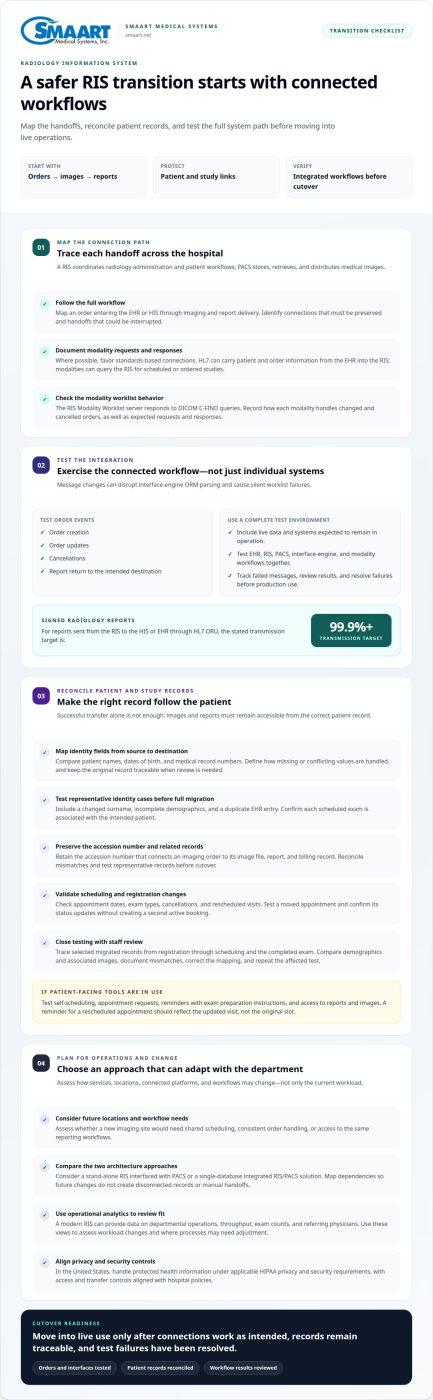
A RIS coordinates radiology administration and patient workflows; PACS stores, retrieves, and distributes medical images. A useful way to approach how to transition to a new RIS system is to map each handoff, from an order entering the EHR or HIS through imaging and report delivery. This map shows which connections the hospital must preserve and where interface changes could interrupt work.
Prefer standards-based connections where possible. HL7 can carry patient and order information from the EHR into the RIS, while modalities can query the RIS for scheduled or ordered studies. The RIS Modality Worklist server responds to DICOM C-FIND queries, letting imaging equipment retrieve relevant worklist entries. Document the expected request and response for each modality, including how changed or cancelled orders appear.
Message changes can disrupt an interface engine’s ORM parsing and lead to silent worklist failures. Test order creation, updates, cancellations, and report return in a complete integrated test environment using live data. Signed radiology reports sent from the RIS to the HIS or EHR through HL7 ORU have a stated transmission target of 99.9% or higher. Track failed messages and confirm reports reach their intended destination.
When planning how to transition to a new RIS system, make sure data migration preserves links between patient, scheduling, reporting, and billing records. Retain the accession number, which connects an imaging order to its image file, report, and billing record. Reconcile mismatches and test representative records before cutover.
In the United States, handle protected health information under applicable HIPAA privacy and security requirements, with access and transfer controls aligned with hospital policies. Test EHR, RIS, PACS, interface-engine, and modality workflows together, then resolve failures before production use.
During replacement, use a complete integrated test environment with live data to exercise connected workflows before the change goes into use. Include the systems and interfaces expected to remain in operation, check whether exchanges work as intended, and review results before transition.
When planning system connections, favor standards-based integration over proprietary integration when possible. A RIS often integrates with PACS and electronic health record systems, so assessing these connections together helps teams plan the broader workflow rather than treating each system in isolation.
Patient identity and demographic reconciliation
Patient records may contain different spellings, outdated demographics, or duplicate entries across hospital systems. During a RIS migration, map identity fields in the source system to their counterparts in the destination. Compare patient names, dates of birth, and medical record numbers, then define how the new RIS handles missing or conflicting values. Keep the original record traceable when records need review.
Test the mapping with representative cases before migrating the full dataset. Include a patient with a changed surname, a record with incomplete demographics, and a duplicate entry in the EHR. Confirm that the RIS associates each scheduled exam with the intended patient. Images and reports must remain accessible from the correct record, not merely transfer successfully.
Registration and scheduling data need their own mapping rules. Check how the new RIS represents appointment dates, exam types, cancellations, and rescheduled visits. Test a moved appointment and confirm its status updates without creating a second active booking. This helps preserve scheduling workflows as staff register patients and prepare them for imaging.
Patient-facing tools can also affect a transition. RIS patient engagement features may support self-scheduling, appointment requests, reminders with exam preparation instructions, and access to reports and images. Test each available path against registration and scheduling records. For example, a reminder for a rescheduled appointment should reflect the updated visit, not the original slot.
Close reconciliation testing with staff review of selected migrated records. Trace each example from registration through scheduling and the completed exam, then compare the displayed demographics and associated images. Document mismatches, correct the mapping, and repeat the affected test. For teams refining connected registration and scheduling workflows, radiology workflow solutions can be a relevant next consideration.
Scalability and future-proofing
Plan for the radiology department you expect to operate, not only its current workload. A RIS may support registration, scheduling, order tracking, and reporting, so assess how those workflows would function if services or locations change. Consider whether a new imaging site would need shared scheduling, consistent order handling, or access to the same reporting workflows. These scenarios help define practical requirements before selecting a system.
Architecture shapes how a RIS can evolve alongside PACS. A hospital can use a stand-alone RIS interfaced with PACS or a single-database integrated RIS/PACS solution. Consider which arrangement fits current operations and anticipated changes, such as adding a department or adjusting how staff route exams. Map system dependencies so future workflow changes do not create disconnected records or manual handoffs.
Operational analytics can help leaders assess whether a system continues to fit. A modern RIS can provide data on departmental operations, throughput, exam counts, and referring physicians. Use these views to identify workload changes and evaluate where processes may need adjustment. For example, a shift in exam volume across departments may prompt a review of scheduling patterns and incoming-order management.
Future-proofing also means considering patient-facing workflows and new service needs. RIS engagement tools may support self-scheduling, appointment requests, reminders with exam preparation instructions, and access to reports and images. Assess which functions align with the hospital’s plans and how they connect with registration and scheduling. Discuss likely changes with the vendor, such as a new site or revised patient workflow, and evaluate how the system can accommodate them without unnecessary complexity. Clear growth scenarios give selection teams a practical basis for comparing fit now and later.
Selecting and implementing a hospital RIS
Select a RIS by matching hospital workflows, system architecture, migration needs, and staff requirements. Connect those decisions to testing, training, and a controlled launch through a clear implementation plan.
Implementation Costs and Pricing Factors
Implementation costs depend on project scope, and pricing is provided after a quote request. Factors include migration needs, interfaces, configuration, training, and deployment model. The hospital’s current systems and workflow requirements shape the work involved. Define which records and connections the project includes, and whether the RIS will operate independently with PACS or within an integrated RIS/PACS solution.
Transition Steps
A practical answer to how to transition to a new RIS system is to organize the work around requirements, migration, testing, and cutover. Document current workflows and desired capabilities, then define system architecture and data scope. Map interfaces and assign responsibility for decisions and issues. Ask whether the vendor has completed data migrations many times and can provide references. This sequence keeps dependencies visible throughout implementation.
Staff Training and Workflow Updates
Training prepares each role to work in the new RIS, while workflow updates clarify changed handoffs. Both matter because registration, scheduling, technologist, and reporting tasks may involve different screens or procedures. Use role-based practice, such as registering a patient, updating an appointment, or completing a report. Give staff time to rehearse these tasks and raise workflow questions before launch.
Testing, Launch, and Success Measures
Testing confirms whether the configured RIS supports hospital procedures before teams rely on it. Use end-to-end scenarios for registration, scheduling, order handling, image association, and report delivery. Resolve failures before launch, then track issues after production begins. To transition to a new RIS system successfully, review incomplete records, interface errors, scheduling problems, and report delivery with department leads.
Plan your RIS transition around implementation scope, workflow needs, and launch measures.
SMAART Medical Systems
SMAART Medical Systems, Inc. provides radiology management software for hospitals and clinics planning a connected RIS transition. Its solutions are designed to integrate with existing EMR and HIS platforms, helping organizations align system selection with current workflows and infrastructure.
SMAART-RIS, SMAART-PACS, and SMAART-SHARE support radiology information, image management, and sharing needs. Consider these offerings when evaluating how a new RIS fits alongside imaging systems and existing hospital platforms. The right configuration depends on the workflows and connections your organization needs.
As a practical next step, outline your current systems, migration priorities, and integration requirements. Contact SMAART Medical Systems, Inc. to discuss your RIS transition.
Make the Next RIS Decision With Confidence
Turn your transition goals into a decision your clinical, operational, and technical teams can share. Agree on what must work from day one, who owns each decision, and how teams will raise issues after launch. This clarity keeps system selection tied to hospital priorities, rather than a feature list alone.
If you’re deciding how to transition to a new RIS system, focus on a practical fit between your workflows and the technology that supports them. SMAART Medical Systems offers SMAART-RIS, SMAART-PACS, and SMAART-SHARE as part of its radiology software solutions. Evaluate these offerings in relation to your hospital’s connected imaging and information needs.
Start a conversation with your requirements and priorities in hand. Contact SMAART Medical Systems to discuss the next step for your RIS transition.
A clear plan can make modernization feel manageable and give your teams a stronger foundation for what comes next.
Frequently Asked Questions
How long does a RIS migration and implementation typically take?
There’s no single standard timeline; the schedule depends on project scope and readiness. Interface count, data condition, workflow complexity, and staff training all affect duration. Replacing a connected RIS and PACS involves more dependencies to coordinate than changing a limited workflow. Build the timeline around migration, testing, staff preparation, and cutover decisions, rather than setting a date before those tasks are scoped.
How do you integrate a new RIS with PACS, EHR, modalities, and billing systems?
Start with an interface inventory that names each system, its data exchanges, and the team responsible for resolving errors. Define how orders, exam status, reports, and billing events should move, including where failed messages appear for review. For example, test whether a completed exam reaches the billing workflow only after the expected status update. Document routing and error-handling rules so teams can trace a transaction across systems.
What are common RIS implementation risks, and how can downtime and data loss be prevented?
Common risks include incomplete migration, incorrect record associations, interface failures, and cutover disruption to active work. Reduce exposure with protected source data, reconciliation checks, tested recovery procedures, and a defined rollback decision. Compare a sample of migrated appointments and reports against source records, then confirm staff can access them in the new system. Keep issue ownership clear during launch so teams can respond quickly.