
Hybrid cloud PACS solutions for balancing cost and performance
The best PACS for balancing cost and performance is not always fully cloud-based. Hybrid cloud PACS solutions combine local and cloud storage, supporting on-site image access while extending storage and sharing through the cloud. Local PACS keeps storage and access on site, while cloud PACS relies on internet access for viewing, sharing, and storage.
Choosing between these models means weighing more than storage costs. Internet reliability, image retrieval needs, and connections to EMR or HIS platforms all affect how well a system fits your workflow. This article compares local, hybrid, and cloud PACS across cost, performance, and integration, then provides a practical guide to choosing a model for your organization.
Key Takeaways
- Match the PACS model to your internet reliability and how quickly your team needs to retrieve images, including during an outage.
- Balance local hardware needs with cloud storage by considering how image access patterns change over time.
- Assess how DICOM and healthcare data exchange standards fit with your existing imaging and hospital systems.
- Use the decision guide to weigh local, cloud and hybrid models against your organization’s workflow and infrastructure.
Local, Hybrid, Cloud…What Kind Of PACS Do I Need?
There is no single hybrid PACS that suits every U.S. practice. The right fit depends on image workflows and infrastructure. Bandwidth and on-site hardware needs depend on image volume, simultaneous viewing, and how much storage stays local.
Image Access During Outages
A local PACS stores and shares images on site, allowing teams to access them without internet when local servers are available. A server failure can still interrupt access. Cloud PACS relies on internet connectivity, so an outage can prevent cloud-based viewing. Hybrid systems can preserve local access to images stored on site, while cloud features may be unavailable until connectivity returns.
For example, a clinic with unreliable internet may prioritize local image access. A hybrid setup can pair that local layer with cloud storage and sharing, but access during an outage depends on which images and functions remain available locally.
Browser-Based Cloud Access
Cloud PACS stores images in the cloud and supports browser-based viewing and sharing across locations and devices. Local PACS, by contrast, keeps image storage and access on site. A reliable internet connection is needed to use cloud features effectively, as slow service can delay image retrieval. Hybrid cloud PACS solutions can combine cloud storage and sharing with a preferred desktop DICOM viewer.
Security and access controls matter in every model. Define who can view or share images, then apply platform permissions to those roles. Choose a system design that fits your clinic’s security needs, rather than assuming cloud storage alone determines access.
| PACS model | Image storage | Access and sharing | Outage consideration |
|---|---|---|---|
| Local | On-site | On-site access and sharing | Internet loss may not prevent local use; server failure can |
| Cloud | Cloud | Browser access across locations and devices | Internet loss can block cloud features |
| Hybrid | Local and cloud | Can combine a desktop viewer with cloud sharing | Local access depends on the on-site layer; cloud functions need connectivity |
Choose a model by comparing outage priorities, remote access needs, image workflows, and available network and server capacity.
Hybrid cloud storage balancing performance and cost
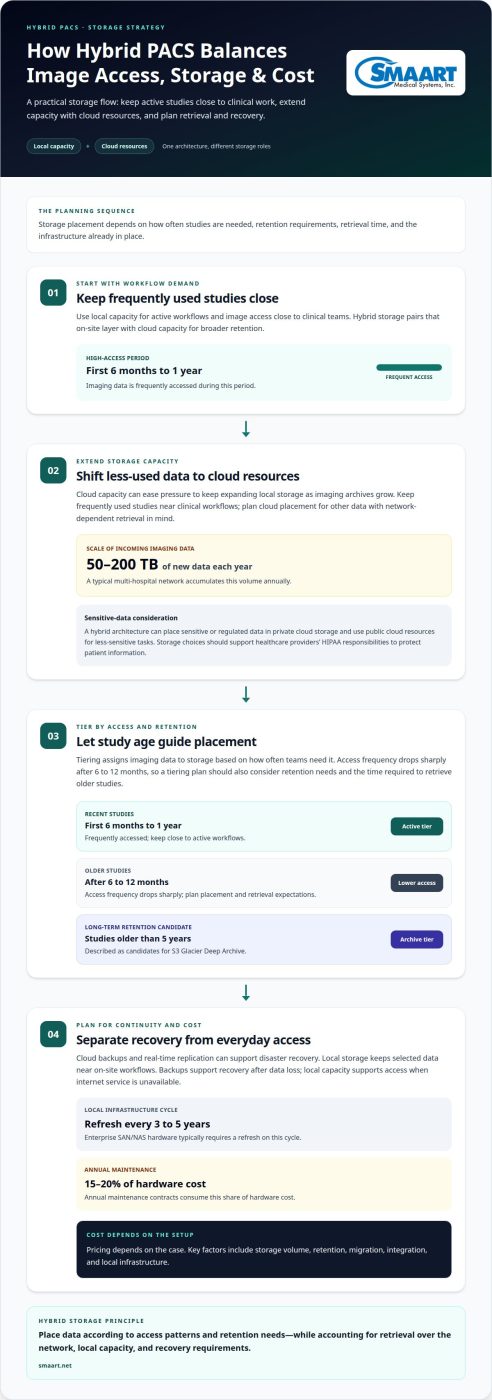
Hybrid storage combines local capacity for active workflows with cloud resources for broader retention. Pricing depends on the case and is given after a quote request; storage volume, retention, migration, integration, and local infrastructure affect costs.
Cloud Storage for Sensitive Data
A hybrid architecture can place sensitive or regulated data in private cloud storage and use public cloud resources for less-sensitive tasks. This differs from keeping all imaging data on local hardware or placing all storage in one cloud environment. U.S. healthcare providers must comply with HIPAA to protect patient information, according to the U.S. Department of Health and Human Services. Storage choices should support that responsibility.
Storage Relief for Existing Infrastructure
Cloud capacity can reduce pressure to keep expanding local storage as imaging archives grow. A typical multi-hospital network accumulates 50 to 200 terabytes of new imaging data each year. Keeping frequently used studies close to clinical workflows while shifting other data to cloud storage can ease local capacity demands. The trade-off is that cloud retrieval depends on network access and planned data placement.
Imaging Storage Costs and Tiering
Tiering assigns data to storage based on how often teams need it. Imaging data is frequently accessed during its first 6 months to 1 year, then access frequency drops sharply after 6 to 12 months. Studies older than 5 years are described as candidates for long-term retention in S3 Glacier Deep Archive. A tiering plan should account for retention needs and the time required to retrieve older studies.
Storage and Disaster Recovery
Cloud disaster recovery can use scheduled backups and real-time replication, while local storage keeps selected data near on-site workflows. These approaches address different risks: backups support recovery after data loss, while local capacity supports access when internet service is unavailable. Enterprise SAN/NAS hardware typically requires a refresh every 3 to 5 years, with annual maintenance contracts consuming 15 to 20 percent of hardware cost. Explore PACS storage planning as you map these trade-offs to your infrastructure.
DICOM, DICOMweb, HL7, and FHIR integrations
Integration links imaging workflows with electronic records and hospital systems. DICOM handles imaging data, while HL7 and FHIR compatibility can support data exchange between online PACS and hospital systems.
DICOM and Messaging Standards
DICOM supports the exchange of medical images and related information between imaging systems. DICOMweb provides web-based ways to work with DICOM objects, which can suit browser-oriented workflows. HL7 and FHIR address healthcare data exchange, rather than replacing imaging formats. Their role is to help PACS communicate with hospital systems that manage patient and clinical information.
Plan integrations around actual workflows. Map how an imaging order reaches the PACS, how a completed study is matched to the correct patient, and how results return to the record. Compatibility matters, as do field mappings, identity matching, and exception handling. A clear interface plan helps teams identify gaps before routine use.
Electronic Record and Modality Integration
An EMR or EHR connection can reduce duplicate entry by exchanging relevant patient and study information with PACS. Modality integration links imaging equipment with the archive workflow, so acquired studies can move into the correct patient record. These connections serve different purposes: record systems exchange clinical context, while modalities create and send imaging data.
Start by tracing a representative workflow from scheduling through image review. Identify which system supplies patient identifiers, where orders originate, and how images reach the PACS. Then test the exchanges with realistic cases, including corrected patient details and incomplete information. This reveals integration issues more effectively than relying on a hardware inventory alone.
Hybrid deployments add a placement decision: determine which connected systems communicate locally and which use cloud services. Keep the integration design consistent across both paths. Include backup and recovery procedures for interface configurations, and document how teams handle delayed messages or interrupted transfers. This keeps workflows clear when connectivity or a connected system is unavailable.
Cloud, onsite, and hybrid PACS system models
Hybrid cloud PACS solutions combine local and cloud capabilities, but features, scalability, and interoperability depend on deployment design. Match image workflows, integration needs, and internet reliability to the strengths of each model.
Cloud PACS Model
A cloud PACS stores and provides access to imaging through cloud infrastructure. Teams can view and share images in a browser across locations and devices, supporting distributed workflows without relying solely on local storage. Capacity can scale through cloud resources, while access depends on internet connectivity. Interoperability still depends on how the PACS exchanges imaging and clinical data with connected systems.
On-site PACS keeps image storage, sharing, and access at the facility. It can suit workflows that require local control or continued local use when internet access is unavailable, provided on-site servers remain available. Capacity depends on local infrastructure, and remote access is more limited than browser-based cloud access. Expansion also involves managing additional on-site storage and hardware.
Hybrid PACS Model
A hybrid cloud architecture combines at least one private cloud solution with at least one public cloud resource, using at least two types of cloud infrastructure. It can pair local imaging workflows with cloud storage or sharing, balancing on-site access and cloud capacity. Some deployments use cloud bursting, adding public resources when demand peaks. A hybrid setup can also include two or more public cloud resources, making it multi-cloud.
For interoperability, map where each workflow runs and how systems exchange information across locations. Assess internet connectivity when considering a fully cloud-based implementation, since weak connections can affect access and image retrieval. Compare models against actual needs: local access during outages, remote viewing, expansion capacity, and connections to hospital systems. The best fit supports required workflows without adding unnecessary complexity.
Plan your PACS deployment around your workflows, connectivity, and integration priorities.
SMAART Medical Systems: SMAART-PACS
SMAART Medical Systems, Inc. offers SMAART-PACS, radiology management software for hospitals and clinics assessing PACS options. It is designed to integrate with existing EMR and HIS platforms, making it relevant when imaging workflows need to connect with established hospital systems.
Consider SMAART-PACS when evaluating how PACS can support your organization’s imaging and system-integration needs. SMAART-RIS supports radiology management workflows, while SMAART-SHARE provides a cloud-based sharing platform. These offerings address related parts of radiology operations, without assuming that every organization needs the same configuration.
Contact SMAART Medical Systems, Inc. to discuss your PACS requirements and explore a solution for your organization.
Set a Clear Direction for Your PACS Strategy
The next step is to turn your preferred architecture into a practical plan. Identify which workflows need reliable local access, where remote image sharing matters, and how the PACS should connect with existing systems. These priorities help shape a focused evaluation without treating every feature as equally important.
Bring your imaging, clinical, and IT teams into the planning conversation. Agree on the workflows that matter most, then use them to assess how a PACS platform will fit daily operations and future needs. Shared priorities make technical decisions easier to explain and keep the evaluation grounded in real work.
For help considering how SMAART Medical Systems, Inc. may fit your requirements, contact SMAART Medical Systems, Inc. A thoughtful next step can put your organization on a clearer path toward a PACS strategy that supports its workflows.
Frequently Asked Questions
Want to see how Hybrid works in practice?
Trace an imaging exam from order to review to see where each system fits. Follow how patient details enter the imaging workflow, where the study is stored, how a radiologist accesses it, and how a referring clinician receives it. This exposes handoffs and potential delays. Use your organization’s actual workflow, not just a feature demonstration.
What is a hybrid cloud PACS and how does it work?
A hybrid cloud PACS combines on-site systems with cloud infrastructure, assigning different roles to each environment. A facility might keep part of its imaging workflow local while using cloud resources for storage or sharing. The design determines which data and tasks depend on local systems, cloud services, or both, helping teams understand how the setup will fit daily operations.
How do hybrid cloud PACS solutions integrate with EHR, RIS, modalities, and DICOM standards?
Integration connects imaging workflows with patient records, radiology management systems, and image-producing modalities. DICOM supports imaging data exchange, while HL7 and FHIR can support information exchange with hospital systems. Map which system supplies patient and order details, where modality studies enter the workflow, and how completed imaging information returns to the record.
What HIPAA, HITECH, and data-residency requirements apply to cloud PACS in the United States?
U.S. healthcare providers must comply with HIPAA to protect patient information, according to the U.S. Department of Health and Human Services. HITECH and data-residency considerations also warrant attention to the organization’s applicable obligations and agreements. A deployment model alone does not determine compliance or data location. Document the requirements that apply to your organization and its information flows.
How do hybrid cloud PACS solutions handle image storage, backup, disaster recovery, and uptime?
Storage and recovery tasks can be distributed across local and cloud environments, but the design determines what remains accessible during an interruption. A recovery plan should identify the authoritative image source, how backups are restored, and how queued transfers resume. Uptime depends on connected infrastructure and services, so define which clinical workflows take priority during recovery.
What are the security risks and safeguards for hybrid cloud PACS?
Risks can arise from unauthorized access, exposed credentials, misconfigured permissions, or gaps between connected systems. Safeguards include limiting access by role, reviewing permissions, protecting data in transit and at rest, and monitoring system activity. For example, remove access when staff responsibilities change and include cloud connections in security reviews, rather than focusing only on local servers.