
Radiology billing integration with RIS: How records connect
Integration can connect existing imaging systems to billing workflows without requiring compatible equipment to be replaced. A well-designed radiology billing integration with RIS uses an accession number to link an imaging order with its images, report, and billing record, keeping the exam traceable throughout the workflow.
It’s understandable to worry that connecting radiology systems means starting over with new technology. In practice, standards-based connections can help existing systems exchange information: HL7 can carry clinical and administrative data, while APIs can provide another route for system-to-system communication. DICOM-compatible imaging modalities can connect to standards-based PACS without necessarily replacing the equipment.
This article explains how the accession number links records, how orders and signed reports move between systems, and where billing and hospital ERP connections fit. It also covers how RIS, PACS, and EHR systems work together, and how a facility can build on its existing setup.
Key Takeaways
- Follow how one exam record stays connected as it moves from scheduling through imaging, reporting, and billing.
- Understand what HL7 messages and APIs contribute to data exchange, and where interface design matters.
- See how billing workflows connect procedure and diagnosis information with hospital financial systems.
- Distinguish the roles of RIS, PACS, and EHR systems to better plan integration around existing workflows.
Accession numbers as links to images, reports, and billing records
An RIS uses an accession number to identify an imaging exam across operational systems. This shared reference helps connect the patient’s order, images, report, and billing record.
Accession Number Links
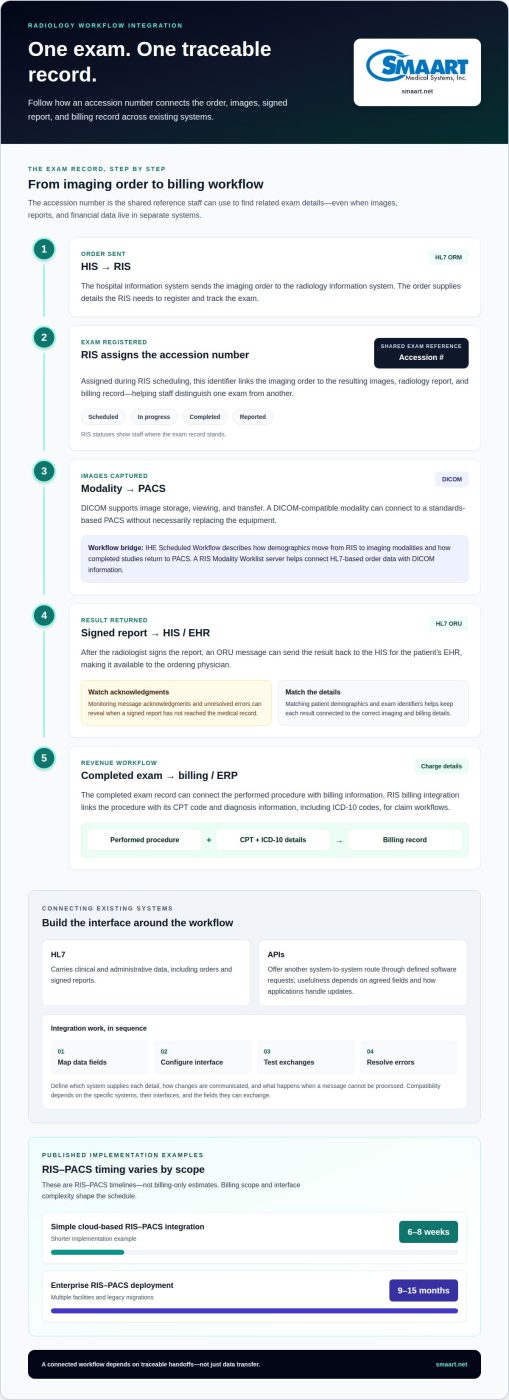
An accession number is assigned during RIS scheduling and links an imaging order to its resulting images, radiology report, and billing record. Staff can use the same number to trace a scheduled exam through image capture and reporting. This connection helps prevent records for separate exams from being confused and gives clinical and billing teams a consistent reference.
Exam, Report, and Billing Data
The exam record follows the procedure through scheduling, performance, and reporting, while the images and report document its clinical result. The billing record connects the performed exam to the charge workflow. In the RIS, an exam may move through statuses such as scheduled, in progress, completed, and reported. These statuses show staff where the record stands and help distinguish an unfinished exam from a completed one.
After the radiologist signs a report, the billing workflow can use the completed exam record to associate the performed procedure with its billing information. The accession number provides a practical way to find related records, even when images, reports, and financial data are held in separate systems.
HL7 Order and Report Messages
HL7 ORM messages carry radiology orders from a hospital information system to the RIS; signed reports can return through HL7 ORU messages. The incoming order gives the RIS information needed to register and track the exam. The report message sends results back to the HIS for storage in the patient’s EHR, making the report available to the ordering physician.
These messages help create a traceable flow from order to result. For example, a received ORM order can enter RIS scheduling, and the exam status can advance as the study is performed and reported. After the report is signed, an ORU message can distribute it back to the HIS. Matching patient demographics and exam identifiers at each step helps keep the clinical record connected to the correct imaging and billing details.
HL7 and API connectivity
HL7 and APIs provide routes for a radiology information system to exchange information with hospital software. HL7 carries clinical and administrative data, while an API can connect systems through defined software requests. The right path depends on which systems need to exchange orders, patient demographics, exam status, and results. Clear field mapping helps preserve meaning as information moves between applications.
For example, an HIS can send an imaging order through an HL7 ORM message. The RIS receives the order details and makes them available for scheduling and workflow. After a radiologist signs the report, an HL7 ORU message can return it to the HIS for the patient’s medical record. This gives the referring physician a route to the result without manual re-entry.
APIs can support other exchanges, such as passing selected record details between systems. Their usefulness depends on the agreed data fields and how each application handles updates. A sound integration plan defines which system supplies each detail, how changes are communicated, and what happens if a message cannot be processed. These decisions help staff trace an incomplete imaging order instead of relying on duplicate entry.
HL7 and imaging standards also serve different purposes. HL7 moves patient and workflow information; DICOM supports image storage, viewing, and transfer. The IHE Scheduled Workflow profile describes how demographics move from the RIS to imaging modalities and how completed studies return to PACS. A RIS Modality Worklist server helps connect HL7-based order data with DICOM information used by modalities and PACS.
Interface-engine configuration or HIS-side message handling can cause ORU transmission failures. Monitoring message acknowledgments and unresolved errors helps reveal when a signed report hasn’t reached the medical record. Missing results can disrupt clinical follow-up, while mismatched order details can complicate billing review and contribute to claim denials. A well-defined connection supports traceable handoffs, not just data transfer. Explore radiology system integration options to see how connected workflows can fit existing software.
RIS integration with hospital ERP and billing systems
Connecting RIS with billing and hospital ERP systems links imaging activity to administrative and revenue workflows. The integration depends on compatible interfaces and clear mappings between records.
RIS Platform Compatibility
Radiology billing platforms can integrate with RIS when both systems support a compatible data exchange, such as HL7 messages or APIs. There isn’t one universal vendor pairing: compatibility depends on the specific systems, interface capabilities, and fields they can exchange. A hospital department benefits when the connection carries exam and billing details into its existing workflow, rather than requiring repeated manual entry.
Integration Steps and Timing
Integration typically involves mapping the data fields, configuring the interface, testing exchanges, and resolving errors before routine use. The work includes aligning RIS exam records with billing-system workflows and validating that exchanged information remains consistent. Simple cloud-based RIS-PACS integrations may take 6-8 weeks, while enterprise RIS-PACS deployments involving multiple facilities and legacy migrations may take 9-15 months. These are RIS-PACS timelines, not billing-only estimates; billing scope and interface complexity shape the schedule.
Coding and Charge Capture
RIS billing integration links the performed procedure with its CPT code and diagnosis information, including ICD-10 codes, for claim workflows. In an integrated process, signing the report can trigger billing: the procedure’s CPT code is linked to diagnosis codes from the report, then transmitted to a hospital billing system or payer. This helps the administrative team connect documented services with charge capture and review discrepancies before claims move forward.
Integration Errors and Security Risks
Common issues include mismatched fields, incomplete exam details, and failed report or billing messages. Interface-engine configuration or HIS-side message handling can cause HL7 ORU transmission failures, interrupting report delivery and downstream workflows. To reduce these risks, teams can monitor failed messages, review field mappings, and test end-to-end exchanges. Encrypting data in transit and at rest helps protect information exchanged between RIS, PACS, and external systems. Traceability can also show who performed an action, when, and how.
How do RIS and billing systems integrate with an EHR and PACS?
Integration connects distinct systems around the same imaging exam. The RIS manages workflow and reports, PACS handles medical images, and the EHR stores patient records. Billing systems use exam and report details to support charge and claim workflows.
An order can enter the RIS from the HIS, which may be part of the EHR environment. The RIS manages scheduling and order status, then sends study details to imaging modalities through a modality worklist. DICOM carries image data between compatible modalities and PACS. This lets imaging staff access the correct study while the RIS manages the administrative workflow.
After the exam, PACS stores and makes images available for retrieval and viewing. The radiologist works from those images and completes a report in the reporting workflow. Once signed, the report can return to the HIS through an HL7 ORU message for storage in the patient’s EHR. The EHR then gives the ordering physician a record of the result, while the RIS retains the exam’s workflow context.
Billing connects to the same exam record, using procedure and report information to support charge capture. Integration can help connect report information with billing workflows. The claim can then move to the hospital billing system or payer. Shared identifiers and mapped fields help align the imaging study, report, and financial record across systems.
These connections don’t automatically require replacing existing imaging equipment. DICOM-compliant modalities can connect to standards-based PACS, allowing a facility to build around compatible equipment. The practical design depends on how its RIS, PACS, EHR, and billing software exchange data. Plan a connected RIS and PACS workflow around existing systems and billing needs.
SMAART Medical Systems, Inc.
SMAART Medical Systems, Inc. offers radiology management software designed to integrate with existing EMR and HIS platforms. For facilities planning connected imaging and billing workflows, its products include SMAART-RIS and SMAART-PACS, as well as SMAART-SHARE, a cloud-based sharing platform.
The right configuration depends on how your current systems handle orders, images, reports, and billing data. SMAART-RIS manages radiology workflows, while SMAART-PACS manages medical images. Together, they can support planning for how exam records connect across clinical and operational systems, with the setup tailored to the facility’s needs.
If you’re evaluating how to connect radiology records with existing systems, contact SMAART Medical Systems, Inc. to discuss your workflow and software needs.
Shape the Next Integration Around Your Workflow
Start by defining what a connected imaging workflow should make easier for your facility. A practical planning discussion can cover existing systems, how information moves between departments, and where staff need clearer visibility. This gives integration decisions a sound operational foundation, rather than treating connectivity as a technical change alone.
A well-planned radiology billing integration with RIS should fit the facility’s workflows and support clear handoffs across clinical and administrative teams. Priorities may include maintaining existing system connections, reducing duplicate data entry, or making exceptions easier to trace. Clear goals help guide decisions and keep the project focused on operational needs.
When you’re ready to discuss how your radiology systems can work together, contact SMAART Medical Systems, Inc. A thoughtful next step can make integration planning clearer and help your team move forward with confidence.
Frequently Asked Questions
Does integration require replacing existing equipment?
Not necessarily. DICOM-compliant imaging modalities can connect to standards-based PACS, so compatible equipment may remain in place. The practical questions are whether the modality can send studies through the proposed image workflow and whether PACS can receive and display them. Testing a sample study can reveal connection or data-mapping issues before the workflow handles routine exams.
How does radiology billing integration with a RIS work?
Radiology billing integration with RIS connects exam and billing information so a completed imaging service can enter the financial workflow with its supporting details. A practical design identifies which system supplies each field and what happens if an exchange fails. For example, staff can follow a test order from scheduling through billing to confirm that the same exam is represented at each stage, rather than entered as separate work.
What data should a RIS send to radiology billing software?
Useful data includes patient demographics, the exam order, accession number, procedure details, completion status, and signed-report information. Billing workflows may also use the performed procedure’s CPT code and diagnosis codes associated with the report. Field mapping should preserve enough context to distinguish exams for the same patient, such as separate imaging orders scheduled during one visit.
What HL7 and FHIR standards are used for RIS billing integration?
For the workflow described here, HL7 ORM messages can carry orders, and HL7 ORU messages can carry signed reports. APIs can provide another way for systems to exchange data. Where connected systems support FHIR interfaces, the integration can map the needed patient, order, and result information to their agreed exchange format. The chosen connection must match the capabilities of both systems.
How should a practice compare vendors and test a RIS billing integration?
Compare how each proposed system handles required data fields, existing interfaces, and visibility into failed messages. Then test representative scenarios before routine use: a complete exam, a corrected order, and a report that fails to transmit. Confirm staff can identify the affected record and resolve the workflow without creating duplicate charges or losing the link between the exam and its billing details.
Which radiology billing platforms integrate with popular RIS systems?
Radiology billing platforms can integrate with RIS systems that support compatible data exchange, such as HL7 messages or APIs. There is no universal vendor pairing; compatibility depends on the systems and the fields they can exchange.