Agfa Enterprise Imaging Alternatives: How to Compare PACS Solutions in 2026
A broader feature set doesn’t automatically make a PACS the better fit. The right choice depends on how your teams read, share, and manage imaging today, and how much change your operations can absorb. Comparing Agfa Enterprise Imaging alternatives can be difficult when enterprise platforms, cloud PACS, and specialized tools address different needs.
Look beyond the feature checklist. Integration with EMR and HIS platforms, image access, deployment model, workflow continuity, and migration planning all affect how a solution works in practice. This guide offers a practical framework for building a shortlist around those operational needs, rather than choosing on features alone.
We’ll compare enterprise imaging options and explain when a focused PACS, RIS, or cloud image-sharing solution may be a better match. You’ll also find ways to assess integration and transition requirements, including how SMAART-PACS, SMAART-RIS, and SMAART-SHARE support distinct imaging workflows.
Key Takeaways
- Compare Agfa Enterprise Imaging alternatives by workflow fit and transition readiness, not feature count alone.
- Understand how enterprise PACS, cloud PACS, integrated RIS-PACS, and image-sharing tools differ in scope and deployment.
- Separate mandatory requirements from preferences across clinical workflows, integrations, image access, and administration.
- Reduce transition uncertainty by documenting workflows, assessing interfaces, validating real scenarios, and planning a staged rollout.
- Assess SMAART-PACS for image storage and distribution, SMAART-RIS for scheduling and patient data, and SMAART-SHARE for cloud-based image sharing.
Why radiology teams explore Agfa Enterprise Imaging alternatives
Evaluating another imaging solution isn’t simply a search for more features. It’s a decision about whether the technology supports how radiologists read, how imaging teams coordinate work, and how clinical information moves through the organization. Even a platform with extensive capabilities can leave a practical workflow gap.
In this article, an Agfa Enterprise Imaging alternative means a PACS platform or complementary imaging tool considered to address an organization’s operational, integration, or deployment needs. That could mean replacing a full platform or adding a focused solution while keeping the core archive and reading environment. Agfa has a long history in imaging; its parent company’s background and business focus are outlined in Agfa-Gevaert’s history and imaging solutions.
What should prompt a PACS alternatives review?
Start with the work, not vendor demonstrations. Map where studies are acquired, how they reach readers, how results and patient information move between systems, and where users encounter delays or workarounds. Changing operational needs, integration gaps, evolving support expectations, or a new platform strategy can all prompt a review. First define the problem precisely, then decide what kind of solution could address it.
Look for patterns. A recurring mismatch between the system and a clinical workflow may justify a broader review. An issue limited to a recent rollout, a particular configuration, or unfamiliarity with a feature may call for targeted troubleshooting or training instead. Include radiologists, imaging operations, IT, and administration so the shortlist reflects clinical usability, technical dependencies, and organizational priorities.
Does every alternative need to replace the entire imaging platform?
No. A full replacement changes the core PACS environment, so data, interfaces, and continuity need careful attention. A modular addition can address a specific need while the existing platform remains in place. A complementary tool, such as cloud-based image sharing, can support access or collaboration without replacing the PACS. Radiology AI assistance is another adjacent category. It may support parts of a reading workflow, but it isn’t automatically a replacement for image storage and distribution.
Choose the scope that matches the problem. If the pain point involves scheduling or patient data, a RIS may be more relevant than a PACS swap. If it involves sharing images, an image-sharing tool may be the narrower fit. SMAART-PACS supports image storage and distribution, while SMAART-RIS manages patient data and clinical scheduling. For a broader view of how system choices affect daily operations, connect this review to the existing guide on hospital imaging workflow optimization.
Compare Agfa Enterprise Imaging alternatives by solution type
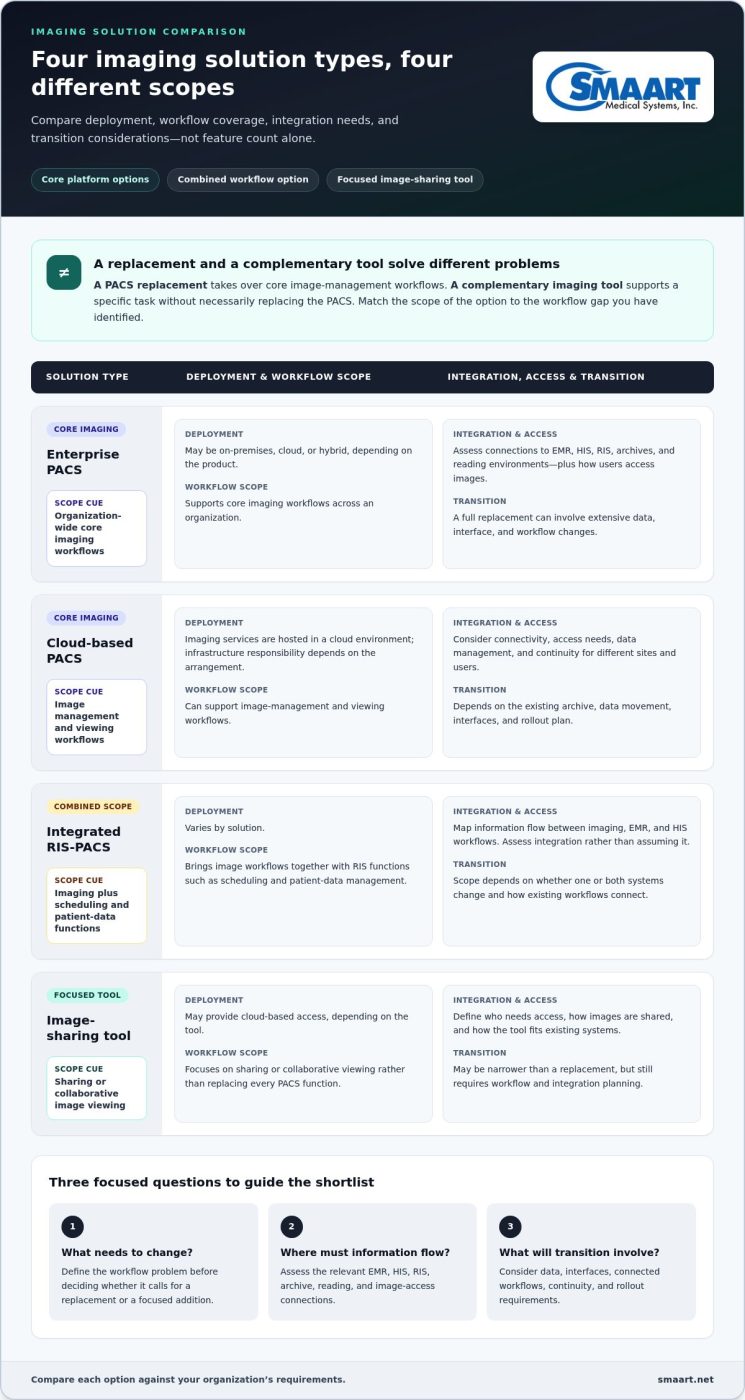
Start by identifying what you’re comparing. Some options are designed to serve as the core imaging platform; others address a narrower workflow alongside an existing PACS. A PACS replacement takes over core image-management workflows, while a complementary imaging tool supports a specific task without necessarily replacing the PACS.
Use the categories below to frame a shortlist, not as a guarantee of any vendor’s exact capabilities. Product scope, hosting options, interfaces, and access models vary. Compare each option with your organization’s requirements and assess how its specific capabilities fit the workflows you need to support.
| Solution type | Deployment approach | Workflow scope | Integration and access considerations | Transition complexity |
|---|---|---|---|---|
| Enterprise PACS | May use on-premises, cloud, or hybrid arrangements, depending on the product. | Supports core imaging workflows across an organization. | Assess connections to EMR, HIS, RIS, archives, and reading environments, as well as how users access images. | A full replacement can involve extensive data, interface, and workflow changes. |
| Cloud-based PACS | Imaging services are hosted in a cloud environment; responsibility for infrastructure depends on the arrangement. | Can support image management and viewing workflows. | Consider connectivity, access needs, data management, and continuity for different sites and users. | Transition depends on the existing archive, data movement, interfaces, and rollout plan. |
| Integrated RIS-PACS | Deployment varies by solution. | Brings image workflows together with RIS functions such as scheduling and patient-data management. | Map how information should move between imaging, EMR, and HIS workflows. Assess integration rather than assuming it. | Scope depends on whether one or both systems are changing and how existing workflows connect. |
| Image-sharing tool | May provide cloud-based access, depending on the tool. | Focuses on sharing or collaborative image viewing rather than replacing every PACS function. | Define who needs access, how images are shared, and how the tool fits existing systems. | May be narrower than a replacement, but still requires workflow and integration planning. |
Enterprise PACS versus cloud-based PACS
Neither deployment model is automatically the better choice. Compare infrastructure responsibilities, expected access across locations, scalability needs, and continuity plans. On-premises and cloud arrangements can assign operational responsibilities differently, so make those responsibilities explicit in your evaluation. For a deeper look at the trade-offs, see the guide to enterprise PACS and cloud imaging storage.
Integrated RIS-PACS versus separate imaging tools
PACS supports image storage and distribution; RIS workflows center on patient data and clinical scheduling. An integrated approach may connect these functions, while separate tools can address distinct needs. In either case, evaluate the required interfaces and information flow instead of assuming integration from a category label. The guide to integrated RIS-PACS solutions can help frame that comparison. To assess a PACS option, explore SMAART radiology software, including SMAART-PACS for image storage and distribution.
Use a requirements framework to evaluate PACS alternatives
A useful shortlist starts with the work your imaging teams need to do, not the longest feature list. Before reviewing Agfa Enterprise Imaging alternatives, agree on which capabilities are essential, which would be helpful, and which are outside the project’s scope.
A requirements-weighted comparison is more useful than feature counts alone because it shows how well each option supports your organization’s actual workflows and technical environment. Group requirements into five areas:
- Clinical workflow: Map how orders, scheduling, image storage, viewing, and results move through the organization. Note where delays, duplicate steps, or workarounds occur.
- Integrations: Document required connections to your EMR and HIS, and identify where DICOM exchange is needed. Validate each interface and compatibility detail for the proposed solution.
- Image access: Define who needs to view or share images, from which locations, and as part of which workflows.
- Administration: Consider the tasks teams need to manage, such as user access, system oversight, and coordination between imaging and IT.
- Future operating needs: Capture expected changes in sites, workflows, or technology strategy that could affect the system over time.
Which workflow and integration needs belong on the shortlist?
Trace a representative study from order to result. Record how scheduling and patient information enter the process, where images are stored, how readers access them, and where results go next. This makes gaps visible and helps distinguish requirements for a PACS from needs better addressed by a RIS, image-sharing tool, or combination of functions. SMAART-PACS supports image storage and distribution, while SMAART-RIS manages patient data and clinical scheduling. Assess each product against the specific workflow it is intended to support.
How should teams compare vendor claims fairly?
Use the same scenarios and questions for every shortlisted option. For example, trace a study through ordering, image access, review, and results, then record what the product demonstrates at each step. Include radiologists and imaging operations to assess clinical fit, IT to examine interfaces and technical dependencies, and administrators to weigh operational priorities.
Keep evidence separate from impressions. Label each item as a verified capability, a roadmap statement, an assumption, or something observed during a demonstration. Score vendors against agreed mandatory requirements before considering preferences. This prevents an engaging demo or a large feature list from obscuring a critical gap, and gives stakeholders a clearer basis for discussing trade-offs.
Plan a PACS transition without losing sight of workflow continuity
Replacing a PACS affects more than where images are stored. It can change how studies reach readers, how teams access prior imaging, and how staff handle exceptions. Manage that risk with explicit testing and staged planning, rather than relying on assumptions or a single demonstration. A structured transition plan also helps organizations judge whether Agfa Enterprise Imaging alternatives fit their operational reality.
Build the plan in sequence: document current workflows, define requirements, assess interfaces, validate representative scenarios, then plan the rollout. Include image access, user readiness, operational continuity, and issue escalation at each stage. Avoid setting migration dates or assuming a data-transfer method before the project’s technical scope is understood.
What should a PACS evaluation and validation plan include?
Define test scenarios before demonstrations or validation begin. Include routine cases and exceptions, such as a study with incomplete information, a user who needs access from a different location, or a workflow that depends on information moving between imaging and another clinical system. These scenarios show how a proposed system performs under real operating conditions.
Bring radiologists, imaging operations, and IT into validation. Test the required workflows, image access, and interfaces, including connections to EMR or HIS platforms where needed. Record acceptance criteria, results, and unresolved risks in one place. A gap that affects a mandatory requirement should be visible before selection, not lost in general demonstration feedback.
How can organizations prepare stakeholders for a change?
Assign clear owners for clinical decisions, technical dependencies, and administrative priorities. Agree on who can approve workflow changes, track issues, and escalate problems during rollout. Plan communications and user orientation around the organization’s operating model, so each team understands what is changing, when it affects their work, and where to raise concerns.
Also plan how teams will maintain access to the images and information they need throughout the transition. A staged rollout can help teams validate workflows and address issues before expanding to additional users or settings, though the appropriate approach depends on the project. Where browser-based access is relevant, include the zero-footprint PACS viewer guide in your review of access needs.
Keep the plan practical: name owners, define test scenarios, document acceptance criteria, and establish issue pathways before rollout decisions are finalized. To assess an image storage and distribution option against your requirements, explore SMAART-PACS for medical imaging workflows.
Evaluate SMAART-PACS as one Agfa Enterprise Imaging alternative
A practical shortlist should include options that match the scope of the problem, not just platforms with similar labels. SMAART-PACS is a system for medical image storage and distribution. Evaluate it against the workflows, integrations, image access needs, and transition criteria your team has defined. This lets you consider SMAART-PACS among Agfa Enterprise Imaging alternatives while recognizing that products can serve different roles.
Where could SMAART’s radiology software fit?
Start with the function you need to address. If your review centers on storing and distributing medical images, assess SMAART-PACS against those requirements. If the need also includes patient data and clinical scheduling, SMAART-RIS supports those distinct RIS workflows. For cloud-based image sharing and collaborative viewing, SMAART-SHARE provides a separate function that can complement a PACS decision.
Include integration in the same assessment. SMAART’s solutions are designed to integrate seamlessly with existing EMR and HIS platforms, making your organization’s required information flows an important part of the evaluation. Document which systems need to connect and what information needs to move between them, then assess those requirements against the proposed workflow. This keeps integration central without assuming a specific interface or outcome.
What are the next steps for a considered shortlist?
Bring the decision back to a concise, shared record. Summarize the workflows the organization needs to support, the EMR and HIS connections to evaluate, image access expectations, and the transition criteria that matter for continuity. Keep essential requirements distinct from preferences so stakeholders can see why an option remains on the shortlist.
Then compare SMAART-PACS using the same representative scenarios and evaluation criteria applied to other shortlisted products. Include relevant clinical, operational, and technical stakeholders, and record demonstrated capabilities separately from assumptions or open questions. This creates a consistent basis for discussion and helps the team judge fit on operational evidence rather than feature volume.
Explore SMAART radiology software solutions to see how SMAART-PACS, SMAART-RIS, and SMAART-SHARE align with distinct imaging workflow needs.
Build a shortlist your whole team can stand behind
The strongest PACS decision starts with operational fit, not a feature count. Compare Agfa Enterprise Imaging alternatives against the workflows your teams need, the integrations your environment depends on, and the transition your organization can realistically plan. A focused tool may address a specific gap without requiring a full platform replacement.
Keep the evaluation grounded in real requirements. SMAART-PACS supports medical image storage and distribution; SMAART-RIS manages patient data and clinical scheduling; and SMAART-SHARE provides cloud-based image sharing and collaborative viewing. Consider each option against the same use cases and integration needs, then document the trade-offs so clinical, IT, and administrative stakeholders can make a clear decision.
Ready to explore a radiology software option for your shortlist? Explore SMAART’s radiology software solutions and see how its PACS, RIS, and image-sharing tools relate to your organization’s needs. A practical, evidence-led comparison can help your team move forward with greater confidence.
Frequently Asked Questions
What are the main alternatives to Agfa Enterprise Imaging?
Potential alternatives include enterprise imaging platforms from Sectra, Philips, GE HealthCare, Fujifilm, and Visage Imaging, as well as cloud-focused options such as Medicai. SMAART-PACS is another option for medical image storage and distribution. These products may serve different needs and shouldn’t be treated as interchangeable. Compare each against your required workflows, integration environment, deployment preferences, image access needs, and transition scope.
How do I compare PACS alternatives for a hospital or imaging center?
Compare PACS options against the same practical requirements, not just a feature checklist. Map how orders, scheduling, image storage, viewing, and results move through your organization. Then assess integrations, user access, administration, and transition considerations. Ask radiologists, imaging operations, IT, and administrators to distinguish must-haves from preferences. Validate product claims through consistent scenarios, and record evidence, assumptions, and unresolved questions before building a shortlist.
Can a cloud-based PACS replace an enterprise imaging platform?
It can if the cloud PACS supports the workflows and technical requirements your organization expects from its existing platform. A cloud deployment model alone doesn’t establish that it covers enterprise imaging needs. Compare image management, access, integrations, operational responsibilities, and continuity requirements. Some organizations may instead use a cloud-based tool for a narrower purpose, such as image sharing, while retaining their core PACS.
What should I consider before replacing an existing PACS?
Start by documenting current workflows and the problems a replacement needs to solve. Assess required interfaces, image access, user readiness, and how clinical operations will continue during the transition. Define representative test scenarios and acceptance criteria with clinical, technical, and administrative stakeholders. Also identify issue owners and escalation pathways. A staged plan and explicit validation can help manage risk, but migration scope and timing depend on project-specific requirements.
How does an integrated RIS-PACS differ from a standalone PACS?
A standalone PACS focuses on medical image storage and distribution, while a Radiology Information System manages workflows such as patient data and clinical scheduling. An integrated RIS-PACS brings these distinct functions into a connected solution, though the exact scope varies by product. Compare how information should move between systems and validate the required interfaces. SMAART-PACS supports image storage and distribution; SMAART-RIS manages patient data and clinical scheduling.
Can a radiology AI assistant replace a PACS?
No, a radiology AI assistant isn’t automatically a PACS replacement. AI tools may support specific tasks in image review or reporting, while a PACS addresses image storage and distribution. Treat AI as a potential workflow component and assess how it fits alongside your imaging platform, rather than assuming it can replace core PACS functions. Define the clinical task, user workflow, and integration requirements before evaluating an AI tool.
What role do DICOM and EMR integration play when choosing a PACS?
DICOM is relevant to imaging data exchange, while EMR integration concerns how imaging workflows connect with the electronic medical record. Evaluate both against your organization’s actual requirements, including which information needs to move between systems and where users need access. Don’t assume compatibility from a product category or standards reference alone. Document required connections, then validate each proposed solution’s relevant interfaces and workflows.