
PACS as a service pricing: Compare included features and extra costs
A cloud PACS subscription is only part of the total cost. PACS as a service pricing can also depend on study volume, storage, migration, staff training, support, and connections to existing systems. Compare the full cost, not just the monthly rate.
Cloud services can reduce the burden of managing on-site servers, but subscription features and extra charges vary. Check what the subscription covers and what is billed separately, including software, hardware, integrations, and ongoing support.
This article explains what a cloud PACS is, how pricing models work, and which features can affect the bill. It also covers migration and implementation costs, so you can compare options against your imaging workflow rather than a headline price.
Key Takeaways
- Compare the full cost of migration, training, support, and integrations, not just the subscription rate.
- Match storage limits and workflow features to your imaging volume, then identify which capabilities may cost extra.
- Separate software licensing from hardware and infrastructure expenses to see the full ownership picture.
- Review renewal, minimum-use, and cancellation terms to understand how contract conditions could affect future costs.
Migration, training, support, and integration costs
Separate subscription fees from one-time launch work. Archive size, data quality, and the number of systems involved all affect the migration workload.
Integration can add another cost layer. A small practice may mainly need to transfer studies and connect core systems. A multi-site radiology group may require broader integration testing and coordinated training.
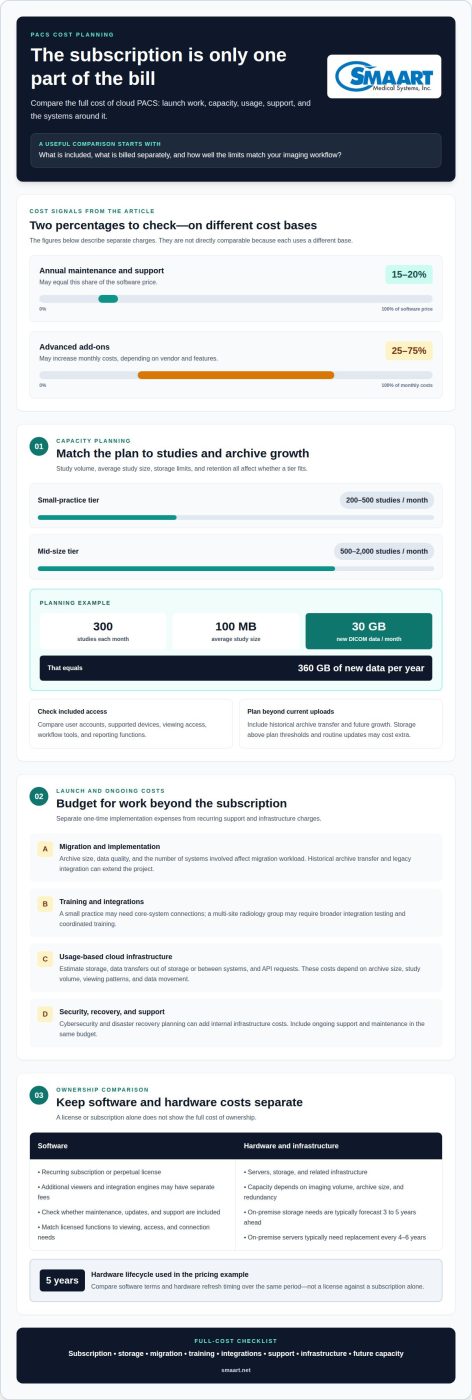
Support and maintenance also affect total cost. Annual PACS maintenance and support may equal 15-20% of the software price.
AWS infrastructure can introduce usage-based costs. Storage charges reflect retained imaging data, while transfer charges may apply when data moves out of storage or between systems. API-request charges depend on request volume. Estimate each component using archive size, study volume, viewing patterns, and data movement, rather than treating cloud storage as the only infrastructure expense.
Cybersecurity and disaster recovery planning can add internal infrastructure costs. A small clinic, a mid-size imaging group, and an enterprise with multiple sites have different storage, transfer, access, and recovery needs. Map those requirements before comparing a cloud subscription with internally managed systems. Include historical archive transfer, legacy integration, staff training, and ongoing support in the same budget.
Included storage, workflow, viewing, and reporting features
Cloud PACS subscriptions vary in what they include, so compare capacity and access as well as workflow tools. Study volume can help determine whether a tier suits your operation. PACS as a service pricing also depends on how the included limits match daily use.
Included Workflow, Viewing, and Reporting Features
Compare each tier by imaging workflow, viewing access, reporting tools, included storage, user accounts, and supported devices. These are distinct considerations: storage determines archive capacity, while account and device allowances affect who can access studies and where. Check which functions are included and which cost extra. For radiology teams, map the steps from study access through review and reporting to identify gaps.
Storage Volume and Archive Growth
Storage limits matter as an archive grows. A small-practice cloud tier commonly covers 200-500 studies per month; a mid-size tier commonly covers 500-2,000. For a concrete planning example, 300 studies per month at an average size of 100 MB produce 30 GB of new DICOM data monthly, or 360 GB annually. Compare those figures with the plan’s stated capacity and retention approach.
Growth can change which tier fits. Some vendors charge separately for storage above specified thresholds or routine updates. User and device allowances can also differ by subscription; identify the account and access limits that match your staff and locations. Advanced add-ons may increase monthly costs by 25-75%, depending on vendor and features, so separate essential workflow needs from optional capabilities.
Migration brings a separate storage consideration: transferring a large historical archive can extend a project. Include existing studies and new monthly volume in capacity planning, then consider how archive growth may affect future tier selection. This avoids sizing a plan around current uploads alone. Compare PACS as a service pricing models with your expected storage, access, and workflow needs.
For a practical comparison, list studies per month, average study size, user accounts, devices, and required viewing and reporting functions. Then map each item to the vendor’s included limits and potential add-ons. A review of radiology workflow requirements can help clarify which capabilities matter most to your imaging operation.
Separate software and hardware pricing
A PACS budget has two distinct layers: software for managing medical images and the hardware that stores and serves them. A subscription or software license does not automatically represent the full cost of ownership. Separate line items make it easier to compare cloud and on-premise PACS.
Software may be priced as a recurring subscription or a perpetual license. A perpetual license is a software purchase, but additional viewers and integration engines may carry separate fees. Compare licensed functions with your actual workflow, including image viewing, user access, and connections to other systems. Identify whether maintenance, updates, and support are included or billed separately. That distinction affects annual budgeting and costs over time.
Hardware is a separate investment in servers, storage, and related infrastructure. Its requirements depend on imaging volume, archive capacity, and redundancy needs. Storage planning for an on-premise PACS typically forecasts needs 3 to 5 years ahead. That forecast matters because medical images accumulate as new studies enter the archive. Underestimating growth can lead to additional capacity planning and procurement.
Replacement timing also changes ownership costs. On-premise PACS servers typically need replacement every 4-6 years; the pricing example assumes a five-year useful life for hardware. A refresh can therefore arrive before or around the end of a long-term software agreement. Compare software terms and hardware lifecycle on the same timeline, rather than evaluating only the first-year purchase.
Build a side-by-side cost model with separate rows for software, viewers, integration engines, hardware, storage, maintenance, and future refreshes. For example, a practice comparing a perpetual license with a subscription should also account for its on-site server lifecycle. Cloud changes the infrastructure cost structure, while on-premise systems put hardware capacity and replacement planning directly into ownership costs. Compare the complete system over the same period, not a license against a subscription alone.
What contract terms, minimum commitments, and cancellation fees should buyers check?
Contract language can change the total cost even when the subscription rate stays the same. Review the initial term, renewal date, annual commitment, minimum study volume, and process for ending service. An annual cloud PACS commitment typically discounts rates by 5-15% compared with month-to-month billing. Weigh that reduction against the length of the commitment and your expected imaging volume.
Pay close attention to renewal terms. Understand how future price changes will be communicated and when they take effect. Check whether renewal uses the existing rate or a revised one, and whether notice arrives before the renewal date. Put the rate-change notice period, renewal timing, and cancellation deadline on one calendar.
Cancellation terms should explain required notice, outstanding subscription charges, and any early-termination fees. The contract should also describe how images and related records can be transferred when service ends. Read the data-export process alongside the cancellation clause: archive transfer may affect timing, staffing, and onboarding with the next system. Do not treat the monthly rate as the full exit cost.
Minimum commitments may apply to contract length, study volume, users, or storage capacity. Compare each stated minimum with your forecast rather than assuming a lower-volume month will change the contracted amount. A practice with fluctuating study volume, for example, should compare expected use with the agreement’s billing basis and terms for exceeding included limits.
Before signing, make a comparison table covering initial term, renewal, rate-change notice, usage minimum, cancellation notice, early-exit charges, and data export. Record the contract wording for each option. This makes differences clear and supports a practical decision based on ongoing costs and the effort of leaving.
For help aligning imaging workflows with your system plans, explore PACS workflow options.
SMAART Medical Systems: SMAART-PACS
SMAART Medical Systems, Inc. offers SMAART-PACS to hospitals and clinics assessing radiology management software. The system is designed to integrate with existing EMR and HIS platforms, making compatibility an important part of the cost discussion.
After mapping software, hardware, migration, and integration needs, consider how SMAART-PACS fits your imaging workflow. SMAART-RIS supports radiology information management, while SMAART-SHARE provides cloud-based image sharing. These products offer options for planning how systems support imaging operations.
Discuss your workflow, current systems, and priorities with SMAART Medical Systems, Inc. to explore the right next step.
Choose a PACS that fits your next stage
Use your PACS as a service pricing review to connect current budget decisions with your organization’s future imaging workflow. Clarify which systems must work together, how your team accesses images, and which capabilities matter as operations evolve. This keeps the discussion practical and focused beyond comparing subscription models.
SMAART Medical Systems, Inc. offers SMAART-PACS, SMAART-RIS, and SMAART-SHARE. These radiology management software solutions are designed to integrate with existing EMR and HIS platforms. Bring your workflow priorities and system requirements into the discussion to identify a suitable configuration.
Contact SMAART Medical Systems, Inc. to discuss your imaging workflow and software needs. A clear next step can help your team move forward with confidence.
Frequently Asked Questions
Are there any hardware fees?
Hardware costs depend on whether your setup requires locally managed equipment. A cloud PACS may reduce the need to purchase PACS servers and storage, while workstations and network equipment remain separate considerations. With an on-premise system, server capacity and replacement planning add to ownership costs. Separate software charges from equipment in your budget, and account for hardware your facility already has.
Do I need to pay for user licenses?
User access may be included in a subscription or billed according to the vendor’s licensing model. The difference matters when additional staff, departments, or locations need access. A radiologist, technologist, and administrator, for example, may need different permissions. Map the roles that use the PACS and how access is assigned, then compare those needs with account limits and license terms.
How do I get a price for my organization?
Request a quote based on your organization’s needs. Pricing depends on the requirements and is provided after a quote request. Include your imaging workflow, existing EMR or HIS environment, deployment preference, and required software capabilities. SMAART Medical Systems offers purchase, lease, rental, and cloud-based solutions. These details help shape a discussion about the model and configuration suited to your organization.
How do add-on prices change on monthly billing?
Monthly billing can make add-on charges recur for as long as a feature remains active, rather than appearing only as an initial expense. Find out how each addition changes the recurring bill and whether the charge depends on use, users, devices, or capacity. An added viewer or storage allowance, for example, may follow a different billing basis. Keep optional features separate from core workflow requirements.
What is the typical monthly cost of cloud PACS as a service in the United States?
There is no single monthly rate for every U.S. organization. Costs depend on factors such as study volume, storage needs, access requirements, and selected capabilities. A small clinic may need a different configuration from a multi-site imaging operation. For budgeting, define expected usage and required functions first, then compare recurring charges and any usage-based costs on the same basis.
How do PACS providers price per study, per modality, per user, or per storage volume?
Pricing may be based on studies processed, imaging modalities, user access, or stored data. A per-study model follows examination volume; a per-modality model reflects the modalities covered. Per-user pricing ties charges to account counts, while storage pricing follows retained image capacity. To understand which model fits, estimate how study volume, modalities, users, and archive needs change during normal operations.