Best Radiology Software for Small Clinics: 2026 Guide
Why are small clinics still paying enterprise-level prices for radiology software that was never built for their scale? It’s a common trap. Finding the best radiology software for small clinics shouldn’t mean settling for bloated systems or high licensing fees that drain your budget. You want to provide elite care, but fragmented data between your EMR and RIS makes every patient interaction feel like an administrative hurdle. Sharing images shouldn’t involve burning CDs or navigating complex portals that your referring physicians can’t access.
We agree that the most effective software isn’t the one with the longest list of bells and whistles. It’s the solution that integrates most naturally with your current EMR to eliminate friction. You deserve the relief of a streamlined workflow where data flows freely and costs remain predictable. Modernizing your imaging department shouldn’t require a massive IT staff or a room full of expensive, proprietary hardware.
This 2026 guide will show you how to choose an efficient, affordable, and integrated software package tailored specifically to your clinic’s needs. We’ll explore how cloud-based accessibility and zero-footprint viewers can transform your daily operations. You’ll learn exactly what to look for to ensure your clinic remains both technologically advanced and fiscally responsible.
Key Takeaways
- Identify the best radiology software for small clinics by prioritizing seamless EMR integration over unnecessary enterprise-level features.
- Transition from high upfront capital costs to predictable cloud-based models to eliminate the financial burden of hardware refreshes and server maintenance.
- Eliminate the “CD bottleneck” and data fragmentation by adopting zero-footprint diagnostic viewers that facilitate instant image sharing.
- Execute a targeted five-step audit of your current imaging workflow to ensure your new software matches your specific modality requirements.
Why Small Clinics Need Specialized Radiology Software in 2026
Small clinics often find themselves trapped in a cycle of high licensing costs and technical complexity. For years, the industry forced smaller practices to use “enterprise-grade” systems designed for massive hospital networks. These tools are bloated with features you’ll never use and require a dedicated IT staff just to keep the servers running. The best radiology software for small clinics has shifted toward agility, prioritizing lean workflows that actually match your daily pace. By choosing specialized software, you trade unnecessary complexity for modern efficiency.
The “CD bottleneck” remains one of the greatest frustrations in modern patient care. Handing a patient a physical disc is an outdated practice that creates friction for both the patient and the referring physician. Modern solutions like SMAART-SHARE replace this hardware-heavy process with secure, cloud-based links. This shift doesn’t just improve the patient experience; it ensures HIPAA compliance through encrypted, audited access points rather than unencrypted physical media. When your RIS and PACS are integrated, your team spends less time on data entry and more time on diagnostics, directly reducing the administrative burnout that plagues small teams.
Operational Burdens of Legacy Systems
On-premise servers are a quiet drain on clinic resources. Beyond the initial capital expenditure, the hidden costs of electricity, cooling, and routine hardware refreshes can overwhelm a modest budget. Legacy systems often leave patient data fragmented. When your imaging data doesn’t talk to your EMR, your staff must manually bridge the gap, which slows down diagnostic speed and increases the risk of errors. Manual scheduling is another growth killer. If your team is still using paper logs or disconnected calendars, you’re losing hours every week that could be spent on revenue-generating scans.
The Relief of Modern Radiology Workflows
Transitioning to an integrated workflow brings immediate relief to a busy clinic. By moving from detached data to integrated clinical insights, you create a single source of truth for every patient. Tools like SMAART-RIS streamline scheduling and data management, allowing small teams to punch above their weight class. This modernization also transforms your professional image. Providing referring physicians with instant access through a zero-footprint diagnostic viewer, such as SMAART-PACS, positions your clinic as a technologically advanced partner. It’s about more than just software; it’s about building a reputation for seamless, elite-level service that keeps your referral network growing. To further support this growth, you can learn more about SidePanelist and how social media marketing can enhance your clinic’s visibility and reputation online.
Essential Features for Small Clinic Radiology Management
Identifying the best radiology software for small clinics requires looking beyond flashy interfaces. You need functional depth that solves specific operational headaches. Small teams can’t afford to waste time on technical troubleshooting or manual data entry. The goal is a unified environment where scheduling, imaging, and reporting happen within a single, cohesive ecosystem. Modernizing your practice means selecting tools that prioritize interoperability and ease of use over sheer feature count.
Diagnostic Excellence: The Zero-Footprint Advantage
Zero-footprint technology is a game changer for clinics without on-site IT support. It means the diagnostic viewer runs entirely in a web browser. There’s no software to install on local workstations and no plugins to manage. This setup ensures elite performance even in high-volume environments, as the heavy processing happens on the server side. Radiologists can review images from any secure device, whether they are in the office or working remotely. It provides immediate relief by removing the technical friction that often stalls patient care. When your viewer is accessible from any browser, you eliminate the hardware limitations that previously dictated where and how you could work.
The Power of Integrated RIS/PACS
Fragmented systems force your staff to enter patient names and IDs multiple times. This double-entry isn’t just tedious; it’s a primary source of clinical errors. An integrated RIS and PACS creates a single source of truth. When a patient is scheduled in the RIS, their information automatically populates the PACS and modality worklist. This seamless flow accelerates the path from the initial scan to the final diagnostic report. By centralizing clinical history, your team gains a comprehensive view of the patient’s journey without hunting through different software modules. This integration reduces administrative overhead and lets your staff focus on patient interaction.
Secure image sharing is the final piece of the efficiency puzzle. Replacing physical media with cloud-based links through SMAART-SHARE allows you to deliver results to specialists and patients instantly. When combined with automated billing and scheduling, these features work together to modernize your practice. You’ll spend your energy on patient outcomes rather than software management. By choosing a system that prioritizes these essential integrations, you ensure your clinic remains competitive and fiscally responsible in a rapidly changing healthcare landscape.
Cloud-Based vs. On-Premise: Evaluating Total Cost of Ownership
Choosing the best radiology software for small clinics involves more than comparing monthly fees. You must evaluate the total cost of ownership (TCO) over several years. Traditional on-premise systems require heavy upfront capital expenditure (CAPEX), tying up funds that could be used for patient care or medical equipment. Cloud solutions shift this to operational expenditure (OPEX). This pay-as-you-go model keeps your cash flow healthy and predictable. It provides the financial relief small clinics need to remain competitive without a massive initial investment.
On-premise systems carry silent costs that often surprise administrators. Electricity for cooling servers, physical space requirements, and the need for specialized IT staffing add up quickly. If a local server fails, your clinic grinds to a halt. Cloud models provide built-in redundancy. This protects your data against local hardware failure without requiring you to manage the backups yourself. Scalability happens automatically. Your software grows alongside your patient volume without needing new physical infrastructure or complex server upgrades.
Breaking Down the On-Premise Price Tag
Medical-grade servers aren’t “set it and forget it” investments. They require constant maintenance, security patches, and physical monitoring. Most localized hardware reaches the end of its reliable lifespan every three to five years. This creates a recurring financial strain. You’re forced into expensive hardware refreshes just to keep your software compatible. The risk of downtime is a significant fiscal threat; every hour your system is offline results in lost revenue and compromised patient trust. Small teams often find that the “control” of an on-premise server is actually a burden that distracts from clinical excellence.
The Fiscal Logic of Cloud-Based Sharing
Cloud-based workflows offer a level of predictability that localized systems can’t match. Subscriptions are consistent, which eliminates erratic repair bills. You can also realize significant savings by modernizing your distribution methods. Replacing physical CDs with secure cloud links via SMAART-SHARE reduces the overhead of purchasing, burning, and mailing discs. This move directly addresses the “CD bottleneck” while cutting tangible costs. As your clinic’s volume grows, cloud storage scales with you. You only pay for what you use, ensuring your technology budget remains as agile as your clinical team. This scalability is essential for small facilities aiming for sustainable growth without the weight of over-provisioned local servers.
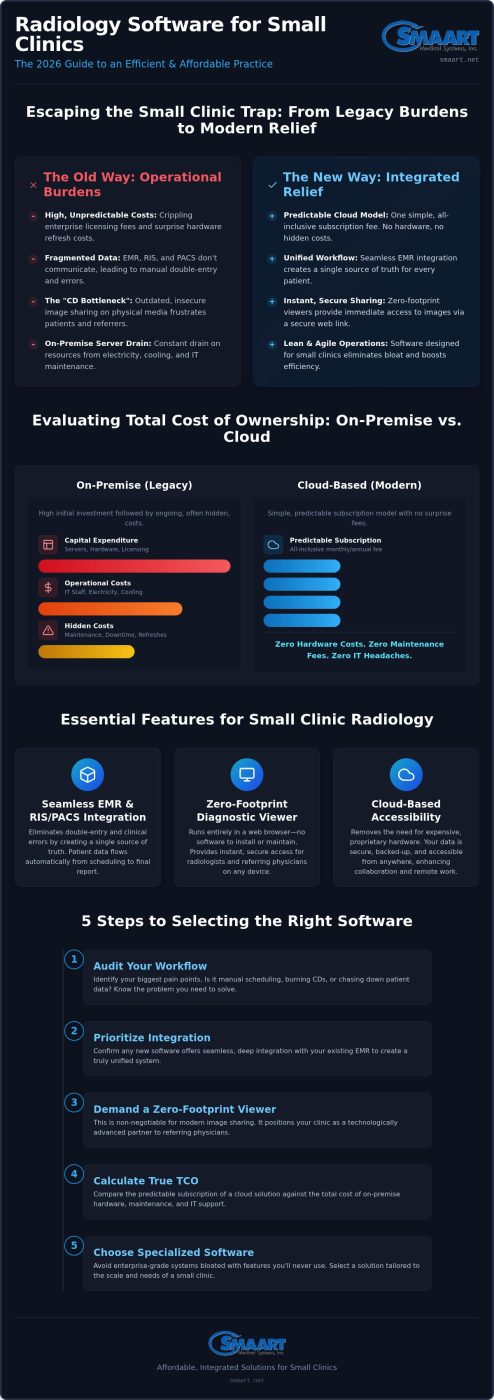
5 Steps to Selecting the Right Software for Your Imaging Workflow
Choosing the best radiology software for small clinics requires a structured approach to avoid the “bloatware” trap. You aren’t just buying a tool; you’re designing the backbone of your clinical operations. A systematic evaluation ensures that the solution you pick provides immediate relief rather than long-term technical debt. Follow these five steps to identify a system that balances elite performance with fiscal responsibility.
- Step 1: Audit your modality and EMR integration needs. List every imaging machine in your facility. Your new software must communicate perfectly with your existing modalities and your Electronic Medical Record (EMR) system to prevent data silos.
- Step 2: Evaluate the user experience for both radiologists and staff. A clunky interface slows down diagnostics. Test how many clicks it takes to open a study or generate a report. Efficiency here directly reduces staff burnout.
- Step 3: Verify security standards and HIPAA compliance protocols. Look for end-to-end encryption and robust audit logs. Your software should act as a shield for patient data, not a liability.
- Step 4: Analyze the referring physician and patient portal experience. Your referral network depends on speed. Ensure the software provides a professional, easy-to-navigate portal for viewing results and images.
- Step 5: Request a demo focused on your specific clinic pain points. Don’t settle for a generic sales presentation. Ask the vendor to show exactly how they handle your most common workflow bottlenecks.
Interoperability: The Non-Negotiable Requirement
Growth is impossible without standardized communication. HL7 and DICOM are the universal languages of medical imaging. If a system doesn’t fully support these standards, you’ll face “vendor lock-in,” where moving data in or out becomes an expensive nightmare. Test how well a potential PACS communicates with your existing HIS. High-quality integration ensures that patient demographics flow automatically into the modality worklist, which eliminates manual entry errors. Modernizing your clinic means choosing open integration standards that allow your technology stack to evolve as your practice expands.
The Support and Partnership Evaluation
Software is only as good as the team standing behind it. When a technical issue arises, you need a responsive partner, not a generic help desk. Assess the provider’s reputation for ongoing training and implementation support. A true partner invests in your success and understands the specific pressures of a small clinical environment. They should offer proactive updates and clear communication channels. If you’re ready to see what a true partnership looks like, request a consultation at smaart.net to explore our commitment to clinic-focused support.
SMAART Medical Systems, Inc.: Affordable, Integrated Solutions for Small Clinics
SMAART Medical Systems, Inc. positions itself as the provider of the best radiology software for small clinics by removing the technical and financial barriers inherent in traditional systems. We don’t believe you should settle for fragmented workflows or high maintenance costs. Our mission is to provide the relief of a streamlined, modern imaging environment that allows your staff to focus on patient outcomes. Each component of our ecosystem is designed to work in harmony, ensuring that data moves as quickly as your team does. This integrated approach eliminates the administrative friction that typically plagues smaller practices.
- SMAART-PACS: Provides zero-footprint diagnostic viewing that integrates effortlessly with your EMR. This ensures imaging data is never detached from the patient’s clinical record.
- SMAART-RIS: Manages the administrative side, from scheduling to reporting, within the same interface. It replaces manual logs with automated, traceable data management.
- SMAART-SHARE: Eliminates the need for proprietary hardware by facilitating secure image distribution through the cloud. This reduces radiology overhead and protects your clinic from erratic hardware costs.
Seamless Integration with EMR and HIS Platforms
SMAART Medical Systems, Inc. bridges the critical gap between imaging data and patient records through SMAART-PACS. By supporting full EMR and HIS integration, we ensure that clinical history is centralized and accessible. This integration eliminates the double-entry of data that often leads to diagnostic delays and administrative errors. Our solutions are fully customizable to fit your clinic’s unique scale. Whether you operate a single-modality facility or a multi-site clinic, our software adapts to your specific volume without requiring a massive IT overhaul. You gain the power of an enterprise system with the agility of a clinic-focused tool. This drive toward total integration is mirrored in other highly regulated sectors; for instance, those managing medicinal cannabis operations can find out more about how a unified ERP platform can connect every part of their business ecosystem.
The transition to a digital-first workflow is most visible through SMAART-SHARE. You can finally replace outdated radiology CDs with secure, QR-coded links. This allows referring physicians and patients to access diagnostic-grade images instantly on any device. This modern approach doesn’t sacrifice diagnostic confidence; SMAART Medical Systems, Inc. provides a full range of measurement and manipulation tools required for elite-level care. It’s time to move away from the “CD bottleneck” and embrace the speed of the cloud. Modernize your clinic’s workflow with SMAART Medical Systems, Inc. to experience the financial and operational relief of a truly integrated imaging solution.
Future-Proof Your Clinic’s Imaging Workflow
Choosing the best radiology software for small clinics is about finding a partner that understands your scale. You’ve seen how moving away from bloated, enterprise-grade systems provides immediate financial relief and operational clarity. By prioritizing seamless EMR and HIS integration, you eliminate the double-entry of data and the risk of clinical errors. Diagnostic zero-footprint viewing ensures your team can work from anywhere without the burden of local installations or hardware refreshes.
Embracing an affordable cloud-based sharing platform finally puts an end to the “CD bottleneck” while creating a professional environment that referring physicians and patients appreciate. This transition isn’t just about software; it’s about building a sustainable practice that scales with your volume. You deserve a workflow that supports your clinical excellence rather than obstructing it with technical hurdles.
Ready to see these tools in action? Modernize your clinic’s radiology workflow with a SMAART demo today. We’re here to help you navigate the shift toward a more streamlined, fiscally responsible future.
Frequently Asked Questions
What is the difference between RIS and PACS for a small clinic?
A Radiology Information System (RIS) manages the administrative side of the workflow, including patient scheduling, tracking, and billing. In contrast, a Picture Archiving and Communication System (PACS) handles the storage, retrieval, and distribution of medical images. For a small clinic, integrating both ensures that patient demographics from the RIS flow directly into the imaging studies in the PACS. This unified approach eliminates double-entry and reduces the risk of clerical errors during busy shifts.
Can radiology software integrate with my existing EMR system?
Yes, the best radiology software for small clinics utilizes HL7 and DICOM standards to ensure seamless communication with your current Electronic Medical Record (EMR). This integration allows clinicians to launch imaging studies directly from the patient chart, bridging the gap between clinical notes and diagnostic images. Modernizing your workflow through these integrations significantly reduces the time spent searching for detached data across different platforms, providing a comprehensive view of patient health.
Is cloud-based radiology software secure and HIPAA compliant?
Cloud-based solutions are designed with end-to-end encryption and robust audit logs to meet or exceed HIPAA requirements. Unlike local servers that may lack physical security or routine patches, cloud providers employ dedicated security teams to monitor and update the infrastructure. This provides immediate relief for small clinics, as the burden of data protection and redundancy shifts to the software partner. Your patient data remains protected against local hardware failures or unauthorized access points.
How much does radiology software typically cost for a small clinic?
While specific costs vary based on volume and modality needs, the shift toward cloud-based models has made high-end software more accessible. Instead of massive upfront capital expenditures for on-premise servers, most clinics now opt for predictable monthly subscriptions. This operational expenditure model covers maintenance, updates, and support, preventing the erratic repair bills associated with legacy hardware. It allows small teams to manage their budgets with greater fiscal responsibility while using the best radiology software for small clinics.
What are the hardware requirements for a zero-footprint PACS viewer?
A zero-footprint PACS viewer requires no specialized hardware or local software installations. Because the diagnostic viewing happens entirely within a standard web browser, you can use existing workstations, laptops, or even tablets. This setup is ideal for clinics with limited IT resources, as it eliminates the need to manage plugins or workstation-specific updates. As long as you have a stable internet connection and a modern browser, your team can access diagnostic-grade images from any secure location.
How does cloud image sharing replace traditional radiology CDs?
Cloud image sharing replaces physical discs with secure, encrypted links or QR codes generated instantly after a study is completed. Patients and referring physicians receive access via email or a secure portal, allowing them to view images on any device without needing a CD drive. This transition eliminates the costs of hardware, media, and mailing while providing a much faster experience. It removes the “CD bottleneck” and ensures that specialists can review studies immediately for better patient outcomes.
Can SMAART-PACS handle multiple imaging modalities like X-ray and Ultrasound?
SMAART-PACS is built to handle a wide range of DICOM-compliant modalities, including X-ray, Ultrasound, CT, and MRI. It centralizes all imaging data into a single viewer, regardless of the source machine. This versatility is essential for small clinics that provide diverse diagnostic services but want to maintain a unified patient record. By consolidating your imaging into one platform, you simplify the diagnostic process for your radiologists and streamline the data management workflow for your entire staff.
What kind of training is required for staff when implementing new RIS/PACS?
Modern RIS and PACS solutions are designed with intuitive, browser-based interfaces that minimize the learning curve for your team. Most staff members can become proficient within a few hours of hands-on training. Implementation typically includes a combination of guided walkthroughs and ongoing support from the software partner to ensure a smooth transition. Proactive training reduces initial downtime and allows your clinic to realize efficiency gains quickly, ensuring your team feels supported throughout the modernization process.