Compare PACS Vendor Support Packages by Coverage and Contract Terms
The broadest PACS support package can still leave important gaps in coverage or contract terms. When comparing PACS vendor support packages, focus on what the agreement actually covers: support availability, escalation, training, updates, recovery, and data portability. The best fit is the one whose written terms match your facility’s operational needs, not the one with the longest feature list.
Support should mean more than troubleshooting after something goes wrong. PACS affects imaging access, clinical workflows, and long-term records, so the details matter before a contract is signed.
This guide explains how to assess vendor evidence through demonstrations and customer references, compare contract terms, and evaluate storage, retention, and ownership changes. Use the practical steps to compare packages and identify the questions that matter to your decision.
Key Takeaways
- Use live demonstrations and conversations with experienced users to assess how support and training work beyond routine updates and troubleshooting.
- Read contract terms for data export, recovery, and transition responsibilities so you understand how patient images and information can be retrieved if arrangements change.
- Assess a vendor’s security track record and compliance practices against your facility’s privacy obligations, including HIPAA.
- Compare storage capacity, retrieval needs, and retention policies for both DICOM and non-DICOM data, then align them with applicable requirements.
- Review how ownership or product-line changes could affect support continuity, system updates, and access to your data.
Evaluating vendors through demos and customer references
In the United States, PACS support coverage and training vary by vendor. Third-party support can divide responsibility between a support firm and the software vendor, complicating escalation, product updates, or troubleshooting a patient workflow issue. When comparing PACS vendor support packages, assess demonstrations and customer experiences alongside the written terms.
Support Availability, Training, and Success
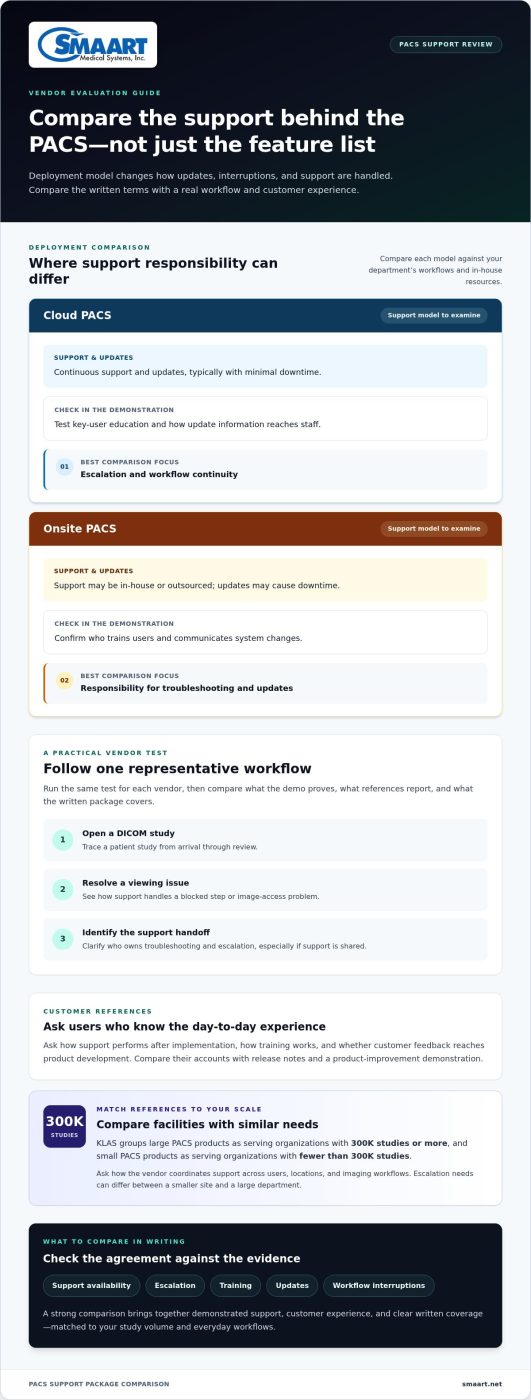
Support availability describes how users reach help and how incidents are escalated. Training shows how well staff are prepared to use the system. During a demonstration, trace a patient study from arrival through review, then ask how support would handle a blocked step. Compare the answer with the vendor’s approach to key-user education and follow-up guidance, which help departments build confidence beyond software updates and troubleshooting.
Cloud and on-premise PACS have different operating and support models. Compare who manages updates, how service interruptions are handled, and what support the contract provides. Then assess those terms against your department’s workflows and available in-house resources.
Customer Satisfaction Scores and KLAS Rankings
Customer feedback can reveal patterns in responsiveness, training, and communication, while KLAS rankings offer a separate market comparison. Treat both as evidence to investigate, not as substitutes for a workflow demonstration. For example, compare feedback about support follow-through with what you observe when a vendor resolves a test issue involving image access or a communication system.
Ask experienced users how support performs after implementation and how customer feedback reaches product development. Compare their accounts with release notes and a demonstration of a product improvement. This can help establish whether customer feedback informs product changes.
Support for Large and Small Customers
Customer scale can shape the support experience. KLAS groups large PACS products as serving organizations with 300K studies or more, and small PACS products as serving organizations with fewer than 300K studies. Compare references from facilities similar to yours, since a large department’s escalation structure may differ from a smaller site’s daily needs.
During reference calls, ask how the vendor coordinates support across users, locations, and imaging workflows. A smaller organization may prioritize direct communication and access to training. A larger one may need to examine escalation across departments and complex integrations.
Use the same practical test for each vendor: run a representative workflow, such as opening a DICOM study, resolving a viewing issue, and identifying the support handoff. Record what the demonstration proves, what references report, and how the written package describes coverage. This makes comparing PACS vendor support packages more consistent and relevant to your facility’s needs.
| Option | Support evidence | Training and development | Best comparison focus |
|---|---|---|---|
| Cloud PACS | Continuous support and updates, typically with minimal downtime | Test key-user education and update communication | Escalation and workflow continuity |
| Onsite PACS | In-house or outsourced support; updates may cause downtime | Review who trains users and communicates changes | Responsibility for troubleshooting and updates |
Choose the package whose demonstrated support, customer evidence, and training fit your study volume and everyday workflows.
Data portability terms and contract considerations
PACS licensing and support costs depend on factors such as deployment model, license scope, storage, and coverage. Compare the proposed costs and terms alongside what happens to archived images and associated information if your facility changes software or support arrangements.
Start with the exit clause. It should explain how your facility can retrieve patient images and associated information, the export format, who performs the transfer, and how long access remains available. Compare data portability terms in the contract rather than relying only on sales claims. For example, confirm that exported DICOM studies remain usable and that related non-DICOM files are addressed.
Switching vendors involves more than copying image files. Map the current archive, identify required records, and document how the incoming system will index and retrieve them. The contract should assign responsibility for migration planning, transfer, validation, and resolving missing or unreadable studies. Clinicians need usable prior records, not simply a completed transfer.
Implementation planning should connect data movement to patient care. Define the sequence for transferring archives, testing representative studies, and confirming access through the new software. Include examples such as a recent image, an older study, and a non-DICOM document. Clear acceptance criteria help identify transfer problems before the facility relies on the new PACS for routine work.
Recovery terms matter if an outage or data-loss event affects the archive. Choose a vendor with a contingency plan for recovering stored patient information and images. Leading cloud PACS vendors maintain redundancy across multiple geographically distributed data centers to help prevent data loss. The contract should explain recovery responsibilities, communication during an incident, and how the facility regains access to images.
Uptime, availability, and service credits are contract terms, not universal PACS figures. Compare how availability is measured, which outages qualify, what exclusions apply, how incidents are reported, and whether credits follow a documented claim process. For example, distinguish an internet interruption at your facility from an issue with the hosted system, and check how the contract treats each event.
Before signing, evaluate these portability and continuity points together:
- Export scope, formats, and access to images and related patient information.
- Migration responsibilities, validation steps, and resolution of transfer errors.
- Backup redundancy, recovery procedures, and incident communication.
- Availability definitions, exclusions, and service-credit conditions.
These contract details help protect access during a transition. Facilities planning broader imaging software workflows can also explore integrated radiology software solutions.
There is no single standard PACS package price or licensing cost. Compare costs in light of the deployment model, license scope, storage needs, and support coverage.
Vendor track records and compliance certifications
Compare each PACS platform’s security evidence, compliance practices, and record of supporting clinical imaging. Use a consistent review process so your facility can judge how the documented controls fit its patient-data responsibilities.
Vendor Track Records
A vendor’s track record can show how it maintains its platform and responds to security concerns. Review documented incident communications, security updates, and product changes, then compare them with the support commitments in the agreement. For example, ask how a past vulnerability was communicated and addressed, and whether customers received guidance for protecting imaging workflows.
Separate product history from marketing claims. Review release notes, support documentation, and customer references together. A vendor’s ability to explain how an update affects interoperability with your existing systems offers a practical view of product development and operational communication.
Compliance and Security
Security evidence describes controls used to protect data; certifications provide independent evidence against defined standards. Ask the vendor to identify relevant certifications and explain their scope, issuing organization, and coverage of the PACS platform. A certificate for one service or environment may not cover every system handling patient imaging.
For cloud PACS, examine documented controls such as multi-factor authentication and encryption for data in transit and at rest. Then trace a user-access example: who can view a study, how identity is verified, and how access is removed when roles change. These details connect security claims to daily clinical use.
Compliance Requirements
Healthcare providers must protect patient data privacy and comply with regulations such as HIPAA, according to the U.S. Department of Health and Human Services. Compare how each vendor documents its role in supporting the hospital’s privacy and security processes. Keep the distinction clear: vendor statements do not replace the provider’s own compliance responsibilities.
For a U.S. facility, map each applicable requirement to a practical control, such as user access, data handling, or incident communication. If a platform also handles data subject to GDPR, include that regulation in the review. Assess the vendor’s documented practices against your facility’s actual operating context.
Use a repeatable review rather than relying on a single certificate or presentation. The following steps turn evidence into a useful comparison:
- List the patient-data workflows the PACS platform supports, including image access and system interoperability.
- Match each workflow to the vendor’s documented safeguards, certifications, and security responsibilities.
- Compare support for multi-factor authentication, encryption, updates, and incident communication.
- Record gaps between the vendor’s stated controls and the hospital’s clinical or privacy requirements.
Finally, compare the quality of evidence across vendors. A clear certification scope, accessible security documentation, and specific explanations of safeguards make evaluation more direct. If two platforms describe similar controls, compare how each applies them to imaging access, user roles, and system updates. Practical fit matters as much as the label attached to a certification.
Storage capacity and image-retention duration
Storage terms determine whether a PACS can hold and retrieve your facility’s imaging records throughout their required lifecycle. Compare capacity, retrieval, and retention together. A system with ample space still falls short if staff cannot find an older radiology study or retrieve a non-DICOM document alongside its images.
Start by listing what the archive must contain. Include DICOM studies, non-DICOM data, and records clinicians need alongside images. Then compare how each PACS stores and retrieves those categories. For example, test whether a user can locate an image study and its related document through the department’s existing workflow.
Retention is a policy question as well as a storage question. Medical-image retention duration could range from 7 to 21 years, depending on applicable regulations. Map the facility’s applicable requirements to image types and record categories, then determine which records need longer retention. Avoid treating one default setting as suitable for every study or patient record.
Traditional PACS image archiving is typically handled by in-house IT using local hardware and maintaining 2 copies. That approach makes local storage planning and operational responsibility central to the comparison. Identify who oversees capacity, maintains both copies, and handles retrieval when the primary archive or a stored copy is unavailable.
For cloud or hybrid PACS, compare storage and recovery terms with the facility’s chosen operating model. In a hybrid arrangement, some images may remain on-site while backups are hosted in the cloud. Confirm how the arrangement handles retrieval of primary images and backup copies, and how workflows continue during a disruption.
Storage needs depend on the studies and records your facility retains, how images are accessed, and the planned archive lifecycle. Use representative examples from radiology, such as a routine study, an older image, and a non-DICOM file. Evaluate whether each can be stored and retrieved under the proposed configuration.
Contract language should connect retention requirements to operational steps. Identify who manages archived data, how retrieval works, and what happens when the agreement ends. Compare those terms with your facility’s retention plan, especially if records must remain accessible after a system transition. Retained images still need to be usable, so data portability terms matter.
Use this checklist to compare storage and retention without relying on capacity labels alone:
- List DICOM and non-DICOM data that the archive must store and retrieve.
- Map the applicable 7 to 21 years retention range to facility requirements.
- Identify responsibility for local hardware and the 2 copies in traditional PACS.
- Test retrieval with representative studies, older images, and related records.
- Compare cloud or hybrid backup arrangements with the facility’s recovery workflow.
- Read contract terms for retained data access, export, and transition responsibilities.
A practical comparison ties each retention requirement to a storage location, retrieval method, and accountable owner. For example, trace an older study from its archive through retrieval by an authorized user. This connects capacity planning to daily access and can reveal gaps between storage promises and your facility’s imaging needs.
Vendor ownership and product-line changes
A PACS ownership change or product-line shift can affect support continuity, upgrades, and long-term planning. Compare how each agreement handles those changes, not just the current service description. For example, an enterprise may depend on a specific imaging workflow that needs support through a vendor transition.
Begin with the contract’s change-of-control language. Identify whether a new owner can change support terms, transfer customer agreements, or discontinue a product. Then look for notice requirements and your options if the software or service changes materially. Clear terms help imaging teams plan without assuming the current product structure will remain unchanged.
Product-line changes can also alter a platform’s development path. A vendor might consolidate products, shift investment to another system, or change which integrations receive updates. Review product roadmaps and release communications alongside the agreement. Ask how PACS updates affect existing interfaces, user workflows, and infrastructure dependencies, such as connections with a hospital information system.
Support ownership matters during a transition. The agreement should identify which organization handles issue escalation, software maintenance, and customer communication after a sale or product transfer. For example, if a new company takes over support, clarify whether existing tickets and technical documentation transfer with the account. This keeps responsibilities visible to IT and radiology teams.
Compare these change-related terms across contracts:
- Notice: How the vendor communicates ownership, product, or support changes.
- Continuity: Which party remains responsible for support during a transition.
- Product status: How the vendor communicates upgrades, consolidation, or discontinuation.
- Integration impact: How changes affect interfaces, archiving, and communication workflows.
- Exit rights: What options the facility has if a product change no longer fits its needs.
Use a practical scenario to test the contract language. Imagine the vendor transfers your PACS product to another organization while your facility plans an infrastructure upgrade. Trace who provides support, who communicates technical changes, and how the transition affects integrations. If the contract leaves a handoff unclear, seek precise wording before signing.
Also compare how product changes are managed across customer segments. An enterprise with several departments may need coordinated updates, while a smaller facility may prioritize a direct support path. The agreement should explain how communication and implementation responsibilities apply to your configuration, rather than relying on broad statements about all customers.
Record the vendor’s current product name, supported integrations, and contract owner in your internal system inventory. Review that information during renewal planning or after a vendor announcement. Comparing signed terms with current product communications can reveal changes that affect support or system dependencies.
For a PACS workflow review, explore PACS workflow options.
SMAART Medical Systems: SMAART-PACS
SMAART Medical Systems, Inc. offers SMAART-PACS, a full-featured PACS for hospitals and clinics. Its diagnostic zero-footprint viewer and interfaces with EMR, HIS, and practice-management systems may suit facilities evaluating imaging workflows and integration needs.
Use the criteria in this guide to assess how a PACS fits your facility: review workflow needs, integration requirements, data portability, retention, and contract terms. SMAART Medical Systems, Inc. also offers SMAART-RIS, with scheduling, dictation with speech recognition, report distribution, modality worklist, and billing system integration. SMAART-SHARE provides cloud-based image and report sharing.
Include SMAART-PACS in your comparison if its features align with your imaging priorities. Visit smaart.net to learn more or contact SMAART Medical Systems, Inc.
Make Your PACS Decision Work for the Future
Turn your comparison into a decision your team can maintain. Before renewal or procurement, document the operational priorities that matter most, assign owners for contract review, and set a date to revisit whether the agreement still fits your imaging workflows. This keeps support expectations connected to departmental needs as systems and responsibilities evolve.
Use the same criteria to assess whether a solution fits your next step. SMAART Medical Systems, Inc. offers SMAART-PACS, SMAART-RIS, and SMAART-SHARE. If your evaluation points toward updating radiology management or image sharing, these products provide a relevant place to continue the discussion.
Careful comparing PACS vendor support packages gives your team a clearer basis for choosing and planning. Contact SMAART Medical Systems, Inc. to discuss your imaging software needs. With a practical decision process and clear priorities, your facility can move forward with confidence.
Frequently Asked Questions
What support tiers do PACS vendors offer, such as standard, premium, and 24/7 support?
PACS support tiers vary by vendor, and labels such as “standard” or “premium” do not define consistent coverage. Compare what each package provides for routine questions, urgent incidents, user training, upgrades, and escalation. For example, a department with evening imaging workflows should distinguish round-the-clock access to help from weekday-only support. Use the contract’s coverage descriptions, not tier names, to determine what assistance your team can use.
How do PACS vendor support packages compare on response and resolution time SLAs?
Compare the service-level agreement’s definitions before its timing commitments. Response time may measure acknowledgment, while resolution time measures when service is restored or an issue is closed. Check how the vendor classifies severity, starts the clock, communicates progress, and handles issues that depend on third parties. For example, a viewing problem affecting one workstation may follow a different escalation path from an outage affecting multiple departments.
Which PACS vendors provide 24/7 phone support and guaranteed emergency response?
SMAART-PACS includes 7 × 24 × 365 U.S. telephone support, remote desktop assistance, native English-speaking engineers, and single-call issue resolution. These are distinct support details to compare against a contract’s emergency definitions and escalation process. Round-the-clock phone access isn’t the same as a guaranteed emergency response time, so assess the exact commitment and how urgent incidents are classified before relying on it for clinical operations.
Do PACS support packages include software upgrades, patches, and cybersecurity updates?
Some packages include updates, while others define maintenance separately or limit which updates are covered. Check whether the agreement distinguishes feature upgrades from security patches, and how the vendor communicates changes that could affect integrations. For example, ask how updates are documented and whether your team receives release information before deployment. Cloud PACS vendors may manage updates and patches, but the contract should clarify the facility’s responsibilities.
What implementation, migration, training, and onboarding services are included in PACS support?
Implementation and onboarding may be separate from ongoing support, so compare each scope independently. Look for assigned responsibilities for configuration, data transfer, workflow testing, user education, and post-launch assistance. For example, a clinic replacing its archive needs to distinguish technical transfer from validating that staff can retrieve prior studies. Identify which activities are included in the agreement and which need separate project planning.
How do PACS vendors handle remote support, on-site service, and escalation?
Support models can use phone assistance, remote access, on-site visits, or escalation between teams. Confirm how staff open a case, what information helps diagnose it, and how the vendor handles an issue that remote troubleshooting cannot resolve. For example, a problem limited to one workstation may need a different path than an issue affecting image access across the facility. SMAART-PACS includes remote desktop assistance and telephone support.
What contract terms, renewal rules, and termination fees should buyers compare for PACS support?
Compare contract duration, renewal timing, notice windows, termination conditions, and any fees tied to ending service. Also review whether support scope or software terms change at renewal, and how the agreement handles transition assistance and data access. For example, align renewal deadlines with internal budget approvals so decision-makers have time to assess the next term. Read fee language as carefully as support coverage.
What PACS support requirements apply to HIPAA compliance and healthcare data security in the United States?
Healthcare providers must protect patient privacy and comply with regulations such as HIPAA, according to the U.S. Department of Health and Human Services. For PACS support, assess how access to patient information is controlled during troubleshooting, how security incidents are communicated, and which party handles each responsibility. For example, clarify the approved process for remote support sessions involving clinical images and user accounts.