Common RIS Implementation Mistakes, and How to Avoid Them
RIS implementations rarely run into trouble because of a single technical issue. More often, common RIS implementation mistakes begin when teams plan workflows, data, integrations, and ownership separately, then discover the gaps during rollout.
It’s understandable to worry about how a new RIS will fit existing systems and day-to-day radiology work. Unclear responsibilities across clinical, administrative, and IT teams can add to that concern, especially when data migration and staff preparation are left too late. These risks are easier to manage when teams identify them early and make decisions together.
This article explains how to prevent avoidable rollout problems by assigning clear owners, mapping current workflows, planning integrations, validating migrated data, and preparing users before go-live. You’ll also learn what to consider when choosing an implementation approach that supports ongoing operations, not just a launch date. With the right groundwork, your team can move into a new RIS with clearer expectations and fewer last-minute surprises.
Key Takeaways
- Treat RIS implementation as an operational change, not just a software installation, and assign clear owners across teams.
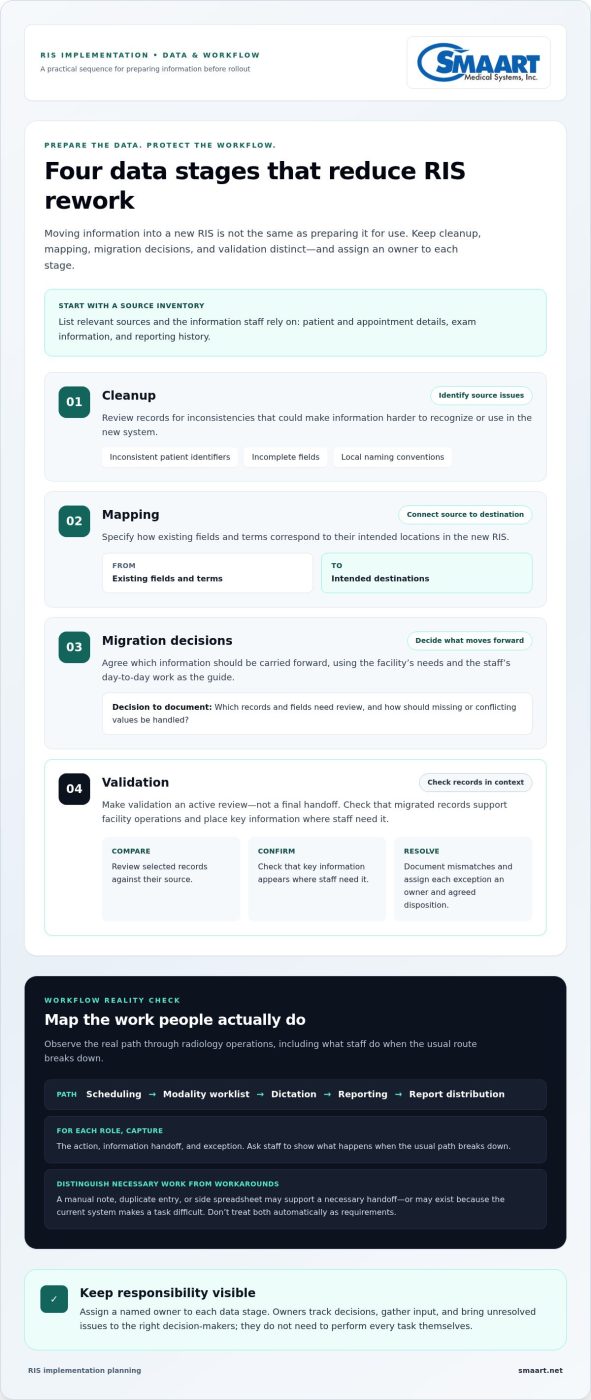
- Break data migration into cleanup, mapping, migration decisions, and validation to catch record issues before they create rework.
- Turn interface plans into test scenarios with documented evidence, responsible owners, and unresolved issues.
- Prepare for go-live by rehearsing workflows and giving users role-based practice before they handle real work.
- Learn how to avoid common RIS implementation mistakes and assess how SMAART-RIS features can support your documented workflows.
Common RIS Implementation Mistakes Start Before the Project Begins
Treating implementation as software installation is an early mistake with consequences that can surface long after go-live. A new system may be configured correctly and still make daily work harder if the facility hasn’t agreed on how scheduling, reporting, information handoffs, and staff responsibilities should work. Existing process gaps don’t disappear when a new RIS arrives. If teams leave them unresolved, they can carry inconsistent steps and workarounds into the new environment.
A practical implementation coordinates four areas: workflows, data, interfaces, and staff preparation. These areas depend on one another. For example, the team can’t define useful scheduling tests until it understands how appointments are currently created and updated. A Radiology Information System (RIS) supports radiology operations and complements other healthcare systems, so planning should account for how information and work move across the facility.
“RIS implementation is the facility-wide work of preparing people, information, and connected processes to support radiology operations in the new system.”
Mistake: Starting without a shared definition of success
Before configuration begins, ask the people doing the work what slows them down. Scheduling staff may describe duplicate entry or unclear appointment changes. Radiologists may point to delays in dictation or report distribution. IT may identify handoffs that depend on manual follow-up. Record the problem and where it occurs before jumping to a preferred feature or screen layout.
Separate immediate operational problems from preferences and future enhancements. A must-fix issue affects a necessary workflow or information handoff. A preference may improve convenience but isn’t required for launch. Agree on observable readiness outcomes, such as staff completing representative scheduling tasks or reports reaching the intended recipients in a test workflow. This gives teams a shared basis for configuration and readiness decisions.
Mistake: Leaving ownership unclear
Every decision needs a clear path. Identify clinical, administrative, and IT representatives who can resolve questions in their areas, and assign an owner to each workstream: workflow, data, integration, and training. An owner tracks decisions, gathers input, and brings unresolved issues to the right decision-makers. They don’t need to perform every task themselves.
Without clear ownership, teams can wait for one another, provide conflicting requirements, or raise essential changes late in the project. A simple responsibility record can keep the work visible:
- Workflow: Who approves how each role completes its core tasks?
- Data: Who decides which records and fields need review?
- Integration: Who coordinates requirements and test scenarios with connected systems?
- Training: Who prepares role-specific practice and identifies staff readiness gaps?
These early decisions help prevent common RIS implementation mistakes from becoming urgent go-live problems. They also give the facility a practical foundation for detailed data, workflow, and interface planning.
RIS Data and Workflow Mistakes That Create Rework
Moving information into a new RIS isn’t the same as preparing it for use. Source records may contain inconsistent patient identifiers, incomplete fields, or local naming conventions that don’t match the new system’s structure. If teams transfer information without reviewing how it will be recognized and used, staff may need to search, correct, or re-enter details manually. That can undermine the workflows the implementation is meant to support.
Organize data work into distinct stages, with a named owner for each: cleanup identifies source issues, mapping connects existing fields and terms to their intended destinations, migration decisions determine what information moves forward, and validation checks whether the resulting records support facility operations. One team may contribute to several stages, but decisions and responsibilities shouldn’t blur together.
Mistake: Migrating data without defining what must be validated
Start with an inventory of relevant sources and the information staff rely on, such as patient and appointment details, exam information, and reporting history. The facility’s data and workflow owners should define how to reconcile records and what counts as an exception. For instance, identify which fields must match across systems and how staff will review records with missing or conflicting values.
Make validation an active review, not a final handoff. Compare selected records against their source, confirm that key information appears where staff need it, and document mismatches. Assign each exception to an owner for resolution or an agreed disposition. This creates a traceable path from discovery to decision, instead of leaving unclear records for frontline staff to work around after launch.
Mistake: Configuring the system around undocumented workarounds
Observe the actual path from scheduling through modality worklist use, dictation, reporting, and report distribution. Ask staff to show what they do when the usual path breaks down, too. A manual note, duplicate entry, or side spreadsheet might support a necessary handoff, or it might exist only because the current system makes a task difficult. Treating both as requirements can reproduce avoidable work.
Map each role, action, information handoff, and exception before configuring the new process. Distinguish required steps from habits or workarounds, document proposed changes, and invite affected users to review realistic scenarios. For example, walk through a changed appointment and follow its information through the relevant workflow. This can reveal missing decisions while changes are still manageable.
“A facility is ready to implement when its data has been checked for operational use and its real workflows are mapped, reviewed, and understood by the people who perform them.”
These checkpoints connect directly to the work SMAART-RIS supports, including scheduling, modality worklist, dictation with speech recognition, and report distribution. Reviewing SMAART-RIS radiology workflow capabilities alongside your documented processes can help focus implementation discussions on the tasks staff need to complete.
RIS Integration and Testing Mistakes to Catch Before Go-Live
An interface can appear in a project plan and still fail to support the intended workflow. Integration planning defines which systems exchange information, what each handoff should accomplish, and who will resolve questions. Testing provides evidence that those exchanges behave as expected in realistic scenarios. Treating the two as the same task is one of the common RIS implementation mistakes that can leave gaps undiscovered until staff depend on the system.
Start by documenting each connection in practical terms: the systems involved, the information expected to move, the workflow it supports, and the people responsible for requirements, testing, and escalation. SMAART-RIS is fully integrated with SMAART-PACS and is designed to work with EMR and HIS platforms. Each facility should still define and test the handoffs that apply to its own environment. For broader context on how these systems work together, review this guide to integrated RIS PACS solutions.
Mistake: Accepting vague integration assumptions
“The systems will connect” isn’t a testable requirement. State what should happen at each handoff and how users will recognize the expected result. Assign an owner for interface questions, a clear point of responsibility for testing coordination, and a path for escalating issues that cross system boundaries. This prevents unresolved assumptions from being mistaken for completed work.
Mistake: Testing features instead of end-to-end scenarios
A feature may work on its own while the full process still breaks down. Build acceptance tests around tasks staff actually perform, such as scheduling an exam, checking the modality worklist, dictating a report, and distributing it. Include the users who carry out those steps. They can spot confusing handoffs or missing information that a technical check alone may not reveal.
For each scenario, record the planned behavior alongside the evidence gathered during testing. Keep the record concise and specific:
| Planned behavior | Test evidence | Owner | Unresolved issue |
|---|---|---|---|
| Information reaches the intended next step | Observed result and scenario tested | Person responsible for follow-up | Open question or “none” |
| Staff can complete the workflow as designed | User feedback and any missed or manual step | Workflow or testing lead | Issue, decision, or resolution status |
Test relevant connections across the RIS, PACS, and existing EMR or HIS environment. Use realistic scenarios, including exceptions such as a changed appointment or information that needs correction. Record both expected and observed results. If the outcome differs, assign the issue, document its resolution status, and repeat the scenario after a change. A passing result should mean the intended handoff worked and the staff member could continue the task, not simply that a screen opened.
This approach makes interface readiness visible. Teams can distinguish tested behavior from assumptions, direct open questions to the right owner, and make a more informed go-live decision.
RIS Go-Live Mistakes: Prepare People, Decisions, and Contingencies
A successful go-live depends on more than a system that passes testing. Staff need to know how their roles change, who can make decisions, and where to raise issues. Without that preparation, routine questions can turn into delays, and teams may fall back on inconsistent workarounds. A clear transition plan gives people structure without pretending every issue can be predicted.
Use a facility-owned readiness sequence before the transition:
- Confirm owners. Reconfirm who leads each operational area and who can make time-sensitive decisions.
- Rehearse workflows. Have staff practice realistic tasks in the order they’ll perform them, including common variations.
- Prepare users. Provide role-based instruction and explain where updated workflow guidance will be available.
- Review open issues. Assign each unresolved finding an owner, a status, and a clear next step before go-live.
Mistake: Treating training as a one-time announcement
A general feature tour can show what a system does without preparing staff to use it in their own work. Build practice around role-specific tasks. Scheduling staff can rehearse appointment workflows; radiologists can practice dictation and reporting; other users can focus on the steps they perform. Use realistic scenarios, leave time for questions, and give users a clear way to raise issues that remain unresolved.
Name team representatives responsible for communicating workflow updates to colleagues. That creates a dependable route for sharing approved changes and correcting outdated instructions. Broader planning for coordinated imaging operations can also draw on this hospital imaging workflow optimization guide.
Mistake: Going live without clear decision and escalation paths
Before launch, document who can approve workflow decisions, who prioritizes reported issues, and how staff should report them through facility-approved channels. Make the route easy to follow. If a user encounters a problem, they should know what information to provide and who receives the report, rather than sending it to several teams and hoping someone responds.
Review outstanding test findings with the relevant owners. For each one, record its operational impact, current status, and next action. The facility should also define its own contingency plan for issues that could interrupt normal work, including who makes decisions and how approved procedures are communicated. Keep that plan aligned with facility policy. Don’t leave staff to improvise or assume an untested workaround is safe.
These steps help prevent common RIS implementation mistakes from resurfacing as confusion during the transition. SMAART-RIS includes 7 × 24 × 365 U.S. telephone support, single-call issue resolution, native English-speaking engineers, and remote desktop assistance to support ongoing system use. Learn more about SMAART-RIS.
Choose an RIS Implementation Partner for the Work Beyond Installation
Go-live is a milestone, not the end of implementation work. Staff will encounter real-world situations that weren’t represented in every test, and approved workflows may need clarification as the team uses the system. A reliable ongoing approach gives feedback and recurring issues a clear destination instead of leaving staff to create informal workarounds.
Consider whether the implementation approach connects the facility’s documented workflows and assigned responsibilities to system setup and ongoing use. Teams should understand who gathers user feedback, who reviews recurring issues, who decides whether a workflow change is appropriate, and how approved changes reach staff. These responsibilities matter after launch, when small uncertainties can otherwise become inconsistent practices across shifts or departments.
Mistake: Ending the project plan at go-live
Assign an owner to collect user feedback after the transition and establish a regular process for reviewing recurring issues. Route each concern to the appropriate workflow, data, or technical owner, and document its status and next action. When an operational change is approved, update the relevant workflow guidance and share it with affected users. This keeps practice aligned with decisions rather than outdated instructions.
Keep the facility’s issue-handling process distinct from the vendor’s support role. Staff should know how to report an operational concern internally, while the designated facility contact can coordinate technical questions through the appropriate support channel. That distinction makes ownership clearer and helps the team see whether an issue calls for a workflow decision, additional user guidance, or technical assistance.
How SMAART-RIS fits an integrated radiology workflow
SMAART-RIS is fully integrated with SMAART-PACS and is designed to work with EMR and HIS platforms. Its capabilities include scheduling, dictation with speech recognition, report distribution, modality worklist, and billing system integration. During planning, map the facility’s documented responsibilities to the workflows these capabilities support, then maintain clear ownership for feedback and follow-up once the system is in use.
That ongoing support matters. SMAART Medical Systems provides 7 × 24 × 365 U.S. telephone support, single-call issue resolution, native English-speaking engineers, and remote desktop assistance. A defined support model gives facilities a resource for questions during continued system use, while the facility retains ownership of its clinical and operational decisions.
The common RIS implementation mistakes discussed here are easier to prevent when teams plan for both launch and the work that follows. Explore SMAART-RIS to see its radiology workflow capabilities.
Make Your Next RIS Decision with Confidence
Turn implementation lessons into a practical plan for your facility. Use documented workflows and responsibilities to guide decisions about system fit, ongoing ownership, and how questions will be handled after launch. That focus helps keep common RIS implementation mistakes from becoming part of everyday operations.
SMAART-RIS is fully integrated with SMAART-PACS and is supported by 7 × 24 × 365 U.S. telephone support, single-call issue resolution, native English-speaking engineers, and remote desktop assistance. These resources support your team as it moves from implementation planning into ongoing system use.
Explore SMAART-RIS and plan your next steps with its radiology workflow capabilities and support model.
Frequently Asked Questions
What are the most common RIS implementation mistakes?
The most common RIS implementation mistakes are failures to connect project decisions to everyday radiology work. A useful early warning is when staff can’t explain how a routine task should move from one role or system to the next. For example, if teams give conflicting answers about who corrects an appointment detail, clarify the process before launch. Tracking these gaps as decisions, not just technical defects, helps prevent them from being overlooked.
How long does a RIS implementation take?
A RIS implementation timeline depends on the facility’s scope, existing systems, data readiness, and the decisions required along the way. Rather than relying on a generic duration, build a schedule around dependencies. Workflow configuration may need to follow agreement on scheduling steps, while acceptance testing depends on the relevant connections being ready. Review milestone status with project owners and adjust estimates when a dependency, decision, or scope changes.
Does implementing a RIS require replacing an existing PACS?
No, implementing a RIS doesn’t automatically require replacing an existing PACS. A facility may plan to connect systems with distinct roles, depending on its desired workflow and project scope. Start by recording what users need to accomplish across the RIS and PACS, then document the information handoffs that support those tasks. SMAART-RIS is fully integrated with SMAART-PACS; broader system decisions should reflect the facility’s environment and requirements.
What should a RIS go-live plan include?
A go-live plan should give staff a usable reference for decisions and communication, not just a launch date. Include a current contact and escalation directory, a record of approved workflow decisions, and a clear method for communicating changes. For example, if a team updates an instruction after a rehearsal, identify who approves the revision and how affected staff will receive it. This keeps operational guidance consistent as the transition progresses.
Can a clinic implement a RIS in phases?
Yes, a clinic can consider a phased RIS implementation if the sequence fits its processes and system dependencies. Before dividing the rollout, identify tasks that rely on shared information or must work together. Define what each phase includes, which workflows remain outside it, and how staff will handle handoffs between phases. Assign someone to review results before the next stage begins so unresolved issues don’t quietly carry forward.
How can a facility measure whether a RIS implementation is working?
A facility can assess its RIS implementation by comparing observed results with goals set before the project began. Choose measures that reflect actual work, such as whether staff can complete assigned tasks without unplanned manual steps or whether reported issues are being resolved by their owners. Establish a baseline using current processes where practical. Review findings with workflow leads, gather staff feedback, and use the evidence to decide what needs attention next.