On-Premise and Cloud PACS Costs Over Five Years
Cloud PACS may cost less over five years, but the comparison depends on study volume and which services are included.
The difference is easy to miss if you compare only hardware with a subscription fee. On-premise systems also involve licenses, maintenance, storage expansion, infrastructure, and IT administration. Cloud PACS shifts more spending to recurring subscription charges, while migration and connectivity still affect the total.
This guide explains how those expenses shape a five-year comparison, so you can assess total costs rather than just the initial purchase. It covers recurring on-premise expenses, common cloud pricing structures, and how practice size and imaging volume influence the decision.
Key Takeaways
- Compare the full ownership picture, not just the equipment purchase or cloud subscription. Include staffing, maintenance, storage growth, and implementation.
- Map hardware refreshes and storage expansion against your imaging growth to reveal costs that can be easy to overlook.
- Review what software licenses cover and how support contracts affect recurring expenses over time.
- Use study volume, infrastructure needs, and migration requirements to make a fair five-year comparison between deployment models.
- Consider whether SMAART-PACS, SMAART-RIS, or SMAART-SHARE fits your imaging workflow and integration needs.
Is cloud PACS cheaper than on-premise PACS?
Cloud PACS may cost less over five years, but study volume and included services shape the comparison. That means the cost of maintaining on-premise PACS involves more than comparing hardware with a subscription.
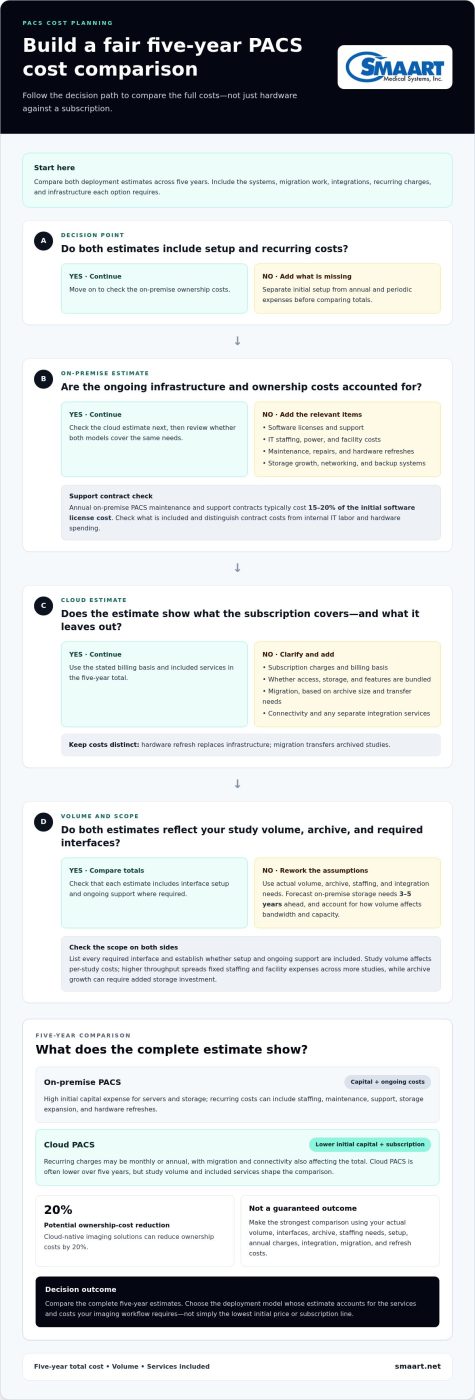
Compare both deployment estimates, including the systems, migration work, and integrations each option requires.
Subscription models may bundle user access, data storage, and software features, while some providers charge by study or stored data. Account for migration separately from annual subscriptions, since its cost depends on archive size and transfer requirements.
Integration may add professional-services costs in either model. List every required interface, then establish whether setup and ongoing support are included in the estimate.
These are separate expenses: a hardware refresh replaces infrastructure, while migration transfers archived studies.
| Option | Initial setup | Recurring costs | Five-year example |
|---|---|---|---|
| On-premise PACS | High capital expense for servers and storage | Staffing, maintenance, and hardware refreshes | Significant total cost requiring capital outlay |
| Cloud PACS | Lower initial capital expenditure | Predictable monthly or annual subscription fees | Often lower overall five-year total |
Cloud-native imaging solutions can reduce ownership costs by 20%, but the strongest comparison uses your actual volume, interfaces, archive, and staffing needs. Choose the model whose five-year estimate includes setup, annual charges, integration, migration, and refresh costs.
On-premise PACS hardware and infrastructure costs
Annual budgets should include staffing, power, support contracts, and storage growth, not just equipment.
Equipment and Infrastructure
These capital purchases differ from recurring upkeep: they establish the infrastructure for image capture, storage, retrieval, and disaster recovery.
IT Staffing and Facility Costs
On-premise systems require staff to monitor services, verify backups, maintain interfaces, and respond to incidents.
Annual Hardware and Storage Upkeep
Hardware upkeep includes repairs, maintenance, upgrades, and replacement planning. Servers and storage require periodic replacement, and storage capacity may need to be expanded as imaging needs grow. These irregular capital costs differ from annual support contracts and power bills.
Networking costs depend on existing infrastructure and PACS workload. Include network switches and backup or redundancy systems, then account for how imaging volume affects bandwidth and storage needs. Per-study costs also depend on volume: higher throughput spreads fixed staffing and facility expenses across more studies, while archive growth can require additional storage investment.
Support adds another recurring line. Annual on-premise PACS maintenance and support contracts typically cost 15 to 20 percent of the initial software license cost. Some support is included, while other arrangements charge separately. Add contract terms to the infrastructure budget, then distinguish them from internal IT labor, hardware repairs, and upgrade spending.
For a practical estimate, separate the budget into upfront equipment, recurring facility and staffing expenses, support contracts, and periodic capacity upgrades. This structure shows which costs remain steady and which rise with archive growth or refresh cycles. Practices assessing broader radiology management software options can also compare how each deployment model affects their infrastructure workload.
Hardware and software license expenses
License terms and refresh timing shape PACS ownership costs beyond initial installation.
Software Licensing and Support Fees
Perpetual licenses require a larger upfront purchase, and the quoted scope matters. Annual maintenance and support contracts typically cost 15 to 20 percent of the initial license cost. Compare included modules, user rights, and support coverage before estimating recurring expenses.
Storage Expansion and Hardware Refresh
Refreshes and storage expansion are separate investments. Forecast medical-image growth across both cycles so a refresh budget also accounts for added capacity.
Hardware Maintenance and Upgrades
Maintenance keeps existing hardware operating; upgrades add or replace capacity and capabilities. Facilities need to budget for maintaining and upgrading physical devices, as well as software support. Costs vary with the installed equipment and planned changes. Track each server, storage array, and network component, then separate routine maintenance from replacement purchases to plan spending and downtime risks.
Scalability and Hardware Expansion
As imaging volume increases, on-premise systems may need extra storage, hardware, or licenses for added users and workstations. Capacity planning typically requires forecasting storage needs 3 to 5 years in advance. This differs from a scheduled refresh: expansion responds to growth, while refresh replaces aging infrastructure. Include both in projections, and connect new capacity to expected study volume.
Estimate costs by listing software licenses, support, hardware refreshes, and growth-related additions separately. Identify which charges recur annually and which involve larger purchases. Check whether viewer access or integration engines have separate license fees beyond the base PACS license. A quote is easier to compare when each line item maps to a system component and planning period.
Traditional on-premise PACS requires upfront purchases of software licenses and hardware. Costs depend on the organization’s requirements, hardware, software licenses, and installation and testing fees, with high initial upfront costs; facilities also pay for hardware, installation, and software licenses.
Annual maintenance and support contracts
Support contracts and IT labor add recurring costs beyond hardware purchases. Separate vendor coverage from staff responsibilities to understand what the practice pays each year.
Annual Support Contracts
Annual maintenance and support contracts typically cost 15 to 20 percent of the initial software license cost. The contract may cover software support, while hardware upkeep and internal IT duties remain separate budget lines. Traditional PACS support can be included or offered as an add-on, so compare the contract scope before projecting annual spending.
Review coverage details closely. A contract’s value depends on which software components it covers, how support requests are handled, and whether maintenance is bundled or charged separately. On-premise PACS may experience downtime during updates, so include update planning in your review of clinical workflows. Record these terms alongside the annual fee rather than treating all support agreements as equivalent.
Ongoing IT Staffing and Support
On-premise PACS administration requires 0.5 to 1.0 FTE for monitoring, backup verification, interface engine maintenance, and incident response. This staffing expense differs from a vendor contract: it covers ongoing system management within the healthcare organization.
That cost reflects ongoing operational work, not a one-time installation. Assign each responsibility, such as checking image backups or maintaining interfaces, to a role or support agreement. This avoids counting contract coverage while overlooking internal labor.
Build an annual support plan around the systems that keep radiology images available. List software contract costs, staff time, update coordination, backup verification, and incident response separately. Identify which tasks fall to in-house IT and which belong to the support provider. This breakdown helps administrators spot overlapping coverage or unassigned responsibilities.
For patient-facing operations, support planning also means accounting for update windows and recovery tasks. On-premise systems may experience downtime during updates, while in-house or outsourced support manages the environment. Keep the schedule, assigned owner, and affected servers together in one operating plan. This makes it easier to assess each support arrangement’s practical value alongside its annual cost.
Finally, compare recurring support with the cost of keeping systems actively managed. A lower contract fee does not describe total support spending if staff must take on more monitoring or maintenance. Include both the 15 to 20 percent contract rate and the relevant staffing estimate in the same annual budget, then use that view to assess ongoing ownership costs.
Five-year total cost of ownership
A five-year cost-of-ownership estimate should include every expense required to run PACS, not just its purchase price. The range reflects differences in equipment, staffing, storage growth, support, and implementation needs.
A worked example can show how practice size affects the total. The range includes system and operating expenses, not just the initial purchase. Use your study volume and workflow requirements to build a comparable estimate.
Separate one-time, recurring, and growth-related expenses. Include implementation and software licenses as initial costs. Add annual support contracts, IT staffing, facility expenses, and storage expansion as recurring or variable costs, then account for a hardware refresh during the five-year period. This structure clarifies which expenses remain stable and which rise with medical-image archives.
Include the work required to keep systems running. On-premise PACS administration requires 0.5 to 1.0 FTE for monitoring, backup verification, interface engine maintenance, and incident response. Leaving out that labor can make the apparent cost of ownership incomplete.
A fair comparison with cloud PACS should include subscription charges and any migration or integration work, alongside on-premise refresh and staffing costs. Compare the same study volume, interfaces, archive needs, and support requirements for each option.
- Setup: Include implementation, licenses, and required integrations.
- Operations: Count support, staffing, and facility expenses across five years.
- Growth: Forecast study volume and storage needs, then include expansion costs.
- Refresh: Budget for hardware replacement within the comparison period.
Use these categories to build a five-year estimate that reflects your medical imaging workflow and connection requirements. To discuss PACS options for your organization, review PACS solutions.
SMAART Medical Systems, Inc.: SMAART-PACS
SMAART Medical Systems, Inc. offers SMAART-PACS for hospitals and clinics evaluating radiology management software. Its diagnostic zero-footprint viewer and interfaces with EMR, HIS, and practice-management systems can support imaging workflows connected to those platforms.
SMAART-RIS supports radiology information workflows, while SMAART-SHARE provides cloud-based image sharing. Consider how these offerings fit your organization’s systems and operational needs as you plan the next step.
To discuss your imaging software needs, contact SMAART Medical Systems, Inc.
Make Your PACS Decision With Confidence
Turn the comparison into a decision brief for clinical and IT stakeholders. Define the imaging workflow you need to support, the systems PACS must connect with, and how you want to manage infrastructure over time. Weigh each option against those priorities, not just its purchase model. This puts the cost of maintaining on-premise PACS in the context of a broader operational decision.
SMAART Medical Systems, Inc. offers SMAART-PACS, SMAART-RIS, and SMAART-SHARE. These options support radiology management and cloud-based image sharing, and the software solutions are designed to integrate with existing EMR and HIS platforms. Consider how they align with your workflow and technology environment as you plan the next step.
Contact SMAART Medical Systems, Inc. to discuss your imaging software needs. A clear plan can help your team move forward with confidence.
Frequently Asked Questions
How much does PACS maintenance cost per imaging study or per radiologist?
On-premise expenses per study depend on how fixed operating costs are spread across annual volume; per-radiologist costs depend on staffing and licensing arrangements. Estimate your unit costs by dividing the annual PACS operating budget by completed studies, then dividing it separately by radiologist count.
What staffing costs are involved in operating an on-premise PACS?
Budget for IT time spent monitoring systems, verifying backups, maintaining interfaces, and responding to incidents. For a practice-specific estimate, assign each task to a responsible role and include the time spent supporting PACS alongside other IT duties.
What are the backup, disaster recovery, and cybersecurity costs for on-premise PACS?
These costs depend on how much duplicate storage, redundancy, security tooling, and staff oversight the organization needs. Include the infrastructure used to protect image archives, plus the labor for backup verification and incident response. Recovery planning matters too: restoring an on-premise PACS failure can take 4 to 48 hours. Consider how that potential disruption affects image access and the medical workflow when setting recovery priorities.
How do on-premise PACS costs compare with cloud-based PACS?
On-premise PACS concentrates spending in infrastructure, staffing, support, and refreshes. Cloud PACS shifts more expense to subscriptions and may add migration costs. Study volume affects the comparison: practices with fewer studies spread fixed infrastructure costs across fewer exams, while subscription pricing may scale with usage.
What factors affect on-premise PACS maintenance costs for hospitals and imaging centers?
Key cost drivers include modality count, study volume, archive growth, number of sites, interface complexity, and available IT capacity. For example, a center adding imaging equipment may need more storage and network capacity, while a hospital with several connected systems may require more interface maintenance. Compare current workloads with planned growth, then map each requirement to hardware, staffing, support, or software licensing.
What HIPAA and data-retention requirements affect PACS operating costs in the United States?
Healthcare organizations need data-security measures that support HIPAA compliance, so PACS budgets should include security controls and the work of managing them. Retention periods also affect storage planning: adult DICOM archives are typically retained for 7 to 10 years under local regulations, while pediatric records may be retained longer. These retention needs shape archive capacity and backup planning, so include them when estimating ongoing infrastructure needs.