Change Healthcare PACS Competitors: 2026 Alternatives Compared
The best replacement for a PACS isn’t necessarily the platform with the longest feature list. It’s the one that supports clinical continuity and fits how your organization manages imaging, information, and daily work. If you’re comparing Change Healthcare PACS competitors, start by understanding the product landscape: Change Healthcare is now part of Optum, and Stratus Imaging PACS is one product to consider in that context.
A switch can affect reading workflows and connections to your EMR and other systems. Compare alternatives by workflow fit, integration, deployment approach, and operational needs, not vendor claims alone.
This guide compares alternatives including Sectra, Agfa HealthCare, Fujifilm, Philips, Merative, and RamSoft, with attention to their positioning and product context. It also outlines practical continuity questions to address before making a change. You’ll see how SMAART-PACS, SMAART-RIS, and SMAART-SHARE support different imaging, scheduling, and image-sharing needs, helping your team build a focused shortlist and identify next steps.
Key Takeaways
- Compare Change Healthcare PACS competitors by diagnostic viewing, image distribution, archiving, user access, and administrative workflow, not feature lists alone.
- Review current product naming, availability, and support status so your shortlist reflects each vendor’s current offering.
- Map interfaces, image archives, users, and retention needs before planning a transition to help protect clinical continuity.
- Use a phased approach to requirements, testing, training, and go-live to manage workflow impacts.
- Assess how SMAART-PACS, SMAART-RIS, and SMAART-SHARE address imaging, scheduling, and image-sharing needs, including integration with existing EMR and HIS platforms.
Why organizations search for Change Healthcare PACS competitors
Organizations searching for Change Healthcare PACS competitors are usually assessing options for their imaging workflows, not simply looking for a different software name. A PACS supports the storage, retrieval, management, and distribution of medical images. The Picture Archiving and Communication System (PACS) overview provides background, but choosing an alternative means assessing how a platform fits your clinical and operational needs.
Separate a vendor-level alternative from a like-for-like product replacement. A vendor may offer a broader enterprise imaging portfolio, while a specific PACS product may cover only part of your current workflow. Compare capabilities and responsibilities, not just company names. Changes to how users view studies, access prior images, or move through worklists can have different operational impacts.
What should readers verify about Change Healthcare PACS?
Product names, ownership, availability, and support arrangements can change. As of October 2026, Change Healthcare is part of Optum, and the next Stratus Imaging PACS version reached general availability in spring 2026. Review current official company materials to establish whether a product name or version is available, supported, or actively marketed.
Distinguish legacy references from current offerings. An old product page, acquisition announcement, or archived support document may describe a past arrangement. Check the date and context of each source, especially when assessing maintenance, upgrades, and support responsibilities.
When does evaluating a PACS alternative make sense?
Consider an evaluation when radiology workflows are changing, existing interfaces no longer align with system plans, or your organization is reviewing its imaging architecture. These are reasons to assess fit, not proof that the current PACS is failing. If it continues to meet clinical and operational requirements, retaining it may be the right choice.
Include transition risks from the start. A PACS change can affect access to current and prior images, clinical continuity, EMR or HIS connections, and user adoption. Before comparing vendors, map how studies reach readers, how users retrieve priors, and which teams rely on image distribution or administrative workflows. This baseline helps you evaluate alternatives and plan a controlled transition.
How to compare Change Healthcare PACS alternatives fairly
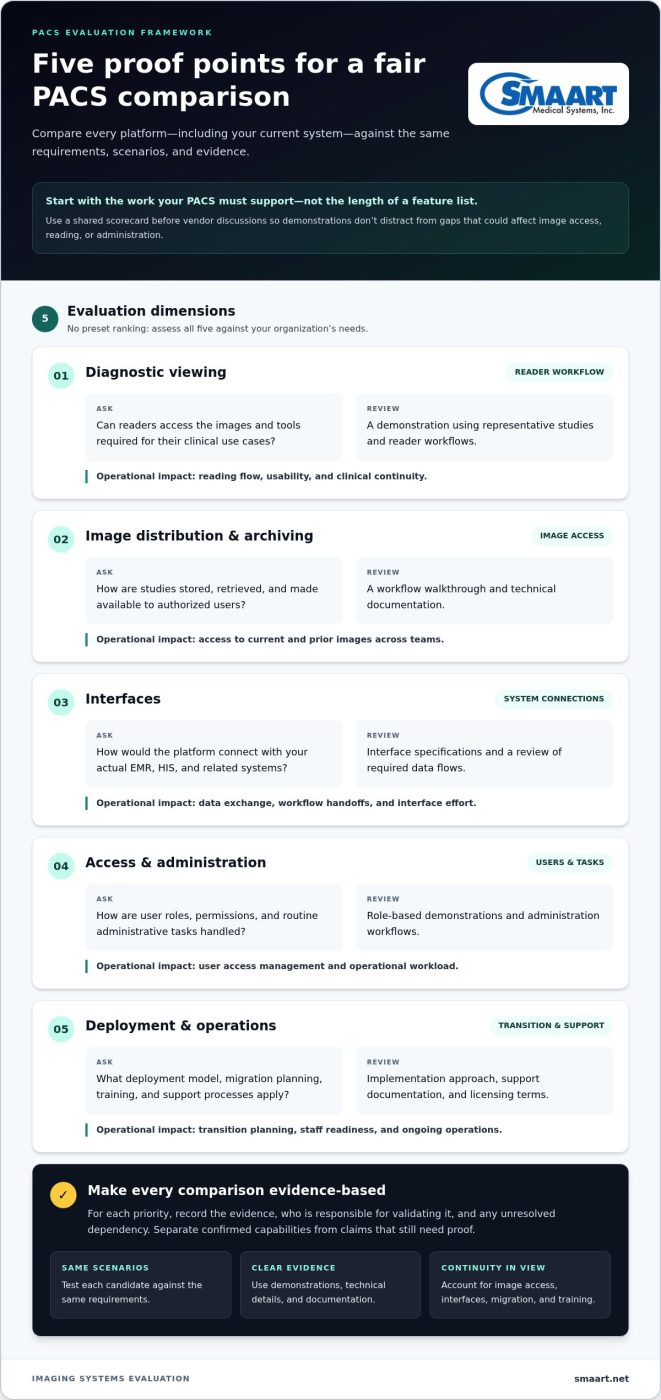
Start with the work your PACS must support, then test each platform against the same requirements. Build a scorecard before vendor discussions so presentations don’t distract from gaps that could affect image access, reading, or administration. Use the same scenarios and evidence standards for every candidate, including the system already in place.
| Criterion | Questions to answer | Evidence to review | Operational impact |
|---|---|---|---|
| Diagnostic viewing | Can readers access the images and tools required for their clinical use cases? | Demonstration using representative studies and reader workflows | Reading flow, usability, and clinical continuity |
| Image distribution and archiving | How are studies stored, retrieved, and made available to authorized users? | Workflow walkthrough and technical documentation | Access to current and prior images across teams |
| Interfaces | How would the platform connect with your actual EMR, HIS, and related systems? | Interface specifications and a review of required data flows | Data exchange, workflow handoffs, and interface effort |
| Access and administration | How are user roles, permissions, and routine administrative tasks handled? | Role-based demonstrations and administration workflows | User access management and operational workload |
| Deployment and operations | What deployment model, migration planning, training, and support processes apply? | Implementation approach, support documentation, and licensing terms | Transition planning, staff readiness, and ongoing operations |
Which technical and workflow criteria matter most?
Assess DICOM workflows alongside image access and diagnostic viewing. List the systems that send or receive imaging data, the users who need access, and the clinical use cases the PACS must support. Compare each platform against those requirements. Products with similar labels may not provide equivalent capabilities or handle a workflow in the same way.
For EMR and HIS integration, document the interfaces your organization uses and the information that must pass between systems. Review technical details and validate critical exchanges in a demonstration or test environment. A general interoperability claim doesn’t show how a required workflow operates.
How should buyers weigh implementation and ongoing operations?
Look beyond the software demonstration. Consider archive migration, user training, transition support, and how clinical work will continue during deployment. Review licensing or subscription terms alongside the resources needed to operate the platform, without relying on unsupported price comparisons.
Separate confirmed capabilities from claims that still need proof. For each priority, record the evidence, who is responsible for validating it, and any unresolved dependency. This keeps comparisons of Change Healthcare PACS competitors consistent and gives stakeholders a clear basis for evaluating options. Organizations assessing SMAART-PACS can explore how its image storage and distribution role aligns with their requirements through SMAART-PACS information.
Change Healthcare PACS competitors to evaluate in 2026
This shortlist is a starting point for research, not a ranking or a claim that the systems are interchangeable. Product names, ownership, availability, and support arrangements can change. Review each vendor’s current product information and support status before making procurement decisions, then compare candidates against the same clinical and technical requirements.
| Vendor or product line | 2026 context | Verify for your organization |
|---|---|---|
| Sectra PACS | A candidate for organizations assessing enterprise imaging workflows. Sectra PACS received a 2026 Best in KLAS score of 90.4 in the large PACS category, for sites with 300,000 or more studies. | Product scope, deployment model, interfaces, and fit for your scale and specialties. |
| Agfa HealthCare Enterprise Imaging | A radiology imaging platform with Enterprise Imaging for Radiology recognized in the 2026 Best in KLAS small PACS category. Version 8.4.x was announced in a technology preview on September 4, 2026. | Current release and availability, relevant components, deployment, and integration details. |
| Fujifilm Synapse PACS | A PACS platform with version 7.6.0 receiving FDA clearance on June 18, 2026. | Current product availability, deployment, integration, and fit for your clinical workflows. |
| Philips Image Management | Philips launched Version 15, the next generation of Vue PACS, in November 2025. The version is reported as available in the United States. | Regional availability, current naming, deployment choices, and workflow fit. |
| Merative Merge PACS | Merge PACS 9.4 was made available in March 2026. Older IBM Watson Health references may appear in historical product information. | Current product status, ownership, support responsibilities, and upgrade path. |
How to present established PACS vendors without overstating fit
Use vendor announcements and current product documentation to establish names, versions, and availability. A KLAS score provides a defined category context, but it doesn’t prove that a system fits your workflows. Review deployment, integration, and specialty capabilities in current technical materials and scenario-based demonstrations. Avoid rankings unless you state the criteria and evidence behind them.
Where can a specialist radiology software option fit?
Include SMAART among the Change Healthcare PACS competitors to evaluate when a focused radiology software option fits your shortlist. SMAART-PACS supports medical image storage and distribution; SMAART-RIS manages radiology patient data and scheduling; SMAART-SHARE supports cloud-based image sharing and collaborative viewing. SMAART software is designed to integrate with existing EMR and HIS platforms, giving teams specific functions to assess against their workflow and interface needs. Explore radiology software options as part of your comparison.
Plan a PACS transition without disrupting radiology workflows
A smooth PACS transition starts before data moves. Build the plan around how studies, reports, users, and connected systems work together today. This turns a vendor change into a controlled operational project, with clear clinical continuity checks at each stage.
What should a PACS migration plan include?
Start with an inventory. Record image archives and data sources, interfaces, user groups, reading and administrative workflows, and dependencies such as EMR or HIS connections. Document applicable retention obligations using your organization’s policies and current authoritative guidance. Assign owners for clinical sign-off, technical decisions, training, and issue escalation.
Agree on acceptance criteria before testing. For example, define how teams will verify that representative studies and priors can be found, image data remains intact, reporting workflows operate as intended, and users can complete key tasks. Specific criteria make gaps easier to identify before they affect routine work.
How can teams reduce operational risk during transition?
Use a phased sequence, with each phase tied to an approval point:
- Map requirements: Document workflows, systems, users, archives, and dependencies.
- Test migration and interfaces: Use representative data to validate image access, study integrity, and required data exchanges.
- Prepare users: Train affected roles on revised workflows before production access changes.
- Go live in stages: Monitor agreed acceptance measures, track issues, and resolve critical problems before expanding use.
Before cutover, document contingency and rollback steps, including decision owners and escalation paths. During go-live, track issues against the agreed criteria, communicate changes to affected teams, and pause expansion if critical workflows aren’t working as expected. Make the plan specific to your organization’s risk tolerance and technical environment.
Use this plan to compare not only platform capabilities, but also the work required to preserve image access and clinical routines during a change. A phased approach helps teams surface migration and adoption risks early, rather than treating them as go-live surprises.
For a shortlist that includes radiology-specific tools, explore SMAART radiology software alongside your workflow and continuity requirements.
How SMAART can fit a Change Healthcare PACS alternative shortlist
A useful shortlist reflects the work your organization needs its software to do, not just platform names. SMAART offers radiology software for image management, scheduling, image sharing, and system integration. Assess each product against your validated workflows, interfaces, user needs, and transition plan.
How do SMAART products address different radiology needs?
Each product has a distinct operational role:
- SMAART-PACS supports medical image storage and distribution.
- SMAART-RIS manages radiology patient data and clinical scheduling.
- SMAART-SHARE supports cloud-based image sharing and collaborative viewing.
Assess these roles separately and together. Map image storage and distribution needs to PACS requirements, scheduling and patient data needs to RIS workflows, and image-sharing needs to the teams involved in collaboration. SMAART-SHARE provides a cloud-based way to distribute radiology results without proprietary hardware.
SMAART software is designed to integrate with existing EMR and HIS platforms. Document which systems exchange information with radiology, what data moves between them, and which handoffs users depend on. Use those requirements to evaluate integration and workflow fit instead of relying on a general compatibility statement.
What are practical next steps for evaluating SMAART?
Prepare a short requirements brief before a product discussion. Include the imaging workflows you need to support, relevant interfaces, user roles, image-sharing needs, and transition priorities. Use representative scenarios to explore how the products map to those needs. This keeps the discussion grounded in your environment and helps identify technical validation or implementation planning needs.
If browser-based image viewing is part of your evaluation, the existing zero-footprint PACS viewer guide offers related context. Use it alongside your requirements and assess the specific viewing workflow your organization needs.
As you compare Change Healthcare PACS competitors, include SMAART as a specialist radiology software option and assess each product against your documented requirements. Discuss your radiology software needs and explore how SMAART-PACS, SMAART-RIS, and SMAART-SHARE align with your workflows.
Build a PACS shortlist around continuity
The strongest Change Healthcare PACS competitors for your organization are the ones that match its clinical workflows, integration needs, and operational priorities. Compare vendors using consistent criteria, and review current product names, availability, and support arrangements before deciding. A phased transition plan can help protect image access and give teams time to test interfaces, prepare users, and address issues before expanding use.
SMAART offers distinct tools for radiology workflows: SMAART-PACS for image storage and distribution, SMAART-RIS for patient data and scheduling, and SMAART-SHARE for cloud-based image sharing and collaborative viewing. Its software is designed to integrate with existing EMR and HIS platforms, making those connections part of the evaluation.
Ready to explore a specialist option for your shortlist? Explore SMAART’s radiology software solutions and see how they align with your documented needs. With clear requirements and a practical transition plan, your team can move forward with confidence.
Frequently Asked Questions
What are the main alternatives to Change Healthcare PACS?
Potential Change Healthcare PACS competitors to research include Sectra, Agfa HealthCare, GE HealthCare, Philips, and Fujifilm. This non-ranked list is a starting point, not a claim that the products are interchangeable or suitable for every organization. Product names and availability can change. Compare candidates against your diagnostic and administrative workflows, integration needs, deployment preferences, and transition requirements, rather than choosing by brand recognition alone.
Is Change Healthcare PACS still available in 2026?
Availability depends on the specific product, version, and support arrangement, so don’t assume a general yes or no. Change Healthcare is part of Optum, and product branding and ownership context can change over time. Identify the exact product installed at your organization and review its current commercial availability and support status using official information. Distinguish active offerings from legacy references, archived materials, and historical company announcements before planning a change.
What is the difference between Change Healthcare PACS and Merge PACS?
Change Healthcare PACS and Merge PACS refer to different product histories, so don’t treat the names as interchangeable. Before comparing them as active options, establish current ownership, product branding, availability, and support arrangements from official sources. Identify the exact system your organization has installed and the specific target product under consideration. Then compare interfaces, image workflows, archive requirements, and migration work rather than relying on a product name alone.
How do I choose a PACS replacement for a hospital or imaging clinic?
Start with clinical and operational requirements, including diagnostic viewing, image archives, interfaces, user roles, deployment preferences, and support needs. Turn these into documented criteria, then compare candidates through demonstrations and technical validation using representative workflows. Include migration planning, staff training, and continuity needs in the assessment. A feature checklist or ranking can help organize research, but it shouldn’t determine the decision unless its criteria and evidence match your organization’s requirements.
How difficult is it to migrate from one PACS to another?
Migration complexity depends on factors such as archive volume, data formats, interfaces, workflow dependencies, retention needs, and user readiness. Begin by inventorying systems, connected workflows, archives, and affected users. Test representative data and validate interfaces before setting a cutover plan. Include clinical sign-off, staff training, contingency planning, and agreed acceptance criteria. Effort and schedule vary by project, so avoid relying on a fixed timeline without assessing your organization’s environment.
Can a PACS alternative integrate with an existing EMR or HIS?
Integration depends on the PACS, EMR or HIS platforms, interfaces, and workflows involved. Document current data exchanges and user handoffs, then validate proposed connections technically and operationally against your requirements. SMAART’s software is designed to integrate with existing EMR and HIS platforms. Assess that fit against your systems and workflows, including the information radiology teams need to exchange and how those connections support continuity during a transition.
Should we replace our PACS if the current system still works?
No, replacement isn’t automatic. Compare current workflow performance, support status, integration needs, operational priorities, and future plans with the effort and risk of transition. If the system continues to meet documented requirements, keeping it may be a reasonable choice. If needs have changed, a structured market evaluation can help identify alternatives. Base the decision on clinical fit and organizational priorities, not pressure to change or a vendor ranking alone.