Radiology Business Continuity Plan: 2026 Guide
What if a radiology outage leaves your team unsure whether to restore image access, scheduling, reporting, or another essential workflow first? A business continuity plan for radiology department operations should answer that question before a disruption hits. Radiology depends on connected systems, including PACS, RIS, networks, and power, as well as the people who keep exams moving. Restoring technology alone does not tell staff how to prioritize patient care or who should communicate decisions.
A practical plan turns those decisions into clear, usable procedures. This guide explains how to prioritize imaging services by patient-care impact, assign downtime and recovery responsibilities, and establish communication paths across clinical, operational, and technology teams. It also covers how to document procedures, set recovery objectives with the right stakeholders, test the plan, and keep it current. The goal is a framework your department can use to make informed decisions during downtime and coordinate a return to normal workflows.
Key Takeaways
- Build a business continuity plan for radiology department operations around patient-care impact, not technology recovery alone.
- Map how people, facilities, systems, and external partners support each essential imaging service before setting recovery priorities.
- Give staff a clear downtime sequence, including who activates the plan, leads clinical decisions, and coordinates the technology response.
- Use discussion-based exercises to uncover gaps in roles, communication, documentation, and return-to-service procedures.
- Position PACS, RIS, and image-sharing software as one layer of a broader continuity plan, supported by defined workflows and clinical governance.
Why a Radiology Department Needs a Business Continuity Plan
A radiology department can lose the ability to deliver an essential service even when the rest of a facility remains open. A power interruption may affect imaging equipment, a network outage may block access to images or reports, and a staffing shortage may reduce capacity. A business continuity plan for radiology department operations sets out coordinated procedures for maintaining essential services during disruption, with patient-care priorities guiding decisions.
Continuity matters beyond the scan itself. Delayed imaging can affect urgent clinical decisions, referrals, procedure planning, appointment schedules, reporting, and teams that depend on timely results. The plan should clarify which services can continue, which need an alternate process, and how clinicians and operational leaders will communicate changes. Business continuity planning provides a broader overview of the discipline and its relationship to disaster recovery.
These terms describe related but distinct work. Business continuity guides how essential operations continue during a disruption, including through temporary workflows or adjusted priorities. Disaster recovery focuses on restoring systems, data, and services after an interruption. Radiology needs both perspectives: restoring a system is not the same as deciding how to manage urgent exams while it is unavailable.
Which radiology services are essential to continue?
Start with an inventory of services, not a list of software. Include modalities and examination types, reporting, scheduling, image access, and referral workflows. For each service, consider whether an interruption could delay urgent care or affect dependent clinical teams. Clinical and operational leaders should set priorities based on local patient-care requirements, available capacity, and the consequences of delay.
- Identify urgent and time-sensitive examination pathways.
- Record the people and workflows needed to schedule, perform, interpret, and communicate results.
- Note which other departments rely on radiology access, reports, or referrals.
This inventory gives the team a basis for deciding what must continue, what can be deferred, and who makes that call. Priorities vary by facility and patient population, so define them locally rather than assuming every modality or workflow has the same impact.
What can disrupt a radiology department?
Build scenarios across five dependency groups: facility, workforce, technology, vendors, and communications. Examples include power loss, an inaccessible imaging system, a network outage, staffing shortages, an unavailable external service, or a failure in the channels staff use to share updates. One disruption may affect a single workflow or several connected services at once.
- Facility: Power or access problems affect rooms and equipment.
- Workforce: Staff shortages constrain service capacity.
- Technology and vendors: Systems, networks, or external dependencies become unavailable.
- Communications: Teams cannot reliably exchange operational updates.
Use these scenarios to examine operational impact, not to assign unsupported likelihoods or recovery timelines. Department-level continuity procedures complement facility-wide emergency procedures and the organization’s compliance plans; they do not replace them.
Map Radiology Dependencies Before Setting Recovery Priorities
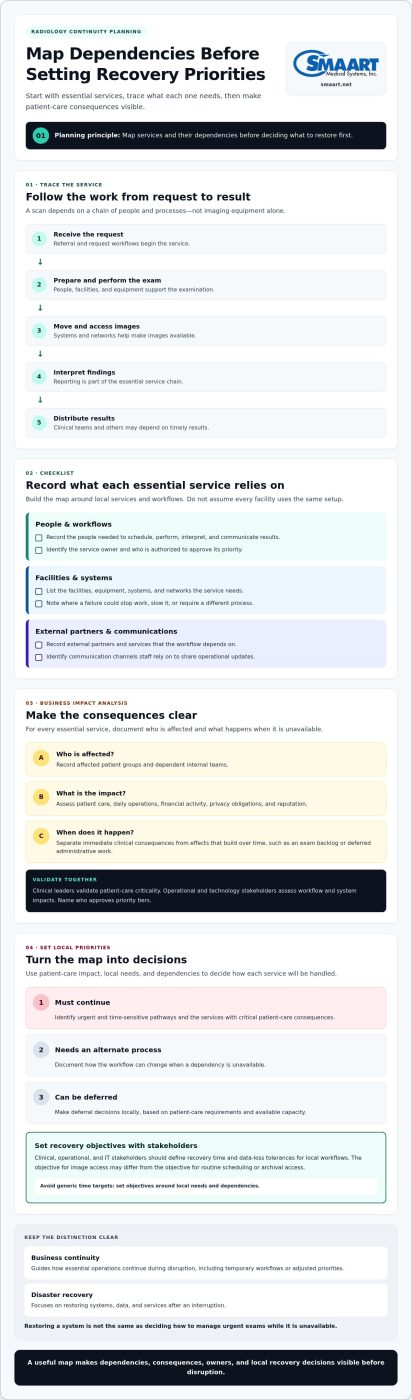
Once essential services are identified, trace what each one needs to function. A scan depends on more than imaging equipment: staff must receive the request, prepare for and perform the exam, move images, interpret findings, and distribute results. If one link in that chain fails, the impact can extend to patients and teams that rely on radiology. Mapping dependencies shows where a disruption could stop work, slow it, or require a change in process.
Build the map around services rather than assuming every facility uses the same technology or workflow. For each service, record the people, facilities, systems, external partners, and communication channels it relies on. Then assess consequences for patient care, daily operations, financial activity, privacy obligations, and reputation. The purpose is to make trade-offs visible before an incident, not to predict exactly how every disruption will unfold.
Run a radiology business impact analysis
For each essential service, document who is affected and what happens if the service becomes unavailable. Separate immediate clinical consequences, such as a delay affecting a time-sensitive decision, from effects that build over time, such as an exam backlog or deferred administrative work. Clinical leaders should validate patient-care criticality, while operational and technology stakeholders assess workflow and system impacts. Name who approves priority tiers.
- Record the service, affected patient groups, and dependent internal teams.
- Describe immediate impacts separately from backlog and administrative consequences.
- Identify a service owner and the person or group authorized to approve its priority.
Use the analysis to set recovery priorities and objectives with clinical, operational, and IT stakeholders. Departments can define recovery time and data-loss tolerances for their own workflows, based on local needs and dependencies. Avoid importing generic time targets: the appropriate objective for image access may differ from the objective for routine scheduling or archival access.
Map PACS, RIS, imaging, and communication dependencies
Trace each workflow from request to result: image acquisition, transfer, storage, viewing, reporting, scheduling, and result distribution. Add the people, rooms, equipment, power, network connections, workstations, vendor support, and referral channels each step relies on. The integrated RIS and PACS workflow guide offers context for examining how scheduling, imaging, and reporting processes connect.
Look for single points of failure in your actual environment. A shared network connection, a specific workstation, or one staff role may support several workflows, but that will not be true in every department. Verify each dependency with the people who perform the work, then note which other services would be affected if it became unavailable. Include how staff will communicate status and decisions if normal channels are disrupted.
Keep the map usable. Assign an owner to review it when services, staffing, system architecture, or external dependencies change. Radiology technology can support the workflows in this assessment. For example, radiology workflow solutions can be part of a department’s broader continuity planning.
Keep Essential Radiology Work Moving During Downtime
During an outage, staff need a clear sequence, not a collection of disconnected instructions. A usable business continuity plan for radiology department operations should show who takes charge, how teams handle requests, and how they track work until normal workflows return. Keep the steps accessible in a form staff can use if electronic systems or usual communication channels are unavailable.
- Declare downtime: An authorized role confirms the disruption and records when the procedure begins.
- Assess impact: Identify affected services, locations, systems, and teams. Clinical leaders determine immediate patient-care priorities.
- Activate procedures: Staff use approved fallback processes for affected workflows.
- Communicate: Share what is affected, which interim instructions apply, and where updates will come from.
- Document decisions: Track actions, handoffs, pending work, and changes in service status.
Name the roles behind each step. Specify who can activate downtime procedures, who leads clinical prioritization, and who coordinates the technology response. Include alternates and an escalation path so decisions do not stall if the primary contact is unavailable.
Create usable downtime procedures for clinical teams
Write fallback steps for scheduling, patient identification, examination tracking, and reporting. Use department-approved forms or other designated methods, and tell staff where to find them. Record timestamps, decisions, handoffs, and unresolved work consistently so teams can reconcile activity later. Clinical leaders must approve triage criteria and any rules for accepting, deferring, or redirecting exams. A continuity guide should not prescribe clinical decisions.
Make request handling explicit. Staff should know how to receive and log a request, flag it for clinical review, and communicate whether it can proceed, must be deferred, or needs redirection under local procedures. Clarify who informs the referring team and how that communication is recorded.
Coordinate communication and escalation
Prepare role-based contact paths for radiologists, technologists, administrators, IT, and referring teams. A status message should state which services are affected, what interim instructions apply, who owns the next update, and how staff should escalate urgent questions. Keep the message consistent across teams, even if different channels are needed to distribute it. Hospital imaging workflow optimization can also inform planning for clear handoffs between connected workflows.
Resumption needs its own controlled process. A system becoming available does not automatically mean every workflow is ready to return. The designated operational and technology leads should confirm the status of affected services, communicate what has resumed, and direct staff on whether to continue fallback procedures or return to standard processes.
Then reconcile downtime records against system activity. Match exams, requests, reports, and handoffs; identify duplicate or incomplete entries; and assign owners to unresolved items. Review the backlog with clinical leaders so pending work is handled according to local priorities. Close the downtime period only after responsibilities for remaining work are clear and teams know where to direct questions. Planning with radiology workflow software can help teams map how established systems fit into these procedures, without replacing clinical governance or staff-led downtime steps.
Test the Radiology Continuity Plan and Keep It Current
A plan is useful only if staff can apply it under pressure. Start with discussion-based exercises that let the team rehearse decisions without interrupting live care or changing systems. These sessions can reveal unclear roles, missing contacts, and gaps between written procedures and actual radiology workflows. Use the findings to improve the business continuity plan for radiology department operations, then consider more operational exercises when appropriate and approved by facility leadership.
Test whether participants can find the plan, identify who has authority to act, follow downtime documentation procedures, escalate issues, and coordinate a return to service. Give each scenario defined roles and observable objectives. For example, can the assigned lead identify affected services, direct staff to the relevant procedure, and ensure referring teams receive consistent updates? The goal is to evaluate readiness, not individual performance.
Choose exercises that reflect real department dependencies
Use scenarios grounded in local workflows, such as unavailable PACS or RIS, a network disruption, restricted facility access, or staff shortages. Include clinical, operations, IT, compliance, and relevant vendor stakeholders so the discussion reflects real handoffs. Give each participant a role and an objective, such as locating downtime materials or identifying the escalation path. Begin with a guided discussion before attempting exercises that affect live operations.
Vary the questions to test decisions as well as contacts. Ask which services are affected, who validates clinical priorities, how requests are tracked, and what conditions must be met before normal workflows resume. Check that contact details work and that staff know the approved communication route if usual channels are unavailable.
Turn exercise findings into maintained procedures
Debrief promptly while participants remember where decisions stalled. Separate process issues, such as unclear approval authority, from technology gaps or training needs. Record each finding, its accountable owner, the corrective action, and a target review date. Track actions through completion, then update related procedures and make the changes available to affected teams.
Keep a controlled plan version, current contact list, and downtime materials staff can access during an outage. Set review points based on local governance, and revisit the plan after changes to workflows, staffing, systems, vendors, facilities, or policies. A change to reporting or image access, for example, may alter handoffs and dependencies even if the department’s overall structure stays the same. Avoid assuming one exercise schedule fits every facility.
Radiology systems are one part of preparedness, alongside clear ownership and practiced procedures. To explore how radiology workflow solutions can support your department’s planning, review SMAART imaging solutions.
Use Radiology Software and Support as One Layer of Continuity
Radiology software can support the workflows a department has identified as essential, but it cannot replace clinical governance, staff decision-making, or approved downtime procedures. A business continuity plan for radiology department operations should explain how each system fits into the service, who owns its workflow, and what staff do if it becomes unavailable. This keeps technology in its proper role: a key operational dependency within a broader, clinically led plan.
Map systems to the work they support. SMAART-PACS provides image storage and distribution and includes a diagnostic zero-footprint viewer. SMAART-RIS supports scheduling and reporting workflows and is fully integrated with SMAART-PACS. SMAART-SHARE supports exam and report sharing through cloud or enterprise access, including QR-code-based sharing and sharing by CD, DVD, or USB drive. These capabilities help departments describe their workflows clearly; they do not guarantee uninterrupted access or a particular recovery outcome.
Align PACS and RIS workflows with the continuity plan
Document which department procedures rely on SMAART-PACS and SMAART-RIS, from image access and distribution to scheduling and reporting. For each workflow, identify its owner, connected steps, and approved downtime process. SMAART-RIS is fully integrated with SMAART-PACS, so include their relationship in the dependency map without assuming integration removes other dependencies or determines recovery time.
If an optional Vendor Neutral Archive is part of your facility’s architecture, include its role in image management and continuity planning. Keep the plan specific to your environment. Record which teams use each workflow and how they will track pending work if a system is unavailable.
- Identify the workflow and system involved.
- Name the internal owner responsible for reporting an issue and coordinating updates.
- Reference the approved downtime procedure and the process for resuming normal work.
Plan vendor support into escalation procedures
Define how staff escalate software issues and how that escalation connects to the facility’s incident process. SMAART Medical Systems provides 7 × 24 × 365 U.S. telephone support, single-call issue resolution, native English-speaking engineers, and remote desktop assistance. Document who contacts support, what information they provide, and who communicates the operational impact to radiology and referring teams.
Keep ownership clear. Department leaders manage clinical priorities and service status; designated technology staff coordinate the internal response; and the assigned contact maintains communication with vendor support. Record actions and updates using your established incident documentation process. This creates a traceable escalation path without assuming a specific restoration time or promising that systems will remain accessible during disruption.
For departments assessing diagnostic image access, zero-footprint PACS viewing can be part of the workflow discussion. SMAART-PACS includes a diagnostic zero-footprint viewer. Explore SMAART Medical Systems and its radiology workflow solutions as you plan how software and support fit alongside department-owned procedures and clinical leadership.
Put Your Continuity Plan Into Practice
A continuity plan becomes more useful when it is part of everyday department governance, not a document opened only during an emergency. Choose a practical next step: bring clinical, operational, and technology leads together to review one workflow, confirm decision ownership, and identify any procedure that needs clarification. Then incorporate those improvements into staff orientation and future plan reviews.
As you refine the plan, consider whether your radiology systems align with the workflows your department needs to support. SMAART-PACS, SMAART-RIS, and SMAART-SHARE serve healthcare facilities across the United States. SMAART also provides 7 × 24 × 365 U.S. telephone support, single-call issue resolution, native English-speaking engineers, and remote desktop assistance. These products and support services can form part of the technology layer, alongside department-owned governance and downtime procedures.
Build a business continuity plan for radiology department operations that your people can understand, access, and improve. Explore SMAART radiology workflow solutions as you plan the next step for your department. With clear ownership and regular review, your team can strengthen its readiness one practical improvement at a time.
Frequently Asked Questions
What is the difference between a radiology business continuity plan and a disaster recovery plan?
A business continuity plan guides how the department manages essential work during a disruption; a disaster recovery plan focuses on restoring affected systems and services. For example, continuity procedures may explain how staff track pending examinations while image access is unavailable. Recovery procedures address the technical work of restoring access. The plans should connect so staff know when temporary processes apply and who confirms a return to normal operations.
Who should be responsible for maintaining a radiology department continuity plan?
A designated department lead should coordinate plan maintenance, with clinical, operational, and technology stakeholders contributing to the sections they own. A radiologist or clinical leader can validate patient-care priorities, while operations and IT leads maintain workflow and system details. Include alternates and identify who approves revisions. Shared ownership helps keep the plan accurate when staff roles or processes change, rather than leaving updates to one person without input.
What should a radiology downtime kit include?
A downtime kit should give staff the tools and instructions to follow approved fallback processes without relying on unavailable systems. Include current contact and escalation lists, paper or offline forms for requests and exam tracking, patient identification procedures, status-message templates, and relevant downtime instructions. Add directions for storing completed records and reconciling them later. Keep the materials accessible to the roles expected to use them.
How should a radiology department prioritize examinations during a system outage?
Use locally approved clinical criteria, with a designated clinical leader responsible for resolving priority questions. The department can define how staff flag requests for review and communicate decisions, but a general continuity guide should not assign clinical urgency. For example, an outage that affects reporting may require a different response from one that makes image acquisition unavailable. Document decisions and ensure referring teams receive clear instructions.
What information should staff document during radiology downtime?
Staff should capture enough information to account for work and reconcile it later. Record patient and examination identifiers using approved procedures, request and exam timestamps, current status, decisions, handoffs, communications, and unresolved tasks. Note who completed each action and identify any duplicate or incomplete records. Follow facility privacy and documentation policies, and keep downtime records in the designated secure location until reconciliation is complete.
How should a radiology department notify referring teams about service disruptions?
Use an established communication channel and a consistent message owner so referring teams receive coordinated updates. State which services are affected, what request or result workflows are changing, what interim instructions apply, and where to direct questions. Include when or how another update will be shared, without promising a restoration time the department cannot verify. Record notifications and update teams when service status or instructions change.
Can PACS or RIS software replace a radiology business continuity plan?
No. PACS and RIS support imaging and information workflows, but software alone cannot assign decision authority, define clinical priorities, or tell staff how to proceed during downtime. A business continuity plan for radiology department operations should document how people use systems in normal workflows and which approved procedures apply if those systems are unavailable. Include software dependencies in the plan while keeping governance, communication, and downtime responsibilities department-led.