Choosing a Radiology Software Partner: A Practical 2026 Buying Guide
What if the best radiology software partner isn’t the one with the longest feature list, but the one that fits your existing workflows? Choosing a radiology software partner can feel risky when imaging teams already have established processes and a new system must work with existing EMR and HIS platforms. A mismatch can add friction instead of easing daily work. Look beyond product demos and evaluate how the software fits your environment.
This guide offers a practical framework for comparing workflow fit, integration, deployment, and long-term value. You’ll learn how to assess core PACS needs, RIS functions such as patient data and scheduling, and image sharing as a distinct workflow requirement. You’ll also see how SMAART-PACS, SMAART-RIS, and SMAART-SHARE relate to those needs. Use the framework to focus your decision on what your facility needs, how the software connects with existing systems, and how users will adopt it.
Key Takeaways
- Start with the workflows your radiology team needs to support, not a vendor’s feature list.
- When choosing a radiology software partner, assess how PACS, RIS, EMR, and HIS fit together in your environment.
- Compare deployment, security documentation, support arrangements, scalability, and the effort involved in using the system over time.
- Use the same real-world scenarios in every software demonstration to make comparisons more consistent.
- Match your needs to the right capabilities: image storage and distribution, patient data and scheduling, or cloud-based image sharing.
Choosing a Radiology Software Partner Starts With Your Workflow
A radiology software decision affects more than image viewing. It can shape how studies are scheduled, how patient information moves between systems, how clinicians access images, and how staff handle routine tasks. That’s why choosing a radiology software partner should begin with the work your facility needs to support, not a tour of features. A feature list won’t show whether a system fits your handoffs or adds steps.
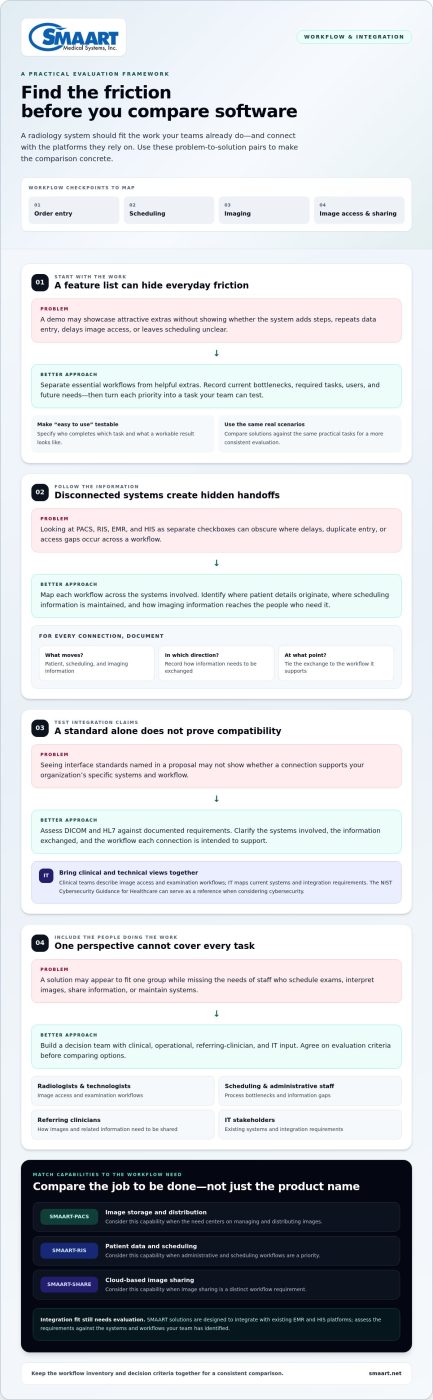
Map what happens from order entry through image access and sharing. Include the systems people already rely on, such as EMR and HIS platforms, and note where information is entered, retrieved, or passed between teams. A Radiological Information System (RIS) commonly supports administrative and scheduling workflows alongside connections to imaging systems. Mapping those relationships makes selection priorities concrete.
Translate daily radiology work into selection priorities
Separate essential workflows from improvements that would be helpful but aren’t required. This keeps demonstrations focused and prevents attractive extras from overshadowing core needs. Gather pain points by role: staff scheduling exams may face different delays than radiologists interpreting images or administrators tracking operations.
- Current bottlenecks: Record repeat data entry, avoidable handoffs, delays accessing images, and unclear scheduling steps.
- Required workflows: List needs for image access, scheduling, patient information, reporting, and sharing, as relevant to your facility.
- Users and tasks: Identify radiologists, technologists, administrators, referring clinicians, and IT staff, then note what each group needs to do.
- Future requirements: Consider expected changes in services, users, or information-sharing needs so the shortlist can support more than today’s workload.
Turn each item into a testable priority. Instead of “easy to use,” specify which user needs to complete which task and what a workable result looks like. For example, define the steps a scheduler needs to complete when arranging an exam and the information they need to see. This gives your team a practical way to judge fit.
Build a decision team with clinical and technical input
Include people who understand clinical practice, administration, daily operations, and IT. Agree on evaluation criteria before comparing options, and decide how the group will weigh workflow fit, integration, usability, and future needs when priorities compete. This shared process connects software decisions to the work people actually perform.
- Clinical: Radiologists and technologists can describe image access and examination workflows.
- Operational: Scheduling and administrative staff can flag process bottlenecks and information gaps.
- Referring clinicians: Their input can clarify how images and related information need to be shared.
- IT: Technical stakeholders can map existing systems and integration requirements.
Keep the workflow inventory and decision criteria together. They’ll give your team a consistent starting point for comparing solutions.
Evaluate Radiology Software Partners on Workflow and Integration Fit
A system can check every feature box and still create friction if it doesn’t fit how your teams and platforms exchange information. Evaluate each option against your workflow inventory, then compare how PACS, RIS, EMR, and HIS work together across the process. Treating them as isolated checkboxes can hide the handoffs where delays, duplicate entry, or gaps in access occur.
Use a consistent comparison matrix to keep the evaluation grounded in your facility’s needs:
Workflow fit
Which prioritized tasks does the solution support, and where could it add steps or leave gaps?
Existing-system integration
Which patient, scheduling, and imaging information needs to move between the software and your current EMR or HIS?
User needs
Can radiologists, technologists, administrators, referring clinicians, and IT stakeholders complete their relevant tasks?
Growth requirements
How well does the proposed workflow support anticipated changes in services, users, or image-sharing needs?
Assess the fit with existing EMR and HIS platforms
Map the systems involved in each workflow before reviewing technical claims. Identify where patient details originate, where scheduling information is maintained, and how imaging information becomes available to the people who need it. Record what must be exchanged, in which direction, and at what point in the process. This gives clinical and IT stakeholders a shared basis for discussing integration scope.
Interface details depend on your organization’s systems and project requirements. Assess standards such as DICOM and HL7 against documented needs, rather than assuming a standard alone proves compatibility. Clarify the systems involved, the information exchanged, and the workflow each connection is intended to support. Include security in the evaluation: the NIST Cybersecurity Guidance for Healthcare offers a reference point for considering cybersecurity in healthcare environments.
SMAART solutions are designed to integrate with existing EMR and HIS platforms. This makes them relevant to facilities assessing how radiology software can fit their current environment. Evaluate the integration requirements against the systems and workflows your team has identified.
Compare workflow coverage without overvaluing feature counts
For each shortlisted solution, test prioritized tasks with the users who perform them. Distinguish essential workflow coverage from functions that duplicate existing systems. A feature may sound useful but add little value if another platform already handles the task effectively. Compare solutions by how clearly they support the required work, not by the length of the feature list.
SMAART-PACS supports medical image storage and distribution, while SMAART-RIS manages patient data and clinical scheduling. SMAART-SHARE addresses cloud-based image sharing as a distinct need. Explore SMAART radiology software solutions to see how these offerings relate to different workflow requirements.
Compare Radiology Software Partner Models for Security and Long-Term Value
Workflow fit is only part of the decision. Deployment, data responsibilities, security practices, support arrangements, and the ability to accommodate change all shape the experience after selection. Compare these as separate criteria. Cloud and on-premise approaches raise different operational questions, and neither is automatically right for every facility. Consider your workloads, resources, and contract terms.
Assess security, data access, and responsibility
Separate what the software can do from what the agreement assigns to the vendor and what remains your organization’s responsibility. Review documented access controls, data handling, backup practices, and incident processes. Don’t infer a certification from general security statements. Treat HIPAA obligations as a shared compliance consideration, and involve your privacy, security, and legal stakeholders rather than drawing legal conclusions from product materials alone.
- Deployment: Understand where the software runs and how the chosen model affects your facility’s operations and oversight.
- Data stewardship: Clarify how data is accessed, handled, backed up, and returned or transferred under the agreement.
- Security documentation: Review available materials on access controls, safeguards, and incident processes with the appropriate internal teams.
- Support model: Identify what support covers, how requests are handled, and which responsibilities stay with your organization.
- Scalability: Consider whether the arrangement can accommodate changes in users, sites, or operational needs.
Keep evidence alongside your comparison. For each criterion, record what is documented, what the contract says, and what your organization must manage. This prevents a general product claim from being mistaken for a specific commitment.
Look beyond initial purchase to lifecycle value
Build a lifecycle view using your own scope and proposed contract terms. Include recurring fees, implementation effort, staff training, maintenance, support, and potential transition work. The same model helps compare cloud and on-premise PACS approaches without assuming one has lower total costs. Account for changes in users, sites, and operational needs, then note how each could affect future effort or contract terms.
Before choosing a radiology software partner, clarify which lifecycle commitments are documented in the proposed agreement. Check what is included, how ongoing support is described, and what the contract says about changes or transition. Keep assumptions separate from confirmed terms. This gives finance, IT, and clinical leaders a clearer basis for comparing long-term value, not just the initial purchase.
Use a Structured Evaluation to Reduce Selection and Implementation Risk
A consistent process makes it easier to compare candidates fairly and uncover gaps before they become project problems. Use the requirements and criteria established earlier to guide each step. The goal isn’t to eliminate every uncertainty, but to make open questions visible and assign someone to resolve them before selection.
- Confirm requirements. Finalize priority workflows, user groups, integration needs, and operational constraints. Mark which requirements are essential and which are desirable.
- Create a shortlist. Compare options against those criteria and document the evidence behind each assessment. Keep unanswered questions visible rather than treating missing information as a pass.
- Run consistent demonstrations. Give each candidate the same representative scenarios and evaluation criteria. This makes differences in workflow coverage easier to see.
- Review findings with stakeholders. Gather clinical, administrative, operational, and IT feedback. Resolve conflicting priorities against the criteria agreed by the decision team.
- Plan readiness before selection. Outline migration, access continuity, training, change management, ownership, and communication needs before committing to a transition approach.
Make demonstrations useful for real users
Choose scenarios that reflect actual tasks, such as finding an image, handling scheduling information, or sharing imaging information with the intended user. Invite the people who perform or oversee each task, including clinicians, administrators, and IT reviewers. If browser-based diagnostic access is a priority, make it a specific evaluation scenario and consult a zero-footprint PACS viewer guide as part of your research.
Use the same scorecard for every session. Record whether the task was completed, how users experienced the steps, which requirements were met, and what remains unanswered. Capture observations in specific terms: note where a user hesitated or needed clarification rather than writing only “easy to use.” This gives the team useful evidence to discuss after the demonstrations.
Plan transition readiness before signing
Selection and implementation planning belong together. Identify questions about data migration, continued access to images and information during transition, staff training, and changes to established routines. Assign internal owners for technical decisions, clinical validation, and project communication so key work doesn’t fall between teams.
Maintain an open-issues log covering technical, operational, security, and contractual questions. For each item, record its owner, the evidence or decision needed, and whether it must be resolved before selection or during project planning. This turns uncertainty into manageable work and helps leaders understand remaining risks before committing.
With the evaluation process defined, see how SMAART supports radiology workflows through software for image storage and distribution, patient data and scheduling, and cloud-based image sharing.
See Where SMAART Fits as Your Radiology Software Partner
The evaluation framework gives your team a way to connect software capabilities to real priorities. SMAART Medical Systems offers three radiology software solutions with distinct roles: SMAART-PACS for medical image storage and distribution, SMAART-RIS for patient data and clinical scheduling, and SMAART-SHARE for cloud-based medical image sharing. Matching each product to a defined need helps your team assess fit without treating every product as a replacement for existing systems.
Match SMAART-PACS, SMAART-RIS, and SMAART-SHARE to defined needs
Start with the job your facility needs the software to support. If image storage and distribution are priorities, assess SMAART-PACS against those requirements. If patient data and clinical scheduling need attention, consider SMAART-RIS. For secure cloud-based image sharing without proprietary hardware, evaluate SMAART-SHARE as a distinct part of the workflow. Each offering addresses a different need, so assess it in context rather than assuming one solution must cover every function.
- Image management: Compare SMAART-PACS with your requirements for storing and distributing medical images.
- Radiology operations: Relate SMAART-RIS to your needs for patient data and clinical scheduling.
- Image sharing: Consider SMAART-SHARE when sharing images through a cloud-based platform is a priority.
Integration is part of the fit assessment, too. SMAART solutions are designed to integrate with existing EMR and HIS platforms. Relate that design to your organization’s environment and documented integration requirements, keeping the discussion specific to the systems and workflows your evaluation team has identified.
Make the next step clear for your evaluation team
Bring clinical, operational, administrative, and technical stakeholders back to the same decision criteria. Summarize the workflows that matter most, the systems already in place, and the questions that remain open. Then review the relevant SMAART product information together. Radiologists can focus on image access and distribution, scheduling teams on patient data and appointments, and IT on how the software fits the facility’s EMR and HIS context.
This shared review helps the team connect product roles to its priorities and identify which capabilities belong in the next stage of evaluation. It keeps the decision grounded in practical fit rather than broad assumptions about what a radiology platform should do. That’s a useful final step in choosing a radiology software partner: match the software to your requirements, then bring the right people together to assess that match.
Explore SMAART solutions and discuss how they relate to your radiology workflow needs.
Take the Next Step With a Clearer Evaluation
Choosing a radiology software partner is an opportunity to shape a smoother path for your team, not simply add another system. Bring your evaluation criteria into the next conversation: the workflows that matter, your existing EMR and HIS environment, and the questions your stakeholders still need answered.
SMAART-PACS supports image storage and distribution, SMAART-RIS supports patient data and clinical scheduling workflows, and SMAART-SHARE provides cloud-based medical image sharing without proprietary hardware. Consider how these capabilities relate to your facility’s priorities and where they may fit within existing processes.
Explore SMAART radiology software solutions and bring your workflow priorities to the next step in your evaluation.
Frequently Asked Questions
Is a radiology software partner the same as a PACS vendor?
Not always. PACS focuses on medical image storage, access, and distribution, while a radiology software partner may provide PACS, RIS, image sharing, or connected workflow capabilities. Before choosing a radiology software partner, identify the tasks and handoffs your team needs the software to support. For example, if external clinicians need images, include that exchange in your requirements instead of assuming a PACS alone addresses every operational need.
What is the difference between PACS, RIS, and an EMR?
PACS manages medical images and their distribution; RIS supports radiology information workflows such as patient data and scheduling; an EMR organizes broader patient records and clinical information. Their responsibilities can overlap through integrations. For example, document whether appointment details originate in the RIS or EMR and which system staff use to verify them. Assigning ownership for each task helps prevent duplicate entry and confusion during workflow changes.
Can a zero-footprint PACS viewer run in a browser?
Yes. Zero-footprint viewers are designed to let users view images in a browser without a traditional local software installation. Capabilities vary by product and configuration, so assess supported browsers, technical requirements, and whether the intended use is diagnostic or for image review. Include representative user roles in testing. A referring clinician’s access needs, for example, may differ from a radiologist’s diagnostic workflow.
Does cloud-based medical image sharing require new imaging hardware?
Not necessarily. Some cloud-based sharing platforms are designed to distribute images without proprietary hardware. SMAART-SHARE provides cloud-based medical image sharing without proprietary hardware. Before selecting a sharing approach, map who needs access, which images or records must be exchanged, and how the workflow fits your organization’s security practices. This helps distinguish an image-sharing requirement from changes to core image storage or radiology information systems.
What happens to access to prior imaging when changing software partners?
Access depends on the migration plan, data formats, retention requirements, contracts, and management of existing archives. Start by identifying which prior studies must remain available and who needs to retrieve them. For example, a transition plan can specify how clinicians will locate historical exams during the changeover and who will validate migrated records. Involve clinical, IT, and administrative stakeholders early so continuity isn’t left to a last-minute technical task.
Does a radiology software partner need to be HIPAA compliant?
Assess how the software relationship handles protected health information and how responsibilities are assigned under applicable agreements and organizational policies. A broad marketing statement alone doesn’t show whether specific practices fit your requirements. Review relevant security documentation, data handling practices, and contracts with privacy, security, and legal stakeholders. They can evaluate the arrangement in context, including how access is managed and what processes apply if a security incident occurs.
What should a radiology software exit plan cover?
An exit plan should define data access and export, retention, transition responsibilities, changes to user access, and coordination with replacement systems. It should also account for contractual notice periods and dependencies that could interrupt work. For example, clarify how authorized staff can access needed records during a transition and who coordinates the handoff. Document these expectations during procurement, when your team can compare agreement terms before a future change becomes urgent.