Cloud Medical Imaging Storage: 2026 Practical Guide
How can you move medical images to the cloud without making them harder to find, share, or use in clinical workflows? As imaging archives grow, cloud based medical imaging storage can look like a straightforward answer, but storage is only one part of the picture. PACS still plays a role in organizing and distributing images, and unclear responsibilities can complicate planning.
If you’re weighing a move, look beyond capacity. Security, retention, user access, retrieval needs, and connections to existing systems all affect whether a cloud approach fits your organization. Migration planning matters, too: consider image access and connected workflows before making changes.
This practical guide explains how cloud storage and PACS relate, which security, retention, and access questions to raise, and how to assess workflow and migration needs. Use it to compare options and plan a transition that supports reliable image access while keeping operational requirements in view.
Key Takeaways
- Understand where cloud storage fits alongside PACS, diagnostic viewing, and image sharing so you can assess each function separately.
- Trace how images move from acquisition to storage, retrieval, and authorized sharing, including where DICOM and connected systems may fit.
- Evaluate cloud based medical imaging storage by reviewing security controls, access needs, retention obligations, and implementation responsibilities.
- Build a transition plan based on your current systems, study volumes, users, and workflows, then validate access before rollout.
- See how SMAART-PACS supports medical image storage and distribution, and identify the platform details your organization should verify.
What cloud-based medical imaging storage does, and what it does not
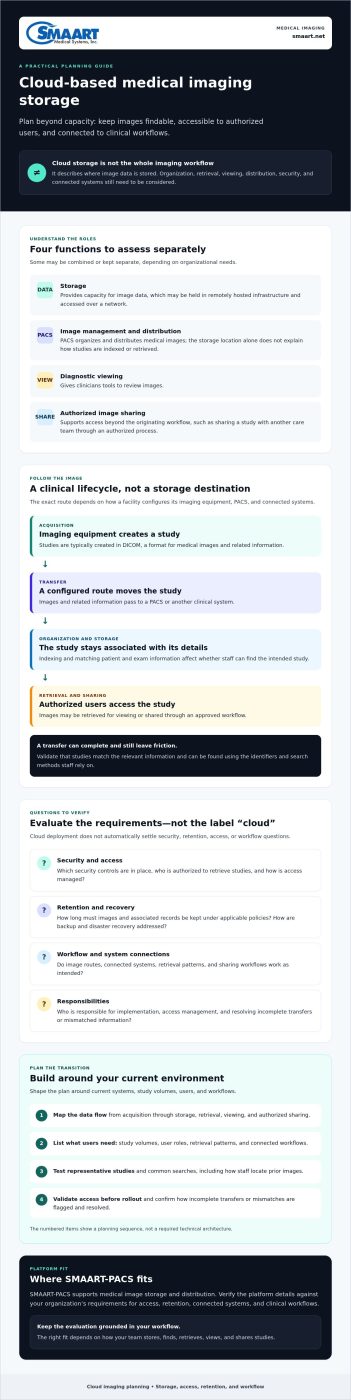
Cloud-based medical imaging storage keeps medical image files in remotely hosted infrastructure so authorized users and connected systems can store and retrieve them over a network. It describes where image data is stored, not every tool or workflow needed to manage, interpret, or share that data.
That distinction matters for radiology departments, hospitals, and imaging clinics. A small clinic may prioritize dependable access to current and prior studies, while a hospital may need to coordinate image flows across departments and connected clinical systems. Needs can differ in study volume, user roles, retrieval patterns, and existing workflows. Moving files to cloud infrastructure does not resolve those requirements by itself.
How medical images move from acquisition to storage
Imaging equipment typically creates studies in DICOM, a format for medical images and related information. A configured workflow sends those studies into clinical systems, where they may be organized, stored, made available for viewing, or distributed to authorized users. The route depends on the facility’s systems and setup.
A PACS, or Picture Archiving and Communication System (PACS), manages and distributes medical images. Cloud storage may be part of that environment, but the storage location alone does not explain how studies are indexed, retrieved, displayed, or connected to other systems. Before selecting or changing a setup, ask the relevant technical teams to map the data flow from image acquisition through retrieval and sharing.
Cloud storage versus cloud PACS and image sharing
Storage provides capacity for image data. PACS adds management and distribution functions, while diagnostic viewing gives clinicians tools to review images. Image-sharing tools support authorized access beyond the originating workflow, such as sharing a study with another care team. These functions can be combined or separated, depending on the organization’s needs.
For example, an imaging clinic might store studies in a cloud-connected PACS and use an image-sharing workflow when an outside clinician needs access. That does not mean every organization needs separate platforms. It means teams should list the functions they need before comparing options.
Cloud deployment does not automatically settle security, retention, access, or workflow questions. Teams still need to determine who can retrieve studies, how long images must be retained, how access is managed, and whether connected systems work as intended. Treat these as requirements to verify, not benefits guaranteed by the word “cloud.”
How cloud-based imaging storage works across a clinical lifecycle
Cloud based medical imaging storage is part of a chain, not a destination on its own. A study must move from imaging equipment to the right clinical system, remain associated with the correct patient and exam details, and be retrievable by authorized users when needed. The exact path depends on how a facility configures its modalities, PACS, and other connected systems.
A typical workflow starts when imaging equipment creates a DICOM study. A configured route transfers the images and related information to a PACS or other clinical system, which may organize the study and make it available for retrieval or viewing. From there, approved users may access it within the originating workflow or share it through an authorized process. For a helpful overview of how cloud-based imaging works, consider how each handoff connects to the next rather than evaluating storage in isolation.
Image ingestion, organization, and retrieval
During ingestion, systems need to receive image files and associate them with relevant patient and exam information. Organization and indexing affect whether staff can locate the intended study using the identifiers and search methods available in their workflow. A transfer that completes but leaves a study difficult to find can still create friction for clinical users.
Before making a change, ask technical teams to validate supported image formats, transfer routes, matching identifiers, and expected retrieval behavior. Test representative studies and common search tasks, including how staff locate prior images. Confirm how incomplete transfers or mismatched information are flagged and resolved.
Retention, backup, and access throughout the lifecycle
Retention defines how long images and associated records are kept under an organization’s applicable policies. Backup and disaster recovery address a different concern: how data may be restored after loss or disruption. Do not assume one includes the other. Ask which parties configure and manage each control, and clarify recovery expectations and service availability for the selected deployment.
Access design matters at every stage. Review role-based permissions, user authentication, audit records, and the process for granting or removing access. For sharing, confirm who can authorize it and how access is limited to intended recipients. These details shape day-to-day use as well as oversight.
Verify storage lifecycle controls, responsibilities, and workflow behavior for each deployment. As you map those requirements, you can also review SMAART radiology software in the context of your organization’s existing systems and workflows.
Is cloud medical imaging storage secure enough for healthcare?
It can be considered, but security depends on the specific service, its configuration, and the responsibilities assigned to your organization and providers. Cloud deployment alone does not establish that a system is secure or suitable for your workflows. A product label or general compliance statement also does not determine whether your organization’s use meets its privacy and security obligations.
Evaluate the complete arrangement. When partnering with infrastructure hosting providers like Snel.com or specialized cloud vendors, a provider may manage parts of the hosting environment, while your organization may retain responsibility for user access, configuration, policies, and oversight. Confirm the division in writing, and have qualified privacy, security, and legal reviewers assess how applicable requirements affect your deployment.
Security and compliance questions to ask
Ask vendors to explain how users are authenticated, permissions are assigned, activity is logged, and access is reviewed or removed when roles change. Request details about encryption in transit and at rest, incident response processes, data location, and available audit information. For teams looking to bolster their continuous threat monitoring and cloud defenses, discover CyberOne to see how managed security specialists handle detection and response. Verify the answers for the specific service and configuration you’re evaluating.
Review contracts and ask qualified advisors whether a business associate arrangement is applicable and what it should cover. Do not rely on a generic assurance. Connect contractual responsibilities to actual workflows, data handling, and your organization’s policies.
Operational trade-offs and risk controls
Cloud access can support retrieval across locations, but it also makes network connectivity and service availability part of the operational picture. Define how staff should proceed during an outage, which clinical access needs take priority, and what recovery expectations apply. Ask who monitors, communicates, and acts during an incident. Test the plan rather than assuming it will work as intended.
The comparison below can help teams turn broad benefits into specific validation questions. Answers vary by provider, service, and configuration.
| Potential benefit | Dependency or responsibility | What to validate |
|---|---|---|
| Access to stored images from approved locations | Network connectivity, identity controls, and configured permissions | How users authenticate, how access is limited, and what happens during connectivity loss |
| Reduced need to manage local storage infrastructure | Clear provider and organization responsibilities | Who manages hosting, configuration, security tasks, and incident communications |
| Centralized image availability for workflows | Service availability and a tested continuity plan | Recovery expectations, downtime procedures, and priority access needs |
| Long-term image management | Defined retention rules and separate backup planning | Retention, deletion, backup, restoration, and audit details for the deployment |
Use this review to decide whether cloud based medical imaging storage fits your risk tolerance and clinical needs. Security and compliance are not guaranteed by the hosting model. Qualified reviewers should assess the controls, contracts, and operating plan together.
How to evaluate and plan cloud imaging storage
A sound plan begins with your current workflows, not a provider’s feature list. For cloud based medical imaging storage, map what you have, define what must improve, and test the proposed approach before moving a broad archive. This makes trade-offs easier to see and helps protect image access during change.
Build requirements before comparing providers
Start by documenting storage pain points and priority clinical workflows. Inventory modalities, study volumes, systems, user groups, image access patterns, and existing retention obligations. Include how studies move today and where staff encounter delays or extra steps.
Then bring IT, radiology, privacy, security, and operational stakeholders together to agree on requirements. Make needs measurable where possible: identify priority studies and retrieval expectations, authorized sharing scenarios, integration needs, continuity expectations, and support responsibilities. Compare cloud and on-premise approaches against the same criteria, including ongoing administration and costs that may sit outside the headline storage rate. A cloud versus on-premise PACS costs guide can help structure that deployment-model comparison.
Plan migration, validation, and ongoing oversight
Break implementation into steps with named owners. Define how data will transfer, how completeness and integrity will be checked, and how staff will test access. Include user acceptance checks for common tasks, such as finding a prior study, viewing the intended images, and confirming authorized sharing works as expected.
Use a representative pilot before wider migration. Choose workflows, systems, and user roles that reflect real operations, then record issues and resolve them before expanding. Agree in advance on how to pause or adjust the rollout if validation uncovers problems. Review results with clinical, technical, privacy, and operational stakeholders.
Planning continues after go-live. Assign responsibility for monitoring, support escalation, recovery coordination, access reviews, and retention-policy checks. Clarify which tasks belong to your organization and which the provider handles. For deeper archive-planning considerations, consult a medical image archiving solutions guide.
- Discover: Inventory data, systems, users, workflows, and obligations.
- Define: Agree on access, retrieval, integration, continuity, and support requirements.
- Validate: Pilot representative workflows and verify migrated data before expanding.
- Oversee: Assign owners for operational reviews and ongoing controls.
Once your requirements are clear, explore SMAART radiology software as part of your evaluation of image storage, distribution, and connected workflows.
How SMAART software fits into a cloud imaging strategy
Choosing a platform starts with the workflows you need to support. Before evaluating any option, clarify whether your main priority is managing and distributing an image archive, sharing images with authorized users, diagnostic viewing, or a combination. Then confirm requirements for security, retention, access, integrations, deployment, and continuity with the relevant technical and compliance reviewers.
Match storage and sharing needs to the right workflow
SMAART-PACS is a system for medical image storage and distribution. SMAART-SHARE is a cloud-based platform for secure image sharing and collaborative viewing. These address different needs: managing an archive is not the same task as enabling authorized sharing. Your organization may need one function or both, depending on its workflows.
Product fit depends on validated requirements, system compatibility, and deployment details. Ask how an option would fit your current image flows, which users need access, and what technical and security details require confirmation. If browser-based diagnostic viewing is part of your evaluation, a zero-footprint PACS viewer guide can provide useful context. Do not assume that sharing or storage capabilities alone answer questions about diagnostic viewing.
Explore the SMAART options and define next steps
SMAART solutions are designed to integrate with existing EMR and HIS platforms. Confirm the specific compatibility and workflow details for your environment rather than assuming every connection works the same way. If patient-facing image access is in scope, a patient portal for medical images guide can help frame questions about access, permissions, and the patient experience. Evaluate a portal workflow separately from clinical image management and sharing.
Bring a concise requirements list to a product discussion. Include:
- Workflow: How images are acquired, managed, viewed, and shared today.
- Access: Which staff or other authorized users need access, and under what conditions.
- Governance: Your retention expectations, security review needs, and access-control requirements.
- Technology: Existing systems, integration questions, and deployment details that need verification.
This preparation helps keep the conversation practical and focused on fit, not assumptions. Ask which capabilities match your requirements and which details need further validation. If you’re assessing cloud based medical imaging storage, discuss your workflows and priorities with SMAART Medical Systems, Inc. to explore whether its radiology software aligns with your organization’s needs.
Build a cloud imaging plan around your workflows
A practical cloud imaging strategy connects the full image lifecycle, from acquisition and storage to retrieval and authorized sharing. Cloud based medical imaging storage is only one part of that design. Define your access, retention, security, integration, and continuity requirements, then validate them against your actual workflows before planning a wider transition.
Start with a clear inventory and a representative pilot. Confirm how responsibilities are divided, test image access and connected workflows, and involve clinical, technical, privacy, and security stakeholders in the review. These steps help your organization compare options based on its requirements rather than assumptions about cloud deployment.
SMAART-PACS supports medical image storage and distribution, while SMAART-SHARE provides cloud-based image sharing and collaborative viewing. SMAART solutions are designed to integrate with existing EMR and HIS platforms. Verify the specific fit and deployment details for your environment.
Explore SMAART radiology software solutions and consider how they align with your organization’s requirements. With a thoughtful evaluation, you can move forward with a plan grounded in your workflows and priorities.
Frequently Asked Questions
What is cloud-based medical imaging storage?
Cloud based medical imaging storage keeps imaging data in a cloud-hosted environment for access by authorized users and connected systems under configured permissions. It does not automatically include a complete PACS, diagnostic viewer, or image-sharing platform. Before evaluating a service, confirm how images are transferred, indexed, retrieved, retained, and governed. For example, ask whether staff can locate prior studies using the workflows and identifiers they rely on in daily work.
Is cloud-based medical imaging storage HIPAA compliant?
Cloud deployment alone does not establish HIPAA compliance, and a general vendor claim is not enough to assess a specific solution. Review the service and its configuration, applicable safeguards, responsibilities, contracts, and risk-management processes. Ask qualified privacy and security professionals to assess your organization’s use and determine which requirements apply. Focus on documented details, not marketing language, and clarify how each party’s responsibilities appear in the agreement and operating plan.
How secure is cloud storage for medical images?
Security depends on the service, its configuration, organizational policies, and how responsibilities are shared. Ask vendors to document identity and access controls, audit records, encryption, incident response, recovery processes, and data-handling terms. Then have your security and privacy teams assess those details against your needs and workflows. Consider how permissions are reviewed and changed as staff roles shift. No deployment model should be treated as risk-free or secure without verification.
Can DICOM images be stored in the cloud?
Yes, DICOM images can be stored and managed through cloud-based workflows, but compatibility depends on the systems and configuration involved. Confirm supported transfer methods, study organization, metadata handling, retrieval behavior, and connections to PACS or other clinical systems. Before relying on a proposed design, ask technical stakeholders to test representative studies and use cases. Testing can reveal workflow or data-association issues that a general compatibility statement may not address.
How much cloud storage does a medical imaging organization need?
Capacity depends on study volume, image types, retention obligations, existing archives, and expected growth. Start by measuring current data and reviewing representative studies across modalities, then estimate future needs using your organization’s own activity and retention plans. Include data that must remain readily available. Ask providers how storage usage is measured and managed, and how any tiers affect retrieval. A generic estimate based only on facility size may not reflect your archive.
What happens to image access if the internet connection goes down?
The impact depends on the architecture, local systems, network resilience, and continuity procedures. Identify which clinical workflows need image access during an outage and document how staff should respond. Ask your IT team and provider to explain and validate recovery expectations for the specific setup. Do not assume offline access, local caching, or a particular recovery time unless it has been confirmed for your deployment and tested against operational needs.
What is the difference between cloud storage and cloud PACS?
Cloud storage describes where data is hosted, while PACS includes functions for managing and distributing medical images within imaging workflows. A cloud PACS may include storage, but storage alone does not necessarily provide PACS management or diagnostic viewing. Compare the actual functions, integrations, access controls, and responsibilities included in each option. For example, clarify whether a proposed service organizes and distributes studies or simply provides capacity to store image files.