
Cloud PACS Pricing: Monthly Costs and Billing Models
A single monthly figure can’t show whether a cloud PACS plan fits your imaging workload. Cloud PACS pricing models may charge per study, through a flat fee or subscription, according to usage, or through a hybrid structure. The same level of activity can therefore produce different bills. Key cost drivers include study volume, storage needs, user access, and included features and support.
It’s reasonable to want a predictable bill without paying for capacity you don’t use. This guide compares per-study and flat-fee pricing, explains what subscription and pay-per-use plans may count, and outlines where hybrid pricing can fit. You’ll also learn how to assess the full monthly cost, including storage and usage patterns, so you can focus on the model that matches your practice.
Key Takeaways
- Estimate the full cost by accounting for study volume, storage, users, setup, and migration, not just the monthly subscription.
- Compare per-study fees with flat monthly billing against your imaging volume to understand how predictable each model will be.
- Review what subscription, pay-per-use, and hybrid plans include, especially how storage growth and support affect the bill.
- Track study volumes, storage needs, and user access patterns to identify a pricing structure that fits your workflow.
What is the typical monthly cost range for cloud PACS?
There is no single monthly figure that fits every clinic or hospital. Compare recurring subscription charges with the full costs of hardware, implementation, archive migration, and ongoing operations.
Cloud Subscription Costs
A cloud subscription shifts spending from upfront hardware and software purchases to recurring fees. By contrast, on-premise PACS requires capital for servers, storage, and licenses, with server replacement typically needed every 4-6 years. Annual maintenance for on-premise PACS commonly runs 15% to 20% of the software license cost. Cloud plans can reduce initial capital needs, but study volume, modality, storage, users, and integration shape the ongoing total cost.
| Option | Upfront expenditure | Recurring cost factors | Cost profile |
|---|---|---|---|
| Cloud subscription | Setup and migration | Studies, storage, support, add-ons | Recurring fees |
| On-premise PACS | Hardware and software licenses | Maintenance, infrastructure, replacement | Capital plus recurring costs |
For either option, build a multi-year view that includes one-time charges and recurring expenses, not just the monthly bill.
Support and Ongoing Protection Costs
Support may be included or sold as an add-on, while cloud customers may pay more for higher support tiers. Training, cybersecurity, and disaster recovery also affect the budget, depending on the organization’s workflow and protection requirements. According to the U.S. Department of Health and Human Services, healthcare providers must comply with HIPAA to protect patient information. Cloud storage and recovery services may carry additional fees.
Implementation and integration costs depend on the systems involved and the migration workload. Moving an existing archive can create a sizable one-time charge; a five-year archive averaging 300 studies monthly contains approximately 18,000 studies. Training requirements also vary with user roles and imaging workflows. Include these project costs separately from the recurring subscription when estimating total cost.
Choose by comparing recurring fees, upfront needs, archive size, integration scope, and support requirements across the full ownership period.
Per-study versus flat monthly pricing
Per-study, per-user, and per-storage fees use different billing units, so no single rate applies to every PACS plan. For your practice, compare them against monthly imaging volume, modality mix, user access, and stored image capacity.
Per-Study Pricing
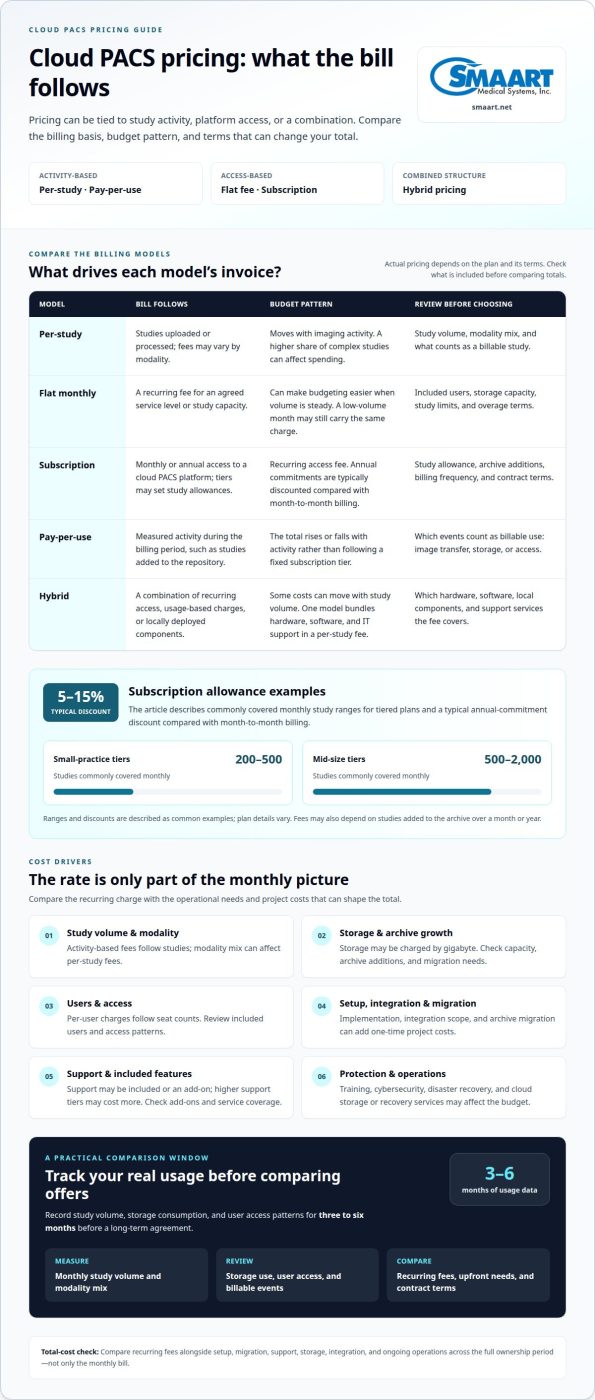
A pay-per-study plan charges according to the studies uploaded or processed, so the bill tracks imaging activity. Fees may vary by modality and vendor, meaning a higher share of complex studies can affect spending. Software fees may also be calculated per study. Per-user pricing works differently: annual seat-based plans tie charges to licensed users rather than imaging volume.
Flat Monthly Pricing
A flat monthly plan sets a recurring charge for an agreed service level or study capacity. Unlike per-study billing, the fee doesn’t rise with each additional image, which can make budgeting easier when volume is steady. The trade-off is that a low-volume month may still carry the same charge. Compare included users, storage capacity, and overage terms.
Hybrid Per-Study Fees
A hybrid PACS model can bundle hardware and software into a per-study fee, with IT support included and no upfront capital expense. Unlike a cloud-only per-study charge, this fee also covers components used locally. It may suit organizations seeking local access alongside cloud services, though costs still move with study volume.
For a useful comparison, track study volume, storage consumption, and user access patterns for three to six months before a long-term agreement. Per-storage charges may be calculated by gigabyte, while per-user charges follow seat counts. Pricing depends on the case and is given after a quote request; study volume, modality mix, storage needs, users, and integration affect the estimate. Explore PACS workflow planning to consider how imaging and operational needs fit together.
Subscription, pay-per-use, and hybrid pricing models
Each structure ties radiology platform charges to a different measure: access, activity, or a combination. Study limits, billing frequency, and contract terms determine how the selected plan works.
Subscription Pricing
A subscription charges monthly or annually for access to a cloud PACS platform. Tiered plans can set study allowances by practice size: small-practice tiers commonly cover 200-500 studies monthly, while mid-size tiers commonly cover 500-2,000. Fees may also depend on studies added to the archive over a month or year. Annual commitments are typically discounted by 5-15% compared with month-to-month billing.
Pay-Per-Use Pricing
Pay-per-use billing follows measured activity instead of a fixed subscription tier. A provider may charge according to studies added to the repository during the billing period. This can align charges with changing radiology workloads, but the total rises or falls with activity. Check which events count as billable use, such as image transfer, storage, or access, because those definitions shape the invoice.
Hybrid Pricing
A hybrid plan combines recurring access with usage-based charges or locally deployed components. For example, one model includes hardware, software, and IT support within a per-study fee, without upfront capital expense. Compared with a subscription-only platform, this structure ties more of the service cost to study volume. Contract terms should specify which components and support services the fee covers.
Vendor Pricing and Trial Offers
US vendor pricing pages, free-trial terms, and quote-based offers vary. The available facts do not identify specific vendors offering published prices or trials, so compare the stated offer on each vendor’s own pricing page or quote. A quote should define included study limits, archive transfer, renewal timing, cancellation, and any minimum commitment.
Contract length affects the billing choice: annual cloud subscriptions are typically discounted by 5-15% versus monthly billing. Before committing, compare that reduction with the agreement’s renewal date, notice period, tier limits, and charges if study volume exceeds the allowance. These terms determine whether a lower annual rate suits a healthcare organization’s changing workload.
Usage-based cloud PACS pricing
Usage-based billing links charges to resources consumed rather than a fixed study tier. Storage and data transfer are separate measures, so archive growth and diagnostic access patterns can affect different parts of the bill.
Data Storage Charges
Storage charges are commonly measured by gigabytes retained each month. For example, 300 studies averaging 100 MB add 30 GB of new DICOM data monthly. Existing archive retention adds to that footprint over time. A CT study can contain hundreds of megabytes, so modality mix matters: calculate expected growth from study counts and sizes, then consider how long images remain stored.
A storage line item differs from a per-study charge because it follows retained data, not just new examinations. Check whether the contract measures total archive capacity, monthly additions, or both. Also distinguish active storage from long-term image archiving, since retention choices change the amount of data carried forward. This estimate helps show whether infrastructure costs scale with current workflow or accumulated images.
Bandwidth Charges
Bandwidth reflects data transferred between the cloud platform and users, rather than data kept on servers. Image review, downloads, and transfers between locations can affect usage. A practice with frequent diagnostic access may therefore have a different transfer profile from one that mainly stores images. Check how the billing interface defines outbound and inbound data, and whether routine viewing counts.
For a practical estimate, map one month of uploaded studies, stored capacity, and image access across locations. Then project archive growth and transfers using your actual modality mix. This separates storage from bandwidth and shows their effects alongside subscription or support charges. Cloud services can reduce capital spent on local servers, but usage still needs to be monitored against the selected contract.
Discuss your PACS workflow needs to connect imaging access, archive planning, and platform requirements.
SMAART Medical Systems: SMAART-PACS
SMAART Medical Systems offers SMAART-PACS for hospitals and clinics assessing radiology management software. It interfaces with EMR, HIS, and practice-management systems, helping connect imaging workflows with existing technology.
Consider SMAART-PACS when comparing PACS options against your organization’s users, imaging processes, and existing technology. SMAART-RIS supports radiology information management and integrates with SMAART-PACS, while SMAART-SHARE provides cloud-based image sharing. Each product addresses distinct workflow needs, and the right billing structure depends on your requirements.
To discuss how SMAART-PACS may fit your imaging environment, contact SMAART Medical Systems.
Plan Your Next PACS Decision
Use your pricing review to define what your imaging workflow needs to support next. Consider whether your organization expects changes in study volume, access patterns, archive requirements, or integration needs. Look beyond the plan that fits today to the structure that can adapt as clinical and operational priorities shift.
Bring those priorities together in a short internal brief. Include the workflows that matter most, the systems involved, and the billing structure your team can manage. This gives the conversation a practical starting point and connects technical requirements with financial planning. The right cloud PACS pricing models should support the way your team works, not complicate it.
For a discussion about your imaging environment and PACS needs, contact SMAART Medical Systems. A clear next step can make a complex software decision easier to approach.
Frequently Asked Questions
Are there hidden costs to watch for in cloud PACS contracts?
Yes. Costs can arise outside the headline subscription, especially when usage exceeds plan limits or a practice adds services. Review how the contract handles archive export at cancellation, storage growth, support upgrades, and integration changes. For example, a clinic adding an imaging location should understand whether that affects its plan or requires separate work before renewal.
What Drives Cloud PACS Pricing?
Study volume, modality mix, archive size, user access, integrations, and support needs all shape the total. A clinic focused on one imaging modality may have different storage demands from a hospital with varied imaging workflows. Also consider how long the organization retains images and how often staff retrieve them. These operating details help explain why two facilities can receive different quotes.
What Should a Cloud PACS Quote Include?
A useful quote separates recurring charges from one-time project costs and describes the assumptions behind each. Look for the covered study volume, storage terms, user access, support level, integration scope, and archive migration. It should also explain overage charges, renewal timing, and cancellation or data-export terms. This makes it easier to compare proposals on the same operational scope.
What are the common cloud PACS pricing models?
Common options include per-study billing, a flat monthly fee, tiered subscriptions, usage-based charges, and hybrid plans. The best fit depends on how predictable your workload is and which resources the fee measures. A practice with changing study volume may prefer a different structure from one with stable activity. Compare the billing unit and included services, not just the plan name.
How much does cloud PACS typically cost per month or year in the US?
There is no single monthly or annual amount that applies to every US facility. Pricing depends on study volume, storage and archive needs, users, integrations, support, and implementation scope. The price depends on the case and is provided after a quote request. For planning, define those requirements first, then assess recurring commitments alongside one-time migration and setup costs.
What setup, migration, training, and implementation fees do cloud PACS vendors charge?
These charges vary with project scope rather than following one standard fee. Archive size and condition affect migration work; integrations and workflow requirements shape implementation; and training needs depend on user roles. Request a separate line for each item, including data preparation or system configuration. That breakdown helps distinguish initial project spending from ongoing service charges.