
How to Migrate On-Premise to Cloud PACS with Data Checks
A cloud PACS migration is safer when it moves in validated stages, not as a single all-or-nothing switch. The practical answer to how to migrate from on-premise to cloud PACS is to prepare and map the imaging data, transfer it in batches, and verify each batch before moving on. Keep the existing archive available as a fallback while you confirm that studies and workflows are ready.
If your current PACS makes storage, access, or maintenance difficult to manage, moving to the cloud may help, but the transition needs careful planning. Assess cloud PACS capabilities, plan bulk transfer and incremental synchronization, and use integrity checks to catch data problems. Then organize storage and refine workflows so the new environment supports daily imaging work rather than simply relocating the archive.
Key Takeaways
- Break the transfer into manageable phases, then use integrity checks to confirm each batch before proceeding.
- Assess cloud PACS support for DICOM, secure access, audit logs, and integration with your clinical systems.
- Plan storage tiers around how often studies are accessed, and refine workflows after the transition.
- Weigh the operational demands of maintaining on-premises infrastructure against the flexibility of a cloud-based approach.
Bulk transfer, incremental synchronization, and integrity checks
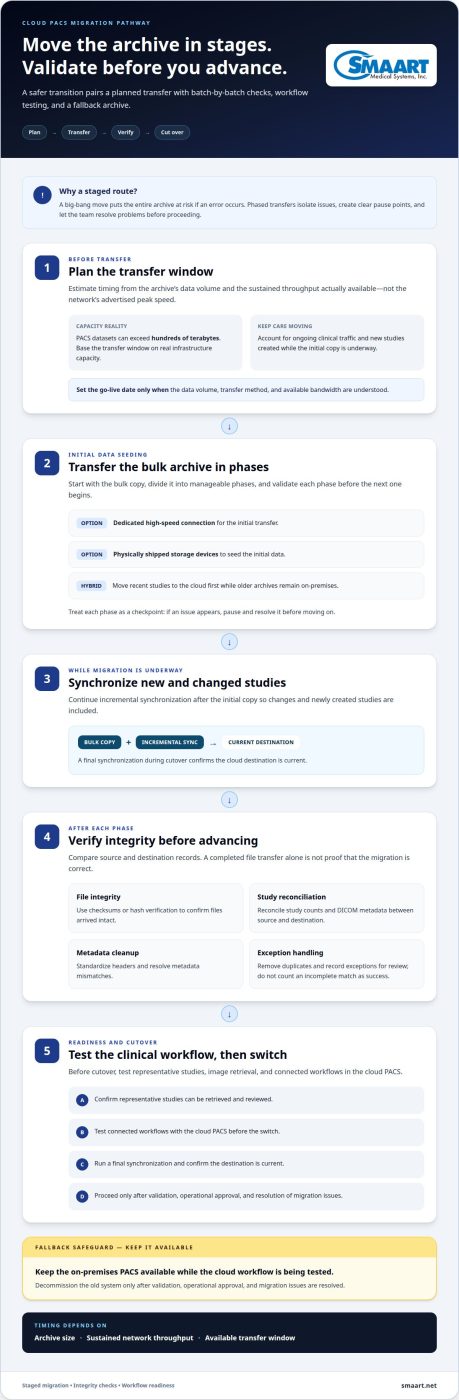
Move the archive in planned stages, verify each transfer, and cut over only after workflow testing. Migration time and bandwidth depend on archive size, sustained network throughput, and the transfer window.
Plan Transfer Timing and Bandwidth
Estimate transfer time using the archive’s total data volume and the sustained throughput available for migration. PACS datasets can exceed hundreds of terabytes, so calculate the transfer window using actual infrastructure capacity, not the network’s advertised peak speed.
Allow for ongoing clinical traffic and new studies created during the transfer. Incremental synchronization captures changes after the initial copy and reduces the work required at cutover. Set a go-live date only after the team understands the data volume, transfer method, and available bandwidth.
Transfer the Bulk Archive
Begin with a bulk transfer, then move the data in phases and validate each phase before proceeding. A big-bang migration moves everything at once, increasing the risk that an error affects the entire archive. Phasing isolates issues and gives the team a clear point to pause and resolve them.
Choose a dedicated high-speed connection or physically shipped storage devices for the initial data seeding. A hybrid approach may transfer recent studies to the cloud first while older archives remain on-premises. Continue incremental synchronization to include new or changed studies.
Check Integrity and Complete Cutover
Compare source and destination records after each transfer. Use checksums or hash verification to confirm that files arrived intact, and reconcile study counts and DICOM metadata. Clean and standardize headers, resolve metadata mismatches, and remove duplicates before the next phase. Record exceptions for review rather than treating an incomplete match as success.
Test representative studies, image retrieval, and connected workflows in the cloud PACS. During cutover, run a final synchronization and confirm the destination is current. Keep the on-premises PACS available as a fallback while testing the cloud workflow. Decommission the old system only after validation, operational approval, and resolution of migration issues.
Cloud PACS vendor selection
Compare deployment models against clinical workflows, integration needs, and security controls. Shortlist options by assessing architecture, compliance planning, and migration safeguards together.
Compare Architecture and Deployment Models
Map each option to your operating model: public cloud, private cloud, or a hybrid arrangement that keeps some systems on-premises. Ask how the PACS handles DICOM image exchange and whether a vendor-neutral archive can support access across systems. These capabilities can help preserve flexibility and prevent every study from being tied to one platform.
Then trace a typical study, from acquisition through review and reporting. Confirm how the proposed architecture connects with your RIS, EHR, and reporting systems through HL7 or FHIR. Include network performance and remote access in the design review, since image retrieval must fit real clinical workflows.
Review Compliance and Cybersecurity Requirements
Include HIPAA and HITECH in the United States compliance review, and map each system component to your organization’s security processes. Assess encryption at rest and in transit, role-based access controls, and audit logs. These controls help protect imaging data and make activity review part of routine administration.
Document how staff access is granted, changed, and removed. Review how the cloud PACS records access to images and supports investigation of unusual activity. Focus the review on the actual configuration, data flows, and responsibilities shared between your organization and the vendor.
Assess Migration and Vendor Risks
Identify downtime and data-loss risks before comparing proposals. Ask how the migration plan supports staged testing, synchronization, and recovery if an issue interrupts the transfer. During evaluation, monitor the network and test representative studies and workflows before approving cutover. A successful file transfer alone does not prove clinical readiness.
Reduce lock-in risk by assessing DICOM support, vendor-neutral archive compatibility, and practical data-export options. Document how studies and associated metadata can move if requirements change. Compare these safeguards alongside integration and security capabilities, not as afterthoughts. A focused cloud PACS capabilities review can help frame those requirements.
Post-migration storage and workflow optimization
After cutover, use access patterns and clinical workflows to guide storage and configuration changes. Review costs, recovery procedures, and system connections as part of routine operations.
Assess Data, Storage, and Workflows
Inventory migrated studies by modality, date, size, and access frequency. Then map the route from modality acquisition through DICOM transfer, RIS scheduling, EHR access, and reporting. Record which applications create, retrieve, or update study information. This baseline reveals interface gaps and helps prioritize frequently used studies for responsive access.
Test representative workflows with radiologists and technologists. For example, confirm that a modality can send a study, the RIS can associate it with the correct worklist, and authorized users can open it through the EHR workflow. Record failed transfers, missing metadata, and extra manual steps so they can be corrected.
Plan Backups and Recovery
Document how your organization will restore imaging access after a service interruption. Define which studies and applications need priority access, who coordinates recovery, and how staff will continue essential work during an outage. A hybrid workflow may retain access to selected on-premises systems while cloud services are restored.
Test backup restoration and recovery procedures, not just backup completion. Use a sample study to confirm that images and associated metadata return together and remain accessible to relevant applications. Record the test outcome, responsible roles, and any workflow changes needed for business continuity.
Review Storage Costs and Optimize Workflows
Separate migration expenses from recurring storage and access costs. Estimate the factors that drive each: archive volume, transfer method, retention needs, retrieval frequency, and connected applications. Because frequent retrieval affects storage choices, use access patterns to place active studies on high-speed storage and older studies on cost-effective cold storage.
After launch, review retrieval times and user feedback, then adjust storage tiers and workflow settings. Track repeated searches, avoidable manual transfers, and interface errors. These operational signals show where configuration changes can streamline daily work without putting every study in the same storage tier.
Limitations of on-premises PACS and benefits of cloud PACS
Compare the infrastructure your practice maintains today with the access and storage model it needs. The strongest case for cloud PACS comes from specific operational pressures, not the assumption that every cloud setup will solve them.
- List the recurring work required to keep your on-premises PACS available. Include server and storage upkeep, capacity planning, backup processes, and coordination when imaging infrastructure needs attention. Connect each burden to a real workflow, such as adding storage as the archive grows or restoring access after a local system issue.
On-premises systems keep infrastructure under local management, offering direct control but also leaving the organization responsible for maintenance. Cloud PACS changes the hosting model, but practices still need to manage access, connectivity, integrations, and clinical workflows. Compare responsibilities line by line.
- Identify where cloud access could improve daily work. For example, staff at multiple clinics may need to retrieve the same study without relying on a single local archive. Map that need to the network, user access, and connected applications. Cloud storage can also support tiering, with frequently accessed studies on faster storage and older studies in cost-effective cold storage.
Assess the trade-offs as well. Cloud access depends on reliable network connectivity, and storage design affects how quickly teams can retrieve older studies. Ask how each option supports DICOM workflows and existing RIS or EHR connections. A cloud move helps only when its access model fits how the practice operates.
- Make the decision using a written comparison of current pain points, required workflows, and operational responsibilities. Include a case where on-premises PACS remains appropriate, such as a practice that prioritizes local control and can sustain its infrastructure. Also consider a cloud scenario where distributed access or storage management is the greater need.
Cloud PACS is not an automatic upgrade for every organization. Choose it when its access and storage model addresses defined constraints, and plan for connectivity, security, and integration alongside the move. These criteria turn the question of how to migrate from on-premise to cloud PACS into a practical infrastructure decision.
SMAART Medical Systems: SMAART-PACS
SMAART Medical Systems, Inc. provides radiology management software for organizations evaluating PACS. SMAART-PACS supports imaging management, SMAART-RIS supports radiology information workflows, and SMAART-SHARE enables cloud-based sharing of imaging information.
SMAART-PACS and SMAART-RIS are designed to integrate with existing EMR and HIS platforms. As you map your current systems, interfaces, and clinical workflows to the future environment, consider how these products can support your radiology software needs after the transfer, not just the data copy itself.
Contact SMAART Medical Systems, Inc. to discuss your imaging software needs and plan your next step.
Turn Your Migration Plan Into a Practical Next Step
Make the next move a shared planning decision across imaging, IT, and clinical teams. Assign a lead to coordinate priorities, document who approves changes, and agree on what a successful transition must support in daily practice. Engaging an IT solutions partner like Distemicha can also help streamline infrastructure planning, data handling, and network readiness. This gives each group a clear role and keeps the project from becoming a purely technical handoff.
A practical plan for how to migrate from on-premise to cloud PACS connects the technology decision to your organization’s broader radiology software needs. Bring questions about system fit, interfaces, and future workflows into one focused discussion. This provides a clearer basis for deciding what to address first and keeping operational needs in view as plans develop.
If you’re considering the next step for your imaging environment, contact SMAART Medical Systems, Inc. to discuss your software priorities. A thoughtful conversation can help you shape a direction that fits your organization and move forward with confidence.
Frequently Asked Questions
What is On-Prem to Cloud Migration?
On-premise-to-cloud PACS migration moves imaging data and related workflows from locally hosted systems to a cloud environment. Planning the migration also means deciding which applications connect, who owns each task, and how teams will work during cutover. For example, assign separate owners for imaging data, clinical interfaces, and staff access to prevent gaps between technical and operational decisions.
How do cloud PACS providers compare on features, uptime, and interoperability?
Compare providers using the same workflow scenarios, not just feature lists. Record each provider’s stated uptime terms, planned maintenance approach, and process for communicating service interruptions. Then assess whether a sample order can move through your EHR or RIS, enter the imaging workflow, and return with its report. A side-by-side scorecard makes differences in interoperability and operational commitments easier to evaluate.
How do you transfer and validate DICOM images and metadata without data loss?
Use a study-level reconciliation record to compare source and destination content. For each study, track identifiers, modality, study date, series count, image count, and required metadata fields. Review exceptions, such as a study with matching identifiers but missing series, or a modality value that changed during transfer. Resolve each discrepancy before marking the study reconciled, and retain the results for migration sign-off.