Data migration from old PACS: timeline and planning for healthcare teams
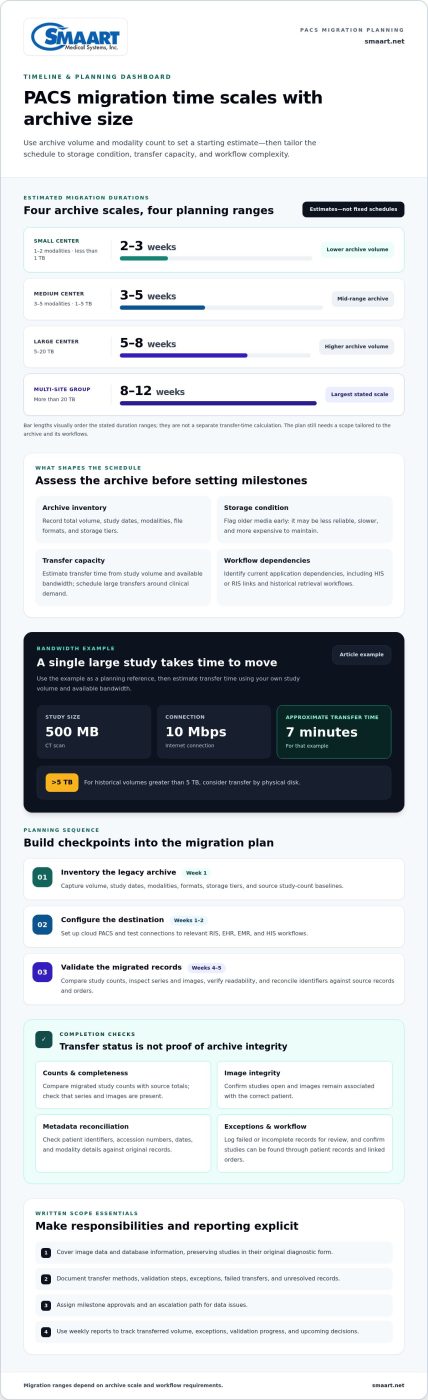
Data migration from an old PACS can take a few weeks or longer, depending on the size of the archive, the number of modalities, and how quickly data can be transferred and validated. A small center with 1-2 modalities and less than 1 TB of data may take 2-3 weeks, while a multi-site group with more than 20 TB may take 8-12 weeks. Both PACS systems can remain in normal use during the move.
That overlap matters: clinicians can continue accessing older studies in the source system while new studies are archived in the destination PACS. Plan the schedule carefully to avoid disrupting daily imaging work or leaving gaps in study records.
This guide explains what affects the timeline and how to plan interoperability, parallel operation, and checks for image integrity and metadata. It also outlines how to sequence assessment, migration, validation, and cutover to make the transition manageable.
Key Takeaways
- Map DICOM workflows across devices, archives, and the destination PACS; protocol compliance alone doesn’t ensure a clean transfer.
- Build the migration plan around archive size, storage media, network capacity, and the complexity of legacy data.
- Validate study counts, image integrity, and metadata against source records before relying on the migrated archive.
- Define how teams will handle new studies, historical retrievals, and cutover while both systems remain operational.
DICOM interoperability across vendors and storage technologies
DICOM provides a common framework for exchanging medical images, but compliance alone does not guarantee a complete transfer. Plan around the source system’s export behavior, destination requirements, and storage format.
Compliance and Proprietary Format Handling
Virtually all imaging devices from the last 15 years support DICOM C-STORE and can send images to a cloud PACS. Still, a vendor’s proprietary tags, compressed files, or archive structure can affect whether destination systems interpret every study correctly. Map supported transfer methods and formats before moving records. Test representative images from each modality, including studies with vendor-specific fields, and confirm they open with their expected series and image details.
Metadata Normalization and DICOM Routing
Normalize metadata before routing studies to the destination. Compare patient identifiers, study dates, accession numbers, modality, and series descriptions across the source PACS and connected HIS or RIS. For example, inconsistent patient ID formats can separate images from the matching record. Set routing rules for each modality, then test a sample workflow from image creation through retrieval.
Include data cleaning and quality assurance in the transfer plan. Identify duplicate studies, incomplete series, missing headers, and inconsistent patient or study identifiers before loading data. Use a documented exception queue to review records that fail validation instead of silently skipping them. After transfer, compare study and series counts, check image readability, and reconcile flagged records against source entries.
Ask how the migration team handles storage-specific exports, conversion logs, and secure transmission. Use an encrypted transfer channel, restrict access to authorized endpoints, and retain logs of transfer status and exceptions. A vendor-neutral DICOM archive should interoperate with the new PACS, helping avoid another archive migration if the PACS is replaced later. Test retrieval from the archive as part of the end-to-end workflow.
Migration impact assessment and planning
Set the schedule based on archive volume, modality count, storage condition, and transfer capacity. A realistic data migration from old PACS plan starts with understanding these dependencies.
Estimates range from 2-3 weeks for a small center with less than 1 TB to 8-12 weeks for a multi-site group with more than 20 TB. How do you compare PACS migration vendors and tools? Compare their ability to move image data and database information, preserve diagnostic form, document exceptions, and support testing. Request a written scope, transfer method, validation steps, and reporting plan.
Migration Impact Assessment
Begin with an inventory of the legacy archive: total volume, study dates, modalities, file formats, and storage tiers. Identify dependencies on the current application, including HIS or RIS links and retrieval workflows. Older media can be less reliable, slower, and more expensive to maintain, so flag it for early assessment. For historical volumes greater than 5 TB, consider transfer by physical disk.
Use the inventory to set project milestones and responsibilities. A small center with 1-2 modalities and less than 1 TB is estimated to take 2-3 weeks; a medium center with 3-5 modalities and 1-5 TB, 3-5 weeks. A large center with 5-20 TB may take 5-8 weeks. These ranges help teams plan capacity, while a data migration from old PACS still needs a scope tailored to its archive and workflows.
Document migration requirements in writing. The plan should cover image data and database information, and specify how studies will be preserved in their original diagnostic form. Define how exceptions, failed transfers, and unresolved records will be logged and reported. Set a baseline for study counts, identify who approves each milestone, and establish an escalation path for data issues.
Bandwidth Planning and Staff Training
Estimate transfer time from study volume and available bandwidth, then schedule large transfers around clinical demand. For example, a 500 MB CT scan takes approximately 7 minutes over a 10 Mbps internet connection. Include network testing and transfer monitoring in the plan; physical disk transfer may suit historical volumes greater than 5 TB.
Train radiology, IT, and records staff on the new application before cutover. Use practice tasks such as searching for a historical study, confirming patient details, and reporting a missing series. Weekly reports should track transferred volume, exceptions, validation progress, and upcoming decisions, giving project leads a clear view of risks and responsibilities.
Study-count, image-integrity, and metadata validation
Validation turns a completed transfer into a usable archive. Start with the PACS inventory in week 1, then document how teams will compare source records with the destination.
Study Counts and Image Integrity
Compare migrated study counts with source totals, then review series and images within sampled studies. P2P-DBridge verifies successful transfer by querying the target PACS. Use that check alongside image review: confirm studies open, series are present, and images remain associated with the correct patient. Record missing or incomplete items for reconciliation instead of treating a successful transfer status as proof of complete integrity.
Cloud PACS configuration is scheduled during weeks 1-2, before validation begins in weeks 4-5. Test the destination’s connections with the relevant RIS, EHR, EMR, and HIS workflows. For example, confirm a study can be found through its patient record and linked order, not only through a PACS search. This exposes integration gaps that a file-count comparison alone can miss.
Metadata Validation
Compare each migrated study with its original HIS or RIS order. Reconcile discrepancies in study headers, including patient identifiers, accession numbers, dates, and modality details. Check that the destination preserves links between patient data, orders, and imaging. Keep a discrepancy log noting the affected study, the field requiring correction, and the resolution, so teams can track metadata issues through validation.
Protect data integrity by retaining transfer records and separating verified studies from unresolved exceptions. Review failed queries, duplicate entries, and incomplete series before sign-off. During weeks 4-5, assign reviewers to compare counts, inspect image readability, and reconcile header differences. A clear approval record shows which checks passed and which studies still need attention before the destination becomes the dependable source for historical retrieval.
Migrating data while both PACS systems remain in use
Parallel operation lets a healthcare center move studies without abruptly disrupting established retrieval workflows.
For U.S. PACS migrations, include HIPAA-related safeguards, retention rules, and audit records in the project plan. Define who can access patient data, how migration activity is logged, and how records remain available under the organization’s retention policies.
The cost of migration depends on the project scope. Key factors include archive volume, legacy formats, transfer method, integrations, validation scope, and how long both systems must operate.
Plan cutover after successful destination testing and establish a clear rollback process. Keep the old PACS accessible for historical retrieval while teams resolve issues in the new system.
Cutover, Rollback, and Legacy Access
During migration, the source and destination PACS typically remain in use. New patient data can be archived in the destination while older studies continue to be retrieved from the source. Set role-based access and explain which system holds each type of study, so staff know where to search during parallel operation.
Allow a recommended parallel-operation period of 1-2 weeks. Set cutover criteria in advance, including completed transfer checks, functioning integrations, and a process for handling failed retrievals. Keep the old system available as a contingency, and document who can authorize rollback if the destination disrupts clinical workflows.
Migration Cost Factors
Project scope drives the work: archive size, database complexity, storage condition, and the number of connected sites all affect transfer planning. Validation depth and the need to preserve access across both systems also shape the effort. A written scope should identify these factors, define reporting milestones, and explain how exceptions will be recorded.
Map the operational handoff before decommissioning. Confirm the destination supports routine access, historical retrieval, and the required network connections. Review PACS migration planning options as you define the transition workflow.
SMAART Medical Systems, Inc.: SMAART-PACS
SMAART Medical Systems, Inc. offers SMAART-PACS, a radiology management software solution for hospitals and clinics evaluating their next PACS environment. Consider it as you plan the destination system, map existing workflows, and assess integration with your EMR or HIS. This helps teams consider image management and information flow together, rather than treating the PACS transition as an isolated technology change.
SMAART-RIS and SMAART-SHARE can also support organizations assessing related radiology workflows and image sharing. The right fit depends on the systems and processes your team needs to support. Reviewing your current PACS environment and integration priorities can help clarify the next step.
Contact SMAART Medical Systems, Inc. to discuss your imaging workflow and PACS needs.
Set Your PACS Transition in Motion
A successful data migration from old PACS starts with a clear decision about the future workflow, not just the transfer itself. Bring imaging, IT, and operations leads together to define what the destination must support, who owns each decision, and how the team will judge readiness. Shared direction helps turn technical planning into a workable change for the people who use the system every day.
SMAART Medical Systems, Inc. offers SMAART-PACS, SMAART-RIS, and SMAART-SHARE. Consider how these products fit your imaging management, radiology workflow, and image-sharing priorities as you plan the next stage.
Contact SMAART Medical Systems, Inc. to discuss your PACS priorities and identify a practical next step. A thoughtful plan can help your team move forward with greater clarity and confidence.
Frequently Asked Questions
How long does a typical migration take?
The time needed for data migration from old PACS depends on archive size, modality count, and transfer conditions. A small center with 1-2 modalities and less than 1 TB may take 2-3 weeks; a medium center with 3-5 modalities and 1-5 TB may take 3-5 weeks. Integration work, older media, and review of exceptions also shape the schedule.
What does PACS data migration involve?
PACS data migration moves historical imaging and associated database information from a legacy archive into a destination system. The work includes identifying what must move, preparing source records, transferring data, and testing retrieval. Account for linked reports and patient records, and document exceptions so staff can distinguish successfully migrated studies from items that still need attention.
What are the steps to migrate data from a legacy PACS to a new PACS?
Use an ordered workflow: inventory the source archive, map formats and integrations, configure the destination, transfer historical studies, validate results, and cut over. Before a full transfer, test representative studies from different modalities and dates. Track exceptions separately and resolve them against source records. Define phase approvals in advance so teams know what must be complete before proceeding.
How do you assess and prepare old PACS data for migration?
Prepare the archive by reviewing study dates, modalities, storage locations, file formats, and linked database records. Identify duplicate entries, incomplete series, unreadable media, and inconsistent identifiers. Group studies by storage tier and format, then test retrieval from each group. This assessment helps teams spot source-specific problems early and determine which records need special handling before transfer begins.
How long does a PACS data migration typically take?
A large center with 5-20 TB may take 5-8 weeks, while a multi-site group with more than 20 TB may take 8-12 weeks. Transfer speed is only part of the schedule. Destination configuration, integration testing, exception handling, and clinical review also require time. Build the estimate around the complete workflow rather than the time needed to copy image files alone.
How do you preserve DICOM images, metadata, reports, and patient identifiers during migration?
To preserve records during data migration from old PACS, map source fields to destination fields and define how reports connect with each study. Test representative records for correct patient, order, and study associations. Compare results with source entries, investigate mismatches, and retain transfer documentation showing completed work and exceptions. This creates a traceable process for resolving discrepancies before relying on migrated records.