DICOM image lifecycle management: Storage tiers and access
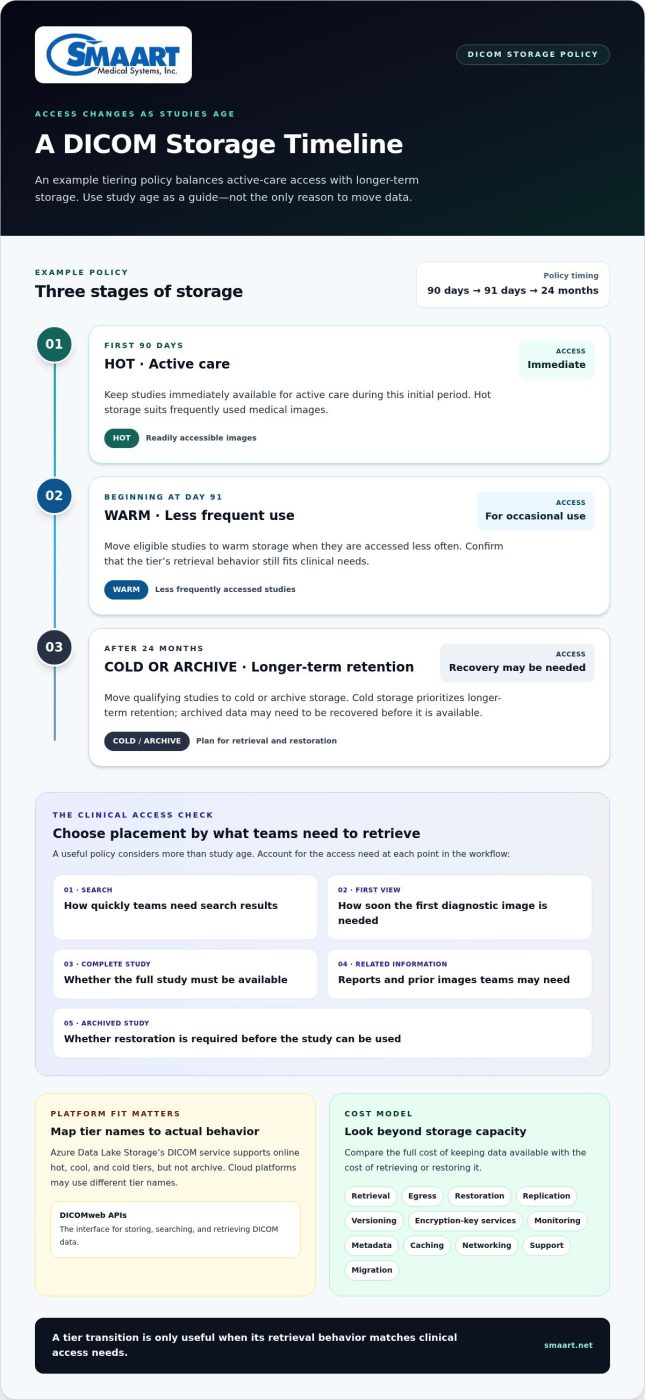
Storage speed matters as much as capacity in DICOM image lifecycle management. In an example policy, studies stay immediately available for active care during the first 90 days, eligible studies move to a warm tier beginning at 91 days, and qualifying studies move to a cold or archive tier after 24 months.
As studies age, moving them between storage tiers can make sense, but it can also affect retrieval time. Hot storage supports immediate access, warm storage suits less frequently accessed studies, and cold or archive storage may require recovery before a study is available.
This guide explains how storage tiers affect study access, retrieval targets, archive recovery, and DICOM workflows. A useful policy considers more than study age: it accounts for how quickly teams need search results, the first diagnostic image, a complete study, related reports and prior images, or an archived study restored. The aim is to match storage placement to clinical access needs without treating tiering as a substitute for recovery planning.
Key Takeaways
- Match storage tiers to how quickly clinicians need images and related information, not just how old a study is.
- Test archive recovery workflows so teams can track requests, manage restored studies, and spot delays.
- Follow imaging data through acquisition, use, storage, and eventual deletion to keep each stage of the lifecycle clear.
- Build retention planning around the full imaging record, including reports and annotations, as well as the images themselves.
What Are Hot, Warm, and Cold Medical Imaging Storage?
Hot, warm, and cold tiers balance retrieval speed against how often teams access imaging data. An example policy keeps studies immediately available during the first 90 days, moves eligible studies to warm storage beginning at 91 days, then moves qualifying studies to cold or archive storage after 24 months.
Hot, Warm, and Cold Storage Tiers
Hot storage keeps frequently used medical images readily accessible. Warm storage suits studies accessed less often, while cold storage prioritizes longer-term retention. Because clinicians may need an image, a complete study, a report, or prior images at different times, storage policies should account for retrieval needs, not study age alone.
In Azure Data Lake Storage, the DICOM service supports online hot, cool, and cold access tiers, but not the archive tier. DICOMweb APIs provide the interface for storing, searching, and retrieving DICOM data. Cloud platforms may use different tier names, so map each tier to its actual access behavior and expected clinical use.
Automated Movement Between Storage Classes
Automated movement applies lifecycle rules to eligible DICOM assets, changing their storage tier when policy conditions are met. For example, a policy can keep studies available for active care during the first 90 days, move eligible studies to warm storage from 91 days, and assign qualifying studies to cold or archive storage after 24 months.
Storage transitions need to match the system’s capabilities. Azure Data Lake Storage’s DICOM service supports online hot, cool, and cold tiers, but not archive. A DICOM image lifecycle management policy should distinguish a supported cold tier from archive storage, then align each transition with how teams search for and retrieve studies through DICOMweb.
Storage Costs and Pricing Models
Storage costs depend on the chosen tier and workload, but a useful cost model goes beyond capacity. Account for retrieval, egress, restoration, replication, versioning, encryption-key services, monitoring, metadata, caching, networking, support, and migration. These factors help determine whether a lower-access tier suits the actual workflow.
Moving older studies into cold storage, for example, may change retrieval behavior and require restoration planning. Compare the full cost of keeping data available with the cost of retrieving or restoring it when needed. Consider how often clinicians request prior studies, whether they need an initial image or the complete study, and how reports and priors are accessed.
Testing archive restoration and recovery
Test archive recovery as a clinical workflow, not just a storage operation. Moving DICOM data into an archive access tier can cause errors through DICOMweb APIs. Azure Data Lake Storage’s DICOM service supports online hot, cool, and cold tiers, but not archive. Confirm that the application can locate and restore archived studies before relying on them.
A useful test follows a study from request to diagnostic display. The workflow should identify when restoration is needed, record the request, prevent duplicates, and notify the requester. After restoration, it should route the study to the intended viewer, manage temporary copies, and report failures or delays. Monitor each stage, including whether images and related information become available as expected.
Cloud archive workflows also affect research and AI. A model or research process may need imaging data that has moved offline. Build restoration into the workflow: identify the required studies, track the request, make restored copies available to the processing environment, and manage those copies afterward. This helps teams plan for the extra step before analysis depends on archived images.
Define recovery point and recovery time objectives, then test whether the architecture can meet them. Include alternate compute, databases, networking, identity, and viewing capabilities. A restored file alone cannot support clinical access if the application or viewer remains unavailable. A cold imaging copy is not disaster recovery if production and backup share credentials or administrative control.
- Test DICOMweb access to restored studies.
- Track requests, duplicate prevention, notifications, and delays.
- Include AI or research workflows that use offline imaging data.
- Exercise alternate infrastructure and viewing capabilities.
These checks make recovery behavior visible before a real retrieval need. Teams reviewing their broader imaging workflows can also explore radiology workflow software as part of planning how studies move between storage and clinical use.
What are the stages of the DICOM imaging lifecycle, from acquisition to deletion?
A DICOM study moves through connected stages, from an imaging procedure to eventual disposal. At each stage, organizations need to preserve links between images, patient information, reports, and the systems that support clinical use.
- Acquire: An X-ray, ultrasound, or MRI system creates DICOM images during an imaging procedure. Procedure management protocols support scheduling and execution, while DICOM data includes image content and associated metadata.
- Receive and organize: The imaging system transfers data into a management environment, where it can be associated with the correct study and made searchable. DICOM defines both a file format and network communications protocols for managing medical imaging information.
- Interpret: Radiologists use PACS and workstations to review images for diagnosis, treatment planning, and consultation. The lifecycle includes more than image pixels: reports, annotations, presentation states, waveforms, videos, and AI results may also form part of the imaging record.
- Share and reuse: DICOM studies can support care across departments and facilities. Patients may access files through portals or physical media, while authorized clinical teams use studies and priors during later interpretation. To handle phone inquiries about records and scheduling without diverting clinical staff, practices can use an AI receptionist like Oscar to answer calls 24/7.
- Store and preserve: Active studies remain available for current workflows, while older imaging data may move to other storage classes. Access patterns, research or AI use, and legal-hold status help shape how records remain available.
- Review and dispose: Before deletion, apply the organization’s retention policy and account for associated records, not just image files. Confirm that no legal hold or continuing clinical need applies, then document the disposition according to internal procedures.
These stages form a chain. A prior MRI, for example, is useful only if the study can be found, its images interpreted, and its related report retrieved. Clear ownership of the lifecycle helps teams maintain those connections from acquisition through storage and final disposition.
What are DICOM and PACS data retention requirements in the United States?
There isn’t one retention period that can be applied to every DICOM study or PACS archive. Medical imaging data is typically retained for 7-10 years for adult patients, with longer retention for pediatric cases. Treat that range as a planning benchmark, not a universal legal deadline. A U.S. retention policy needs to account for the rules and circumstances that apply to each record.
Start by defining what the archive preserves. A complete medical imaging record may include DICOM objects, reports, annotations, presentation states, waveforms, videos, and AI results. Deleting images while retaining an associated report, for example, creates a different record from deleting the entire study. Retention rules and disposition procedures should cover related material as well as image files.
Organize the policy by record type, patient population, and use. Separate adult and pediatric records, then identify studies subject to a legal hold or ongoing clinical need. Document the retention trigger, authorized disposition process, and evidence of deletion. These controls help teams apply the policy consistently across PACS storage and other imaging repositories.
For an individual study, follow a practical sequence: identify the record and associated materials, determine the applicable retention requirements, check for a hold or continuing need, then apply the approved disposition process. The archive should preserve enough metadata to locate records and show how each disposition was handled. This makes retention management more reliable than relying on study age alone.
For U.S. organizations, document which policy governs each record class and how exceptions are handled. Review the rules when workflows, record types, or patient populations change. A consistent DICOM image lifecycle management policy connects retention decisions to storage, access, and documented disposition without treating a general benchmark as a universal rule.
To align imaging software workflows with your retention approach, review radiology management solutions.
SMAART Medical Systems: SMAART-PACS
SMAART Medical Systems, Inc. offers SMAART-PACS, a radiology management software solution for imaging workflows. For organizations aligning PACS operations with storage access and retention policies, it can be a practical next step. SMAART-PACS is designed to integrate with existing EMR and HIS platforms, helping connect radiology management with established systems. SMAART-RIS and SMAART-SHARE are also available for radiology information management and cloud-based sharing needs.
To discuss how SMAART-PACS may fit your imaging workflow, contact SMAART Medical Systems, Inc. or visit smaart.net.
Make the Next Step Operational
A durable DICOM image lifecycle management approach turns policy into routine system behavior. Map ownership: who maintains storage rules, monitors access and restoration workflows, and updates retention processes as clinical operations change. Clear responsibilities make it easier to identify gaps before they disrupt access or create avoidable work.
Use that map to identify where radiology workflows need better coordination. SMAART Medical Systems, Inc.’s radiology software can support organizations refining how imaging systems fit into broader operations. Discuss how SMAART-PACS aligns with your existing environment and priorities.
Contact SMAART Medical Systems, Inc. to discuss your imaging workflow. A practical next step can make lifecycle decisions easier to manage and support more confident care operations.
Frequently Asked Questions
What happens if access patterns change?
Reassess storage placement and retrieval workflows when usage changes. If an older study type becomes important for a new clinical service or research project, for example, its access profile may no longer suit its current tier. Review search and retrieval activity by modality, study type, service line, facility, and patient population. Then adjust lifecycle rules and monitor whether clinicians can access the images, reports, and priors they need.
What is DICOM image lifecycle management?
DICOM image lifecycle management is the way an organization governs imaging data from creation through clinical use, storage, sharing, retention, and disposition. It connects technical choices with operational ownership: which systems receive a study, how staff locate it, and what happens as its use changes. A clear lifecycle helps teams manage the complete record rather than treating each image file as an isolated object.
How do HIPAA and state laws affect medical image storage and retention?
HIPAA and applicable state laws shape how organizations protect and retain identifiable medical images and related records. Map the requirements relevant to each record type and patient population, then connect them to access controls, storage locations, and disposition procedures. A pediatric record, for example, may need a different retention approach from an adult record, so avoid applying one blanket schedule.
What are best practices for DICOM image archiving, backup, and disaster recovery?
Keep archiving, backup, and disaster recovery distinct. A backup should support recovery from data loss, while an archive supports long-term access; neither alone restores a full clinical service. Document recovery point and recovery time objectives, protect backup administration separately from production, and test whether databases, identity, networking, compute, and image viewing can work together during recovery.
How should healthcare organizations manage DICOM image migration and long-term preservation?
Begin migration planning with an inventory of studies and associated records, then map identifiers and metadata between source and destination. Test representative studies for completeness, searchability, and diagnostic display before moving the full collection. Preserve relationships among images, reports, annotations, and presentation states. Keep a migration record showing which data moved, how it was validated, and where it resides.
How can organizations manage DICOM metadata, privacy, access controls, and audit logs?
Protect metadata as part of the medical record because it may contain patient-identifying information. Limit access according to staff responsibilities, and use audit logs to record meaningful events such as viewing, exporting, and administrative changes. For approved data-sharing or research workflows, apply de-identification carefully and validate the output. DICOM de-identification tools can remove patient-identifying information without changing image data.