DICOM router workflows for multi-modality clinics
A DICOM router for multi-modality clinics moves medical images and related data between imaging modalities, PACS, RIS, and reading workstations according to routing rules. This lets a clinic direct studies to the systems and teams that need them. The key is coordinating routes across connected sites, not just individual scanners.
As a clinic adds modalities or locations, keeping image flow organized can become harder. Routing rules can direct studies by factors such as modality, destination, or workflow, while a hub-and-spoke design connects local imaging sites to shared central systems. DICOM routing can also sit alongside HL7 interfaces that carry workflow information between systems, though the roles of each interface are different.
This article explains how a router handles image traffic, where DICOM and HL7 fit together, and what cloud security considerations matter when patient data moves between sites. It also shows how hub-and-spoke workflows can support a multi-modality clinic, so you can assess the setup in terms of practical connections, routing logic, and access needs.
Key Takeaways
- Map how studies move from each modality to PACS and reading workstations, then use routing rules to direct them to the right destination.
- Understand how DICOM image traffic and HL7 workflow information can work together across EMR and RIS systems.
- Assess cloud routing with attention to secure transmission, access controls, and the handling of imaging data.
- Explore how a hub-and-spoke workflow can connect clinic sites to shared systems while supporting different modalities and reading needs.
What is a DICOM Router and How Does it Work?
A DICOM router moves medical imaging data between modalities, PACS, and workstations. Routing rules determine which systems receive each study.
For a DICOM router for multi-modality clinics, the value is in coordinating image flow across different devices, departments, and destinations.
Routing Across Modalities and Imaging Systems
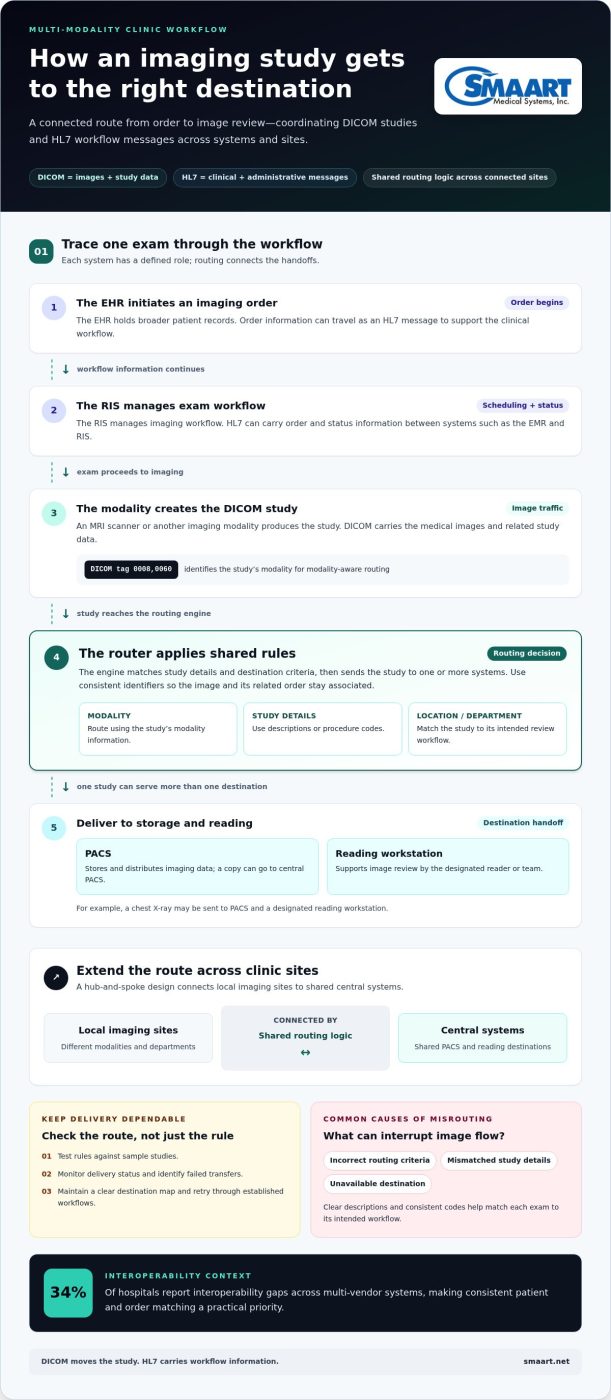
DICOM routing transfers studies from imaging modalities, such as MRI scanners or multi-modality systems from manufacturers like Animage, to PACS and reading workstations. This matters because each destination serves a different role: PACS stores and distributes imaging data, while workstations support image review. A router can streamline those handoffs without requiring staff to manually move every study. DICOM uses tag 0008,0060 to identify a study’s modality, helping systems apply modality-aware routing.
Routing Rules and Delivery Destinations
Routing rules use study details or destination criteria to send imaging data to one or more systems. For example, a chest X-ray may go to PACS and a designated reading workstation. In enterprise imaging, intelligent routing coordinates destinations through shared logic rather than isolated, modality-by-modality pathways. This creates a consistent approach across infrastructure, especially when departments need the same study for storage, review, or workflow.
Study and Location-Based Routing
Study-based routing directs imaging according to descriptions or procedure codes, while location-based rules use a patient’s location or department. A clinic could route a study tagged for a specific department to its review queue while sending a copy to central PACS. These criteria help match each exam to its intended workflow. Clear descriptions and consistent codes are essential: incorrect or incomplete study details can send an image to the wrong destination.
Router Choices and Routing Failures
U.S. clinics can choose cloud, on-premises, or hybrid routing based on where systems run and how sites connect. Cloud routing uses hosted infrastructure; on-premises routing runs within clinic infrastructure; hybrid routing combines both. Available options include standalone routing software and routing functions within broader imaging platforms. DICOM routing software and implementation pricing depends on interfaces, destinations, volume, storage, and deployment; the price depends on the case and is given after a quote request.
Common failures include incorrect routing criteria, mismatched study details, and unavailable destinations. Clinics can reduce misrouting by testing rules against sample studies, monitoring delivery status, and maintaining a clear destination map. Identify failed transfers and retry them through established workflows rather than assuming delivery is complete.
Can one engine handle DICOM and HL7 interfaces?
One integration engine can coordinate DICOM image flows and HL7 messages, but the standards carry different information. For a clinic, the goal is matching each image study with the correct patient, order, and workflow destination across connected systems.
DICOM and HL7 System Integration
DICOM carries medical images and related study data; HL7 exchanges clinical and administrative messages between systems such as an EMR and RIS. An integration engine can connect these streams so an imaging order and its resulting study stay associated. This matters because 34% of hospitals report interoperability gaps across multi-vendor systems, making consistent patient and order matching a practical priority.
For example, an EMR can initiate an imaging order, the RIS can manage the exam workflow, and the modality can produce the DICOM study. Routing can direct the study toward PACS alongside the related messages. This division helps systems deliver the right information to the right destination without treating an image file and a clinical message as interchangeable.
Connecting PACS, RIS, EHR, and Modalities
PACS, RIS, EHR, and modalities work together when each system has a defined role and exchange path. The RIS manages imaging workflow, the EHR holds broader patient records, modalities create studies, and PACS provides image storage and access. Integration streamlines these handoffs and supports patient care by reducing disconnected steps between ordering, scanning, and review.
HL7 can carry order and status information, while DICOM moves the imaging study. FHIR can support electronic exchange of structured health information alongside those workflows; it doesn’t replace DICOM image transfer. In a growing clinic, map which system is authoritative for patient identity, orders, and study storage, then align interfaces around those sources. A radiology management platform can support this coordination; explore radiology management software as part of the integration picture.
A routing engine can coordinate interfaces, but successful integration also requires clear ownership of each data type, consistent identifiers, and tested handoffs. Trace one exam from EHR order through RIS scheduling, modality acquisition, PACS storage, and returned status. This end-to-end view helps teams spot where mismatched patient details or incomplete messages could interrupt the process.
Is Cloud-Based DICOM Routing Secure For Patient Data?
Cloud routing security depends on how each connection, user role, and archive destination is managed. When assessing a system, review its access controls and safeguards for image transmission and storage.
Security Controls and Compliance
Access controls define which users can view, send, or manage medical images. A radiologist may need image access, while an administrator may manage accounts and routing settings. Role-based permissions help limit access to each user’s responsibilities, including remote access for specialized providers.
HIPAA and GDPR are relevant compliance frameworks for cloud-based DICOM routing, according to the U.S. Department of Health and Human Services and European Commission. A SOC 2 Type 2 attestation is a separate assurance document about an organization’s controls. It doesn’t replace reviewing user permissions, data handling, and system access for a clinic’s workflow.
For practical oversight, map access by role, review who can reach each archive, and remove access when responsibilities change. Examine how the cloud service logs access and routing activity, too. These controls help teams see who handled images and where files were sent.
Secure Image Transmission
DICOM over TLS protects medical images in transit between connected systems by creating an encrypted transport channel. It helps prevent image data from being exposed as studies move from a modality to cloud ingestion or onward to PACS. Include every transfer path, not just the initial upload, in the security design.
Cloud DICOM ingestion systems can verify uploaded image-file integrity before storage and routing, helping detect files that arrive incomplete or altered. For example, a clinic can define a workflow to check an incoming study, route it to the intended archive, and restrict access to authorized users.
Security also depends on destinations and access patterns. A shared archive used by several clinic locations needs clear role permissions, and remote viewing should follow the same access controls. Map every image path, including transfers to specialized readers, and pair secure transmission with controlled storage and traceable access.
Rapid DICOM Router for hub-and-spoke workflows
A hub-and-spoke workflow connects imaging sites to shared routing and storage. Each spoke represents a clinic or department, while the hub coordinates where studies go. This design can simplify DICOM routing across locations while connecting local imaging workflows to central systems.
For example, an MRI unit at one clinic sends a study to the hub, which routes it to shared PACS and the appropriate reading workstation. A second spoke, such as an ultrasound department, can use the same central pathway while retaining its own destination rules. This structure helps healthcare teams manage studies across sites without creating a separate routing plan for every transfer.
To plan the workflow, map each spoke’s modalities, destinations, and storage needs. Decide which studies go to central PACS, which need a local copy, and which must reach a specific reading team. A clear map also shows where each study is stored and how readers access it. These choices matter more than simply connecting every site to one hub.
A hub can also provide a shared point for monitoring transfers. If a spoke loses connectivity, teams need to know whether queued studies are still waiting or have reached their destination. A defined recovery path helps prevent a delayed transfer from being mistaken for completed delivery. Test representative studies from each modality and location before expanding the workflow.
Scalable routing comes from adding spokes through consistent rules, not duplicating configurations without review. When a clinic adds a department, compare its modality types, routing destinations, and storage requirements with the existing workflow. Keep exceptions explicit, such as sending a particular study to both central PACS and a department workstation.
Build a hub-and-spoke plan around your clinic’s sites, systems, and study destinations. Explore connected imaging workflow options for your multi-site environment.
SMAART Medical Systems, Inc.: SMAART-PACS
SMAART Medical Systems, Inc. offers SMAART-PACS, a radiology management software solution for clinics and hospitals. Consider it when aligning image management with existing EMR or HIS systems and connecting workflows across imaging operations.
The SMAART product line also includes SMAART-RIS and SMAART-SHARE, a cloud-based image-sharing platform. Together, these solutions support radiology management and image sharing as connected parts of a broader workflow. The right fit depends on how your clinic manages image access, information flow, and collaboration across departments.
If you’re reviewing how your imaging systems fit together, contact SMAART Medical Systems, Inc. or visit smaart.net to explore SMAART-PACS.
Make Your Next Workflow Decision Count
Start by turning your clinic’s imaging priorities into a clear systems plan. Identify which workflows need attention, where staff lose time between systems, and how new sites or modalities should connect. This gives your team a practical basis for evaluating a DICOM router for multi-modality clinics without adding unnecessary complexity.
SMAART Medical Systems, Inc. offers SMAART-PACS, SMAART-RIS, and SMAART-SHARE to help clinics address radiology management and image sharing as part of their broader workflow.
Bring your priorities and integration goals into the conversation, then explore how they align with your clinic’s imaging environment. Contact SMAART Medical Systems, Inc. to discuss a suitable next step. A thoughtful plan can help your team move forward with greater clarity and confidence.
Frequently Asked Questions
How is it deployed and managed?
A DICOM router can run in the cloud, on-premises, or through a hybrid setup. Management starts by documenting each modality, destination, and routing rule, then assigning responsibility for reviewing changes. For example, adding a new CT scanner may require an endpoint entry and a test transfer before routine use. Keep the connection map current so administrators can trace each study’s path and identify outdated routes.
How is it secured?
Secure routing combines protected data transfers with controlled access to systems and archives. Define which roles may configure routes, view images, or administer accounts, then review those permissions as staff responsibilities change. For a new remote-reading workflow, include the reader’s access path and intended image destination in the security review. This oversight complements technical safeguards such as encrypted transmission.
How much volume does it handle?
Capacity depends on study size, arrival patterns, number of connected modalities, and available network and storage resources. A router handling routine X-rays faces a different workload from one receiving large tomosynthesis exams, which can range from 450 MB to 3 GB. Review peak arrival periods as well as average activity, since simultaneous transfers can affect delivery and downstream storage demands.
What DICOM does it speak?
DICOM is the medical imaging standard first published in 1993, but compatibility depends on what each connected system supports. During planning, compare the router’s supported DICOM functions with the modalities, PACS, and workstations in your environment. Check how endpoints identify themselves, exchange studies, and handle the image types your clinic uses. This makes interoperability a specific systems question, not just a product-label match.
What is a DICOM router and how does it work in a multi-modality clinic?
A DICOM router is software that directs imaging studies between connected clinical systems using configured criteria. In a multi-modality clinic, a chest X-ray and an MRI study can follow different routes based on their identifying details and intended destinations. The routing design coordinates each exam’s movement through the imaging workflow. A DICOM router for multi-modality clinics should fit the clinic’s actual systems and departmental pathways.
Which imaging modalities and DICOM services should a clinic router support?
Support planning should account for the clinic’s modalities and the destinations each study needs to reach. A clinic might include CT, MRI, ultrasound, X-ray, or mammography, then map each modality to its required PACS and review workstations. Assess the specific exchange functions those endpoints need, including sending studies and any required retrieval or workflow interactions. The right scope follows the clinic’s equipment and operational pathways.