Disaster recovery solutions for medical imaging teams
A PACS backup alone isn’t a recovery plan. Effective disaster recovery solutions for medical imaging pair protected offsite copies with a tested process for restoring images, indexes, interfaces, viewers, and the services imaging workflows rely on. Local storage can support faster recovery, while offsite copies help protect data if fire, flooding, or another disruption affects a facility.
Imaging recovery can be more complex than restoring a typical business application. Teams must account for large data volumes, specialized formats, connected systems, and studies created or routed during downtime. A workable plan sets recovery priorities, defines acceptable data loss and downtime, and tests whether restored studies remain usable.
This guide covers practical PACS recovery planning: synchronizing data after an outage, choosing on-premises, cloud, or hybrid backup, and restoring systems in a clear sequence. It also explains what to include in recovery tests so your team can spot gaps before an incident disrupts clinical workflows.
Key Takeaways
- Plan how downtime studies, queued messages, and temporary-destination images will be reconciled when systems reconnect.
- Match local, cloud, or hybrid recovery to your need for faster access and protection from facility-level disruption.
- Set recovery priorities around imaging workflows and their dependencies, not just the image archive.
- Test restores with realistic outage scenarios and confirm that clinical teams can use the recovered studies and services.
Imaging data synchronization and resynchronization
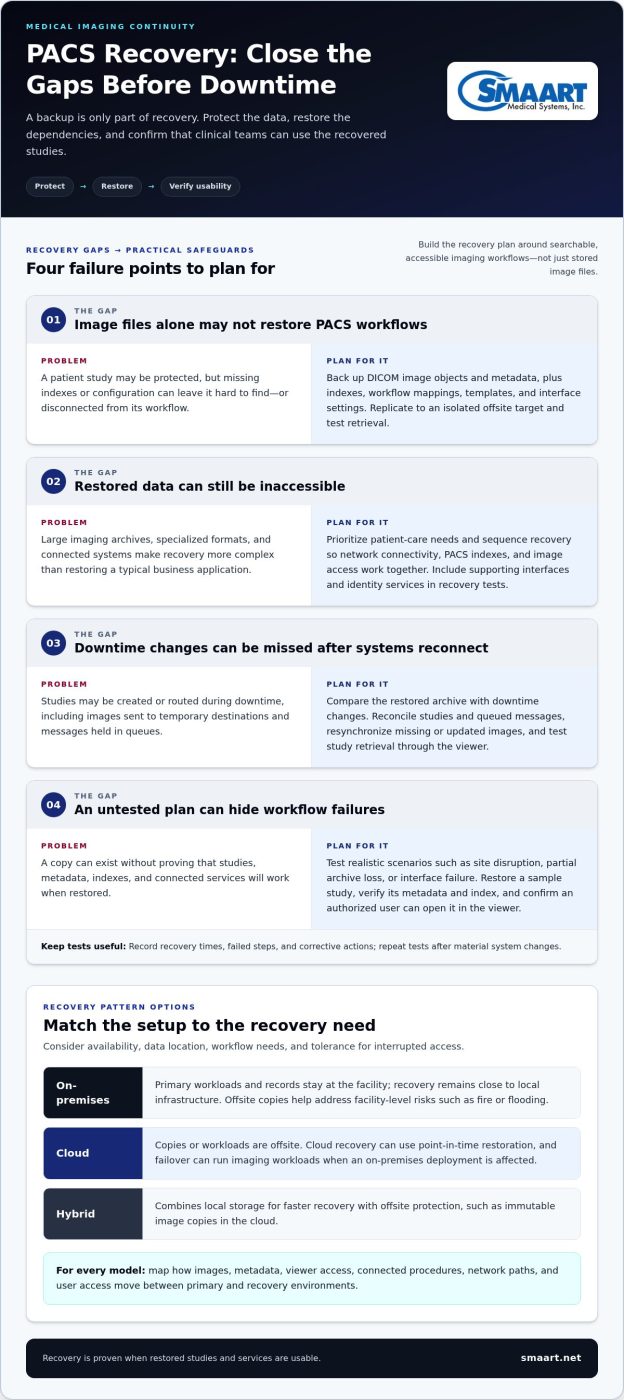
Back up DICOM images and metadata, replicate them to an isolated offsite target, and test retrieval. Protect indexes and configuration as well: image files alone may not restore searchable PACS workflows.
DICOM Image and Metadata Replication
Include every DICOM image object and its associated metadata in backup and replication jobs. Protect indexes, workflow mappings, templates, and interface settings too, since they help PACS find studies and connect them to the right workflow. Track successful and failed transfers during synchronization, and resolve errors before treating the copy as current. After an outage, compare the restored archive with changes recorded during downtime, resynchronize missing or updated studies, and test retrieval through the viewer.
Recovery Complexity Across Imaging Data Volumes
Medical imaging recovery can take longer than restoring a typical business application because it involves large data volumes, specialized formats, and multiple system dependencies. A medical facility may need to restore data across hundreds of machines. Prioritize the data and services needed for patient care, then sequence restoration so network connectivity, PACS indexes, and image access work together. Transfer capacity and archive organization affect how quickly a large backlog can be synchronized and made usable.
Separate backup from disaster recovery. Backups preserve files; disaster recovery can restore mirrored disk-drive and server images. A file copy may protect a patient study, but it won’t by itself restore the system that indexes or serves it. Define recovery time objectives and recovery point objectives, as identified in the NIST Contingency Planning Guide. These targets clarify how much downtime and data loss each imaging function can tolerate.
Protect data, hardware, and software with complementary safeguards. Keep isolated copies of images and configuration, alongside redundant storage and network paths that reduce reliance on a single component. Include supporting services, such as interfaces and identity systems, in recovery tests. For example, restore a sample study, confirm its metadata and index, then verify that an authorized user can open it in the viewer. This tests both data protection and PACS functionality.
On-premises, cloud, and hybrid recovery patterns
Choose a recovery pattern based on availability, data location, and how quickly your organization needs to restore studies. On-premises systems keep primary workloads and records at the facility; offsite copies help address risks such as fire or flooding. A hybrid design can keep production and failover workloads on premises while storing immutable image copies in the cloud.
Cloud disaster recovery can use point-in-time recovery to restore data to a selected moment. Cloud failover can also run imaging workloads when a natural disaster or equipment failure affects an on-premises deployment. For cloud PACS, map how images, metadata, viewer access, and connected procedures move between primary and recovery environments. Include the network path and user access in the recovery sequence.
Hospitals can use on-premises, cloud, or hybrid models. On-premises recovery keeps systems close to local infrastructure; cloud-based recovery places copies or workloads offsite. Hybrid recovery combines local storage for faster recovery with offsite protection. Match the model to your workflows, archive needs, and tolerance for interrupted access.
In the United States, HIPAA doesn’t prescribe one imaging-specific backup architecture. Organizations handling electronic protected health information must implement appropriate safeguards for backup, recovery, emergency operations, and security controls.
Medical imaging disaster recovery costs depend on the project and are provided after a quote request. Key cost factors include data volume, retention needs, recovery targets, hosting pattern, and system integrations.
Test the plan with sample restores and realistic scenarios, such as site disruption, partial archive loss, or interface failure. Confirm that restored studies open in the viewer and that connected services function. Record recovery times, failed steps, and corrective actions, then repeat tests after material system changes. A written imaging system recovery plan can help teams align these choices with PACS workflows.
What should a strong medical imaging backup strategy include?
Build the strategy around PACS and VNA availability, archive integrity, and the clinical services needed during an outage. Set recovery priorities before disruption, then test them against realistic scenarios.
PACS Downtime Impacts
When PACS is unavailable, clinicians may lose access to current images and prior studies, disrupting decisions and patient care. Operational impacts can include delayed image routing, reporting backlogs, and manual work to reconcile studies after service returns. Identify the departments and workflows that depend on each archive, then document procedures for operating in a degraded mode. This helps clinical and technical teams coordinate during downtime.
Failover and Imaging Continuity
Failover shifts imaging workloads to an available recovery environment when a primary system or site fails. High availability can protect DICOM routing, HL7 messaging, and web services from individual node failures; disaster recovery addresses broader events or shared dependencies. Define which functions fail over, who activates them, and how staff access studies. Test the transition and return to normal operations, including queued messages and downtime images.
PACS and VNA Recovery Dependencies
PACS or VNA recovery requires more than restoring archive storage. Account for indexes, modality connectivity, DICOM routing, viewer access, EHR interfaces, identity, DNS, and network services. A restored image may remain inaccessible if its index or viewer service is unavailable. During testing, restore a study and verify that authorized staff can find and open it, then confirm that interfaces and routing work across the imaging workflow.
Backup PACS Versus Storage Backup
Storage backup preserves files; a backup PACS can provide an alternate environment for accessing images. Hospitals use different deployment patterns: St. Joseph’s Candler uses 9 offline backup PACS workstations, while Northside Hospitals has more than 300 backup PACS workstations across 55 locations. Recovery time objectives and recovery point objectives should reflect clinical priority and acceptable data loss. A one-hour RTO may suit high-priority patient data if timed restore tests validate it; historical archive access may use an illustrative four to 24 hours. Define targets by system, then test them.
Medical imaging system recovery
Recovery succeeds when teams restore usable imaging workflows, not just files. Define the restoration order for infrastructure, imaging data, and clinical services, and assign an owner to each step. For example, after a data center outage, teams may need to recover storage, indexes, viewer access, and interfaces before clinicians can retrieve images.
For ransomware or accidental deletion, immutable snapshot copies preserve original medical image content when files are changed. Keep protected snapshots separate from production access, then select a clean recovery point before restoring affected systems. This helps prevent compromised or altered images from being treated as reliable records. Include configuration and supporting services in the restore scope, not just the image archive.
Choose a system recovery method that suits the failure. A mirrored image of disk drives and servers can restore systems faster than reinstalling an operating system and copying files. Self-healing systems can automatically restart failed services and automate common fixes, reducing manual recovery steps. These tools support recovery, but teams still need a documented sequence for dependencies and clinical access.
Make validation part of the recovery plan. Restore a sample study, confirm that the image opens correctly, and test relevant workflows across connected systems. Then reconcile studies, orders, reports, and messages created during downtime. Record test results, management review, and corrective actions. The HHS HIPAA audit protocol reviews data-restore tests and these supporting records.
Many healthcare organizations conduct annual or semi-annual disaster recovery exercises; critical imaging environments may benefit from more frequent testing. Include scenarios such as ransomware, partial archive loss, and extended downtime. Record the steps taken and any failures, then update procedures and responsibilities. Repeat exercises after infrastructure changes so the recovery sequence reflects the current environment.
To align imaging workflows with a dependable system plan, explore imaging management options.
SMAART Medical Systems: SMAART-PACS
SMAART Medical Systems, Inc. offers SMAART-PACS for hospitals and clinics evaluating their PACS environment alongside a documented recovery plan. SMAART-PACS is designed to interface with existing EMR, HIS, and practice-management systems, helping teams consider how imaging management fits into their wider clinical environment.
Consider SMAART-PACS when evaluating radiology management software as part of a broader imaging workflow. SMAART-RIS supports radiology information management, while SMAART-SHARE provides cloud-based image sharing. These products can support imaging workflows alongside, not in place of, backup planning, recovery testing, and clearly assigned responsibilities.
To discuss how SMAART-PACS may fit your imaging environment, visit SMAART Medical Systems, Inc..
Make Recovery Readiness Part of Imaging Operations
A recovery plan works best when it has clear owners, fits daily imaging workflows, and stays current as systems change. Set a regular time to review responsibilities, document dependencies, and capture lessons from each recovery exercise. This turns disaster recovery solutions for medical imaging from a technical document into an operational practice your team can improve over time.
When reviewing software for imaging operations, consider how it fits your existing environment. SMAART Medical Systems offers SMAART-PACS, SMAART-RIS, and SMAART-SHARE. Its radiology management software is designed to integrate with existing EMR and HIS platforms. These products can support imaging workflows alongside your organization’s backup and recovery planning.
Take the next step by discussing your imaging software needs with the team. Contact SMAART Medical Systems to explore the options that align with your environment and priorities. A thoughtful review today can help your team move forward with greater clarity.
Frequently Asked Questions
How should teams plan PACS disaster recovery and offsite image backup?
Start by assigning recovery owners and documenting the decisions they can make during an outage. Identify which images and services matter most to clinical workflows, then define recovery-time and data-loss objectives for each. Store protected copies offsite, and document how staff will handle studies created during downtime. Include vendor contacts and responsibilities if restoration depends on external support.
What are the biggest risks healthcare IT teams should plan for?
Plan for ransomware, facility disruption, storage failure, and loss of connected services. Sophos reported that approximately 34% of healthcare organizations were hit by ransomware in the year before its 2021 report. Attackers successfully encrypted files in 65% of those healthcare ransomware incidents. A separate risk is recovering images while a dependent service, such as identity or routing, remains unavailable.
What mistakes cause imaging recovery plans to break down?
A successful backup job does not prove that clinical access will work. Restoring data can expose missing permissions, outdated routing rules, or gaps in staff instructions. Teams can also overlook reconciling orders, reports, and studies created during downtime. Assign an owner to each recovery task, record unresolved issues after exercises, and update procedures when systems or workflows change.
Why is medical imaging recovery different from normal backup planning?
Imaging recovery must reconnect large image files with specialized formats, indexes, metadata, and the services that make studies searchable. Restoring a file alone may not restore its clinical context or access path. A recovery test should therefore follow a study from archive retrieval through viewer access and associated workflow services. Account for distributed machines and dependencies beyond the archive itself.
How do cloud, on-premises, and hybrid disaster recovery solutions for medical imaging compare?
On-premises recovery keeps workloads close to local infrastructure, while offsite cloud copies help address facility-level disruption. Cloud recovery can use point-in-time restoration, and cloud failover can run imaging workloads when an on-premises site is affected. A hybrid pattern combines local storage with cloud copies. Compare options based on recovery access, network dependence, data volume, and fit with existing imaging workflows.
What are the risks of ransomware, data loss, and downtime for medical imaging systems?
Ransomware can encrypt or delete image files, while hardware or site failures can interrupt access to studies and related workflows. Downtime may leave new images, orders, or reports waiting to be reconciled after systems return. Use isolated, immutable copies to preserve original image content, and define a safe recovery point before restoring affected systems. Include partial archive loss in exercises, not just complete site outages.