
Enterprise Imaging Platforms for Health Systems
Replacing every PACS and specialty application isn’t the only way to pursue enterprise imaging. An enterprise imaging platform for health systems can coordinate imaging workflows and information while retaining clinically valuable PACS, viewers, archives, and specialty applications. The right approach builds on useful systems rather than treating replacement as the only option.
That flexibility matters, but it can also complicate platform decisions. Understand what enterprise imaging adds, where it overlaps with PACS and a vendor neutral archive, and how well it works with the systems your teams already use.
This guide explains those differences and outlines what to assess for integration, data management, analytics, and AI readiness. It also provides a practical selection checklist covering interoperability, metadata, patient matching, and exception handling, so you can focus on capabilities that fit your health system’s needs.
Key Takeaways
- Map imaging workflows across specialties to see where a shared platform can improve access without disrupting clinical work.
- Separate the roles of PACS, VNA, and enterprise imaging to identify the capabilities your health system needs.
- Assess how DICOMweb supports imaging data access and how HL7 and FHIR carry related clinical context.
- Test interoperability in practice by evaluating conformance, metadata quality, patient matching, and exception handling.
Data management, analytics, and AI readiness
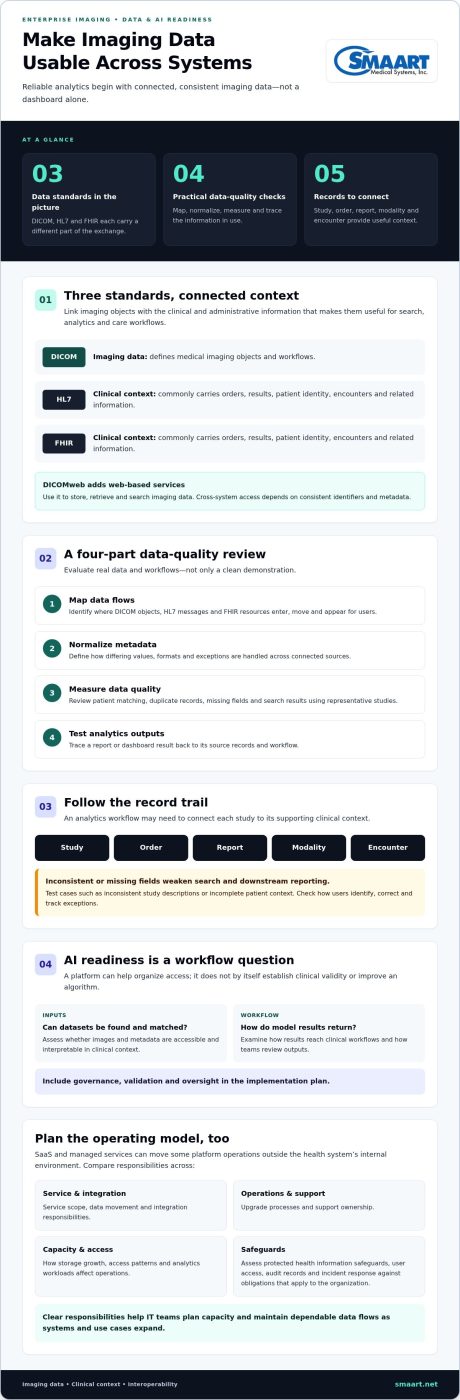
Reliable analytics start with consistent imaging data, not a dashboard alone. A health system should map how studies, reports, orders, and patient identities move between systems. DICOM defines medical imaging objects and workflows. HL7 and FHIR commonly carry orders, results, patient identity, encounters, and other clinical or administrative context. Linking these records gives analysts more useful context than image files alone.
DICOMweb provides web-based services for storing, retrieving, and searching imaging data. This can support access across connected systems when they exchange identifiers and metadata consistently. For example, an analytics workflow may need to connect a study with its order, report, modality, and encounter. Missing or inconsistent fields can weaken search results and downstream reporting.
- Map data flows: Identify where DICOM objects, HL7 messages, and FHIR resources enter, move, and appear for users.
- Normalize metadata: Define how the platform handles differing values, formats, and exceptions across connected sources.
- Measure data quality: Review patient matching, duplicate records, missing fields, and search results using representative studies.
- Test analytics outputs: Trace a report or dashboard result back to its source records and workflow.
Enterprise imaging architectures often use a connected normalization and interoperability layer to support consistent data exchange and manage metadata exceptions. Test how the system handles real-world cases, such as inconsistent study descriptions or incomplete patient context. Find out how users identify, correct, and track exceptions, rather than assessing only a clean demonstration.
SaaS and managed services can move some platform operations outside a health system’s internal environment. Compare service scope, data movement, integration responsibilities, upgrade processes, and support ownership. Ask how storage growth, access patterns, and analytics workloads affect the operating model. Clear responsibilities help IT teams plan capacity and maintain dependable data flows as systems and use cases expand.
What Is Enterprise Imaging?
In the United States, assess safeguards for protected health information, user access, audit records, and incident response against the obligations that apply to your organization. Platform costs depend on deployment, storage, integrations, migration, and service scope. Request a quote for pricing.
Imaging Across Clinical Specialties
Enterprise imaging coordinates images from departments beyond radiology within clinical workflows. Cardiology may manage echocardiograms, ophthalmology retinal images, dermatology photographs, and pathology whole-slide images. Each specialty has distinct capture methods, formats, and viewing needs. Map the source system, responsible team, image type, and intended viewers for each workflow. Then assess whether staff can retrieve images with relevant clinical context. This exercise shows where shared access helps and where specialty applications remain valuable.
Clinical Benefits for Health Systems
Clinical benefits depend on making relevant images accessible during care. A specialist reviewing a dermatology photograph with its clinical context can coordinate discussion with the referring team. Shared access can also help clinicians compare images across departments when those records are available together. Assess how staff find and open images in existing workflows, and identify where separate logins or manual handoffs interrupt care coordination.
ROI and clinical benefits depend on which workflows a health system improves. Establish local baseline measures, such as time spent locating studies, duplicate image requests, and manual transfer steps. Compare those measures after implementation, while also reviewing clinician access and coordination. Include integration, migration, storage, and service expenses in the financial assessment. A platform’s value depends on whether it addresses documented workflow friction without disrupting useful specialty tools.
Start by mapping one cross-specialty workflow and its users, systems, and access needs. Reviewing imaging workflow options can help frame that assessment.
Enterprise imaging compared with PACS and VNA
PACS and vendor neutral archives address important imaging needs, but they aren’t interchangeable. Compare their roles with the broader coordination enterprise imaging aims to support.
PACS and VNA Products
A PACS typically supports radiology image workflows, including image storage, viewing, and study access. A vendor neutral archive, or VNA, focuses on preserving and managing imaging content across systems. For example, a health system might use PACS for radiology workflows and a VNA to consolidate archives from different departments. Product capabilities vary, so assess actual workflows rather than relying on labels alone.
Compare each product’s role in the current environment. Identify which system handles image capture, viewing, storage, retrieval, and connections to clinical applications. Then map the systems that depend on each function. A VNA may support broader archive management, while PACS may remain central to radiology operations and reading workflows.
- PACS: Review radiology workflow support, study access, and viewer integration.
- VNA: Assess archive management across departments and connected systems.
- Both: Map interfaces, data ownership, and how clinicians retrieve prior images.
Comparing Enterprise Imaging Platforms
Enterprise imaging describes a broader architecture for coordinating imaging across specialties and systems. It may connect PACS, archives, viewers, and specialty applications instead of replacing each one. For example, a health system can retain a clinically valuable cardiology viewer while improving access to related images across departments.
The practical distinction is scope. PACS centers on imaging workflows, often within radiology; a VNA emphasizes archive management; enterprise imaging addresses coordination across these systems and clinical specialties. Their roles can overlap. A platform’s label doesn’t establish which functions it performs or how it fits existing applications.
To compare options, trace a study from creation to clinical use. Follow where it is stored, which application displays it, and how another department retrieves it. Note whether PACS, VNA, and specialty tools continue to serve distinct needs. This workflow map clarifies whether the health system needs a coordinating layer, expanded archive capabilities, or targeted PACS improvements. It also helps define migration boundaries and avoid replacing systems that still support effective clinical work.
Platform selection and integration checklist
Choose based on workflow fit, interoperability, and the systems your health system needs to retain. A structured evaluation turns broad platform claims into practical tests using real data and clinical workflows.
Platform Selection Criteria
There’s no single best platform for every large health system. The strongest fit supports the organization’s specialties, existing PACS and archives, clinical applications, and integration requirements. Compare how each option handles image access, workflow coordination, and exceptions across departments. Standards-based systems can implement optional features differently, so assess demonstrated behavior, not standards support alone.
Use representative workflows to compare candidates. For example, trace a study from a specialty application through storage and retrieval. Assess conformance, metadata quality, patient matching, and exception handling. Include clinicians, imaging leaders, and IT in the review, so technical fit and day-to-day use inform the same decision.
Integration Checklist
Implementation steps typically include an inventory of imaging sources, interface mapping, configuration, testing, and staged deployment. Map DICOM objects alongside HL7 and FHIR context, then document how each system identifies patients and studies. Test routine transactions and exceptions before expanding access to additional departments.
Implementation timing depends on the number of connected systems, data migration needs, workflow complexity, and testing scope. Build a schedule around concrete milestones, such as completing interface tests, validating patient matching, and approving a clinical pilot. Assign owners to each integration and define acceptance criteria before moving to the next deployment phase.
- Document each source, destination, and interface owner.
- Test metadata, patient matching, and exception workflows.
- Validate clinical access with representative users and studies.
- Record sign-off criteria for each deployment phase.
Deployment Risks and Challenges
Common challenges include inconsistent metadata, duplicate or mismatched patient records, and interfaces that behave differently across applications. A department may also rely on a specialty viewer that needs to remain available during rollout. Test these cases in representative workflows, and track unresolved exceptions with clear ownership.
Migration can disrupt familiar access patterns if teams don’t plan for legacy archives and clinical workflows. Reduce disruption by piloting a defined use case, confirming retrieval paths, and training affected users before broader deployment. Review feedback and test results before extending the platform to more specialties.
Discuss your imaging integration priorities to plan a practical next step.
SMAART Medical Systems: SMAART-PACS
SMAART Medical Systems, Inc. provides radiology software designed to work with existing systems. SMAART-PACS supports radiology image management, while SMAART-RIS manages radiology information workflows. Both are designed to integrate with existing EMR and HIS platforms.
For health systems assessing broader imaging needs, match each offering to a defined workflow. SMAART-PACS supports radiology imaging management. SMAART-RIS manages radiology information workflows, and SMAART-SHARE provides cloud-based image sharing. These offerings address distinct imaging operations without implying that every specialty workflow requires the same tool.
Consider SMAART Medical Systems, Inc. when your evaluation points to radiology management software that integrates with existing EMR or HIS systems. To discuss your imaging needs, contact SMAART Medical Systems, Inc. or visit smaart.net.
Turn your imaging priorities into a practical next step
Turn platform requirements into a focused implementation plan. Identify the workflow that needs attention first, the systems it depends on, and the clinical teams who will use it. Then define what successful access and coordination should look like for those teams. This keeps an enterprise imaging platform for health systems grounded in operational needs, rather than technology planning alone.
SMAART Medical Systems, Inc. offers SMAART-PACS, SMAART-RIS, and SMAART-SHARE. These products address radiology management and imaging sharing needs as you consider next steps.
Bring your priorities, integration questions, and target workflows into a conversation with SMAART Medical Systems, Inc. Contact SMAART Medical Systems, Inc. to discuss a practical path forward. A clear first step can make a complex imaging initiative easier to move ahead with.
Frequently Asked Questions
What is an enterprise imaging platform in healthcare?
An enterprise imaging platform for health systems coordinates how imaging information is managed and accessed across clinical services. Its practical role is to connect imaging workflows with the applications clinicians already use. For example, a care team can locate relevant images during a referral review without treating each department’s image system as an isolated destination. Define the platform’s scope by the workflows and users it must support.
What features should health systems look for in an enterprise imaging platform?
Prioritize features that support your clinical workflows and technical environment. Assess role-based access, auditability, image and report retrieval, workflow integration, and exception handling. For example, test whether an authorized clinician can find the correct study from a referral workflow and distinguish it from a similarly named examination. Include usability and administrative oversight in the evaluation, not just storage or viewing functions.
How do enterprise imaging platforms compare with PACS and vendor-neutral archives?
PACS generally supports imaging workflows such as radiology viewing and distribution, while a vendor neutral archive focuses on managing imaging content across systems. Enterprise imaging has a broader goal of coordination across specialties and applications. These categories can overlap, so compare actual capabilities rather than product labels. A health system may retain PACS for reading workflows and use other components for archive management or cross-specialty access.
What are the leading enterprise imaging vendors and their products?
There isn’t one universally leading vendor for every health system; product fit depends on workflows and the existing environment. Compare vendors by specialty coverage, integration approach, deployment model, and the systems their products connect. Ask each evaluation team to demonstrate a representative clinical workflow, including image access and exception handling. This offers a more useful comparison than rankings that don’t reflect your organization’s requirements.
How do enterprise imaging platforms integrate with EHRs, PACS, and imaging devices?
Integration connects image-producing devices and existing imaging systems with clinical applications and workflows. For a practical assessment, trace an examination from device capture through image storage, interpretation, and availability in the EHR. Confirm how orders, patient identity, and study details move between systems, and test how errors are surfaced. This end-to-end view helps reveal gaps that separate interface demonstrations may miss.
What cybersecurity, privacy, and compliance requirements apply to enterprise imaging platforms in the United States?
Assess safeguards for protected health information, user access, audit records, and incident response against the obligations that apply to your organization.