
Evaluating Cloud PACS Security Based on Compliance Needs
A secure cloud PACS takes more than a strong password or a reassuring vendor statement. Evaluating cloud PACS security means assessing the infrastructure, identities, workloads, data, and controls that protect imaging systems, then identifying misconfigurations, vulnerabilities, and compliance gaps. The review should also consider whether suspicious activity can be detected and addressed.
A cloud assessment should give you a clear picture of risk, but a checklist alone may miss how settings and access permissions interact. The key question is whether the safeguards fit your organization’s compliance needs and everyday imaging workflows.
This article explains what a cloud security assessment covers and how to evaluate PACS tools, configurations, security baselines, and identity and access controls. It also shows how to prioritize findings by potential impact and how a point-in-time review differs from ongoing monitoring, so the assessment supports practical decisions rather than producing a report that sits on a shelf.
Key Takeaways
- Assess cloud infrastructure, data, identities, workloads, and detection processes together to reveal risks a narrow checklist can miss.
- Match assessment tools to your compliance goals by reviewing how their findings map to the frameworks your organization uses.
- Review storage exposure, encryption, access policies, logging, backups, and other configuration choices against a clear security baseline.
- Examine user, service, and privileged access to identify permissions that are broader than operational needs require.
What Is a Cloud Security Assessment?
A cloud security assessment examines infrastructure, identities, workloads, data, and controls to identify vulnerabilities and compliance gaps. For cloud PACS, it connects technical findings with imaging operations, data handling, and recovery needs.
Risk and Security Assessment Differences
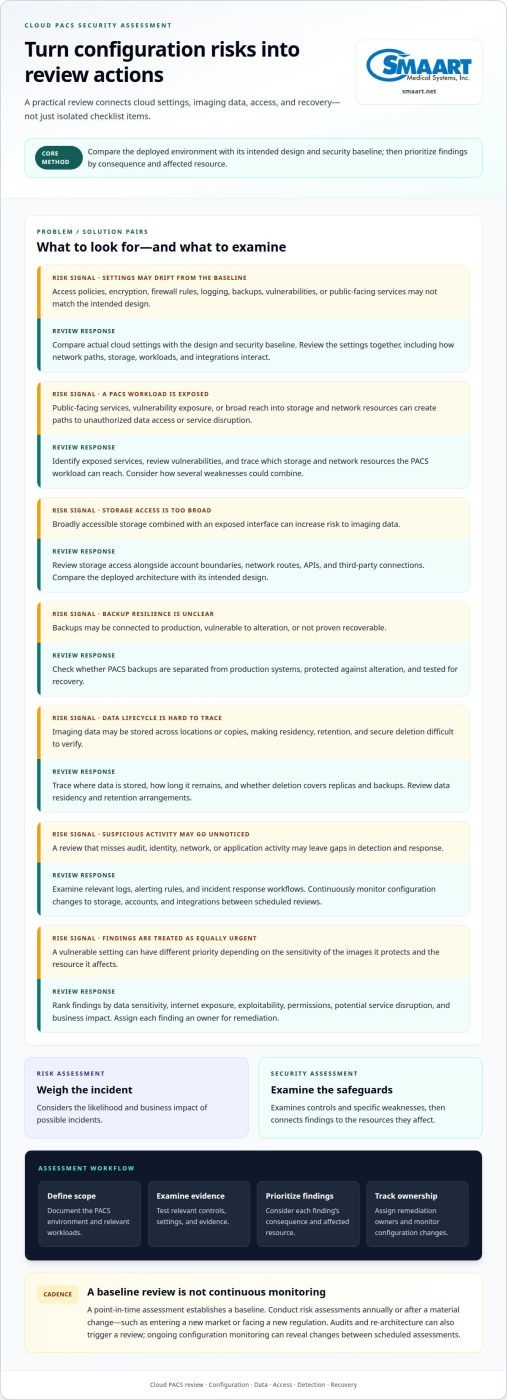
A cloud risk assessment weighs the likelihood and business impact of possible incidents, while a security assessment examines safeguards and specific weaknesses. That distinction matters because a vulnerable setting may warrant different priority depending on the sensitivity of the images it protects. Teams can rank findings by data sensitivity, internet exposure, exploitability, permissions, and potential service disruption.
Assessment Cadence and Continuous Monitoring
A point-in-time assessment establishes a baseline, while continuous monitoring tracks changes to cloud configurations. Conduct risk assessments annually or after a material change, such as entering a new market or facing a new regulation. Audits and re-architecture can also trigger an assessment. For cloud PACS, ongoing configuration monitoring can reveal changes to storage, accounts, or integrations between scheduled reviews. Healthcare organizations looking for external guidance to manage these audits and routine safeguards can partner with IT specialists like M.I.S. Support, Inc. to support proactive security and compliance.
Cloud Configuration and Posture Reviews
A configuration review compares actual cloud settings with the intended design and security baselines. It can examine access policies, encryption, firewall rules, logging, backups, vulnerabilities, and public-facing services. For cloud PACS backups, assess whether they are separated from production systems, protected against alteration, and tested for recovery. Review data residency, retention, and secure deletion by tracing where imaging data is stored, how long it remains, and whether deletion covers replicas and backups.
Assessment Methods and Workflows
A cloud security assessment workflow defines scope, examines evidence, prioritizes findings, and assigns remediation ownership. NIST SP 800-53 Revision 5.2.0 is identified as the latest release in the assessment guidance, according to the National Institute of Standards and Technology. For teams evaluating cloud PACS security, review audit, identity, network, and application logs, alerting rules, and incident response workflows. To assess and monitor security, document the PACS environment, test relevant controls, track findings to owners, and continuously monitor configuration changes. Prioritize each finding by its consequence and the resource it affects.
Choosing tools based on compliance needs
Choose assessment tools based on the compliance outcomes, evidence, and workloads they need to support. The right fit connects findings with remediation, monitoring, and your security strategy.
Compliance Readiness and Due Diligence
Compliance readiness means matching a tool’s evidence and reporting to the outcomes your organization must demonstrate. This matters because ISO 27001 certification, SOC 2 attestation reports, and PCI DSS validated assessments represent different outcomes. Assess whether the platform produces usable evidence for the workloads in scope, rather than treating a framework label as proof of complete readiness. Include ownership and remediation tracking in your selection criteria.
Cloud Compliance Frameworks
Frameworks provide structured references for organizing controls and interpreting findings. A tool may map findings to NIST 800-53/CSF, ISO 27001, PCI DSS, and SOC 2. The Cloud Security Alliance self-assessment usually refers to CSA STAR Level 1. Select a platform that supports the frameworks relevant to your obligations, then compare its control descriptions with evidence your teams can produce for imaging workloads.
Compliance Mapping
Compliance mapping links each technical finding to a relevant control, evidence item, and remediation task. This makes gaps easier to explain across security, operations, and audit teams. For example, a cloud storage access finding can identify the applicable control, affected workload, owner, and corrective action. Prioritize tools that preserve this trace from detection through closure instead of exporting isolated alerts.
Business Associate Agreement Terms
A cloud PACS business associate agreement should define permitted data handling, security responsibilities, incident communications, subcontractor expectations, and retention or deletion arrangements. These terms matter because a PACS workflow can involve storage, access, sharing, and support. Align the agreement with actual data flows and the compliance evidence your organization must maintain, so written commitments match operational practice.
Configuration review and security baselines
Review the cloud PACS configuration against its intended design and security baseline. Check how network paths, storage, workloads, and integrations interact, rather than reviewing isolated settings alone.
Workload Security and Vulnerability Reviews
A workload review examines how cloud applications and supporting infrastructure are configured and exposed. For a PACS workload, identify public-facing services, review vulnerability exposure, and trace which storage and network resources it can reach. To uncover deeper vulnerabilities across interconnected environments, organizations can also engage FaultLine Cyber & Security Ltd for exposure assessments that highlight hidden operational and cyber risks. Prioritize misconfigurations by data sensitivity, internet exposure, exploitability, and business impact. Several minor weaknesses can combine to create a path to unauthorized data access or service disruption.
Cloud Architecture and Design Reviews
A cloud architecture review compares the deployed environment with its intended design. Examine account boundaries, network routes, storage access, APIs, and third-party connections as one system. For example, broadly accessible storage combined with an exposed interface can increase risk. Review the design before or after migration to identify deviations and keep infrastructure aligned with operational needs.
Cloud PACS Security Features
Evaluate whether the PACS environment supports access policies, encryption settings, firewall rules, logging coverage, backup policies, and vulnerability reviews. These controls matter because imaging data moves between storage, viewers, and connected systems. Ask how the configuration limits public exposure and records relevant activity. Assess evidence from the actual deployment, rather than treating a feature description as proof that settings are correctly applied.
Integration Security Risks
Integration reviews examine how a cloud PACS exchanges data with EHRs, DICOM devices, and third-party services. Each connection can introduce an access path, data flow, or configuration dependency. Map what information moves, which systems initiate connections, and what permissions they receive. For example, an integration account with overly broad permissions could expose more resources than its workflow requires. Prioritize custom connections and network rule changes for review.
Identity and access controls
Identity reviews show who can access a cloud environment and what each account can do. For PACS, examine user, role, and service account permissions alongside authentication settings and privileged access.
CSA CCM and CAIQ Control Coverage
The Cloud Security Alliance Cloud Controls Matrix (CCM) and Consensus Assessments Initiative Questionnaire (CAIQ) offer benchmarks for evaluating cloud controls. The CCM and CAIQ v4.1 combine 207 controls across 17 domains and were released in January 2026. The CAIQ uses yes-or-no questions to assess a cloud provider or an organization’s own environment. Teams can use those questions to structure evidence reviews and identify where safeguards need closer examination.
Use a framework to define the review’s scope, not to assume every control applies identically to every PACS workflow. Compare documented controls with actual account permissions, authentication settings, and privileged access. A mismatch can reveal a control gap that affects image access or system administration.
Misconfigurations and Control Gaps
A misconfiguration occurs when identity settings grant broader access than a user, role, or service needs. This matters because excessive permissions increase exposure if an account is compromised or misused. In 2026, Unit 42’s analysis of more than 680,000 cloud identities found that 99% of cloud users, roles, and services had excessive permissions, including access unused for 60 days or more.
Review account ownership, assigned permissions, authentication settings, and privileged access together. For example, compare a service account’s permissions with the PACS integration tasks it performs, then remove access it does not need. Assign an owner and remediation action to each gap. Reassess permissions when responsibilities or integrations change, so outdated access does not persist unnoticed.
Use these identity criteria when assessing cloud PACS options and their fit with your workflows. Explore cloud PACS solutions.
SMAART Medical Systems: SMAART-PACS
SMAART Medical Systems, Inc. offers SMAART-PACS to hospitals and clinics evaluating radiology management software. Once you have assessed your security requirements, consider how a PACS fits your imaging workflows, existing EMR or HIS platform, and operational priorities. SMAART-PACS is designed to interface with EMR, HIS, and practice-management systems, while SMAART-SHARE provides cloud-based image sharing.
Use your assessment criteria to guide the discussion: identify the workflows involved, the systems that need to connect, and the compliance evidence your organization must manage. This helps align software decisions with practical requirements without treating a product description as a substitute for your security review.
Contact SMAART Medical Systems, Inc. to discuss how SMAART-PACS can fit your radiology workflow.
Turn security findings into a confident next step
Turn assessment results into decisions your imaging team can maintain. Assign owners to unresolved risks, set a review trigger for meaningful system changes, and connect security requirements to everyday PACS workflows. This makes evaluating cloud PACS security part of ongoing operational planning, rather than a one-time approval exercise.
When your organization is ready to align radiology software with those priorities, SMAART Medical Systems, Inc. offers SMAART-PACS, SMAART-RIS, and SMAART-SHARE. Consider how each product fits your imaging management and sharing needs, then bring those requirements into a focused discussion.
Contact SMAART Medical Systems, Inc. to discuss your radiology software needs. A clear, practical security approach can help your team move forward with greater confidence.
Frequently Asked Questions
How should cloud PACS encrypt medical images and data in transit and at rest?
Use encryption for medical images and related data in transit and at rest, then assess how it applies across the PACS data flow. Map transfers from imaging devices to the PACS, from the PACS to viewers, and through exports or backups. Review who controls encryption keys, how access to them is restricted, and what evidence shows encryption is active for each storage location and connection.
How does cloud PACS manage user authentication, role-based access, and audit logs?
Cloud PACS access should connect each user to an authenticated identity, a role suited to their work, and a record of their activity. For example, distinguish a radiologist’s image-viewing tasks from an administrator’s configuration privileges. Review whether shared accounts are avoided, how access changes when responsibilities shift, and whether audit logs show who accessed or changed imaging records and when.
What HIPAA requirements apply to cloud PACS providers in the United States?
Assess the PACS arrangement against the HIPAA obligations that apply to your organization and the provider’s role in handling protected health information. Map relevant safeguards, access to that information, contract terms, and oversight evidence to your compliance program. A vendor certificate or audit report can inform due diligence, but does not by itself establish that your organization meets its own obligations.
How can healthcare organizations assess cloud PACS vendor security certifications and audit reports?
Check what each certification or report covers before treating it as evidence for your PACS environment. Match its scope to the service, systems, and data flows you use, then review the audit period, exceptions, and remediation details. For example, a report covering a platform generally may not address every integration or configuration in your deployment. Record which controls the evidence supports and which require a separate review.