
HL7 integration for radiology orders: How orders flow
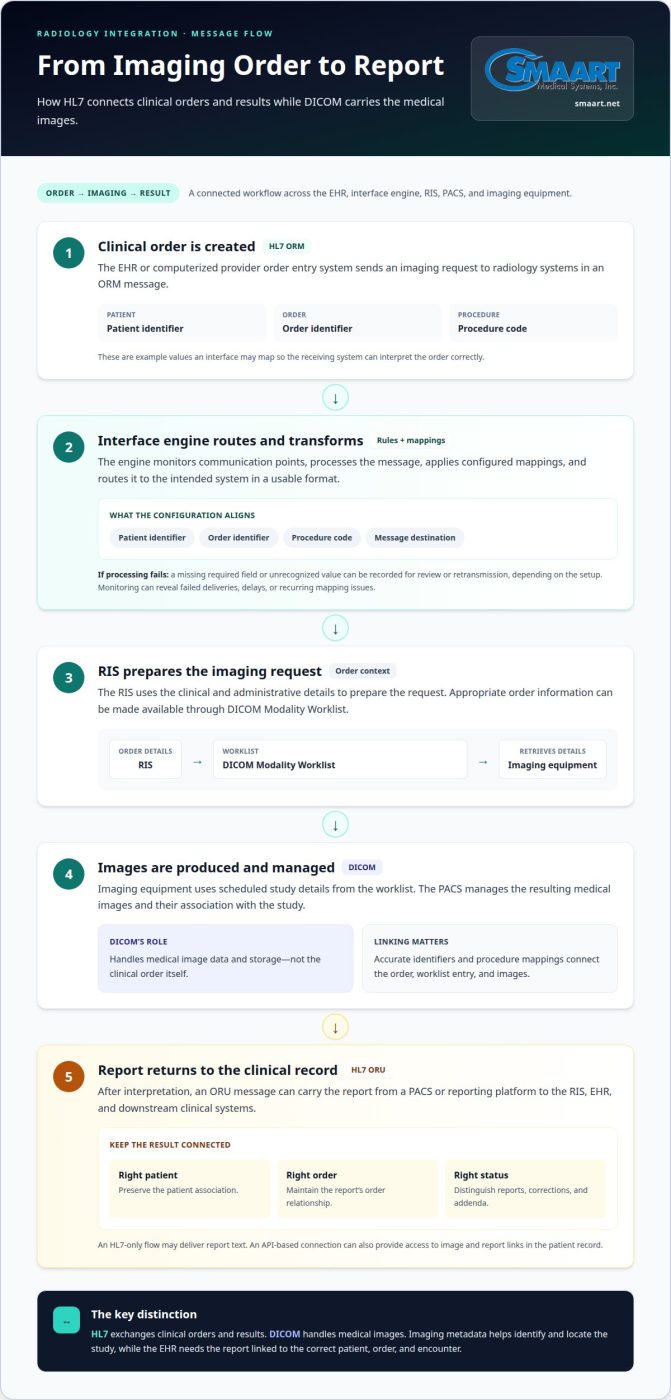
HL7 is the messaging standard that lets healthcare systems exchange clinical information, including radiology orders and results. In HL7 integration for radiology orders, an ORM message carries an imaging request from the EHR or computerized provider order entry system to the radiology information system (RIS) and picture archiving and communication system (PACS). The message communicates the order; DICOM handles the medical images.
That distinction matters: an order can move correctly while its status, patient context, report, or image link fails to reach the system that needs it. Understanding the message flow helps identify where interface engines, identifiers, and data mapping keep systems aligned.
This guide explains what HL7 is, how an interface engine routes and transforms messages, and how message segments carry order details. It also follows the path from a clinical order through scheduling and imaging to the report and related metadata in the patient record.
Key Takeaways
- Separate the role of HL7 messages, which exchange orders and results, from DICOM, which handles medical images.
- Understand how an interface engine routes messages and applies mappings so systems can interpret the same clinical data.
- Read HL7 messages as structured segments and fields to see how patient, order, and result details are organized.
- Trace an imaging order from the EHR to radiology systems, then follow how its report and related metadata return to the patient record.
Radiology reports and imaging metadata in patient records
A radiology result needs more than report text to be useful in a patient record. The receiving EHR must connect the report to the right patient, imaging order, and encounter. HL7 messages can carry orders and results between the RIS, PACS, and EHR. DICOM carries the image data, while imaging metadata helps identify and locate the study. Together, these links let a referring provider review findings in clinical context.
HL7 v2 uses messages for established clinical workflows; a FHIR ServiceRequest represents an imaging order as a resource for API-based exchange. DICOM handles medical image data and storage, rather than the clinical order itself. These standards work together, but they serve different parts of the imaging workflow.
In the United States, healthcare organizations must consider HIPAA when exchanging and protecting patient data, according to the U.S. Department of Health and Human Services. Integration design therefore needs to account for how patient information moves between the EHR, interface engine, RIS, and PACS.
Implementation cost depends on interface count, mapping complexity, testing scope, and existing system capabilities; pricing is provided after a quote request. A full bidirectional integration, including imaging-order intake and report output, typically takes three to six months.
Scaling across facilities and modalities adds mapping and routing decisions. A shared engine can direct messages to the correct site and modality, but each facility’s identifiers, worklist rules, and reporting workflow need consistent mappings. For example, a CT order must reach the appropriate radiology worklist, not another site’s queue. Patient merges also require careful handling so records and studies remain correctly associated.
After interpretation, an ORU message can carry the report from a PACS or reporting platform to the RIS, EHR, and downstream clinical systems. The result should preserve its order relationship and distinguish report status, including corrections or addenda. An HL7-only flow may deliver report text; an API-based connection can also provide access to image and report links in the patient record. That gives the referring provider a clearer path from observation to the relevant imaging study.
What is a HL7 interface engine?
An HL7 interface engine connects healthcare systems by routing messages and applying configured rules. For radiology, it helps orders and results reach the right systems in usable formats.
Interface Engine Fundamentals
An HL7 interface engine monitors communication points, processes messages, and routes them between systems. Its rules support interoperability across EHR, RIS, PACS, and billing workflows without requiring every system to use identical formats. The engine can also convert protocols and handle errors. This gives healthcare teams the ability to connect existing systems while keeping information moving through established clinical workflows.
Data Mapping and Interface Configuration
Data mapping connects a field in one system to its corresponding field or value in another. Configuration might map an order identifier, patient identifier, and procedure code so the receiving RIS interprets each value correctly. Interface rules also determine message destinations and transformations. Clear mappings help prevent mismatched records, incorrect routing, and gaps between clinical and billing workflows. Radiology integration can be tailored to each system’s message structure and operational needs.
Error Handling and Interface Monitoring
Error handling identifies messages that cannot be processed as configured, such as an order with a missing required field or an unrecognized value. Depending on the setup, the engine can record the issue and support review or retransmission. Monitoring message flow helps teams spot delays, failed deliveries, or recurring mapping problems. For example, a queue of unprocessed orders can reveal a connection issue before it disrupts the radiology worklist.
Mapping Orders to Imaging Systems
An HL7 order supplies clinical and administrative details that the RIS uses to prepare an imaging request. The RIS can make appropriate order information available through DICOM Modality Worklist, which imaging equipment uses to retrieve scheduled study details. The PACS manages the resulting images and their association with the study. Accurate identifiers and procedure mappings connect the order, worklist entry, and images. For a broader view of radiology management software, explore how connected systems support these workflows.
HL7 message segments, fields, components, and sub-components
HL7 messages package patient and workflow data in a consistent structure. Reading that structure helps teams understand what each application receives and how implementation choices affect radiology records.
Message Structure and Building Blocks
An HL7 message contains segments, each segment contains fields, and fields can contain components and sub-components. This hierarchy keeps details such as patient identifiers, order information, and results organized. For example, a PID segment carries patient information, while an order message uses other segments for order details. Mapping the right fields helps receiving platforms interpret each value correctly instead of treating the message as undifferentiated text.
Segments and Trigger Events
A trigger event identifies the business event that caused an HL7 message to be sent, while segments carry the related data. In an ADT message, admission, discharge, or transfer events communicate changes to patient status. A radiology workflow can use those updates to keep patient context aligned across systems. Radiology-relevant ADT messages include MSH, EVN, PID, and PV1 segments, covering message details, event information, patient identity, and visit context.
Message types indicate the kind of clinical information being exchanged. ORM messages carry medical orders, including radiology requests; ORU messages carry observation results, such as reports. Older radiology feeds commonly use ORM_O01 for orders and ORU_R01 for results. Newer imaging-specific order profiles may use OMI_O23. The type and trigger event together tell receiving applications how to process each message.
Order control matters as much as message routing. In radiology, ORC-1 represents order intent, such as a new, changed, or cancelled order. For reports, ORC-1 codes CO and RE identify corrected and replaced reports. Preserving placer and filler identifiers helps connect the order with its result, even as information moves between medical platforms.
An integration engine can route each message to its intended application and apply configured transformations. For example, an ADT update may go to systems that need patient context, while an ORU result travels to clinical recipients. Testing these message paths can reveal missing fields, incorrect destinations, or broken order-result relationships before implementation reaches live workflows.
Electronic transmission of clinical orders
Electronic ordering turns a physician’s clinical request into structured data that can move from a hospital EHR or computerized provider order entry system to radiology. An HL7 ORM message commonly carries that request to the RIS, where staff can schedule it and prepare the imaging worklist. Newer imaging-specific profiles may use OMI_O23. The key is preserving the order’s intent, not merely forwarding a message.
ORC-1 communicates that intent through order-control codes. A new request, an update, and a cancellation represent different workflow events, so the receiving system must act on each correctly. The placer and filler identifiers connect the request across systems and help preserve its relationship to the eventual result. If those identifiers or statuses are lost, staff may face duplicate work or an order that appears active after cancellation.
Configuration also defines how clinical details map into the receiving system. A procedure code, patient identifier, ordering physician, and requested timing may need field-level mappings that match local RIS workflows. HL7 SIU messages can carry scheduling information, while the order message initiates the clinical request. Automated transmission reduces manual re-entry, but it still depends on accurate mappings and clear handling for changed or cancelled orders.
- Test new, changed, and cancelled orders.
- Include scheduled orders and each supported message variation.
- Confirm order identifiers remain linked to results.
Those scenarios belong in interface testing alongside report-status variations, patient merges, and supported payload formats. During deployment, parallel testing can send production-message copies to a new PACS and the incumbent system. Comparing their handling helps surface differences before workflows switch over. For transport between PACS and connected systems, use TLS 1.2 or higher to protect message transmission.
Build a dependable electronic order pathway by aligning message intent, identifiers, mappings, and test cases. Explore radiology order integration options for connected imaging workflows.
SMAART Medical Systems, Inc.
SMAART Medical Systems, Inc. offers radiology software designed to integrate with existing EMR and HIS platforms. Its solutions help hospitals and clinics connect radiology workflows, including order management, results, and imaging.
SMAART-PACS and SMAART-RIS support radiology management workflows, while SMAART-SHARE provides cloud-based image sharing. These solutions support workflows for receiving imaging orders, managing radiology information, and sharing studies. The right fit depends on the workflow your organization needs and how its current platforms connect.
Contact SMAART Medical Systems, Inc. to discuss your radiology workflow and software needs.
Make the Next Integration Decision Count
Reliable imaging exchange depends on decisions that remain useful as clinical workflows change. Treat HL7 integration for radiology orders as an operational design choice, not just a connection between systems. Define who owns message changes, how teams identify workflow issues, and how updates are tested before they affect daily operations. A well-planned HL7 integration for radiology orders also gives clinical, radiology, and IT teams a shared basis for improving the connection over time.
The next step is to connect those priorities to the systems your organization already uses and the workflows it needs to support. A focused discussion can help clarify questions about order flow, results, and imaging access.
Contact SMAART Medical Systems, Inc. to discuss your radiology integration needs. A clear starting point can make the next improvement easier to plan.
Frequently Asked Questions
What is HL7?
HL7 is a set of standards for exchanging clinical and administrative information between healthcare systems. In a radiology workflow, it can carry patient updates, imaging orders, and report results between an EHR and radiology applications. Think of it as an agreed format and set of rules for messages, not the imaging file itself. DICOM serves the separate role of handling medical images.
What HL7 messages are used for radiology orders, such as ORM, OML, and OMG?
ORM messages are commonly used for radiology orders in older feeds, while imaging-specific profiles may use OMI_O23. OML and OMG are other order message types, but the message selected depends on the systems’ supported HL7 version and implementation profile. For example, an interface may accept one order structure but not another. The sending and receiving applications need an agreed message definition before exchange.
What HL7 fields and segments are required to create a radiology order?
The required content depends on the receiving RIS and its implementation profile. An order needs enough patient, encounter, procedure, and order-control information for the RIS to interpret the request. For example, patient identity and procedure code must map to the correct local records and catalog entries. MSH identifies message context, while order-related segments carry request details. Local configuration determines which fields are required.
How do HL7 order messages handle acknowledgments, errors, cancellations, and updates?
An acknowledgment tells the sending application whether the receiving system accepted or rejected a message. If validation fails, the interface should record the error for correction rather than silently dropping the order. Order-control values distinguish actions such as placing, changing, or cancelling a request. For example, cancelling an exam should update the receiving workflow, while a corrected message should retain identifiers linking it to the original order.
What are common HL7 integration workflows for radiology orders from EHR to RIS?
A common workflow begins when a physician places an imaging request in the EHR. The order message reaches the RIS, which uses mapped patient and procedure details to register the request for scheduling. A scheduling update may then travel through an SIU message. After imaging and interpretation, a report can return to the EHR. Clear identifiers help staff match the report to the original request.
What steps are required to implement and test an HL7 radiology order interface?
Implementation typically moves through discovery, interface design and data mapping, development and configuration, testing, deployment, and monitoring. Testing should cover new, changed, and cancelled orders, scheduled cases, report-status variations, and patient merges. For example, a test can confirm that cancelling an order removes it from the appropriate worklist. Parallel testing can compare how a new PACS handles workflows against the incumbent system before migration.