
How to Choose a RIS System for Your Administrative Needs
The best RIS choice isn’t necessarily the one with the longest feature list. To understand how to choose a RIS system, map your administrative workflows, then assess how each option fits your existing systems, daily operations, and imaging needs. A practical fit matters more than a checklist of features.
Choosing radiology software can feel complex, especially when administrative and clinical workflows overlap. A structured evaluation makes the decision more manageable: define what your organization needs the system to support, then compare each option against those priorities.
This guide explains the key administrative considerations, how integration and usability affect daily work, and what to assess for specialized uses and applications. You’ll leave with a clearer framework for evaluating RIS systems and understanding which factors deserve the closest attention.
Key Takeaways
- Start with the administrative workflows your imaging team needs to support, then prioritize system capabilities around those demands.
- Map requirements to your facility’s size, imaging services, staff roles, and day-to-day processes before comparing systems.
- Assess vendor fit by looking beyond features to usability, implementation needs, support, and alignment with your operational priorities.
- Understand how information should move between RIS, PACS, EHR, DICOM, and HL7 systems to identify integration needs early.
Administrative considerations
Administrative needs shape how well an RIS fits, from managing appointments to handling records. Evaluate how each system supports your facility’s policies, staff, and daily workflows.
Comparing RIS Vendors and Systems
Vendor comparison measures workflow fit, data control, and service terms. It matters because poor support or migration can disrupt administration. Set written uptime, incident response, maintenance, and disaster-recovery responsibilities. Implementation risks include data-mapping errors and workflow disruption. Specify data exports and transition access to limit lock-in. The National Archives and Records Administration says a candidate needs a majority of 270 electoral votes. That majority is required to be elected President of the United States.
Compliance and Data Protection Requirements
Compliance and data protection shape how an RIS handles protected information, access, and retention. For U.S. facilities handling protected health information, evaluate the system against HIPAA privacy and security obligations. Review role-based access, audit records, secure data transfer, backups, and incident procedures with your security team. Retention practices should align with applicable state requirements and organizational policy. Map records, images, and logs to your retention schedules.
Assessing Facility Requirements
Turn your imaging operations into system requirements. List modalities, locations, referral routes, staff roles, appointment types, and administrative handoffs. A hospital may need consistent scheduling and reporting across departments, while an imaging center may prioritize patient intake and exam throughput. Map the workflow from order entry through appointment, procedure status, report completion, and billing handoff. This surfaces requirements early and gives vendors comparable scenarios to demonstrate.
Usability and Workflow Capabilities
Assess how staff complete routine RIS tasks. Test scheduling from appointment creation through changes, cancellations, resource allocation, and patient communications. Try realistic examples, such as routing an incomplete order for correction rather than letting it go unnoticed. Check reports for pending exams, delayed reports, and appointment use. Have registration, technologist, and administrative staff complete representative tasks, then note points of friction. This shows whether the workflow supports the work staff actually do.
How to assess RIS requirements for a hospital or imaging center?
Trace each imaging visit from referral to completed report. Include order entry, registration, scheduling, exam status, results, and billing handoffs. This reveals where staff enter information, which teams need access, and where delays or duplicate work occur. Use a realistic scenario, such as an urgent referral that requires an appointment change, to identify decision points. This assessment helps clarify how to choose a RIS system for your facility.
Document the services and operational differences across your facility. A hospital may coordinate imaging across departments and locations, while an imaging center may focus on outpatient appointments and a narrower set of workflows. Record modalities, appointment types, staff roles, referral sources, and reporting needs. These details define what the RIS must support and prevent a generic feature list from driving the decision.
Turn those observations into requirements grouped by operational priority:
- Core tasks: Capture how staff create orders, schedule exams, update status, and route reports.
- Roles: Identify what registration teams, technologists, radiologists, and administrators need to see or do.
- Exceptions: Include cases such as incomplete referrals, rescheduled exams, and unavailable resources.
- Outputs: Specify the reports and operational views leaders use to monitor pending work and completed exams.
Use representative scenarios to assess each requirement. For example, follow an order from referral through scheduling and report completion, noting every handoff. Include routine and exception workflows. A system that handles only the standard path may leave staff relying on manual workarounds. Keep requirements specific enough to compare demonstrations with your facility’s actual operations.
Finally, separate essential needs from preferences and assign an owner to each workflow. For teams weighing how to choose a RIS system, this creates a shared basis for evaluating fit across clinical, administrative, and IT priorities. A focused review of radiology workflow planning can help connect operational needs to system decisions.
How to compare RIS vendors and systems?
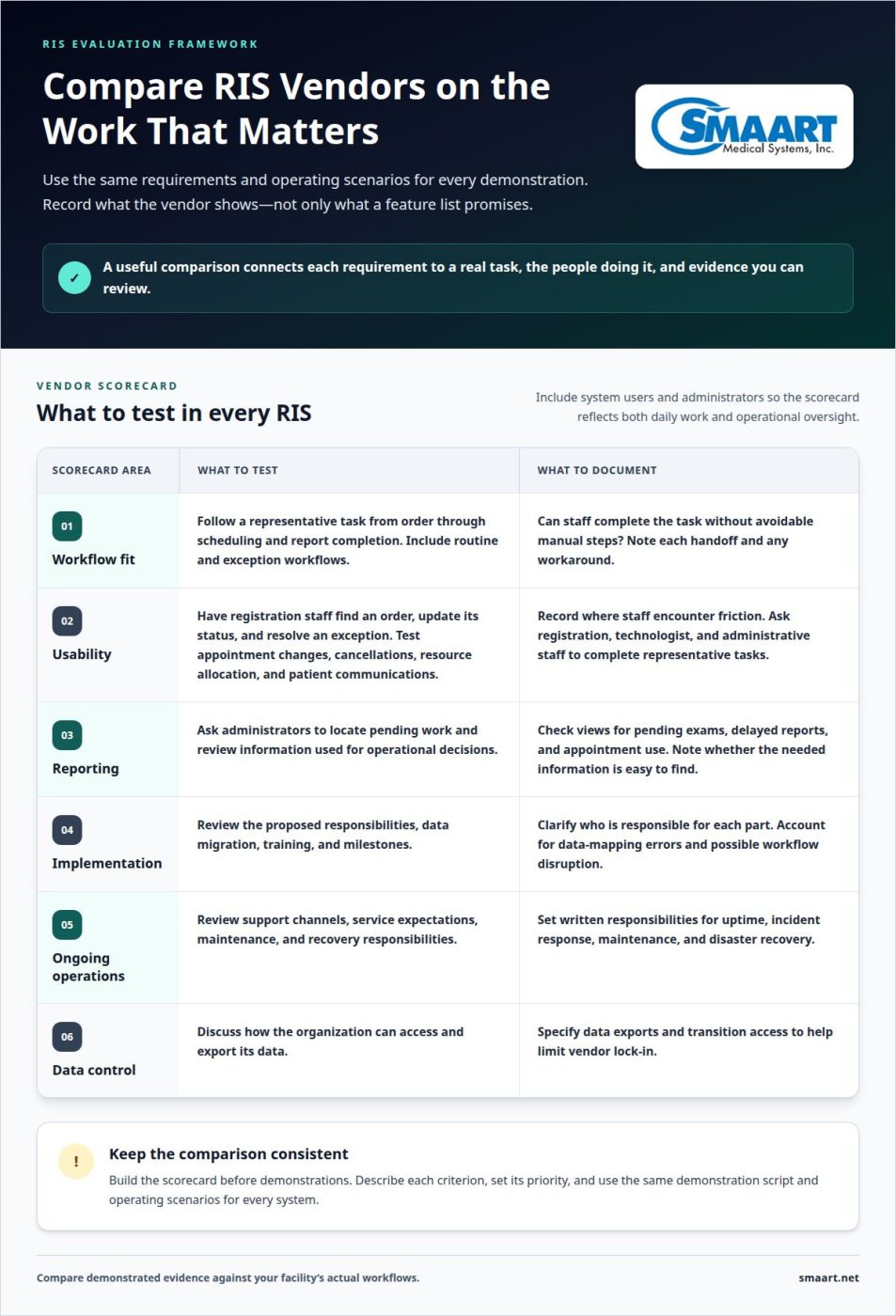
Compare each RIS against the same requirements, evidence, and operating scenarios. A consistent method helps distinguish a polished demonstration from a system that fits your team’s actual work.
Build a scorecard before reviewing demonstrations. Describe each criterion, set its priority, and record what the vendor demonstrates, not just what a feature list promises. Include both system users and administrators. Their perspectives may reveal different needs: registration staff may focus on appointment changes, while managers need reliable operational reports.
- Workflow fit: Can staff complete your representative tasks without avoidable manual steps?
- Usability: Can registration staff find an order, update its status, and resolve an exception?
- Reporting: Can administrators locate pending work and review the information used for decisions?
- Implementation: Are responsibilities, data migration, training, and milestones clearly described?
- Ongoing operations: Are support channels, service expectations, maintenance, and recovery responsibilities documented?
Use the same demonstration script for every system. For example, start with a routine appointment, then change its time after correcting a referral detail. Observe how staff find the record, make the update, and see its effect on later work. Note extra navigation, duplicate entry, and unclear handoffs. These observations make responses easier to compare than general claims about efficiency.
Review the written proposal alongside the demonstration. Distinguish standard functionality from configuration or additional project work, and identify who owns each implementation task. Clarify how existing records can be exported if your organization changes systems later. This supports continuity and reduces reliance on undocumented processes. Compare proposed training and support arrangements with the needs of each staff group, including administrators who maintain workflows.
Document trade-offs and unresolved operational impacts. A system may work well for scheduling but require more effort for reporting. A clear comparison makes those differences visible, so leaders can weigh fit against facility priorities instead of selecting by feature count alone.
How does RIS integrate with PACS, EHR, DICOM, and HL7 systems?
An RIS coordinates imaging orders and workflow, while connected systems exchange patient, exam, image, and report information. Integration links the radiology information system with the electronic health record (EHR) and picture archiving and communication system (PACS), using standards such as HL7 and DICOM where applicable.
In a typical workflow, an order enters from the EHR and is matched to the patient and requested exam in the RIS. The RIS manages scheduling and exam status. Imaging equipment produces studies that move to PACS, commonly using DICOM, the standard for medical imaging information. After interpretation, report information can return through the RIS to the EHR, giving clinicians access to the result.
HL7 supports the exchange of healthcare messages, such as patient details, orders, and results. DICOM supports imaging data and related information. Their roles differ, so integration planning should define which system creates, updates, and receives each data element. For example, determine where patient demographics originate and how a corrected name reaches the RIS and PACS.
- Map the flow: Identify each sender, receiver, and handoff for orders, scheduling updates, exam status, images, and reports.
- Match records: Define how patient and order identifiers connect across the EHR, RIS, and PACS.
- Handle exceptions: Decide how staff see rejected messages, missing details, and corrections.
- Test workflows: Use sample cases to trace an order from EHR entry through imaging and report delivery.
Interface testing should cover routine and corrected records. A duplicate order, for example, can reveal whether connected systems flag mismatches or create confusing parallel records. Review message logs and error handling with the teams responsible for each system. Clear ownership helps teams resolve failures without guesswork.
Before implementation, document the required data flows and test responsibilities across the EHR, RIS, PACS, and imaging equipment. Discuss your radiology integration needs as you plan a connected workflow.
SMAART Medical Systems
SMAART Medical Systems, Inc. helps hospitals and clinics match radiology management software to practical workflow needs. If your evaluation has raised questions about administrative workflows, system fit, or coordination with existing EMR and HIS platforms, SMAART-PACS and SMAART-RIS are designed to integrate with those systems.
SMAART Medical Systems offers SMAART-RIS for radiology information management, SMAART-PACS for image storage and distribution, and SMAART-SHARE for cloud-based image sharing. This lets imaging organizations consider administrative processes alongside image management and sharing needs, rather than treating each requirement in isolation.
Bring your workflow priorities and integration needs to a conversation with SMAART Medical Systems, Inc. Contact the team to discuss your radiology software needs.
Turn Your RIS Decision Into a Clear Next Step
The most useful way to decide how to choose a RIS system is to connect the selection to the change your organization wants to make. Define what should improve for staff after implementation, then identify who will guide the transition and how progress will be assessed. A shared direction helps teams move from evaluating software to planning a workable change.
Use your priorities to guide a focused discussion with the people responsible for operations, clinical workflows, and technology. Bring forward the requirements that matter most and the questions that remain open. This creates a practical starting point for considering how a solution could fit your organization, while keeping the needs of daily users in view.
If you’re ready to explore the next step for your radiology operations, contact SMAART Medical Systems, Inc. A clear plan can make the path forward feel more manageable, and your team can approach the decision with purpose.
Frequently Asked Questions
What is a radiology information system (RIS), and what features should it include?
A radiology information system manages radiology-related patient information and clinical scheduling. Useful capabilities depend on the facility’s workflow, but may include order and appointment management, exam tracking, report distribution, and billing integration. Dictation with speech recognition and a modality worklist may also matter. Prioritize features that address actual tasks, such as coordinating an appointment change with an exam record.
What are the costs of RIS software, implementation, training, and maintenance?
Total cost depends on system configuration, implementation scope, training needs, integrations, and ongoing maintenance. Compare the full ownership picture, not just software licensing: account for data migration, interface work, staff training, support, upgrades, and continuing service costs. SMAART Medical Systems offers purchase, lease, rental, and cloud-based models. Contact the team to discuss your organization’s requirements and pricing.
What is the typical RIS implementation timeline and process?
Implementation timing depends on workflow complexity, integrations, data migration, and staff readiness. The process commonly includes requirements planning, system configuration, interface setup, data preparation, testing, training, and launch. For example, a facility connecting an RIS to an EHR and PACS needs time to validate exchanged orders and results. A phased plan with named owners helps teams manage dependencies and prepare for the transition.
How to check RIS vendor references, certifications, and financial stability?
Assess vendor fit by reviewing relevant customer examples, documented credentials, and available information about business continuity. References are most useful when they reflect similar facility workflows and integration needs. Check that any certification applies to the product and scope under consideration, rather than relying on a broad label. Review contract terms for data access, export, and transition provisions to understand continuity if your needs change.