How to Replace Radiology CDs with Cloud Sharing: A 2026 Implementation Guide
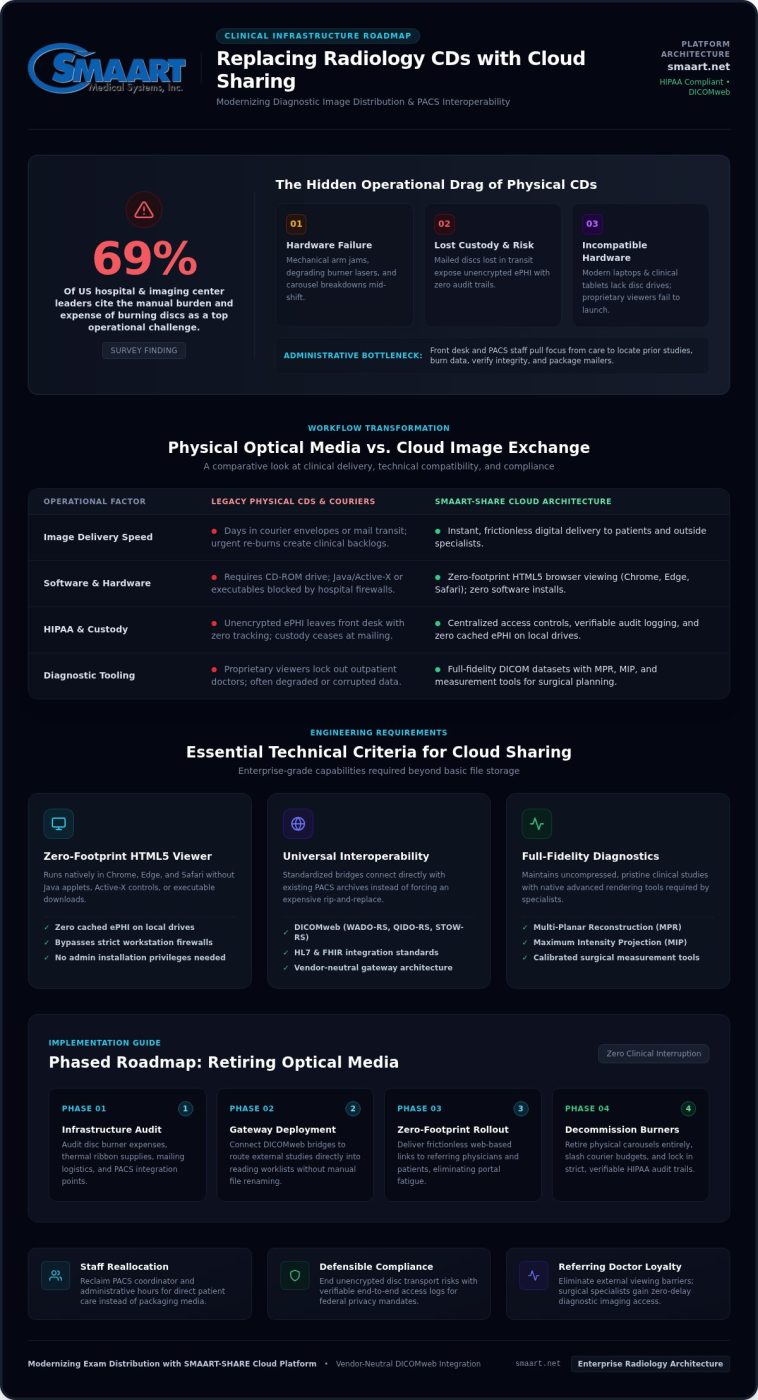
In a survey of US hospital and imaging center leaders, 69% cited the manual burden and expense of burning discs as a top operational challenge. Your facility produces cutting-edge diagnostic studies every day, yet your administrative staff still spend valuable hours burning, labeling, and mailing physical media that modern laptops can’t even read. The decision to replace radiology CDs with cloud sharing is no longer just an IT preference; it’s a fundamental workflow upgrade that protects staff time and modernizes your practice.
You already know the daily friction: lost mailers, damaged discs, and referring physicians locked out by proprietary viewing software. It’s an exhausting cycle that drains resources. In this 2026 guide, you’ll discover how to eliminate disc-burning hardware entirely, slash administrative overhead, and deploy instant, zero-footprint web access for patients and outside specialists. We’ll walk you through the practical, step-by-step roadmap to modernize your image distribution while maintaining strict HIPAA compliance and verifiable audit trails from day one.
Key Takeaways
- Uncover the hidden labor costs and diagnostic delays tied to physical media maintenance, burner hardware, and courier workflows.
- Identify the core technical standards you need for secure web exchange, including zero-footprint browser viewing, centralized access controls, and strict audit logging.
- Follow a phased, structured roadmap to replace radiology CDs with cloud sharing without interrupting daily clinical schedules or existing PACS operations.
- Eliminate portal fatigue and boost adoption among referring physicians and patients by deploying frictionless, secure digital delivery methods.
- Learn how purpose-built platforms like SMAART-SHARE integrate with your current infrastructure to streamline image distribution across your entire clinical network.
The Hidden Operational Costs and Clinical Risks of Radiology CDs
Relying on optical discs places an invisible drag on clinical performance. Beyond the purchase of blank discs, hardware burners demand ongoing mechanical maintenance, specialized thermal ribbon stock, and customized disc labeling supplies. Mechanical arms jam, burning lasers degrade over time, and automated carousels break down mid-shift. Imaging centers end up spending substantial operational funds simply maintaining physical distribution machinery that the broader computing industry abandoned years ago.
The push to electronic exchange of medical images reflects the reality that optical media introduces real clinical risk. When facilities decide to replace radiology CDs with cloud sharing, they eliminate deep vulnerabilities that compromise patient care and practice stability.
Workflow Bottlenecks and Administrative Labor Burden
Disc production pulls front-desk coordinators and PACS administrators away from patient-facing duties. Staff must locate previous studies, burn the data, run manual integrity checks, print labels, and package media for mailing. When a disc fails or arrives corrupted at an external clinic, the entire workflow repeats. Referring specialists cannot afford to wait days for courier envelopes when evaluating surgical candidates or progressive trauma. Emergency re-burns and secondary facility pickups frustrate clinicians, create clinical backlogs, and leave patients stranded in bureaucratic holding patterns.
HIPAA Compliance Exposure and Patient Frustration
Physical discs represent a constant compliance vulnerability under federal privacy laws. Once unencrypted media leaves the front desk, formal tracking ends. Consider the immediate operational and compliance risks:
- Loss of custody: Discs lost in transit or misdelivered by mail couriers expose unencrypted electronic Protected Health Information (ePHI) without an audit trail.
- Hardware incompatibility: Modern consumer laptops and clinical tablets lack disc drives, leaving patients completely unable to view their own imaging records.
- Software barriers: Embedded proprietary viewers frequently fail to launch on updated operating systems, locking out outpatient doctors.
Every unreadable disc forces callbacks to your front desk. Choosing to replace radiology CDs with cloud sharing removes these friction points instantly, replacing physical vulnerabilities with traceable, zero-footprint web access that protects your staff and keeps your referring community satisfied.
Evaluating Cloud Medical Image Sharing: Essential Technical Criteria
Modernizing image distribution requires more than simply uploading files to standard cloud storage. When clinical teams replace radiology CDs with cloud sharing, they need an enterprise framework that guarantees diagnostic precision and total regulatory compliance. That means moving beyond compressed JPEGs to maintain pristine, full-fidelity DICOM datasets complete with multi-planar reconstruction (MPR) capabilities, maximum intensity projection (MIP), and precise measurement tools that outside specialists rely on for surgical planning.
Zero-Footprint Web Viewers vs. Downloadable Software
A true zero-footprint HTML5 viewer runs entirely within standard web browsers like Chrome, Edge, or Safari. It leaves zero cached electronic Protected Health Information (ePHI) on local drives once the session ends. In contrast, older legacy viewers require Java applets, Active-X controls, or executable downloads. Those outdated tools trigger institutional firewall blocks, demand administrative installation privileges, and frustrate referring surgeons on tight clinic schedules. Browser-native rendering bypasses workstation restrictions entirely, delivering instant, diagnostic-quality viewing without software installations.
Interoperability and Infrastructure Compatibility
A resilient cloud architecture connects seamlessly with your current on-premise imaging archives rather than forcing an expensive rip-and-replace project. Standardized data bridges make this possible:
- Universal protocols: Native support for DICOMweb (WADO-RS, QIDO-RS, STOW-RS), HL7, and FHIR ensures smooth communication across diverse multi-facility healthcare systems.
- Automated routing: Cloud gateways capture external studies and route them directly into local reading worklists without manual file renaming or disc ripping.
- Vendor neutrality: Standards-based communication keeps your data portable, preventing vendor lock-in across disparate PACS archives.
- Rigorous cybersecurity: Modern frameworks mandate AES-256 encryption at rest, TLS 1.3 encryption in transit, multi-factor authentication (MFA), and detailed six-year access logs.
As you evaluate options to replace radiology CDs with cloud sharing, look for systems built around lightweight browser delivery and open standards. Exploring a modern imaging setup like SMAART-SHARE helps imaging teams confirm that their distribution layer integrates smoothly with existing modalities, protecting clinical workflows while giving outside providers instant access.
Step-by-Step Transition Plan: Phasing Out CDs for Cloud Sharing
Switching from optical media to web distribution requires an orderly operational cutover. Simply buying a cloud tool won’t solve the problem if your front desk continues burning discs out of habit. A successful migration pairs clear technical milestones with structured policy updates. When you systematically replace radiology CDs with cloud sharing, you protect patient schedules, ease administrative stress, and keep referring clinics engaged throughout every stage.
Phase 1 & 2: Assessment and Infrastructure Integration
Start with a thirty-day operational audit. Track outgoing disc volumes by recipient type, specialty, and clinical urgency to pinpoint who requests physical media most frequently. Next, deploy your cloud gateway. Connect it directly to your existing PACS archive using DICOMweb or standard TLS-encrypted routing nodes. This configuration lets outbound studies queue automatically without interrupting primary diagnostic reading workflows. Run bandwidth stress tests during peak imaging hours to ensure bulk CT and MRI uploads don’t compete with routine modality traffic. For imaging practices that need specialized network guidance during this transition, managed IT providers such as Trinity Networx, LLC offer proactive support and cybersecurity to ensure high-volume data routes cleanly without overloading local infrastructure.
Phase 3 & 4: Staff Enablement and Pilot Deployment
Equip your records coordinators, front-desk receptionists, and technologists with practical training. Give them simple scripts for common patient interactions: “We now deliver your images via a secure digital link sent directly to your phone or specialist.” Once internal teams are confident, launch a targeted 60-day pilot program:
- Select high-volume partners: Partner with three to five responsive orthopedic, neurology, or surgical practices that handle frequent referrals.
- Configure zero-install links: Provide one-click access links or secure tokens so their clinical coordinators can open studies immediately.
- Collect structured feedback: Evaluate diagnostic load speeds, tool responsiveness, and external staff satisfaction weekly.
- Refine the workflow: Address specific usability questions before expanding the rollout facility-wide.
Phase 5: Full Media Sunsetting and Policy Enforcement
Set a hard sunset date for routine disc production. Place clear digital-access signage at check-in desks and publish instructional notices across your patient-facing website. Relegate physical disc burners to offline emergency backup status, then unplug them. Enforce an administrative approval policy for rare physical media exceptions. When imaging leaders establish clear boundaries, operational teams quickly replace radiology CDs with cloud sharing as their default, permanent standard.
Managing Stakeholder Adoption: Referring Physicians and Patients
Technology migrations often stall on human habits rather than technical limitations. When you replace radiology CDs with cloud sharing, success hinges on how seamlessly outside doctors and patients adopt the new workflow. If referring practices feel forced into cumbersome registration processes, they’ll demand discs again. Solving this friction means prioritizing immediate time savings for external office managers and providing zero-barrier access that lets clinicians view diagnostic series within seconds.
Onboarding Referring Doctors and Specialist Networks
External clinical coordinators don’t want another password to remember or a complex portal to manage. Overcoming their initial hesitation requires showing them that digital image exchange saves their team substantial manual effort. Host brief, five-minute virtual demonstrations for specialist front offices, illustrating how they can open diagnostic-quality imaging without creating new accounts or installing software plugins. Highlight three operational advantages:
- Earlier surgical reviews: Orthopedic and general surgeons can review full pre-operative series days ahead of procedures instead of waiting for hand-delivered envelopes.
- Direct archive ingestion: Specialists can push received cloud DICOM studies straight into their own local viewing systems with a single click.
- Automated delivery tracking: Comprehensive audit logs give both practices instant confirmation showing exactly when a study was opened, downloaded, or shared.
Delivering an Intuitive Patient Image Access Experience
Patients expect digital convenience, but complicated portal registrations create drop-offs. Traditional disc distribution forced patients to drive across town, pay for hospital parking, and wait at a records counter simply to pick up a plastic disc they couldn’t even view at home. Secure text and email links change this dynamic completely. By sending an encrypted token directly to a patient’s smartphone or personal inbox, facilities allow individuals to review their scans instantly or forward them to a consulting second-opinion doctor with one tap.
Ensure your front-office staff distribute concise, one-page physical guides and website instructions using plain language rather than medical jargon. When you modernize your clinical workflows to replace radiology CDs with cloud sharing, you eliminate unnecessary trips for patients, build deeper loyalty across your referring specialist community, and remove hundreds of administrative support calls every month.
Modernizing Exam Distribution with SMAART-SHARE Cloud Platform
Eliminating physical media shouldn’t require complex enterprise contracts or months of custom development. For imaging centers seeking a practical, turnkey path to replace radiology CDs with cloud sharing, SMAART-SHARE delivers an agile and affordable cloud-based image exchange solution. It removes the daily operational headaches of mechanical burners, blank disc inventories, and courier logistics, replacing them with immediate browser-based access for your entire clinical network.
High-Performance Cloud Architecture without Proprietary Hardware
SMAART-SHARE operates without demanding expensive on-premise server clusters or specialized distribution hardware. Everything runs securely through a browser-native environment. Front-desk personnel can instantly generate secure, encrypted distribution links or QR codes directly within their normal administrative workflow. Outpatient providers and patients get instant access via zero-footprint web viewing tools that render full-fidelity diagnostic data without local software installations. The platform maintains end-to-end encryption and comprehensive audit logging, ensuring every disclosure aligns with stringent HIPAA security standards.
Unified Ecosystem Integration with SMAART-PACS and SMAART-RIS
True operational efficiency happens when image distribution connects directly to daily imaging operations. While SMAART-SHARE interfaces natively with third-party PACS and EMR systems via standard protocols, it unlocks maximum performance when paired with SMAART-PACS and SMAART-RIS. This integrated trio unifies your entire clinical chain:
- Coordinated study scheduling: Exam orders processed in SMAART-RIS connect directly to modality worklists.
- Seamless diagnostic review: Radiologists interpret studies rapidly within the high-performance SMAART-PACS environment.
- Instant outbound distribution: Finalized reports and accompanying DICOM series populate SMAART-SHARE automatically, ready for distribution to patients and referring clinics within seconds.
Replacing legacy media protects your bottom line, cuts administrative overhead, and builds lasting goodwill with referring doctors. To see how simple it is to upgrade your distribution workflow and replace radiology CDs with cloud sharing, explore modern exam sharing with SMAART-SHARE today.
Take the Next Step Toward Disc-Free Radiology Distribution
Continuing to burn optical discs drains administrative labor, runs up supplies expenses, and frustrates referring physicians who need prompt access to patient studies. Transitioning away from legacy media eliminates burner maintenance headaches, lost shipments, and unreadable files. When you choose to replace radiology CDs with cloud sharing, you give your clinical team reliable, automated workflows that keep diagnostic data moving without delay.
The right cloud framework delivers native zero-footprint diagnostic viewing across all modern web browsers while integrating seamlessly with your existing PACS, RIS, and EMR platforms. You eliminate disc burner maintenance, packaging waste, and courier fees entirely. Upgrading your infrastructure doesn’t have to be overwhelming or disruptive to your daily volume. Discover how SMAART-SHARE streamlines medical image sharing and bring effortless, secure digital access to your imaging practice today.
Frequently Asked Questions
Why should an imaging center replace radiology CDs with cloud sharing?
Imaging centers should replace radiology CDs with cloud sharing to eliminate hardware breakdowns, courier expenses, and severe administrative bottlenecks. Producing physical media pulls front-desk staff away from patient care and causes treatment delays when discs get damaged or lost. Cloud delivery sends diagnostic-quality studies instantly to referring doctors and patients via secure web links, ensuring faster consultations and eliminating ongoing burner maintenance completely.
Do referring physicians need specialized software to view cloud-shared medical images?
No, referring physicians don’t need proprietary software, browser extensions, or local viewer installations. Modern platforms use zero-footprint HTML5 diagnostic viewers that open immediately inside standard browsers like Chrome, Edge, or Safari. This browser-native design lets specialists review complete DICOM studies, manipulate multi-planar reconstructions, and measure anatomical structures on any internet-connected desktop, laptop, or tablet without needing local administrator rights.
How does cloud image sharing maintain strict HIPAA compliance?
Cloud image sharing secures patient data by applying AES-256 encryption at rest and TLS 1.3 encryption in transit, replacing vulnerable physical discs with controlled web pathways. Granular permission tiers and multi-factor authentication prevent unauthorized record access. In addition, systems maintain detailed, tamper-evident audit logs that record every view, download, and external share, satisfying federal disclosure reporting requirements without manual paperwork.
Can cloud image sharing platforms integrate with existing PACS and RIS solutions?
Yes, cloud sharing platforms integrate directly with existing infrastructure using standard protocols like DICOMweb, HL7, and FHIR. Outbound cloud gateways capture finalized studies from your current PACS archive and synchronize patient demographics from your RIS without disrupting active modality worklists. Platforms like SMAART-SHARE are specifically engineered to interface smoothly with third-party hospital systems, while offering seamless native connectivity when combined with SMAART-PACS and SMAART-RIS.
What happens if a patient or outside doctor still insists on receiving a physical CD?
Facilities can maintain a single disc burner on standby as an emergency backup for rare exception requests. When patients or outside offices ask for physical media, staff can guide them toward digital access first by demonstrating its speed and convenience. If someone still requires physical media due to strict institutional rules, administrators can approve an exception while continuing to use digital sharing as the standard default.
How does cloud sharing handle large datasets like 3D mammography or multi-slice CT studies?
Cloud platforms handle massive datasets through intelligent server-side rendering and streaming protocols rather than forcing users to download gigabytes of raw data. When opening high-slice CT scans or tomosynthesis exams, the viewer streams slices on demand as the clinician scrolls. This asynchronous architecture prevents workstation memory freezes, bypasses local network bandwidth limits, and delivers smooth, diagnostic-speed image manipulation even on standard office connections.
How quickly can an outpatient radiology clinic transition from burning CDs to cloud sharing?
Most outpatient imaging centers can replace radiology CDs with cloud sharing within two to four weeks. The technical setup involves connecting a lightweight cloud gateway to your local network, validating bandwidth, and establishing routing rules. Because zero-footprint web viewers require no client-side workstation installs, staff training and referring provider onboarding can happen quickly, allowing facilities to sunset routine disc burning on a predictable timeline.