
How to Select a PACS Vendor for Your Imaging Needs
Cloud isn’t automatically the better PACS choice, and on-premise isn’t automatically the safer one. To understand how to select a PACS vendor, start with your organization’s infrastructure, workflow, integration needs, and long-term costs, then compare cloud, on-premise, and hybrid options against those priorities.
It’s reasonable to focus first on where images will be stored and how they’ll be accessed. But the right decision also depends on how well a PACS connects with your existing clinical systems, what support and service-level agreements cover, and how costs may change as imaging volume grows. This guide walks through those comparisons, practical evaluation steps, and current selection trends so you can make a decision that fits your operations and future plans.
Key Takeaways
- Compare cloud, on-premise, and hybrid PACS against your workflows, infrastructure, and projected imaging volume.
- Prioritize connections with RIS, EHR, and directory services so patient, order, and access information stays consistent.
- Review support commitments and service-level agreements for clear uptime, response, and performance standards.
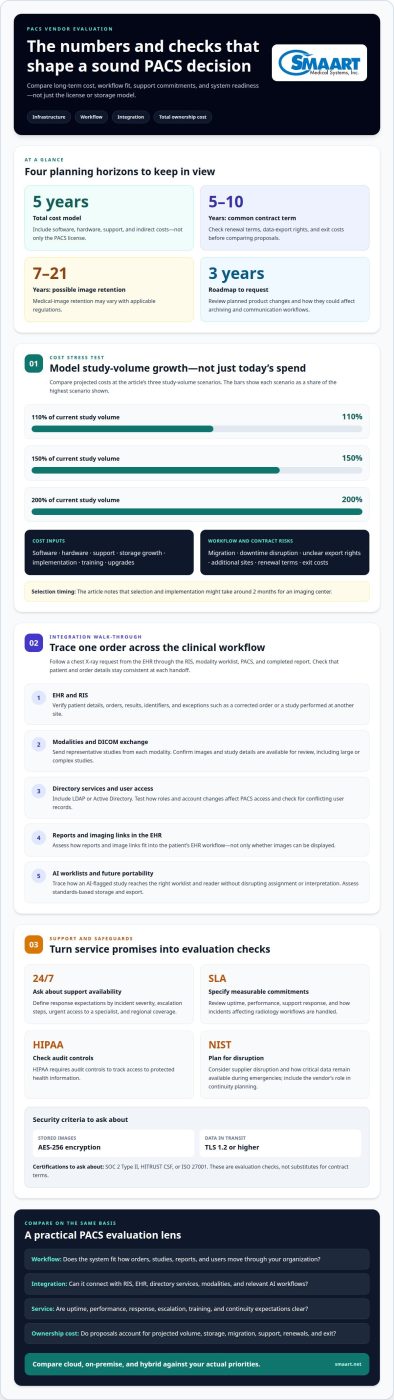
- Estimate total ownership costs over five years, including indirect expenses, and consider how the platform can adapt as needs change.
Integration with RIS, EHR, and directory services
Map how an imaging order moves from scheduling to interpretation and back. A PACS should connect with your RIS, EHR, and directory services so patient details, orders, results, and user access remain consistent across systems.
- Trace a patient order through the workflow. For example, follow a chest X-ray request from the EHR to the RIS, modality worklist, PACS, and completed report. Check that the correct patient and order details carry through each step, and note where staff might otherwise need to re-enter information.
- Test DICOM exchange with the modalities used in your healthcare setting. Send representative studies from each modality to the PACS, then confirm the images and associated study details are available for review. Include large or complex studies, since a basic test may not reflect daily imaging workflows.
- Include directory services such as LDAP or Active Directory in the integration plan. Test how a user’s role and account affect PACS access, then consider what happens when that account changes. Consistent access management helps prevent separate, conflicting user records across clinical systems.
- Assess EHR interoperability beyond image display. Determine how reports or imaging links fit into the patient’s EHR workflow. Map how identifiers, orders, and results move between systems, and document exceptions such as a corrected order or a study performed at another site.
- Evaluate AI interoperability and worklist integration with a real workflow example. If an AI tool flags a study, trace how that information reaches the appropriate worklist and reader without disrupting assignment or interpretation. Also assess standards-based storage and export, which can support future system changes. NIST advises considering critical supplier disruptions in risk management, including emergencies.
Support and service-level agreements
Use the service-level agreement (SLA) to define uptime, performance, and support commitments. Include how the vendor handles incidents affecting radiology workflows.
HIPAA requires audit controls to track access to protected health information. Medical-image retention may range from 7 to 21 years, depending on applicable regulations.
Review Support Response Times and Training
Set response-time expectations by incident severity, and define escalation steps in the SLA. Assess whether support is available 24/7, how urgent cases reach a specialist, and what regional coverage applies. Compare references from similar organizations, written response times, and upgrade history. For training, identify who supports radiologists and other users as they learn the viewer, retrieve images, and manage studies. Use a sample workflow, such as a delayed study, to clarify roles.
Consider Vendor Support and Future-Proofing
Review the vendor’s upgrade process, roadmap, and escalation procedures before choosing a PACS. Request a product roadmap covering the next three years, then assess how changes could affect your archiving and communication workflows. Ask how support responds to a service disruption or disaster, and how critical data remain available. The National Institute of Standards and Technology (NIST) advises healthcare organizations to keep critical data available during emergencies. Include the vendor’s role in continuity planning.
- Test DICOM and non-DICOM support with examples from your imaging environment, such as a radiology study and a document attached to a patient record. Confirm how each item is stored, retrieved, and viewed, and identify any format limitations. Add security criteria to the evaluation: ask about AES-256 encryption for stored images, TLS 1.2 or higher for data in transit, and SOC 2 Type II, HITRUST CSF, or ISO 27001 certification. These are evaluation checks, not substitutes for contract terms. A clear combination of technical coverage, training, and escalation responsibilities makes vendor support easier to assess.
Total cost of ownership
Compare the full operating cost, not just the PACS license. Include implementation, support, storage, and workflow impact.
Compare Multi-Year Licensing Costs
Build a five-year total cost of ownership model covering software, hardware, support, and indirect costs. Compare site licensing for users, modalities, and future integrations with any volume-based terms. Model costs at 110%, 150%, and 200% of current study volume to see how growth changes the total. PACS contracts commonly run five to ten years, so include renewal terms and exit costs.
During a demo or RFP, ask what each license covers, how additional sites affect billing, and whether integrations are included. Comparing proposals against the same criteria makes it easier to evaluate equivalent options rather than headline fees.
Identify Hidden Costs and Risks
List expenses that can sit outside the core license, including data migration, storage growth, training, upgrades, and downtime-related workflow disruption. Ask how prior studies will move into the new PACS system, how access will be preserved during cutover, and whether parallel operation is planned. A selection and implementation process might take around 2 months for an imaging center.
Common risks include underestimating study growth, unclear data-export rights, and poor usability that slows clinical work. During the RFP, ask who handles migration, what happens when a contract ends, and how unexpected storage or integration needs are addressed. Include the answers in your cost comparison, not just your technical notes.
Review Pricing and Ownership Costs
Evaluate the proposed price alongside usability, vendor reputation, and fit with hospital workflows. A PACS quote depends on the case and is provided after a quote request; relevant factors include scope, licensing, integrations, support, and storage. Test the viewer with representative studies, then assess whether clinicians can complete routine tasks without extra steps.
Estimate study volume over five years and compare the vendor’s assumptions with your own forecast. Ask for references from similar healthcare organizations and examine upgrade history. A system that integrates with clinical workflows, including cardiology where needed, may reduce duplicate processes. Balance that fit against support terms and long-term ownership obligations.
PACS vendor evaluation and selection trends
Cloud is receiving attention, but it isn’t the default choice for every organization. KLAS Decision Insights covered purchase decisions from July 2023 through June 2025, offering context for evaluating current selection priorities.
- Define your preferred architecture before comparing proposals. Decide whether cloud, on-premise, or hybrid fits your network, staffing, and operating model. KLAS reported that cloud was mentioned in 30% of PACS decisions in its analysis. Treat that figure as a market signal, not a recommendation. To understand how to select a PACS vendor for your organization, compare how each architecture supports image access, storage, and communication in daily operations.
- Forecast study volume across the next five years, then assess the platform against that outlook. Include current sites, likely growth, and potential new specialties. Organizations evaluating enterprise imaging strategies range from below 100,000 to well over 1 million annual studies. Consider whether the platform can extend beyond radiology to cardiology, dermatology, digital pathology, or the operating theatre.
- Test performance using your own data and network. Include large studies, multiple locations, and remote consultations. Compare 95th-percentile prior-image retrieval times at facilities similar in size to yours. Check that clinicians can use diagnostic-grade viewer tools without performance lag. Test secure sharing across sites and external networks, rather than relying on a single workstation demonstration.
- Weigh flexibility against total cost. Evaluate third-party AI compatibility, standards-based storage, data export rights, and vendor-neutral archive support. These capabilities can reduce dependence on one viewer or workflow. KLAS reported that 22% of analyzed PACS decisions involved consolidation or replacement at a recently acquired facility. Less than 4% of imaging respondents mentioned AI as a main PACS consideration. Use these trends to frame, not replace, your own priorities when deciding how to select a PACS vendor.
Turn selection trends into criteria that reflect your environment and future plans. Explore PACS selection options for your imaging workflows.
SMAART Medical Systems: SMAART-PACS
SMAART Medical Systems, Inc. offers SMAART-PACS for hospitals and clinics evaluating radiology management software. It is designed to integrate with existing EMR and HIS platforms, making it relevant when clinical systems need to work together.
SMAART-RIS may also fit organizations assessing radiology information workflows alongside PACS. For sharing imaging, SMAART-SHARE is a cloud-based sharing platform. Consider these offerings when your selection priorities include clinical-system integration, radiology management, or image sharing. The right starting point depends on the workflows and systems your organization needs to support.
Contact SMAART Medical Systems, Inc. to discuss your PACS needs.
Turn your PACS decision into a practical next step
The strongest choice is one your team can support with confidence, not simply the option that looks most attractive in a proposal. Use your selection criteria to focus discussions on current workflows, integration priorities, support, and future plans. This keeps the decision grounded in your organization’s operational needs.
If you’re deciding how to select a PACS vendor, connect those priorities with the solutions that fit your imaging environment. SMAART Medical Systems, Inc. offers SMAART-PACS, SMAART-RIS, and SMAART-SHARE for radiology management and image sharing needs.
Contact SMAART Medical Systems, Inc. to discuss the right next step for your organization. A clear plan can help your team move ahead with less complexity and greater confidence.
Frequently Asked Questions
On-premise or cloud?
Choose an architecture that fits your organization’s infrastructure, staffing, and access needs. On-premise PACS uses locally managed infrastructure, while cloud PACS provides access through a hosted environment. A hybrid model combines elements of both. For example, an organization with limited local IT capacity may consider cloud-based options, while one with established infrastructure may prioritize local control.
The US Imaging Market Is Hot, Which PACS Vendors Are the Most Competitive?
There isn’t one most competitive PACS vendor for every imaging organization. The right fit depends on workflow, interoperability, usability, support, deployment approach, and total ownership costs. Compare vendors using the same tasks, such as opening a prior study during interpretation or sharing images with an external clinician. This makes the evaluation more useful than relying on rankings or broad market claims.
What Are Organizations Looking for in Their PACS?
Organizations seek a PACS that fits current imaging workflows while supporting future operational needs. For example, a clinic adding another modality may prioritize simple expansion, while a hospital consolidating systems may focus on consistent access across departments. Buyers also consider image retrieval, secure sharing, clinical usability, integration, support, and data portability. The priority order depends on the organization’s goals and existing environment.
How do PACS vendors compare on features, usability, and interoperability?
Compare vendors using the same tasks and representative users, rather than feature lists alone. Ask a radiologist to open a prior study, adjust images, and complete a routine review in each viewer. Then assess whether staff can move through the workflow without duplicate data entry. For interoperability, examine how the PACS exchanges information with connected systems and handles studies from your imaging environment.
What DICOM and HL7 standards should a PACS support?
A PACS should support DICOM for medical imaging and related exchanges with compatible modalities and systems. HL7 supports the exchange of healthcare information, such as patient, order, and result data, between clinical applications. Ask how the system handles the specific DICOM workflows and HL7 interfaces your organization uses. Test representative studies and messages, including how mismatches are surfaced for staff to resolve.
How should a PACS integrate with an EHR, RIS, and imaging equipment?
Integration should preserve the connection between the patient, imaging order, acquired study, and report. For example, the EHR can provide relevant clinical information, the RIS can manage radiology workflow, and connected equipment can send images to the PACS. Map a typical examination from order through review, then test exceptions such as corrected demographics or a rescheduled appointment.