Mobile App for Viewing Medical Images: Patient Access and Accuracy
Medical images can travel with the patient. A mobile app for viewing medical images can provide access to a scan on a phone, while secure sharing links let patients send access by email, text, or WhatsApp. Viewing a scan on a phone can make images easier to carry and share, but it is not the same as receiving a diagnosis.
It is reasonable to ask whether a smaller screen can show enough detail for an accurate reading. The answer depends on the display and the task. Research has compared mobile readings with findings from medical workstations, but results need to be interpreted in context.
This guide explains how patients access and share imaging, what can affect image quality on phones and tablets, and what research reports about reader accuracy. It also outlines radiology software options, so you can distinguish patient access tools from software designed for clinical workflows.
Key Takeaways
- Patient access typically depends on the imaging provider’s sharing method and the credentials or link used to open the study.
- Screen size, display quality, and viewing conditions can affect how clearly an image appears, so mobile access and diagnostic interpretation aren’t interchangeable.
- Research comparing mobile readers with workstation findings offers useful context, but the reading task and clinical setting matter when interpreting results.
- Radiology apps serve different needs: some support patient access, while others are designed for clinical imaging workflows.
Is There A Mobile App To Access Patient Medical Imaging?
Yes, patients can access scans through an imaging provider’s portal or a mobile app for viewing medical images. Look for clear login instructions, secure-link sharing, and tools for navigating DICOM studies.
Patient Portals and Image Sharing
A patient portal connects patients with records and images made available by the imaging provider. Depending on the sharing method, patients may open scans with portal credentials or a secure link, then share access by email, text, or WhatsApp.
Secure links can make it easier to share protected health information while supporting security expectations associated with HIPAA. In one described workflow, image copies requested to mobile devices remain on the local server for 48 hours before deletion. That detail shows why access methods and storage periods matter.
Patient accounts also help families keep imaging together. One family reported tracking more than 20 imaging CDs during the first three months after their child, then 9 years old, was diagnosed with femur cancer. A physician described reviewing images of an athlete’s tibial fracture that had not healed. These examples show how digital access can help patients and clinicians share a study when discussing care.
Features of Mobile DICOM Viewers
A DICOM viewer displays medical imaging files, such as CT or MRI studies, on a mobile device. For patients, useful features include straightforward access, clearly organized studies, and practical sharing controls.
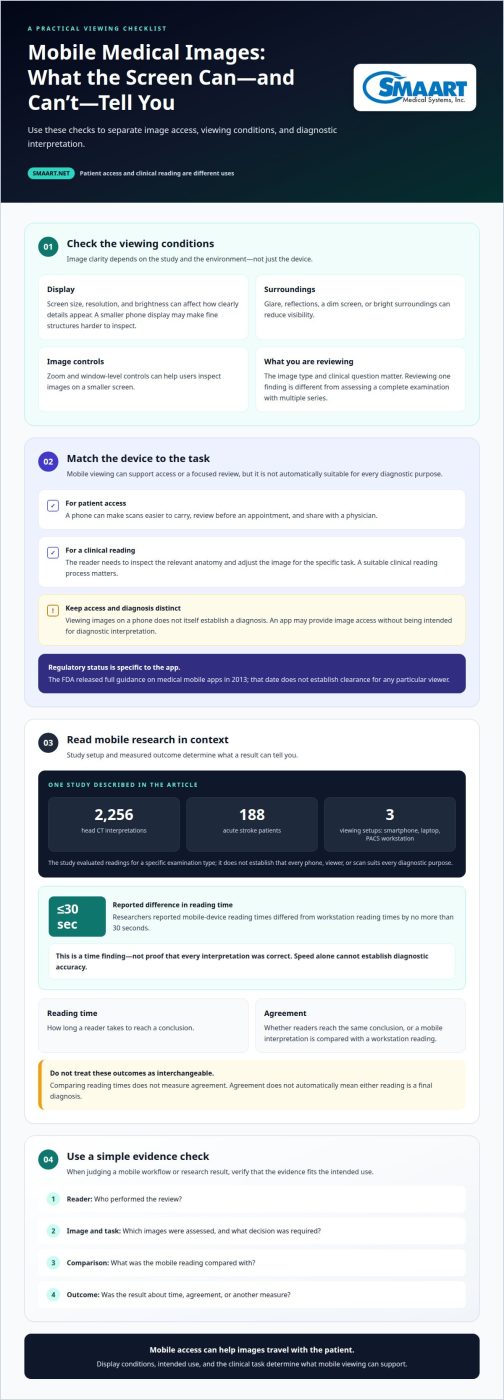
Check whether the viewer supports patient credentials or a provider-issued secure link. It should make it easy to identify the right study and move between its image series. Zoom and window-level controls can help users inspect images on a smaller screen, but viewing images alone does not establish a diagnosis.
Consider how you will share the study, too. A viewer with secure-link sharing can simplify discussion with a physician, while familiar options such as email, text, or WhatsApp may make it easier to send access. The provider’s portal determines the available route, so start by following its login or link instructions.
Diagnostic quality on smartphones and tablets
Mobile image quality depends on the study and viewing conditions. Screen size, resolution, brightness, glare, and zoom can affect how clearly details appear. A phone can help someone review images before an appointment, but its smaller display may make fine structures harder to inspect. The device is only one part of the viewing environment.
A 2019 study evaluated 2,256 head CT interpretations for 188 acute stroke patients. Readers used a smartphone, laptop, or PACS workstation. This design compares several viewing devices for a specific type of examination. It doesn’t establish that every phone, viewer, or scan is suitable for every diagnostic purpose.
Are mobile medical image viewer apps FDA-cleared or intended for diagnosis? Not automatically. An app may provide image access without being intended for diagnostic interpretation. The FDA released full guidance on medical mobile apps in 2013, but that date doesn’t establish clearance for any particular viewer. Intended use and regulatory status are specific to the app.
For a clinical reading, image presentation matters. The reader needs to inspect the relevant anatomy and adjust the image for the task. Reflections, a dim screen, or bright surroundings can affect visibility. Patients can become familiar with images before an appointment, but diagnostic interpretation requires an appropriate clinical reading process.
Consider the image type and clinical question as well as the device. Reviewing one finding is different from assessing a complete examination with multiple image series. A mobile display may support a particular workflow, but its suitability depends on whether it presents the information needed for that task. Accessing images on a phone and making a diagnosis are distinct uses.
Mobile viewing research and reader accuracy
Researchers reported that mobile-device reading times differed from medical workstation reading times by no more than 30 seconds. That finding concerns time, not whether every interpretation was correct. A reader might reach a conclusion quickly yet still need to assess image detail, compare findings, and consider the clinical question. Speed alone cannot establish diagnostic accuracy.
When comparing reading setups, distinguish the device from the task. Reviewing one image series differs from assessing a complete examination. A mobile display may suit a focused review, while a complex case can involve multiple series and findings. Study results are most useful when readers know which images were assessed and what decisions the task required.
Accuracy also depends on how researchers define agreement. Two readers may reach the same conclusion, or a mobile interpretation may be compared with a workstation reading. These approaches answer different questions. Agreement does not automatically mean either reading is a final diagnosis, and comparing reading times does not measure agreement. Keeping these outcomes separate makes results easier to interpret.
When evaluating a mobile workflow, consider the reader, image type, and purpose together. A radiologist checking a specific finding may follow a different process from a clinician reviewing images during a consultation. The key question is whether the evidence matches the intended task. Look for studies that describe their comparison method, reader role, and outcome, rather than relying on reading speed alone.
Radiology app vendors
Radiology vendors serve different users, so identify the intended workflow before comparing products. A patient-facing app can provide access to personal studies, while a clinical viewer supports image review in a care setting. Some platforms focus on image storage and distribution; others connect imaging operations with scheduling and reporting. These categories are not interchangeable.
Start with the task. A patient who needs to share a scan has different needs from a radiologist reviewing diagnostic images. Check whether the app is intended for patient access, clinical review, or both. Then look at supported image formats, mobile operating systems, and access methods, such as a portal login or secure link. These details help determine whether the app suits its intended user.
Next, consider how the app fits the existing imaging environment. A hospital may need mobile access connected to its image archive and clinical systems. A clinic may prioritize a straightforward workflow for staff reviewing studies. Compare how the software handles user permissions, image transfer, and access across devices. The right fit depends on the organization’s workflow.
Separate product claims from evidence. If a vendor says its app supports diagnostic interpretation, look for the stated intended use and relevant regulatory status. Do not assume a general image viewer is a diagnostic workstation. A quick download or attractive interface does not establish clinical suitability, either. Compare the stated use with the readers, studies, and decisions involved.
Build a shortlist around those needs: user type, clinical purpose, system fit, access controls, and documented intended use. That approach makes vendor comparisons more useful than choosing by app-store appearance alone. For organizations assessing connected radiology workflows, explore radiology workflow software options as part of the evaluation.
SMAART Medical Systems
SMAART Medical Systems, Inc. helps hospitals and clinics connect imaging access with the broader radiology workflow. Its software supports image management, radiology operations, and sharing. SMAART-PACS is a picture archiving and communication system, SMAART-RIS supports radiology information workflows, and SMAART-SHARE is a cloud-based sharing platform. The solutions are designed to integrate with existing EMR and HIS platforms.
For organizations assessing mobile image access, the next step depends on the need: managing image archives, coordinating radiology workflows, or sharing studies. These tools serve healthcare organizations rather than providing direct patient imaging or diagnostic readings. Contact SMAART Medical Systems, Inc. to discuss how its radiology software offerings relate to your organization’s imaging workflow.
Set a Clear Direction for Mobile Imaging
Make mobile access part of a deliberate imaging strategy, not a standalone technology decision. Define who needs to view studies, how access fits existing clinical workflows, and where diagnostic interpretation takes place. Assigning a clear role to each tool helps teams assess whether a mobile app for viewing medical images supports the experience they want for patients and staff.
For healthcare organizations planning their imaging workflow, software choices should align with the broader radiology environment. SMAART Medical Systems offers SMAART-PACS, SMAART-RIS, and SMAART-SHARE for image management, radiology operations, and sharing. These options can help organizations assess how mobile access fits their systems.
Start a conversation about your organization’s imaging workflow and priorities. Contact SMAART Medical Systems, Inc. to discuss the next step, and move forward with a clearer plan for connected imaging.
Frequently Asked Questions
What are the best mobile apps for viewing medical images such as DICOM scans?
The right choice depends on whether you need personal access or clinical image review. Patients usually benefit from the imaging provider’s portal or designated sharing tool, which connects access to that provider’s workflow. Clinicians need a viewer suited to their role and intended use. Before choosing, consider how the app opens DICOM studies, organizes series, and supports sharing with the people involved in care.
Which medical image viewer apps are available for iPhone and Android?
Availability varies by app and operating system, so an iPhone app may not have an equivalent Android version. Patients can start with the portal or app named by their imaging provider, then follow its instructions for their device. If a link opens in a browser rather than an installed app, the provider’s access process may still allow them to view the study.
Can patients view their MRI, CT, X-ray, and ultrasound images on a phone?
Patients can view studies on a phone when the imaging provider makes them accessible through a compatible portal or viewer. The experience varies by study: an MRI or CT may contain many image series, while an X-ray may be presented as a smaller set. Mobile access lets patients see their images, but it does not replace a clinician’s interpretation or explanation.
How do I import medical images into a mobile app from a CD, USB drive, or patient portal?
Use the access route provided for the study. A portal may let you open images after signing in, while a CD or USB drive may require a compatible computer or sharing workflow before a phone can access the files. SMAART-SHARE supports medical image sharing from CD, DVD, and USB drives. Keep the original media available until you can open the shared study.
What privacy and security risks apply when viewing medical images on a phone?
A phone may expose images if someone else can unlock it, a link reaches the wrong recipient, or files remain accessible after sharing. Use the provider’s intended access method, protect the device with its available lock settings, and avoid forwarding private links broadly. Send a study link only to the clinician or caregiver who needs it.
Can doctors securely share and review medical images with a mobile app?
Yes, doctors can share and review images through systems designed for secure sharing and collaborative viewing. The workflow should match the clinical task, so the intended care team can open a shared study without treating it as a diagnosis. SMAART-SHARE is a cloud-based platform for secure medical image sharing and collaborative viewing, designed for organizations that need a sharing workflow.