PACS System Performance: Find the Workflow Bottlenecks
PACS speed rarely comes down to one server. To understand how to evaluate PACS system performance, assess the full imaging path: acquisition, DICOM transfer, storage and retrieval, distribution, worklists, and the viewer. A delay at any stage can slow access to a study or make image review less responsive.
It’s easy to focus first on network speed or hardware. Both matter, but they’re only part of the picture. Caching and prefetch rules, storage tiers, network routing, and workflow design also affect how quickly studies reach the people who need them.
This article explains how each component affects performance and where bottlenecks can emerge, from image capture through review. You’ll see how to assess speed in the context of real radiology workflows, so you can distinguish a local delay from a system-wide constraint and make a more informed improvement plan.
Key Takeaways
- Trace delays across acquisition, transfer, storage, retrieval, and distribution to pinpoint where studies slow down.
- Assess DICOM and modality workflows alongside connections to scheduling and patient information systems.
- Look beyond bandwidth: load balancing, server location, and network routing can all affect image access speed.
- Review worklist organization and image-viewer behavior to spot workflow friction that technical metrics alone may miss.
PACS image acquisition, archiving, retrieval, and distribution
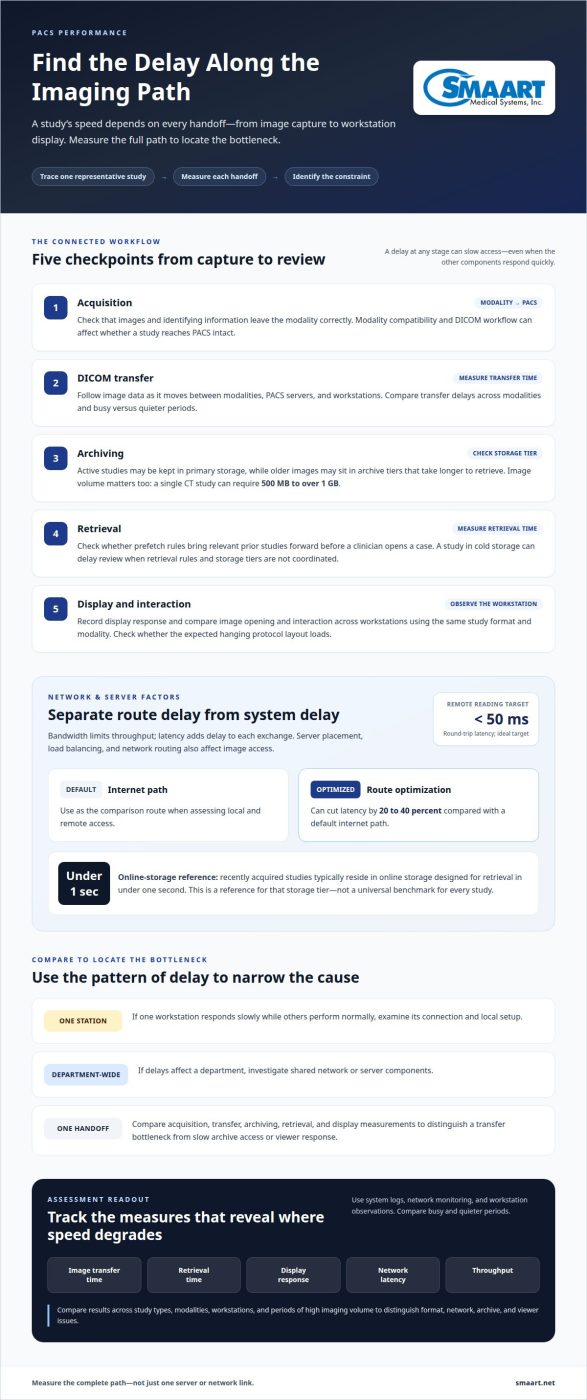
Assess PACS as one connected path, from image capture to workstation display. A delay at any handoff can slow access, even when other components respond quickly.
Image Acquisition and Distribution
PACS receives digital images from modalities, archives them, and distributes them to authorized workstations for review. A single CT study can require 500 MB to over 1 GB of storage, so image volume and transfer capacity matter together.
Storage design shapes retrieval. Primary storage keeps active studies readily available, while archive tiers hold older images that may take longer to retrieve. Check whether prefetch rules bring relevant priors forward before a clinician opens a case. A study in cold storage can delay review if retrieval rules and storage tiers are not coordinated.
Compare on-premises, cloud, and hybrid architectures by tracing the same study across servers, archives, network routes, and workstations. On-premises systems rely on local infrastructure, while cloud architectures can use elastic storage and geographic redundancy. Hybrid designs combine environments. In each case, identify where images move and whether a server, network link, or archive causes a handoff delay.
Performance Assessment Methods
A PACS performance assessment follows representative studies and records delays at acquisition, DICOM transfer, archiving, retrieval, and display. Use system logs, network monitoring, and workstation observations to compare busy and quieter periods. Reviewing these stages together helps distinguish a transfer bottleneck from slow archive access or viewer response.
Include security, backup, disaster recovery, and data integrity in the same assessment. PACS used in the United States must meet HIPAA requirements for protecting patient data. Assess encryption, access controls, backup recovery, and whether restored images remain complete and readable. Test a recovery scenario to see how archived studies return to service without disrupting clinical workflows.
DICOM and imaging modality performance
DICOM, or Digital Imaging and Communications in Medicine, is the standard for exchanging medical images and related metadata. In a hospital workflow, modality compatibility affects whether a CT or MR study reaches PACS with its identifying information intact. Evaluate the complete path from image acquisition to display, because a mismatch can interrupt an otherwise functional transfer.
DICOM and HL7 handle different parts of that path. HL7 commonly carries administrative context, including orders and finalized reports, between PACS, RIS, or EHR systems. DICOM carries image pixel data and imaging metadata, and can deliver patient and order details through the Modality Worklist. Together, these exchanges connect the patient record to the correct images without treating image transfer and scheduling as one process.
During implementation testing, follow a representative case from the modality worklist through image transfer and PACS retrieval. Confirm that the patient identity, order, modality, and body part remain associated with the correct study. Include different imaging modalities and DICOM and non-DICOM files if they are part of the hospital’s workflow. This can expose compatibility gaps before they create duplicate records or delay access to images.
Performance also depends on how PACS presents images. A DICOM hanging protocol can arrange, orient, and window images based on details such as modality and anatomy. Check that the expected layout loads when a study opens, including multimodality comparisons when clinicians need them. Record transfer and display delays alongside errors, then compare results across modalities and periods of high imaging volume. This helps distinguish a format issue from network or viewer problems.
For a broader view of imaging and workflow integration, explore radiology software integration as part of your PACS assessment.
Which PACS components have the biggest impact on speed?
Network capacity, server placement, and workstation configuration all affect how quickly studies open. Evaluating PACS system performance means measuring these components together to find the operational bottleneck.
Network and Server Configuration
Network and server configuration determines how efficiently image data travels between modalities, PACS servers, and workstations. Bandwidth limits throughput, while latency adds delay to each exchange. Load balancing can distribute requests across server nodes. Multiple server locations or dedicated communication lines can also support speed and redundancy during peak hours.
Compare routes used for local and remote access. Route optimization can cut latency by 20 to 40 percent compared with a default internet path. For fluid image interaction in remote reading, round-trip latency below 50 milliseconds is an ideal target. These measures help identify whether routing or server location slows access.
Workstation and Display Setup
Networked workstations turn PACS output into usable images, so their connections and display setups affect image review. Massachusetts General Hospital’s PACS used two monitors at each workstation, supporting image viewing alongside related information. This example illustrates why display configuration belongs in a performance assessment.
Compare image opening and interaction across workstations using the same study format and modality. If one station responds slowly while others perform normally, examine its connection and local setup. If delays affect a department, investigate shared network or server components instead.
Performance Metrics and Benchmarks
Track image transfer time, retrieval time, display response, network latency, and throughput. These metrics show where performance degrades, from the initial request to the rendered study. Recently acquired studies typically reside in online storage designed for retrieval in under one second. Treat this as a reference for that storage tier, not a universal benchmark for every study.
Compare results by modality, study format, workstation, and time of day. For remote image interaction, the under-50-millisecond latency target provides another useful reference. Read both measures alongside user experience, since fast transfer alone cannot reveal a slow display.
Workload and Concurrency Testing
Workload and concurrency testing measures how PACS responds when multiple users and modalities request studies at once. Run representative tasks in parallel, such as opening studies, retrieving priors, and sending new images. Record response times and errors as demand rises, then compare results with quieter periods.
The best way to evaluate PACS system performance is to repeat tests across server locations and network routes. A growing delay as simultaneous requests increase can point to constrained bandwidth, uneven load balancing, or a busy server. These comparisons help prioritize improvements by operational impact instead of treating every PACS component as an equal bottleneck.
Radiologist worklists and user-interface efficiency
A PACS worklist shapes which studies radiologists see and how quickly they can begin reading. A radiologist may read 80 to 120 studies during a shift, so unclear priorities or extra navigation can slow clinical workflow. Evaluate worklist behavior alongside image-viewer response to understand the user experience.
Customizable worklists can organize cases by priority or modality, helping readers focus on the next appropriate study. Check whether the list shows useful details, such as exam status and modality, without requiring repeated searches. AI-driven prioritization can flag urgent cases and move them toward the top of the reading list. Assess how priorities appear in the radiology workflow and whether users can tell why a case is placed where it is.
The viewer’s hanging protocol also affects efficiency. It can arrange, orient, and window images when a study opens, using details such as modality and anatomical region. Compare how representative studies appear across modalities. For example, note whether a CT opens in the expected layout and whether prior comparisons are easy to access. These checks reveal friction that basic software response measurements may miss.
Measure the steps required to move from an assigned case to image review and report completion. Repeated clicks, inconsistent layouts, and unclear status indicators can add operational burden. Include radiologist feedback, because a technically responsive interface may still disrupt clinical work if common tasks are hard to find. Reliability depends on both system availability and predictable behavior during routine use.
Downtime directly affects workflow capacity. In a department reading 40 studies an hour, one hour of downtime could delay 40 reads. Assess how users access worklists and studies during interruptions, and whether recovery restores case status accurately. This connects system availability to the practical impact on radiology operations.
For organizations improving radiology workflows, explore PACS workflow software as a way to align worklists, image review, and daily clinical needs.
SMAART Medical Systems: SMAART-PACS
SMAART Medical Systems offers SMAART-PACS for organizations assessing how PACS performance fits their radiology workflows. It’s a relevant next step when your findings point to a need for radiology imaging software that works with existing EMR and HIS platforms.
Relate your findings to the bottlenecks identified, including image movement, study access, worklists, and daily clinical processes. SMAART-RIS supports radiology information management, while SMAART-SHARE provides cloud-based image sharing. These products may fit workflows with those needs alongside PACS performance improvements.
Contact SMAART Medical Systems to discuss how SMAART-PACS may fit your organization’s imaging workflow.
Turn performance findings into a practical next step
Knowing how to evaluate PACS system performance is most useful when findings lead to a clear operational priority. Identify which workflow needs attention first, then consider how imaging software can support that goal and fit your existing systems.
SMAART Medical Systems offers SMAART-PACS, SMAART-RIS, and SMAART-SHARE for radiology management and image sharing. Discuss your organization’s workflow, integrations, and performance priorities with the team to identify a practical next step.
Contact SMAART Medical Systems to discuss your PACS needs and the workflow goals you want to address. A focused conversation can help you move from performance observations toward a more considered direction for your imaging operations.
Frequently Asked Questions
How do you measure PACS uptime, availability, and reliability?
Measure availability using service logs and monitoring records, separating planned maintenance from unplanned interruptions. Track failed logins, unavailable image retrieval, interrupted transfers, and recovery time, not just whether a server responds. Compare records across core PACS functions and operating periods. A system may appear online while a key workflow remains unavailable, so measure service from the user’s perspective too.
How can PACS network bandwidth and latency be tested?
Test network performance between modalities, PACS servers, and reading workstations using representative image transfers and retrieval requests. Record throughput, response time, packet loss, and variation during busy periods. Compare results across network paths to determine whether a slow transfer affects one connection or the wider system. A controlled test using typical clinical traffic provides a more useful picture than an idle-network measurement.
How do you evaluate PACS storage capacity, scalability, and archiving performance?
Review storage utilization and incoming image volume over time, separated by modality and study type. Estimate future demand from actual departmental trends, then assess how capacity can expand without disrupting access. Test retrieval of older archived studies and validate restored files against their records. For example, a migration test can reveal whether metadata and images remain correctly associated when moved between storage environments.
How do PACS performance benchmarks differ by system size and imaging modality?
Benchmarks depend on user concurrency, image volume, study complexity, and the number of connected locations. A modality producing larger or more complex studies places different demands on transfer and display than one producing smaller studies. Compare like with like by reviewing response times by modality, study type, and workload period. This creates a local baseline that reflects the department’s actual operational mix.
What DICOM and HL7 standards or requirements affect PACS performance evaluation?
DICOM governs image data and imaging metadata exchange, while HL7 commonly carries administrative information such as orders and reports. Evaluate whether each interface passes the fields needed for the next workflow step, not merely whether a connection succeeds. For example, trace an order from the information system to the modality, then confirm the resulting study links to the correct patient record and report.