QR Code Medical Exam Sharing: A Secure, Practical Workflow
What if a QR code made medical images easier to reach without becoming the thing that stores or shares them? That’s the key distinction in QR code medical exam sharing: a code can provide an access handoff, but the linked workflow determines whether patients and care teams can view the right study securely.
It’s frustrating when a patient has to track down a disc or repeat the steps to transfer imaging between providers. A QR code may simplify access, but it doesn’t replace image storage, a viewing platform, or safeguards that protect patient information. The destination and access process matter just as much as the scan.
This article explains what a QR code does and doesn’t do in an imaging workflow, which security and operational safeguards to consider, and how to make the experience practical for patients and staff. It also looks at how cloud-based image sharing, including SMAART-SHARE, can fit into broader PACS, RIS, EMR, and HIS workflows, helping clinics modernize image distribution without confusing a convenient link with a complete sharing system.
Key Takeaways
- See how QR code medical exam sharing can simplify the handoff to imaging, while the linked service remains responsible for access and viewing.
- Follow the steps from preparing a study to opening it in an image viewer, with DICOM and PACS explained in practical terms.
- Compare QR-assisted access, portals, direct links, and CDs to identify the route that best fits patient needs and existing workflows.
- Use a pre-launch checklist to clarify the sharing purpose, intended recipient, patient instructions, and staff responsibilities.
- Explore how cloud-based platforms such as SMAART-SHARE can support medical image sharing and collaborative viewing within a connected workflow.
QR Code Medical Exam Sharing: What It Solves, and What It Does Not
After an imaging appointment, a patient may need to make the study available to a clinician at another care setting. Without a clear handoff, they can be left managing discs, unfamiliar portals, or instructions that are difficult to follow. QR code medical exam sharing can simplify the first step: scanning directs the patient or another intended user to an imaging access route.
That distinction matters. A QR code is a printed or displayed pattern that encodes information, often a web address. It isn’t the image archive, viewer, or sharing platform. The linked service presents the exam or related content according to its access process. The basics of QR code technology explain the scanning mechanism, but an imaging handoff also needs a suitable destination and a defined purpose.
How QR-assisted access differs from a medical ID or patient-education code
These uses can look similar because each starts with a scan, but they serve different needs. An emergency medical ID may point responders to a health profile with details such as medications or allergies. A patient-education code might open an article or video about a procedure. Neither use, by itself, provides another clinician with the patient’s diagnostic images for clinical review.
An imaging handoff has a specific subject and recipient: a particular exam needs to be available through an appropriate route to a patient, clinician, or care team. Before sharing a code, make its purpose clear. Is it meant to help the patient open their own study, or direct a receiving clinician to it? Clear instructions reduce confusion and help prevent a general information link from being mistaken for access to the exam.
What a QR code contributes to an imaging handoff
Scanning can save someone from typing a long web address or searching through several steps to find an imaging destination. On a compatible device, the code opens the designated access path. What happens next depends on the linked service: it may present the study or related materials through its viewing experience. The code itself doesn’t carry out those tasks.
QR-assisted exam sharing directs an intended user to an imaging access route; the linked service, not the code, provides the exam and governs how it can be reached. This is why a scannable pattern shouldn’t be treated as a privacy safeguard. The destination and its access process matter. Staff should explain what the recipient will see and what to do if the link doesn’t open or the study isn’t available.
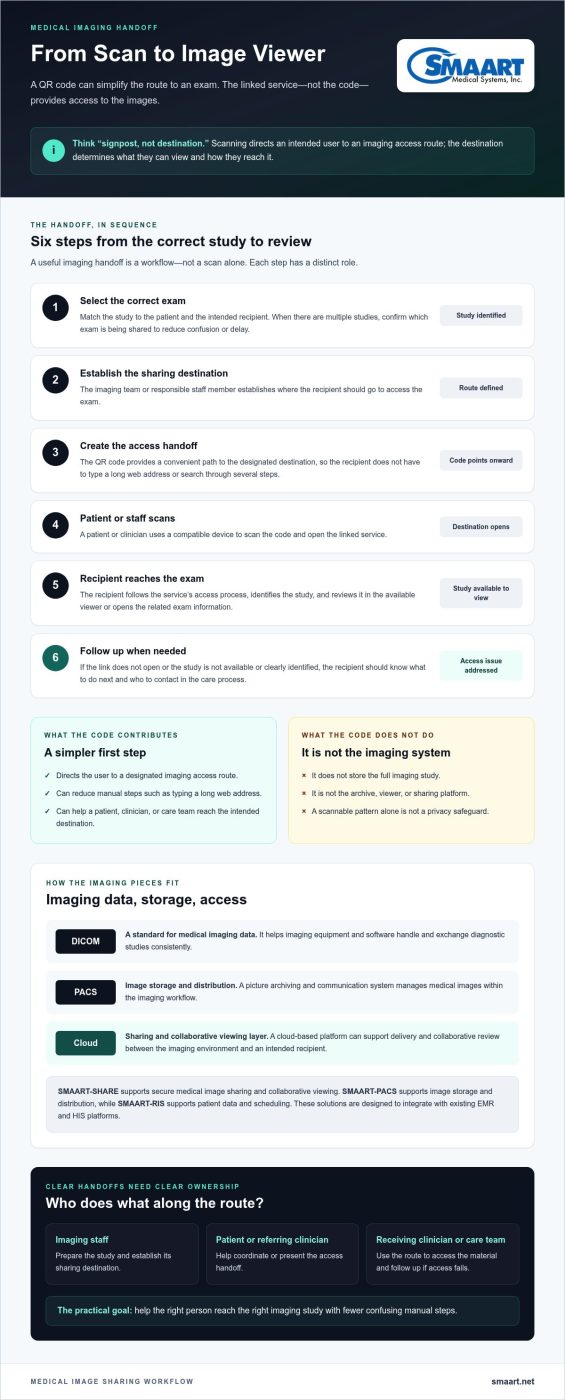
Think of the code as a signpost, not the destination. That framing keeps the focus on the real goal: helping the right person reach the right imaging study with fewer confusing manual steps.
From Scan to Image Viewer: How QR Code Medical Exam Sharing Works
A useful imaging handoff is a sequence, not a scan alone. The team identifies the correct study, sets up its sharing destination, provides an access handoff, and makes sure the intended recipient can reach the exam information. Each step has a different role, from selecting images to opening them for review.
The scan-to-view sequence for a diagnostic imaging exam
Start by matching the exam to the patient and the intended recipient. If a patient has had multiple studies, choosing the wrong one can create confusion or delay clinical review. The imaging team or responsible staff member should establish which exam is being shared and where the recipient should go to access it.
The QR code then provides a convenient route to that destination. It isn’t a container for a full imaging study. A patient or clinician scans it with a compatible device, opens the linked service, and follows that service’s process to reach the relevant images or exam information. The recipient should be able to identify the study and understand what to do next, such as review it in the available viewer or follow up with the care team if access fails.
A patient may receive or present the handoff, while imaging staff prepare the study and its destination. A referring clinician may help coordinate the transfer, and the receiving clinician or care team uses the route to access the material. Clear ownership at each point reduces the chance that the patient is left to troubleshoot an unclear process alone.
Workflow at a glance: Select the correct exam → establish its sharing destination → create the access handoff → patient or staff scans → recipient opens the destination and views the exam → follow up if access or study identification needs attention.
Where DICOM, PACS, and cloud sharing fit
DICOM is a widely used standard for handling and exchanging medical imaging data. It helps imaging equipment and software work with diagnostic studies in a consistent way. PACS, or a picture archiving and communication system, manages the storage and distribution of medical images. These are foundational parts of the imaging workflow, but neither term describes the QR code itself.
A cloud-based sharing platform can provide a delivery and collaborative viewing layer between the imaging environment and an authorized recipient. For example, SMAART-SHARE is a cloud-based platform for secure medical image sharing and collaborative viewing. It can support image distribution and collaborative review within a broader workflow. SMAART-PACS supports image storage and distribution, while SMAART-RIS supports patient data and scheduling. These solutions are designed to integrate with existing EMR and HIS platforms.
The code points to an access route, the sharing platform delivers the viewing experience, and the imaging system manages the study. Keeping these roles distinct makes it easier to map each handoff and identify where a workflow needs improvement. Clinics assessing that broader connection can explore cloud-based medical image sharing as one part of a coordinated imaging environment.
QR Codes vs. Portals, Links, and CDs: Choosing the Right Exam-Sharing Route
No single route suits every imaging handoff. A patient sending a study to a regular care team may use an established portal, while someone visiting a new clinician may need a direct route to the relevant exam. A QR code can simplify reaching a destination, but its usefulness depends on the linked service, the recipient’s needs, and the imaging team’s workflow.
| Route | Patient effort | Recipient experience | Governance and workflow fit |
|---|---|---|---|
| QR-assisted access | Scan to open a designated route; requires a compatible device and a fallback option. | Can lead to an exam access service, where the recipient follows its viewing process. | Controls depend on the linked service. Fits workflows that can reliably prepare and explain the handoff. |
| Patient portal | May require signing in and locating the study. | Useful when the recipient can access the patient’s portal or the patient can share access through its available process. | Depends on the portal’s sharing options and how it fits the care setting’s existing processes. |
| Direct sharing link | Opens a destination without scanning a printed code, though the link must be received and opened. | Can take the recipient straight to the sharing route. | Access limits and the ability to change or withdraw access depend on the service behind the link. |
| CD or other physical media | Requires the patient to keep and deliver the media. | The recipient needs a suitable way to access the images and related information. | May suit workflows already built around physical media, but creates handling and compatibility steps. |
When QR-assisted access can improve the handoff
A scan can be helpful when staff give a patient a clear destination and the patient is comfortable using a smartphone. For example, it may reduce the need to type a long address while transferring a study to another care setting. But reaching a link is only the first step. The linked experience must also help the recipient locate and review the diagnostic images. Offer a practical fallback, such as clear written instructions or another established sharing route, for patients who can’t scan or prefer not to.
How to compare access routes without overlooking risk
Evaluate more than convenience. Confirm that the route points to the intended exam and is appropriate for the intended recipient. Then identify which system, if any, can limit access, change it, or withdraw it, and who is responsible for those actions. Capabilities vary by service, so don’t assume a QR code, portal, or link provides a particular safeguard simply because it’s easy to use.
QR codes improve navigation only when the linked workflow is fit for purpose. A simple handoff doesn’t by itself establish privacy, security, or regulatory compliance. The imaging team should assess the destination and its operational process, including recipient instructions and fallback steps, rather than treating the scan as proof that access is appropriate. That distinction keeps the focus on a usable route and the system behind it.
A Practical Security and Operations Checklist for QR Exam Sharing
A smooth scan is only one part of a dependable handoff. Before introducing QR-assisted access, define what the code is for, who should receive it, and which team owns the process. Treat the linked destination as the security boundary: the QR pattern itself doesn’t protect an exam or determine who can view it.
Use this pre-launch checklist to make responsibilities visible:
- Purpose: State whether the code directs someone to a specific diagnostic exam, exam information, or another resource.
- Recipient: Identify the intended patient, clinician, or care team and how the sharing process reflects that choice.
- Access route: Map where a scan leads and what the recipient must do to reach the relevant exam.
- Patient instructions: Explain in plain language what opens after scanning and where to get help.
- Staff ownership: Assign responsibility for preparing the handoff, answering access questions, and responding to errors.
- Testing: Check the full journey, from selecting the study to recipient viewing, before broader use.
HIPAA obligations depend on an organization’s role and circumstances. A QR workflow alone doesn’t establish compliance. Include the appropriate privacy and security leads in reviewing how the destination and the surrounding process handle medical information.
Privacy, authorization, and access lifecycle
Start with authorization: who is meant to receive the exam, and how will staff avoid directing it to the wrong person? Then review the linked service’s access process, including how it handles authentication, how long access remains available, and whether permissions can be changed or withdrawn. These capabilities vary by destination, so document how the selected workflow operates rather than assuming the code provides them.
Plan for mistakes, too. Define how staff should respond if a study is sent to the wrong recipient or an access route may have been compromised. The response should identify who is notified, who can act on the destination, and how the team records and follows up on the issue. A clear procedure reduces guesswork under pressure.
Patient instructions, accessibility, and fallback options
Keep instructions direct: say what scanning opens, what the patient should expect next, and which staff role can help if access fails. Provide a non-QR option for someone without a compatible smartphone or who prefers another method. A backup route is part of a patient-friendly workflow, not an exception to plan later.
Test with representative patients, staff, and receiving-clinician workflows. Check whether the code is readable on the materials where it will appear, whether scanning works across the devices patients use, and whether the images are usable once opened. Ease of reaching a destination doesn’t guarantee that its viewer is clear or that the recipient can complete the task.
For a broader view of secure medical image sharing, explore how a cloud-based sharing workflow can support a connected imaging process. Explore SMAART medical imaging solutions as you consider how image distribution fits with your organization’s workflow.
Building a Connected Exam-Sharing Workflow with Cloud Imaging Software
A QR-assisted handoff only works as well as the imaging workflow behind it. The clinic still needs a practical way to distribute the correct study and let the intended recipient view it. Cloud-based imaging software can be part of that foundation, supporting image sharing and collaborative viewing while a QR code, if used, remains a separate route into the workflow.
Assess the sharing platform on its own merits. Then consider how an access handoff could fit alongside exam distribution, patient communication, and the systems staff already use. For a broader view of how sharing approaches have evolved, see this guide to medical imaging exam sharing solutions.
What to look for in a platform behind the access handoff
Start with the clinic’s actual needs. Does the approach support the way staff distribute exams and the way recipients need to review them? Can the workflow be explained clearly to patients, and can staff identify who handles routine questions? These practical considerations matter whether a patient reaches the destination through a QR code, a portal, or another method.
- Image distribution: Consider how studies move from the imaging environment to the intended recipient.
- Collaborative viewing: Determine whether the approach supports the review needs of the clinicians involved.
- System fit: Map how the workflow relates to existing imaging and information systems. SMAART Medical Systems’ PACS and RIS solutions are designed to integrate with existing EMR and HIS platforms.
- Operational clarity: Establish which staff roles prepare the sharing handoff and help patients understand it.
Keep the platform assessment separate from the printed code or other patient-facing material. A code can provide a convenient entry point, but it doesn’t demonstrate that the sharing approach meets the clinic’s distribution needs. Review the platform, the intended recipient experience, and the steps staff must follow as connected parts of one process.
How SMAART-SHARE fits into a modern sharing strategy
SMAART-SHARE is a cloud-based platform for secure medical image sharing and collaborative viewing. It provides an image-distribution option for clinics without proprietary hardware. In a broader workflow, it can serve as the sharing layer clinics use to distribute images and enable collaborative review.
A connected approach also means considering where image distribution sits alongside image storage, patient data, and scheduling. SMAART-PACS supports image storage and distribution, and SMAART-RIS supports patient data and scheduling. Together, these workflow considerations help clinics evaluate imaging access as part of their wider environment rather than as a standalone scan.
For clinics exploring QR code medical exam sharing, the goal is not simply to add a code. It’s to create a clear handoff supported by an appropriate image-sharing workflow. Explore SMAART-SHARE as a cloud-based option for medical image sharing and collaborative viewing.
Make the Next Imaging Handoff Easier to Navigate
Start with one common handoff and map the steps from the clinic’s perspective and the patient’s. Notice where people hesitate, which instructions they need, and how staff can respond when the planned route doesn’t work. That practical review can help shape a process patients can follow and care teams can support.
QR code medical exam sharing is most useful when it fits a wider plan for image distribution, rather than becoming a technology project on its own. SMAART-SHARE supports cloud-based medical image sharing and collaborative viewing, with an image-distribution option for clinics without proprietary hardware.
Give your team a clear foundation for modernizing image distribution. Explore SMAART-SHARE for cloud-based medical image sharing and consider how it could support your clinic’s next step. A thoughtful workflow can make exam access feel simpler for everyone involved.
Frequently Asked Questions
Can a QR code contain a complete medical imaging exam?
Usually, a QR code points to an online destination rather than containing a complete imaging exam. Diagnostic studies can include substantial image data, so the practical approach is to host or manage the study through an imaging service and use the code as a route to it. Avoid placing patient identifiers or exam details directly in the code. The destination should be prepared to present the intended study to the appropriate user.
Do patients need an app to access medical exams through a QR code?
Not necessarily. Whether an app is required depends on the service behind the code. Some destinations may open through a device’s browser, while others may use a dedicated application or have specific viewing requirements. Before giving patients instructions, test the route on common devices and explain any steps clearly. For example, tell them whether to scan with their camera, sign in, or use a particular viewer.
Is QR code medical exam sharing automatically HIPAA compliant?
No. Using a QR code doesn’t automatically make an exam-sharing process compliant. HIPAA obligations depend on the organization’s role and circumstances, along with how the full workflow handles protected health information. A clinic should assess the linked service, sharing procedures, and staff responsibilities with its privacy and security leads. For example, review what information the code exposes, how recipients reach the study, and how the organization responds to a misdirected share.
What happens if a patient loses or shares a QR code?
The outcome depends on what the code opens and how the destination manages access. If a patient reports a lost code or unintended sharing, staff should follow a prepared response: identify the affected exam and route, notify the responsible team, and determine whether the destination can change or withdraw access. Then provide the patient with updated instructions if needed. This is another reason not to treat possession of the code as proof of authorization.
Can a referring physician view diagnostic images from a QR code?
Yes, if the code leads to a service that presents the relevant study and the physician is permitted to access it through that workflow. The scan alone doesn’t identify the physician or guarantee access. For example, a clinic coordinating a referral should ensure the receiving clinician can recognize the correct exam and follow the destination’s access process. If access isn’t available, staff need a clear alternate way to complete the handoff.
Are QR codes better than patient portals for sharing medical exams?
Not in every situation. A QR route may help someone reach a designated destination without typing a web address, while a portal may suit patients who already use it to manage their care. The better fit depends on the recipient, the clinic’s workflow, and the experience after the destination opens. For a patient who doesn’t use a smartphone, for instance, a portal or another established method may be more practical.
What should a clinic test before using QR codes for exam sharing?
Test the complete experience with staff, patients, and receiving clinicians. Confirm that the code opens the intended destination, the correct exam can be identified, and instructions are understandable on the devices people use. Also test what happens if a scan fails, a recipient can’t reach the study, or staff need to correct a handoff. Include a non-QR alternative, and assign a team role to manage questions and access issues.