Radiology Information System with Billing: How the Workflow Fits Together
What if the biggest billing bottleneck isn’t the billing system, but the handoff before a claim is prepared? A radiology information system with billing can connect imaging operations to revenue workflows, but the right patient, order, procedure, and report details still need to reach the right systems. When staff re-enter information between scheduling, reporting, and billing, errors, delays, and extra follow-up can result.
It helps to define which system owns each step. An RIS can manage radiology scheduling and patient data, while a separate billing platform handles financial workflows. The benefit comes from clear, reliable data exchange, not from expecting one system to do everything.
This guide explains how RIS workflows can support billing operations, which information and interfaces matter at each handoff, and how to assign ownership for coding, claim preparation, and revenue-cycle tasks. It also shows how RIS, EMR, HIS, PACS, and billing systems can fit together without adding friction to existing workflows. For example, SMAART-RIS manages patient data and clinical scheduling and is designed to integrate with EMR and HIS platforms, while SMAART-PACS supports image storage and distribution.
Key Takeaways
- A radiology information system with billing usually means an RIS exchanging workflow data with a separate billing or revenue-cycle system, not necessarily one platform performing both roles.
- Trace the path from registration and scheduling through exam completion and billing review. Note where patient, encounter, exam, and status details need to move.
- Compare separate and connected workflows by reviewing duplicate entry, information visibility, task ownership, and how teams handle exceptions.
- Before implementation, map which system creates, updates, and uses each key data element. This clarifies responsibilities and exposes gaps.
- Assess how RIS, EMR, HIS, PACS, and billing systems fit your existing workflows. SMAART-RIS manages patient data and clinical scheduling and is designed to integrate with EMR and HIS platforms.
What a Radiology Information System with Billing Actually Means
A radiology information system (RIS) manages administrative and operational information around imaging examinations. It helps organize patient data, appointments, and exam progress. A Radiology Information System may work alongside a billing platform, but the phrase “radiology information system with billing” doesn’t necessarily mean one system performs every financial task. Often, it describes connected systems that pass relevant information between radiology operations and billing workflows.
In brief: An RIS manages radiology workflow records; PACS stores and distributes medical images; an EMR maintains a patient’s electronic medical record; and a billing system supports financial processes. An HIS coordinates broader hospital information and operations. These systems may exchange information, but their roles and responsibilities remain distinct.
What does an RIS manage in a radiology practice?
An RIS can support patient registration, appointment scheduling, and tracking an exam as it moves through the department. It organizes administrative information tied to an imaging appointment, including the patient and scheduled examination, so teams can follow the workflow from booking through completion.
That operational record is different from the image itself. PACS stores and distributes medical images for viewing, while the RIS manages workflow information around the examination. For example, the RIS may track a scheduled exam and its progress, while PACS handles the resulting images. Keeping those roles clear helps teams understand where information belongs and where a handoff is needed.
Is an RIS the same as radiology billing software?
No. An RIS and a billing platform can support connected but separate parts of the process. The RIS organizes radiology scheduling and patient workflow information. A practice-management or revenue-cycle system may support financial tasks such as coding, claim preparation, or payment posting, depending on the organization’s setup. Don’t assume every RIS includes those capabilities.
Billing can depend on information created or updated across systems. Patient identity and encounter details may originate in an EMR or HIS, while exam information and completion status are managed in radiology workflows. A billing team or system may then use relevant details for its own review and processes. Clear handoffs can reduce repeated data entry, but they don’t replace clear ownership: teams still need to know which system maintains each record and who resolves missing or inconsistent information.
For hospitals and clinics assessing a radiology information system with billing, the key question is how the RIS fits into the existing environment. SMAART-RIS manages patient data and clinical scheduling and is designed to integrate with EMR and HIS platforms. This supports a connected radiology workflow while keeping RIS functionality distinct from billing-system responsibilities.
How RIS and Billing Systems Exchange Radiology Workflow Information
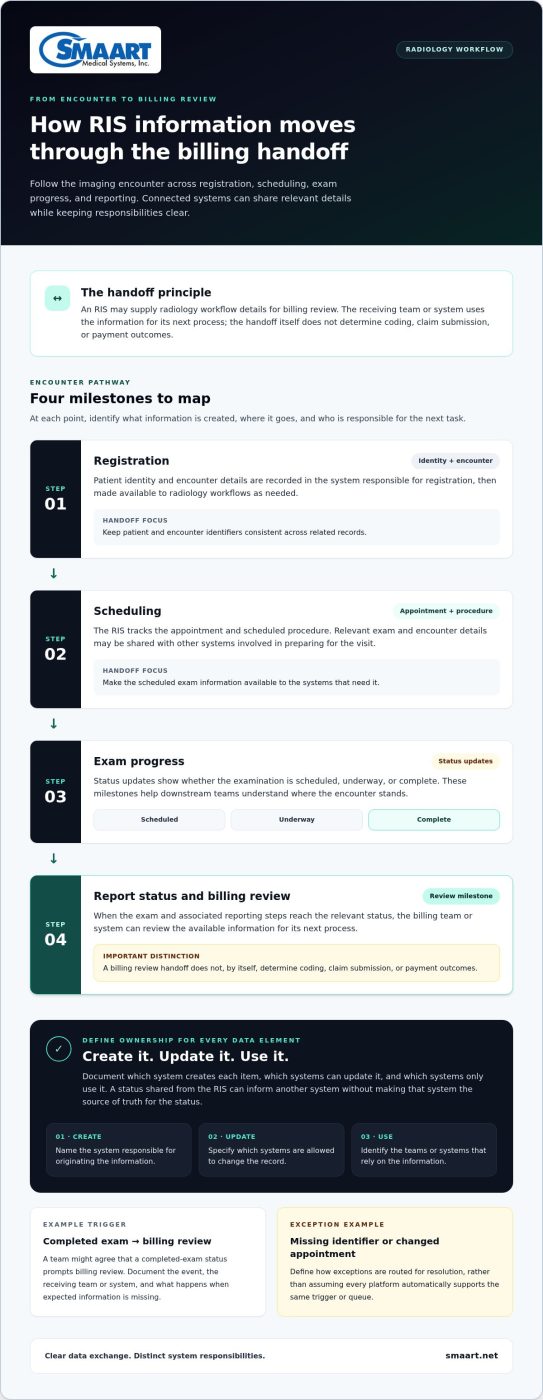
A billing handoff follows the imaging encounter as information is created and updated across registration, scheduling, the exam, and reporting. In a connected radiology information system with billing, the RIS may supply workflow details for billing review, while designated systems and teams remain responsible for maintaining their own records and completing their assigned tasks.
- Registration: Patient identity and encounter details are recorded in the system responsible for registration, then made available to radiology workflows as needed.
- Scheduling: The RIS tracks the appointment and scheduled procedure. Relevant exam and encounter details may be shared with other systems involved in preparing for the visit.
- Exam progress: Status updates show whether the examination is scheduled, underway, or complete. These milestones help downstream teams understand where the encounter stands.
- Report status and billing review: When the exam and associated reporting steps reach the relevant status, the billing team or system can review the available information for its next process. The handoff itself doesn’t determine coding, claim submission, or payment outcomes.
Consistent patient and encounter identifiers help associate the appointment, examination, and related records correctly. For each data element, define which system creates it, which systems can update it, and which systems only use it. For example, a status sent from the RIS might inform another system without making that system the source of truth for the status.
Which radiology events can trigger a billing handoff?
Registration, a scheduled procedure, exam completion, and report status are useful milestones to map. A team might agree that a completed-exam status prompts billing review, while a missing identifier or changed appointment goes to an exception queue for resolution. These are workflow examples, not claims that every RIS or billing platform automatically supports them. When documenting a trigger, specify the event, the receiving team or system, and what happens if the expected information is missing.
What do interfaces and standards contribute?
An interface transfers defined information between systems according to agreed rules: what moves, when it moves, and how corrections or exceptions are handled. HL7 is a relevant standard for exchanging healthcare administrative and clinical data, but the standard alone doesn’t specify an organization’s interface configuration. DICOM supports medical-imaging workflows, including image exchange; it serves a different purpose from messages carrying patient, encounter, or exam-status information.
For additional context on coordinating RIS, HIS, and PACS workflows, see this reference on connected radiology workflows. Mapping these data flows alongside imaging workflows can clarify the role of each system. Explore SMAART radiology software as you consider how RIS and PACS fit into your environment.
Standalone Billing Tools vs. Connected Radiology Workflows
A radiology information system with billing doesn’t have to be a single product. An organization may keep its established practice-management or revenue-cycle platform and connect it with radiology workflows. The practical questions are how information moves, who maintains each record, and how staff resolve gaps when a handoff doesn’t go as planned.
Neither separate systems nor a connected workflow is automatically best for every organization. The right fit depends on the systems already in use, team responsibilities, and how much duplicate entry or limited visibility the current workflow creates.
| Consideration | Separate RIS and billing tools | Connected radiology workflow |
|---|---|---|
| Data entry | Staff may need to enter or verify details in more than one system if information isn’t exchanged. | Defined interfaces can pass selected information between systems and reduce avoidable re-entry. |
| Visibility | Teams may rely on separate screens or status updates to understand appointment and exam progress. | Authorized teams may have clearer access to relevant workflow status across systems. |
| Ownership | Each platform can retain a distinct role, provided staff know which system maintains each record. | Connection doesn’t remove the need to define which system creates or updates each data element. |
| Exceptions | Unclear handoffs can leave staff chasing missing, mismatched, or outdated information. | Documented interface rules and exception handling help teams identify who resolves a problem. |
When can separate RIS and billing systems make sense?
Keeping established billing or practice-management software may suit an organization that already relies on it for broader financial workflows. Define interface ownership and document what happens when patient or encounter details are incomplete, changed, or inconsistent. Without that plan, separate systems can preserve familiar tools but still create administrative friction through repeated entry and manual follow-up.
What can a connected radiology workflow improve?
A connected workflow can make scheduling and exam status more visible to authorized teams, while defined interfaces can reduce unnecessary re-entry. It doesn’t mean every system shares every field, or that an RIS replaces billing software. Teams still need clear rules for data ownership, access, and exceptions.
When evaluating RIS and PACS together, consider how operational information and image access support different parts of the examination workflow. To see how radiology software can support connected workflows, explore SMAART radiology workflow solutions.
How to Map RIS-to-Billing Requirements Before Implementation
Before implementing a radiology information system with billing workflows, map the current process rather than starting with software features. Make every handoff visible: which system creates a record, which system updates it, who uses it next, and who steps in when information is missing or incorrect.
Which workflows and data fields should teams document?
Build a shared inventory of systems and process owners, then trace the patient and encounter details used across each workflow. For every field, name its authoritative source and whether other systems can update it. This prevents two platforms from appearing to own the same information and makes it easier to spot where staff are re-entering data.
- Systems and owners: List the EMR or HIS, RIS, PACS, and billing or practice-management tools. Identify the teams responsible for registration, scheduling, exam workflow, reporting, billing review, and interface support.
- Milestones: Document registration, scheduling, exam completion, report status, and billing review. Note what event starts each handoff and which team acts on it.
- Data ownership: Map patient identifiers, orders, encounter details, exam information, and status updates to the system that creates, maintains, or uses each item.
- Exceptions and access: Record manual workarounds, duplicate or mismatched records, and incomplete information. Define who investigates each exception, who can view or change relevant data, and who reviews the workflow.
Keep the map practical. For example, if an appointment is cancelled after details have reached another system, document which team records the change, how it is communicated, and who confirms that the downstream workflow reflects it.
How should teams test connected workflows?
Use representative test cases before expanding the workflow. Check that information reaches the intended system and user, and that updates don’t create conflicting records or unclear responsibilities. Include both routine cases and the exceptions staff encounter in day-to-day work.
- Run a routine registration, scheduled exam, completion, and billing-review scenario.
- Correct a patient or encounter detail and confirm the correction is handled as intended across connected systems.
- Test duplicate records, cancelled appointments, incomplete information, and delayed status updates.
- Record the result, note any manual steps or failures, and assign a process owner to resolve each issue before broadening use.
Document access controls and review responsibilities as part of the workflow design. Clear ownership helps teams manage information deliberately, but a workflow map alone doesn’t guarantee compliance or eliminate errors.
Use this checklist to clarify your integration needs and explore SMAART radiology workflow solutions.
How SMAART-RIS Fits into a Connected Radiology Environment
SMAART-RIS supports the operational side of radiology by managing patient data and clinical scheduling. It’s designed to integrate with existing EMR and HIS platforms, helping facilities coordinate radiology workflows with the systems already used to manage patient and encounter information. Billing remains a distinct function within the broader environment, so teams can map where relevant workflow information goes without treating the RIS as a billing or revenue-cycle platform.
Where SMAART-RIS supports the radiology workflow
Use the workflow map to assign each system a clear role. SMAART-RIS manages patient and scheduling information for radiology; its EMR and HIS integration supports its place in a facility’s wider information environment. Teams can then define how scheduled exams and related workflow details connect with other processes, including billing review, while financial tasks remain with the designated billing system and team.
That separation matters when assessing a radiology information system with billing. The goal isn’t to assume one product owns every step. It’s to understand how radiology data fits into existing workflows, which system maintains each record, and where staff need visibility to move work forward.
How RIS and PACS contribute different capabilities
RIS and PACS address related but distinct needs. SMAART-RIS supports patient-data and clinical scheduling workflows. SMAART-PACS supports medical image storage and distribution. Together, these capabilities contribute distinct functions within a connected radiology environment: operational information helps teams follow the examination workflow, while PACS supports access to images. Coordinating the roles can make the overall process easier to understand, but it doesn’t determine coding, claim preparation, or payment outcomes.
As you assess system fit, consider the handoffs between scheduling, patient information, image access, and downstream review. Clear responsibilities help staff understand where a record is maintained and where to find information relevant to their work. For a wider view of imaging operations, read the hospital imaging workflow optimization guide.
Explore SMAART radiology software solutions to see how SMAART-RIS and SMAART-PACS can fit into your radiology environment.
Build a Radiology Workflow with Clearer Handoffs
A radiology information system with billing works best when each system has a defined role and teams know how patient, encounter, and exam information moves between them. The RIS can coordinate radiology operations, while billing tools handle their own financial processes. Clear data ownership, planned interfaces, and tested exception workflows help reduce avoidable re-entry without blurring responsibilities.
Fit matters as much as connectivity. SMAART-RIS manages patient data and clinical scheduling and is designed to integrate with EMR and HIS platforms. SMAART-PACS supports medical image storage and distribution. These products provide distinct capabilities within a connected radiology environment, while billing tasks remain with the systems and teams responsible for them.
Start by mapping your current workflow, identifying who owns each handoff, and testing how routine updates and exceptions are handled. A clear plan can make system decisions easier and help your organization improve coordination step by step.
Explore SMAART radiology workflow solutions and consider how SMAART-RIS and SMAART-PACS could fit your environment.
Frequently Asked Questions
What is a radiology information system with billing?
A radiology information system with billing usually means an RIS connected to billing or revenue-cycle workflows, not necessarily a single application that handles every financial task. The RIS organizes radiology patient information and operational activities such as scheduling. Billing processes may draw on relevant data from the RIS, EMR, HIS, and other systems. The organization’s interfaces, procedures, and system roles determine what information moves and who handles each step.
Can an RIS submit insurance claims?
An RIS may support claim submission only if that capability is part of the specific software platform; radiology workflow management alone doesn’t mean it can submit claims. Map which application handles coding, claim preparation, submission, and follow-up. Then define which patient, encounter, and exam details pass between systems, who reviews them, and who resolves missing or conflicting information before billing work proceeds.
How does an RIS help with radiology billing workflows?
An RIS can support radiology billing workflows by managing patient and scheduling information tied to an imaging encounter. If connected systems exchange agreed fields and status updates, billing staff may have relevant details for review without re-entering every item. The RIS doesn’t by itself determine coding, claim outcomes, or payment. Reliable handoffs depend on consistent identifiers, defined data ownership, and a clear process for exceptions.
What is the difference between RIS and revenue-cycle management software?
RIS software supports radiology operations, including patient data, scheduling, and exam workflow. Revenue-cycle management software focuses on financial tasks such as billing, claims, and payment workflows, depending on the platform. The systems may exchange information, but they don’t have identical roles. Some products combine capabilities, so assess the actual functions, data flows, and team responsibilities rather than assuming the product label defines the workflow. For practices looking to streamline front-end approvals and claims workflows with dedicated support, visit Meridian RCM to explore comprehensive revenue cycle management solutions.
Does an RIS need to integrate with an EMR or HIS?
An RIS doesn’t universally need an EMR or HIS integration, but a connection can help coordinate relevant patient and workflow information across a facility’s systems. Start by identifying what data needs to move, which application is authoritative for each item, and how changes are handled. SMAART-RIS is designed to integrate with existing EMR and HIS platforms, supporting its role within a broader radiology environment.
Which standards are used in radiology system integration?
HL7 is used to exchange healthcare administrative and clinical information, while DICOM supports medical imaging workflows. They address different kinds of data, so using a standard doesn’t automatically make two systems interoperable. Teams still need to define identifiers, fields, status changes, interface rules, and testing responsibilities. For example, patient or encounter details and image data may follow separate exchange paths.
How can a radiology practice reduce duplicate billing data entry?
Start by tracing where patient, encounter, exam, and status information is first recorded, then note every later point where staff re-enter it. Determine which systems can exchange the required fields and who owns corrections. Test routine appointments as well as cancelled visits, duplicate records, and incomplete details. Document results and exceptions. This reveals which manual steps may be avoidable without assuming every billing task should be automated.