RIS System Features for Billing and Scanner Integration
Images are only one part of radiology’s workflow. The features of a modern RIS system help manage patient registration, scheduling, imaging orders, reports, billing, and communication with scanners. Working alongside a PACS, which stores and distributes images, an RIS keeps the information and tasks around each imaging study moving through the department.
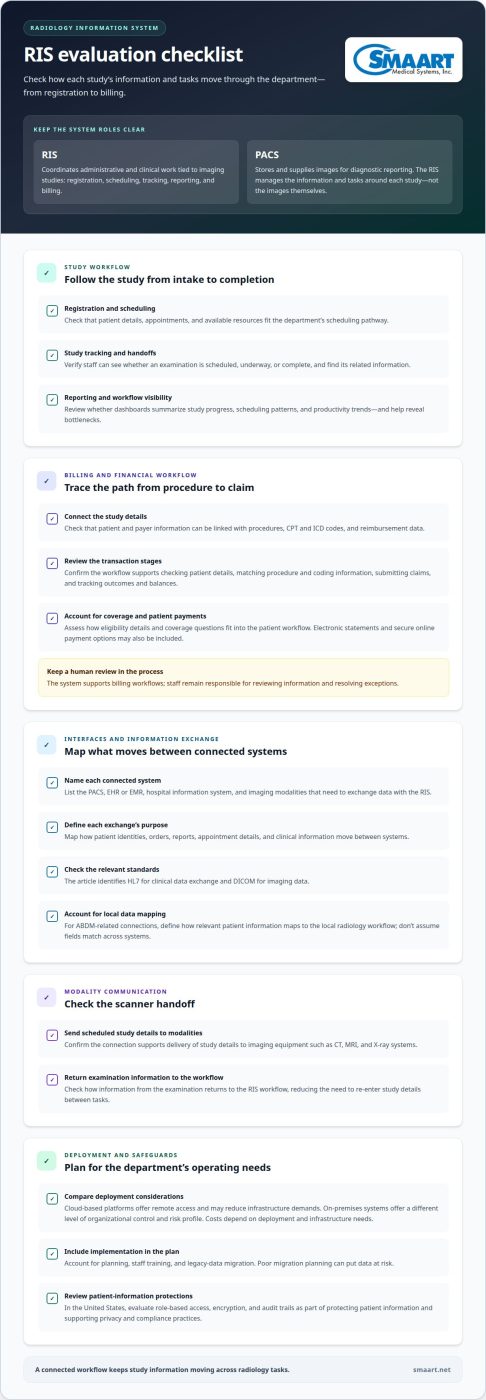
Choosing a RIS involves more than evaluating its scheduling screen. Billing and coding workflows, information exchange, and the delivery of modality worklists to scanners all affect how staff manage each study. This article explains what a radiology information system does and how its core features work together, including financial integration, interfaces, DICOM modality worklists, and scanner communication. You’ll get a clearer understanding of the role a RIS plays in an imaging operation.
Key Takeaways
- Understand how an RIS organizes radiology workflow and how its role differs from PACS.
- See how connecting procedure codes, insurance details, and billing workflows can keep financial information aligned with imaging activity.
- Learn what to consider when an RIS exchanges data with PACS, EHRs, and other systems.
- Discover how DICOM modality worklists and scanner communication can reduce manual data entry during image acquisition.
What Is a Radiology Information System (RIS)?
A radiology information system (RIS) coordinates radiology’s administrative and clinical work. Its workflows connect patient registration, scheduling, study tracking, reporting, and billing.
RIS Definition and Radiology Workflows
An RIS manages information and tasks tied to imaging studies, rather than storing the images themselves. For example, staff can use it to track an order from registration through scheduling and report completion. That radiology-specific view helps teams coordinate each study and find its related information. According to U.S. Congress, the Medicare Access & Chip Reauthorization Act of 2015 is abbreviated MACRA.
Workflow Automation and Scheduling
Workflow automation moves routine tasks and study details through the appropriate steps. Scheduling tools coordinate appointments and resources, while patient tracking shows whether an examination is scheduled, underway, or complete. This gives front-desk staff and technologists a shared view of operations and can reduce repeated data entry, a common source of avoidable errors when information is copied between tasks.
Customizable Clinical and Administrative Processes
Customizable workflows let a department organize administrative and clinical steps around its procedures. A scheduling pathway, for example, can account for the imaging service, available resources, and the information staff need before an examination. Cloud-based RIS platforms offer remote access and may reduce infrastructure demands; on-premises systems offer a different level of organizational control and a different risk profile. Costs depend on deployment and infrastructure needs. During implementation, planning, staff training, and legacy-data migration all matter: poor migration planning can put data at risk. In the United States, evaluate role-based access, encryption, and audit trails as part of protecting patient information and supporting privacy and compliance practices.
Workflow Analytics and Dashboards
Workflow analytics and dashboards summarize operational activity for administrators. A dashboard can help teams review scheduling patterns, study progress, and department productivity trends. These views can reveal bottlenecks, such as appointments waiting for a resource or reports awaiting completion. Reviewing workflow data helps managers pinpoint processes that may need adjustment, rather than relying only on anecdotal reports.
Billing, coding, and financial integration
Radiology billing links each imaging procedure to the patient, coverage details, and information needed for reimbursement. RIS software can associate CPT and ICD codes with procedures, insurance, and reimbursement data. This gives billing staff a clearer path from an imaging order to a claim while keeping administrative work connected to the study record. It also helps the department treat billing as part of the imaging workflow, rather than an entirely separate process.
A RIS supports billing, coding, insurance claims, and revenue-cycle management by organizing procedure, patient, and payer information around imaging activity. For example, staff can review the codes and insurance details associated with a procedure before claims processing. This connects registration and service documentation with reimbursement follow-up. The system supports the workflow, while staff remain responsible for reviewing information and resolving exceptions.
Insurance integration can make eligibility information available within the patient workflow. Before an appointment, staff can use it to prepare for coverage-related questions and identify details that need attention. At check-in, reminders about copayments or self-pay responsibilities can help make the conversation with the patient clear. Electronic statements and secure online payment options may also be part of a RIS billing workflow, helping patients manage balances after care.
Financial management depends on accurate links between demographics, procedures, codes, and payer information. If a patient record or procedure detail is incomplete, the claim may require correction or follow-up. A practical review therefore follows the transaction across its stages: confirm patient details, match the procedure and coding information, submit the claim, then track its outcome and outstanding balance. This gives staff a way to find where delays arise and improve handoffs. For imaging teams assessing connected radiology management software, billing workflows are one part of how RIS and PACS solutions support daily operations.
Integration evaluation and interface support
A RIS connects radiology workflows with systems that handle patient data, images, and diagnostic results. Integration matters because staff need relevant information to move between systems without repeatedly entering the same details. Start an evaluation by listing which systems exchange data and defining what each exchange needs to accomplish.
A modern RIS can integrate with PACS, EHR systems, and imaging modalities. PACS stores and supplies images for diagnostic reporting, while EHR and hospital information systems exchange patient and clinical information. These connections can bring study details and imaging records into a more coordinated workflow. HL7 supports clinical data exchange, while DICOM supports imaging data.
For hospital integration, map how patient identities, orders, and reports move between the RIS and the hospital information system. Clinics using an EHR or EMR should identify which patient data and appointment details pass between systems. For ABDM-related connections, define how relevant patient information maps to the local radiology workflow instead of assuming that systems use identical data fields.
Imaging equipment integration supports data transfer between the RIS and modalities such as CT, MRI, and X-ray systems. The connection can deliver scheduled study details to a device and return examination information to the workflow. If AI tools or teleradiology workflows are part of the setup, define where study context goes and where results return. This clarifies responsibilities and information flow without assuming every tool connects in the same way.
To evaluate interface support, trace one appointment from order entry through image capture and report availability. Identify which system creates each record, what information crosses the interface, and how staff can spot a failed or incomplete transfer. This practical view exposes gaps that a feature list can miss. Clear radiology system integration helps teams understand how each connection supports the overall workflow.
DICOM modality worklists and scanner communication
DICOM worklists connect scheduled exams with imaging devices, reducing manual entry during acquisition. They also help keep study records aligned across the radiology department.
DICOM Modality Worklists
A DICOM Modality Worklist makes patient demographics and order details available on a scanner during image acquisition. Instead of retyping the patient’s name and study information, the technologist can select the scheduled exam. This supports accurate tracking from appointment to image capture. If staff repeatedly enter details by hand, the worklist may be missing, incomplete, or not reaching the modality, increasing the chance of wrong-patient or wrong-study errors.
DICOM and HL7 Data Exchange
DICOM carries imaging data, while HL7 supports the exchange of clinical information between systems. Together, these standards help a RIS, PACS, and modality coordinate orders, images, and study status. Modality Performed Procedure Step, or MPPS, sends scanner updates to the RIS and PACS, including whether a study started, finished, or stopped, and which series were performed. The IHE Scheduled Workflow profile specifies the Modality Worklist and MPPS exchange together.
Reporting completes the workflow after image acquisition. Radiologists can use worklists to organize studies awaiting review, then create, edit, and finalize reports using voice recognition and templates. Electronic sign-off and report distribution can move findings forward without separate manual handoffs. By connecting images with their associated study information, the platform helps staff see each examination’s status.
For a practical evaluation, follow one scheduled exam from the RIS to the scanner, then trace its status and report back through connected systems. Check whether the worklist delivers the right patient and order details, and whether MPPS updates reflect the scan’s progress. This shows how the interfaces support faster tracking and gives analytics a more complete workflow record. Explore imaging workflow solutions to consider how connected systems can support your radiology department.
SMAART Medical Systems: SMAART-PACS
SMAART Medical Systems, Inc. offers SMAART-PACS for organizations evaluating how image management fits into radiology workflows. SMAART-RIS manages radiology information workflows, and SMAART-SHARE is a cloud-based platform for sharing medical images and reports. SMAART-RIS provides dictation with speech recognition, scheduling, report distribution, modality worklists, and billing system integration. The software is designed to integrate with existing EMR and HIS platforms. Identify whether your priority is image management, radiology workflow, or image sharing, then explore the SMAART product that fits that need. To discuss your radiology software needs, contact SMAART Medical Systems, Inc. or visit smaart.net.
Make the next step practical
The features of a modern RIS system matter most when they support the way your team works. Before making a change, choose a representative imaging pathway and define what a successful handoff looks like. Note who owns each transition, what information staff need, and how they’ll know when a task is complete. This gives administrators, technologists, billing staff, and IT a shared basis for assessing operational fit and helps clarify priorities before a decision affects daily routines.
Use those priorities to focus the next discussion: where your current processes create friction, which systems need to work together, and what your team wants to improve. Clear requirements make it easier to evaluate software against real department needs rather than an abstract feature list. If you’re ready to discuss your radiology software needs, contact SMAART Medical Systems, Inc.. A thoughtful next step can help your team move forward with greater clarity and confidence.
Frequently Asked Questions
What Is a RIS?
A radiology information system is software that coordinates information and tasks associated with imaging care. It lets staff follow an order’s administrative progress, such as whether an appointment is booked or a report is ready. For example, a coordinator can check a study’s status in its record without relying on the image archive to manage the workflow.
What are the core features of a modern radiology information system (RIS)?
Core capabilities commonly include registration, scheduling, patient tracking, reporting, results distribution, and billing support. Depending on the platform, analytics can also help administrators review workload and operational trends. The most useful features of a modern RIS system are the ones that fit the department’s actual handoffs. A clinic, for example, may prioritize connecting study records to reporting, while a hospital may focus on coordination with broader information systems.
What RIS features support scheduling, patient registration, and workflow management?
Registration tools organize patient details, while scheduling features coordinate appointments and imaging resources. Workflow tracking shows staff where an examination stands. If an appointment changes, for instance, the team can update the schedule and keep the study’s administrative record aligned. Reviewing resource allocation alongside appointment patterns can also help managers identify where scheduling processes need adjustment.
What interoperability standards do RIS systems support, including HL7, FHIR, and DICOM?
HL7 supports clinical data exchange, while DICOM supports imaging data exchange. FHIR is another healthcare data exchange standard, but its support should be evaluated as a distinct interface requirement rather than assumed from HL7 compatibility. For an interface review, map which system sends each data type, such as an order, patient detail, image, or report, and confirm where that information needs to appear.
What AI, analytics, and decision-support features are available in modern RIS platforms?
Analytics can help administrators assess workflow efficiency and productivity trends. Predictive analytics can help anticipate imaging demand and plan resources, while AI-powered automation can support reporting accuracy and workflow optimization. These tools inform operational review, but they do not replace clinical judgment. A manager might use demand patterns to consider resource allocation, for example, while a radiologist remains responsible for interpreting findings.
How do cloud-based and on-premises RIS systems compare in features and cost?
Cloud-based RIS platforms offer remote access and may reduce infrastructure demands. On-premises systems offer more control but have a different risk profile. Costs depend on deployment and infrastructure needs.