Visage 7 Alternatives: Compare PACS Options for Your Facility in 2026
The best Visage 7 alternative depends on how imaging moves through your facility, which systems need to connect, and what purchasing and support models suit your team. Visage 7 alternatives can serve different needs, so a ranked list alone may overlook important workflow differences.
If you’re weighing a change, look beyond software features. Integration, continuity, and dependable support matter when imaging systems are central to daily operations. This guide offers a practical way to compare PACS and radiology workflow options against your facility’s requirements.
You’ll learn how to assess workflow, interoperability, support, and purchasing flexibility, and where SMAART’s offerings may fit. SMAART-PACS includes a diagnostic zero-footprint viewer and interfaces with EMR, HIS, and practice-management systems. SMAART-RIS integrates with SMAART-PACS, while purchase, lease, rental, and cloud-based solutions provide different purchasing models. SMAART’s support model is another useful point of comparison.
Key Takeaways
- Start by defining whether you need to replace PACS or address broader radiology workflow and image-sharing needs.
- Compare Visage 7 alternatives against required capabilities first, then consider desirable additions.
- Separate PACS, RIS, image-sharing platforms, and broader imaging systems so you compare options that serve similar needs.
- Include implementation questions in your shortlist, such as migration, training, ownership, and continuity planning.
- Use a consistent scorecard to compare shortlisted options against your workflows, interfaces, sharing needs, and support expectations.
Why Look for Visage 7 Alternatives? Start With Your Facility’s Needs
Facilities compare imaging systems for practical reasons: a PACS contract is approaching renewal, workflows have changed, or teams want to assess purchasing models and support alongside software capabilities. The comparison does not need to start with an assumption that Visage 7 has a particular shortcoming. Start instead with the decision your facility needs to make and how imaging work gets done there.
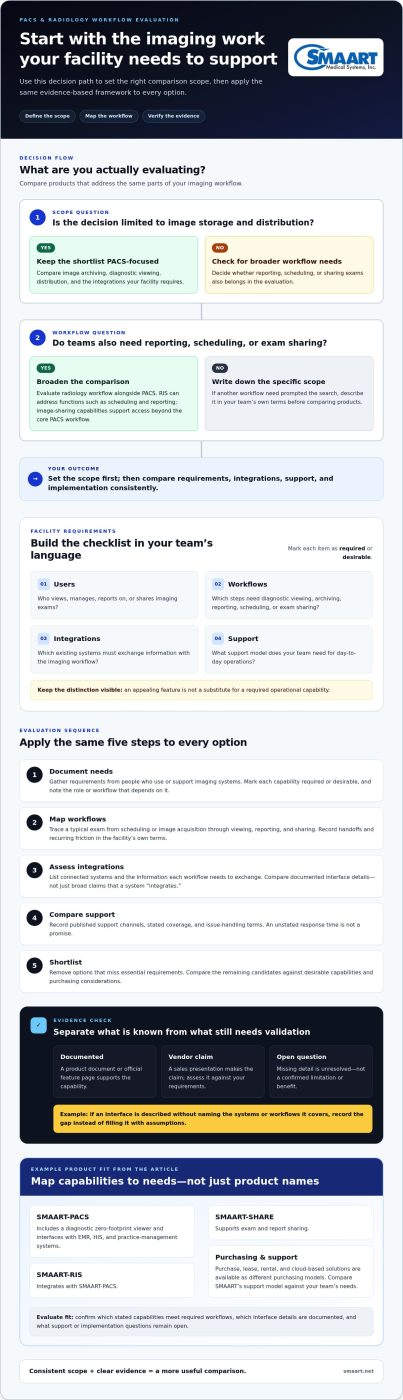
Before reviewing Visage 7 alternatives, define what you’re evaluating. A PACS replacement search focuses on image storage, viewing, and distribution. A broader review may also cover reporting, scheduling, and sharing exams with patients or referring providers. Product directories can help surface names, but a listing is a discovery tool, not a suitability verdict. Two products grouped under an alternatives heading may address different parts of the imaging workflow.
Which facility needs should shape a Visage 7 alternative search?
Facility type can shape priorities, but it shouldn’t dictate them. A critical access hospital may focus on the users and processes that support imaging across its services. A community hospital may need to map requirements across departments and teams. A radiology clinic may prioritize the path from scheduling through image review and report distribution. Treat these as starting points, not assumptions about every facility.
Write requirements in your team’s own language. Describe where a handoff slows down, who needs access to a study, or how reports reach their recipients. Then sort the findings into a checklist:
- Users: Who views, manages, reports on, or shares imaging exams?
- Workflows: Which steps require diagnostic viewing, image archiving, reporting, scheduling, or exam sharing?
- Integrations: Which existing systems must exchange information with the imaging workflow?
- Support: What support model does your team need for day-to-day operations?
Mark each item as required or desirable. This distinction helps keep an appealing feature list from overshadowing operational essentials.
When is a PACS alternative different from a complete workflow alternative?
PACS stands for Picture Archiving and Communication System. In practical terms, it is the system being considered for storing and distributing medical images. The Picture Archiving and Communication System (PACS) overview provides background on the category, but your facility’s needs determine how broad the search should be.
If the main goal is to replace image storage and distribution, focus the evaluation on PACS requirements. If teams also need reporting, scheduling, or exam sharing, broaden the comparison to radiology workflow. A Radiology Information System (RIS) can address workflow functions such as scheduling and reporting, while image-sharing capabilities support access beyond the core PACS workflow. SMAART-PACS and SMAART-RIS integrate with each other, and SMAART-SHARE supports exam and report sharing. Facilities considering this broader scope can explore the concepts behind integrated RIS PACS solutions while defining their requirements.
How to Compare Visage 7 Alternatives: Build a Practical Evaluation Framework
A consistent process makes comparisons more useful than a ranking or feature checklist alone. Apply the same criteria to every option, and label what is documented, what comes from a vendor discussion, and what remains unresolved. This gives clinical, operational, and IT stakeholders a shared basis for evaluating Visage 7 alternatives against facility priorities.
- Document needs. Gather requirements from people who use or support imaging systems. Mark each capability as required or desirable, and note which role or workflow depends on it.
- Map workflows. Trace a typical exam from scheduling or image acquisition through viewing, reporting, and sharing. Record handoffs and recurring friction in the facility’s own terms.
- Assess integrations. List connected systems and the information each workflow needs to exchange. Compare documented interface details rather than broad claims that a system “integrates.”
- Compare support. Record published support channels, stated coverage, and issue-handling terms. Do not treat an unstated response time as a promise.
- Shortlist. Remove options that miss essential requirements, then compare the remaining candidates against desirable capabilities and purchasing considerations.
Keep a clear evidence trail. A product document or official feature page can support a documented capability. A sales presentation is a vendor claim to assess, while missing detail is an open question, not a confirmed limitation or benefit. For example, if a vendor describes an interface without explaining which systems or workflows it covers, record that gap instead of filling it with assumptions.
Which PACS capabilities belong in the comparison?
Compare diagnostic viewing, image distribution, archiving needs, and the integrations your facility has identified. Treat zero-footprint viewing as a specific capability, not a universal requirement. It matters when browser-based access without a local viewer installation suits your users and workflow. For focused background, consult a guide to zero-footprint PACS viewers and assess the capability against your access needs.
Use a simple comparison template for each candidate. Record the evidence source and facility priority rather than relying on memory or impressions:
- Criteria: Diagnostic viewing; Evidence source: Product documentation; Facility priority: Required or desirable.
- Criteria: Image distribution and archiving; Evidence source: Published product details; Facility priority: Required or desirable.
- Criteria: System interfaces; Evidence source: Interface documentation or vendor statement; Facility priority: Required or desirable.
How should facilities assess integration and support?
List the facility’s EMR, HIS, and practice-management systems, then identify the workflows each connection supports. Note what interface documentation says about the connections and implementation responsibilities, including which tasks belong to the facility and which to the vendor. For support, compare stated channels and terms side by side rather than inferring response times from general assurances.
For a concrete reference point, SMAART-PACS interfaces with EMR, HIS, and practice-management systems. SMAART provides 7 × 24 × 365 U.S. telephone support, single-call issue resolution, native English-speaking engineers, and remote desktop assistance. Facilities can review SMAART PACS and RIS options as part of the same evidence-based comparison.
Visage 7 Alternatives Compared: Compare Product Types, Not Just Names
A useful comparison starts by sorting options according to the job they do. A PACS, a radiology information system, and an image-sharing platform may support connected parts of imaging, but they aren’t interchangeable. Treating every product named in an alternatives directory as a direct PACS substitute can lead to an apples-to-oranges shortlist.
How do PACS, RIS, and image-sharing alternatives differ?
A PACS supports medical image storage and distribution. A RIS focuses on radiology workflow functions such as scheduling and reporting. An image-sharing platform helps users share exams and related reports. Broader imaging workflow offerings may bring multiple functions together, but the label alone doesn’t establish what a product includes. Your documented requirements determine whether one category or several belong in the evaluation. This workflow-first approach also supports hospital imaging workflow optimization: assess how tools fit the work, not just how they’re categorized.
SourceForge’s supplied alternatives list names ProtonPACS, PowerShare, Studycast, and Visage RIS. Treat those names as leads for further evaluation, not as recommendations or proof that each product replaces Visage 7. Review each product’s role and capabilities in its official documentation before comparing it with a PACS, RIS, or sharing requirement.
What should a Visage 7 comparison table show?
Use a consistent template. Record when a reviewed source does not state a detail, rather than inferring features, support terms, or purchasing options from a product’s category or name.
| Product or category | Confirmed capabilities | Integration evidence | Support | Purchasing model |
|---|---|---|---|---|
| PACS | Record documented viewing, archiving, and distribution functions. | List documented interfaces. | Compare stated support terms. | Compare stated purchasing models. |
| RIS | Record documented workflow functions. | List documented connections. | Compare stated support terms. | Compare stated purchasing models. |
| Image sharing | Record documented exam or report-sharing functions. | List documented access or system connections. | Compare stated support terms. | Compare stated purchasing models. |
| SMAART-PACS | Diagnostic zero-footprint viewer. | Interfaces with EMR, HIS, and practice-management systems. | 7 × 24 × 365 U.S. telephone support, single-call issue resolution, native English-speaking engineers, and remote desktop assistance. | Purchase, lease, rental, or cloud-based solutions. |
| SMAART-RIS | Dictation with speech recognition, scheduling, report distribution, modality worklist, and billing system integration. | Integrates with SMAART-PACS. | 7 × 24 × 365 U.S. telephone support, single-call issue resolution, native English-speaking engineers, and remote desktop assistance. | Purchase, lease, rental, or cloud-based solutions. |
| SMAART-SHARE | QR-code-based exam sharing, CD/DVD/USB sharing, cloud or enterprise access, and report sharing. | QR-code-based exam sharing, CD/DVD/USB sharing, cloud or enterprise access, and report sharing. | 7 × 24 × 365 U.S. telephone support, single-call issue resolution, native English-speaking engineers, and remote desktop assistance. | Purchase, lease, rental, or cloud-based solutions. |
Keep product facts separate in the comparison: PACS functions belong in the PACS row, RIS functions in the RIS row, and sharing capabilities in the image-sharing row. That makes Visage 7 alternatives easier to compare without overstating what any one product does.
How to Shortlist Visage 7 Alternatives Without Overlooking Implementation Needs
A strong shortlist reflects how a system would fit into your facility’s operations, not just how it looks in a feature comparison. Score each candidate against the workflows and requirements you’ve documented. Keep evidence beside each score so stakeholders can see whether it comes from product documentation, a vendor discussion, or an unanswered question.
- Workflow fit: Can the option support the imaging, reporting, scheduling, and sharing processes your facility identified?
- System interfaces: Is there documented information about connections to the systems your teams rely on?
- Sharing needs: Does the documented approach address how your facility distributes exams and reports?
- Support: Are the support channels and terms clearly stated?
Apply your priorities consistently. A required workflow or interface should carry more weight than a desirable feature. If a capability or term is not documented, record the question and seek a clear answer as part of the evaluation. This keeps the comparison fair and makes vendor discussions more focused.
What should a PACS transition plan address?
Before discussing transition details, capture the information the project must account for. Include image and reporting requirements, user roles, current workflows, and the systems involved. Bring clinical, administrative, and IT stakeholders into planning so the shortlist reflects operational needs as well as technical ones.
Use vendor discussions to clarify responsibilities and surface project-specific decisions. Document questions such as:
- What migration scope is being considered, and what information will the facility need to provide?
- How will user preparation and training be handled, and who owns each task?
- Which internal and vendor teams are responsible for implementation activities?
- What continuity arrangements and timing need to be planned around the facility’s operations?
These are planning topics, not assumptions about a vendor’s process or compatibility. Tie answers to written project details, and record unresolved items before making a selection.
How can facilities compare purchasing and support arrangements?
Compare purchasing models using the same categories across your shortlist. SMAART offers purchase, lease, rental, and cloud-based solutions. Consider which arrangement aligns with your facility’s purchasing approach, and assess the model separately from technical fit. A flexible purchasing path does not by itself establish that a product meets workflow or integration requirements.
For support, compare stated terms with your facility’s needs. SMAART provides 7 × 24 × 365 U.S. telephone support, single-call issue resolution, native English-speaking engineers, and remote desktop assistance. These are support details to include in your evaluation.
To include SMAART in your shortlist, review SMAART imaging solutions alongside your documented workflow, transition, purchasing, and support criteria.
Consider SMAART as a Visage 7 Alternative for PACS, RIS, and Image Sharing
SMAART is an option facilities can include in a comparison of Visage 7 alternatives. Its products address PACS, radiology workflow, and image sharing, so the right evaluation depends on which needs your facility is looking to meet. Compare the documented functions below with your requirements, and assess fit rather than treating any vendor as a universal solution or ranked winner.
What does the SMAART product line include?
The products serve distinct but related roles. Consider each separately, then assess how it aligns with your facility’s imaging processes:
- SMAART-PACS: Includes a diagnostic zero-footprint viewer and interfaces with EMR, HIS, and practice-management systems. Compare these functions with your viewing and system-interface requirements.
- SMAART-RIS: Integrates with SMAART-PACS and includes dictation with speech recognition, scheduling, report distribution, modality worklist, and billing system integration. These features are relevant when assessing radiology workflow alongside image management.
- SMAART-SHARE: Supports QR-code-based exam sharing, CD/DVD/USB sharing, cloud or enterprise access, and report sharing. Compare these options with the ways your teams need to distribute exams and reports.
This product mix lets a facility assess a PACS option, an integrated RIS/PACS combination, and image-sharing capabilities as related parts of an evaluation. It doesn’t mean every facility needs all three. Map each function to a defined workflow, and include interface or implementation questions in your evaluation discussions.
What support and purchasing options can facilities evaluate?
Support is a practical comparison point. Include these stated terms in your comparison, without assuming a particular outcome for every issue or project timeline.
Facilities can evaluate purchase, lease, rental, and cloud-based solutions. Compare these purchasing models with your organization’s planning needs, alongside product fit and support. No single model is automatically the best choice; the useful question is how each option aligns with your facility’s requirements.
Bring your workflow priorities and evaluation questions into a conversation about fit. Discuss SMAART PACS, RIS, and sharing options as part of your facility’s comparison.
Turn Your Shortlist Into a Confident Next Step
Turn your evaluation notes into a decision your clinical, administrative, and IT teams can support. Bring unresolved questions into one shared review, distinguish essential requirements from preferences, and document the evidence behind each choice. This gives your facility a clear record of why an option made the shortlist and what needs discussion before moving forward.
Use the same practical approach when reviewing Visage 7 alternatives: focus on fit with your facility’s workflows, priorities, and implementation considerations rather than relying on a ranking. If SMAART is on your shortlist, compare its PACS, RIS, and image-sharing options with your requirements, along with its support and purchasing arrangements.
Discuss your facility’s PACS and radiology workflow needs with SMAART and take the next step toward an evaluation grounded in your team’s real-world needs.
Frequently Asked Questions
What are the best alternatives to Visage 7?
There isn’t one best alternative for every facility. The strongest candidates are those that match its defined workflows and requirements. Names that may appear in further research include Sectra Enterprise Imaging, Agfa HealthCare Enterprise Imaging, RamSoft OmegaAI, Medicai, ProtonPACS, PowerShare, and Studycast. Treat these as starting points, not recommendations. Review each product’s current role and capabilities through official product information before comparing it with your needs.
How do I compare Visage 7 alternatives?
Compare Visage 7 alternatives with a shared scorecard, not a popularity ranking. For each candidate, record how well it fits your priority workflows, which system connections are documented, what evidence supports each capability, and what questions remain. Keep required capabilities separate from desirable features. For example, if a particular interface is essential, don’t let a useful but optional tool compensate for missing evidence about that connection.
Is SMAART-PACS an alternative to Visage 7?
Yes. SMAART-PACS is a PACS option to include in an evaluation of Visage 7 alternatives. It includes a diagnostic zero-footprint viewer and interfaces with EMR, HIS, and practice-management systems. Assess those functions against your facility’s requirements rather than assuming a product fits based on category alone. Map each required user task to documented PACS capabilities and note any questions for the evaluation.
Can a PACS alternative include RIS and image sharing?
Yes. A facility can evaluate PACS alongside RIS and image-sharing tools, either as separate needs or as connected parts of its radiology workflow. A team reviewing image management may also need to consider report distribution or how it shares exams. SMAART-RIS integrates with SMAART-PACS, while SMAART-SHARE supports exam and report sharing. Evaluate each function against a specific workflow rather than assuming one category covers every need.
What should hospitals consider before replacing a PACS?
Hospitals should document what the current system supports and what a replacement project must preserve or change. Include user roles, image and reporting requirements, key workflows, connected systems, and exam-sharing needs. Identify clinical, administrative, and IT stakeholders who can review those requirements. Then include migration scope, training, implementation ownership, timing, and continuity in project planning. Keep the plan specific to the proposed transition.
What purchasing options are available for SMAART radiology software?
SMAART offers purchase, lease, rental, and cloud-based solutions. Compare these purchasing models with your facility’s purchasing approach, separately from clinical and technical fit. A purchasing arrangement does not establish whether a product meets workflow requirements. Keep the comparison focused on the stated options and the needs your organization has defined.
What support does SMAART provide for its radiology software?
Include these stated support details in your review and compare them with your facility’s needs, such as which staff handle software questions and which support channels they use.