Affordable PACS for Radiology Clinics: A 2026 Buyer’s Guide
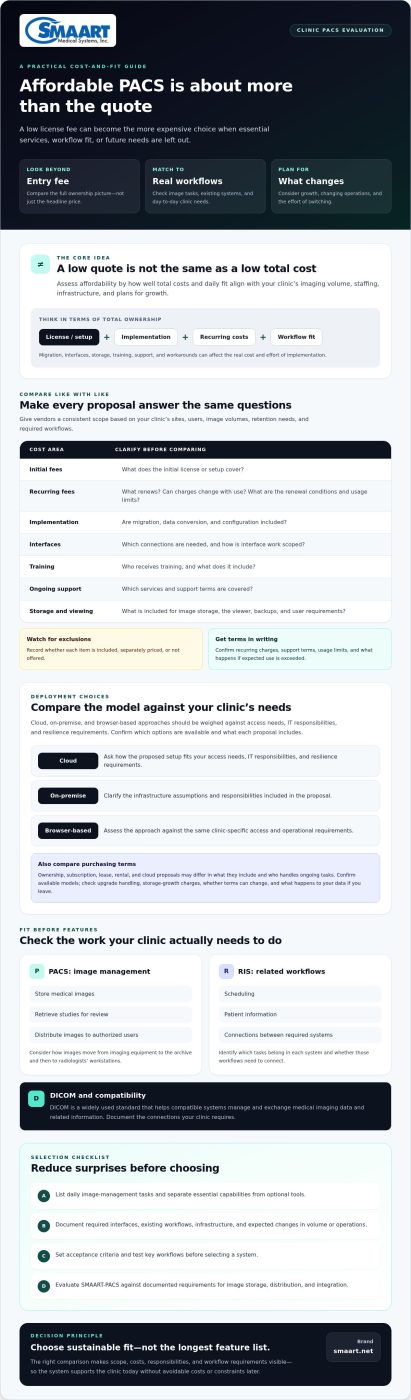
The lowest PACS quote can become the most expensive choice. When comparing affordable PACS for radiology clinics, the license fee is only one part of the decision. Data migration, implementation, interfaces, storage, training, and ongoing support all affect the total cost of ownership.
Vendor proposals can be difficult to compare when one includes services or features another lists as extras. Existing workflows can also make switching more complex than expected. A low starting price won’t help if essential tools are missing or the system can’t support your clinic’s needs.
This guide explains how to assess affordability beyond the upfront fee. You’ll learn what to clarify in pricing proposals, how deployment choices and existing infrastructure can shape costs, and which workflow and growth requirements to consider before you commit. The goal is to find a PACS that supports your clinic today without creating avoidable costs or constraints later.
Key Takeaways
- Compare vendor proposals across setup, recurring fees, migration, interfaces, training, and support to see what each quote includes.
- Assess affordable PACS for radiology clinics by workflow and infrastructure fit, not just by the initial fee.
- Weigh cloud, on-premise, and browser-based approaches against your clinic’s access needs, IT responsibilities, and resilience requirements.
- Set acceptance criteria, document required interfaces, and test key workflows before selecting a system.
- Evaluate SMAART-PACS against your clinic’s documented requirements for image storage, distribution, and integration.
What Makes a PACS Affordable for a Radiology Clinic?
An affordable PACS is more than a system with a low entry fee. Its total ownership costs and day-to-day fit should align with your clinic’s imaging volume, staffing, infrastructure, and plans for growth. A low-priced system can require costly workarounds if it doesn’t support how your team stores, retrieves, and shares images.
In short: An affordable PACS meets a clinic’s imaging needs at a sustainable total cost, including implementation, support, and the ability to accommodate its workflows as they change.
This definition makes it easier to compare proposals and distinguish image management from related radiology workflows. PACS manages medical images, while a Radiology Information System (RIS) supports functions such as scheduling and patient information. Identify which tasks belong in each system and whether those workflows need to connect.
What does a PACS do in a radiology clinic?
A Picture Archiving and Communication System stores medical images, retrieves them for review, and distributes them to authorized users. In a typical workflow, staff send images from imaging equipment to the archive, then radiologists access relevant studies at workstations for interpretation. The Picture archiving and communication system (PACS) overview explains the system’s core components and DICOM. In plain language, DICOM is a widely used standard that helps compatible systems manage and exchange medical imaging data and related information.
Why is the lowest quoted fee not always the lowest-cost choice?
A proposal may list a license fee without showing every cost. Data migration, interfaces to existing systems, staff training, and ongoing support can all affect what your clinic spends and the effort implementation requires. Ask vendors to itemize what’s included, what costs extra, and which ongoing terms apply.
Separate essential capabilities from optional tools. Your clinic may need dependable image storage, retrieval, and distribution, while other features may not serve its current workflows. Compare proposals against your requirements rather than the length of each feature list.
- List the image-management tasks your team must complete each day.
- Identify required connections to existing clinical systems and workflows.
- Clarify what the proposal includes for storage, viewing, backup, training, and support.
- Consider whether the system can accommodate expected changes in volume or operations.
These checks turn “affordable” from a marketing label into a practical measure. They can also help your clinic avoid paying for capabilities it won’t use or overlooking costs that could complicate a future transition.
How to Compare PACS Costs and Value Beyond the License
Start with the same scope for every vendor. Ask each to price your clinic’s actual sites, users, image volumes, retention needs, and required workflows. Without a consistent scope, a lower headline fee may simply mean that more items are excluded from the quote.
Which cost categories belong in a PACS comparison?
Request an itemized breakdown and record whether each item is included, priced separately, or not offered. Ask specifically about data migration and conversion, interface work, training, and the scope of ongoing support. Get recurring charges, renewal conditions, usage limits, and support terms in writing so you can compare equivalent proposals.
| Cost area | What to clarify |
|---|---|
| Initial fees | What does the initial license or setup cover? |
| Recurring fees | What renews, and can charges change with use? |
| Implementation | Are migration, data conversion, and configuration included? |
| Interfaces | What connections are needed, and how is interface work scoped? |
| Training | Who receives training, and what does it include? |
| Support | Which support services and service terms are covered? |
Confirm what the quote includes for image storage, the viewer, backups, and user requirements. Check whether it assumes a specific number of users or storage capacity, and what happens if your clinic exceeds those assumptions. Ask for an estimate based on your expected use rather than a generic sample configuration.
How should clinics compare PACS purchasing models?
Ownership, subscription, lease, rental, and cloud proposals may differ in what they include and who is responsible for ongoing tasks. Don’t assume every vendor offers every model. Confirm which options are currently available, then compare contract terms: how upgrades are handled, how storage growth affects charges, whether terms can change, and what happens to your data if you leave.
Deployment model matters too. Proposals may assign infrastructure and maintenance responsibilities differently, so clarify what your clinic must provide and manage. For more context on deployment choices, see this enterprise PACS and cloud storage guide.
Takeaway: Compare equivalent scope and contract terms before judging PACS affordability. If you’re evaluating options, review SMAART-PACS information against your clinic’s documented requirements.
How Do Cloud, On-Premise, and Browser-Based PACS Fit Clinic Needs?
Deployment affects who manages infrastructure, how staff access images, and what the clinic must plan for as its needs change. No model is automatically cheaper or more secure. When comparing affordable PACS for radiology clinics, weigh responsibilities and workflow fit alongside the quoted terms.
What should a clinic assess before choosing cloud or on-premise PACS?
Start with your current environment: existing servers, network capacity, storage responsibilities, backup plans, and available IT resources. Ask vendors to explain where image data is stored, how users access it, what availability arrangements apply, and which security controls and operational responsibilities belong to the vendor or clinic. Confirm how the proposed setup can support growth and maintain continuity if a system or connection is unavailable.
- Cloud: Ask what infrastructure and maintenance the vendor manages, what your clinic remains responsible for, and how access depends on network connectivity.
- On-premise: Check whether your clinic can support local servers, storage, backups, maintenance, and future hardware needs.
- Either approach: Review data access, recovery arrangements, security responsibilities, and growth terms in the proposal.
A smaller clinic may prefer fewer local infrastructure responsibilities, but should still assess connectivity, access arrangements, and contract terms. An on-premise setup may suit a clinic with established IT resources, but the clinic should account for the work involved in maintaining local systems. Judge each proposal against your actual capacity, not assumptions based on its deployment label.
When does a zero-footprint PACS viewer matter?
A browser-based viewer may reduce the need to install software on each workstation, which can simplify access across different clinic locations or user workstations. But “browser-based” describes how users access the viewer, not necessarily where the PACS stores images or how the full system is hosted. Confirm compatibility with your clinical workflow, diagnostic workstations, and user access policies. Review this zero-footprint PACS viewer guide for more on browser-based viewing.
Before deciding, test representative tasks with the staff who will use the system. Check whether the viewer supports the intended workflow, whether access is appropriate for each user role, and how the setup performs when network conditions vary. Ask the vendor to demonstrate these points against your clinic’s requirements.
Compare the whole arrangement: infrastructure, access, resilience, clinic responsibilities, and growth. A viewer’s convenience matters only if the underlying deployment and day-to-day workflow also fit.
What Should a Radiology Clinic Check Before Selecting PACS?
A structured evaluation helps clinics find affordable PACS for radiology clinics without mistaking a lower quote for a better fit. Use the same requirements to compare vendors, guide demonstrations, and define what successful implementation means for your clinic.
- Map needs. Document daily imaging workflows, user roles, reporting needs, and plans for growth.
- Document interfaces. List required modality connections and links to EMR or HIS platforms. Record who is responsible for each interface, the proposed timeline, and how it will be validated.
- Validate workflows. Trace how a study moves from image capture and retrieval through review and reporting. Identify any steps that must remain unchanged.
- Test against criteria. Turn essential capabilities into pass-or-fail acceptance criteria instead of relying on a feature list or a general promise of functionality.
- Review terms. Confirm migration scope, training responsibilities, project milestones, support processes, service terms, and data-export arrangements before signing.
Which PACS features and integrations should clinics verify?
Confirm that the proposed system supports your required DICOM workflows, image retrieval, reporting needs, and connections to the modalities in use. For EMR and HIS interfaces, document the data exchanged, each party’s responsibilities, expected milestones, and validation steps. If scheduling and patient-information workflows also need to connect, consider how RIS fits alongside PACS. This integrated RIS and PACS guide offers broader workflow context.
How can a clinic reduce implementation and vendor-selection risk?
Ask vendors to demonstrate representative cases with radiologists, technologists, administrators, and IT stakeholders. Have each role test the tasks they actually perform, such as locating a study, reviewing images, or checking that required information flows between systems. A general presentation may show features, but a workflow-based demonstration helps reveal whether those features fit your clinic’s needs.
A useful PACS demonstration should show that each key user can complete the clinic’s agreed workflows and meet its documented acceptance criteria.
Before signing, make responsibilities explicit: what data will be migrated, who handles training, which milestones mark progress, and how the clinic will confirm that requirements are met. Ask how to reach support, review applicable service terms, request relevant references, and confirm how images and associated data can be exported if you change systems. These checks help distinguish an attractive proposal from an implementation plan your clinic can evaluate.
To compare your requirements with the system’s stated capabilities, review SMAART-PACS for your clinic’s workflows.
How SMAART-PACS Can Fit an Affordable Clinic PACS Evaluation
Once your clinic has documented its workflows, interfaces, and ownership requirements, use those criteria to assess each vendor consistently. SMAART-PACS is an option to consider when evaluating image storage and distribution. Rather than assuming a product fits based on a feature description, verify that its capabilities and terms match your requirements for an affordable PACS for radiology clinics.
Where may SMAART products align with clinic requirements?
SMAART-PACS is a full-featured system for medical image storage and distribution, designed to integrate with existing infrastructure. Ask how it handles the image workflows you identified, which systems it can connect with, and what implementation work those connections involve. Confirm current integration capabilities and supported EMR or HIS environments directly with SMAART.
Related products may be relevant if your clinic is assessing connected workflows, but they aren’t necessary for every PACS evaluation:
- SMAART-RIS supports patient information and scheduling. If those workflows need to connect with PACS, ask how the systems work together and which EMR or HIS integrations are supported.
- SMAART-SHARE is a cloud-based option for secure medical image sharing. Consider it separately if image sharing is part of your requirements. It isn’t a replacement for evaluating PACS image storage and distribution.
For each product, compare the stated capabilities with your acceptance criteria. Ask for a demonstration of the relevant workflows and clarify what’s included rather than assuming a related product or feature is required.
What should clinics ask SMAART before requesting a proposal?
Bring a concise record of your expected users, sites, image volumes, retention needs, interfaces, and migration requirements. Ask which deployment and financial models are currently available for that scope. Confirm the integration scope, migration responsibilities, training arrangements, support terms, and ongoing obligations in writing. These details help you compare a proposal with other vendors on equivalent terms.
Ask how the proposed system will be validated against your workflows, what your clinic must provide during implementation, and how data can be accessed or exported if arrangements change. Verify current capabilities and service terms directly, especially if your requirements depend on a particular interface, deployment approach, or support arrangement.
If you’re ready to discuss your documented requirements, discuss your clinic’s PACS requirements with SMAART and ask which options are currently available for your needs.
Choose a PACS That Supports Your Clinic’s Next Step
The right system should fit how your clinic works now and remain practical as its needs change. Judge affordable PACS for radiology clinics by total ownership cost, workflow fit, and clearly documented terms, not the initial quote alone. Compare equivalent proposals that account for implementation, interfaces, support, storage, and future growth.
Before deciding, document essential workflows and use them to guide role-based demonstrations and acceptance criteria. Consider deployment responsibilities alongside how staff will access images. These checks help your team focus on capabilities it needs instead of paying for features that don’t support its operations.
SMAART-PACS is designed for medical image storage and distribution, and SMAART solutions are designed to integrate with existing EMR and HIS platforms. Confirm current capabilities, supported environments, and terms against your clinic’s requirements. For a tailored discussion, discuss your clinic’s PACS requirements with SMAART.
A clear set of requirements makes the decision easier to evaluate. With the right questions in hand, your clinic can move forward with confidence.
Frequently Asked Questions
What does an affordable PACS system typically include?
A PACS generally supports medical image storage, retrieval, viewing, and distribution, but included capabilities vary by vendor and plan. Confirm whether the proposal covers required viewers, interfaces, migration, training, support, storage, and backup responsibilities. Ask the vendor to document the proposed scope against your clinic’s workflows and needs. A low license fee alone doesn’t establish affordability if essential services or capabilities cost extra.
How much does PACS software cost for a radiology clinic?
There’s no single PACS cost that applies to every clinic. Pricing depends on factors such as deployment model, storage requirements, users and sites, interfaces, migration scope, and support terms. Compare written proposals based on the same assumptions rather than relying on a headline fee. Ask vendors to separate recurring charges from implementation work, and clarify renewal conditions, how charges may change as needs grow, and what happens if you leave.
Is cloud PACS more affordable than on-premise PACS?
Not necessarily. Cloud and on-premise PACS allocate infrastructure, maintenance, storage, and support responsibilities differently. The better fit depends on your clinic’s IT environment, data needs, staffing, access requirements, and the terms in each proposal. Ask vendors to specify what’s included, what remains your responsibility, and how charges or obligations could change as image volumes or users grow. Compare the full scope, not just the deployment label.
Can a small radiology clinic use the same PACS as a hospital?
A clinic may use a PACS also used by hospitals, but suitability depends on its workflows, image volume, user roles, integrations, support needs, and deployment requirements. Organization size alone isn’t a reliable selection guide. Ask the vendor to demonstrate your clinic’s typical workflow, confirm that essential capabilities are included, and explain how the system can accommodate future needs without adding unnecessary complexity. Check the scope and terms before deciding.
What should I ask a PACS vendor before signing a contract?
Ask for a written scope covering deployment, migration, interfaces, storage, training, support, upgrades, renewals, and data export. Request a demonstration using your clinic’s workflows, then document acceptance criteria before implementation begins. Clarify which tasks belong to your staff and which belong to the vendor. Review how the agreement handles growth, changes to services or requirements, and transition away from the system so responsibilities are clear before you commit.
Does an affordable PACS need to include RIS?
No. PACS manages medical images, while a Radiology Information System (RIS) supports radiology information workflows such as scheduling and patient data. Some clinics may benefit from connected PACS and RIS workflows, while others may already have suitable tools. Map your current processes and interfaces first, then compare the operational and financial implications of adding or integrating RIS. Ask vendors to identify what each proposal includes and what would be separate.
How can a clinic avoid hidden PACS costs?
Request an itemized proposal that identifies implementation, migration, interfaces, storage, training, support, upgrades, and recurring charges. Confirm the assumptions for users, sites, image volumes, retention needs, and contract duration so proposals are comparable. Ask how terms may change as your clinic grows or requirements shift. Have both technical and operational stakeholders review the scope, including responsibilities and data-export arrangements, before selecting a system.