Cloud vs. On-Premise PACS Cost: The 2026 Total Cost of Ownership Guide
The lowest PACS quote can become the most expensive choice once hardware, maintenance, storage growth, and IT time enter the equation. Comparing cloud vs on-premise PACS cost means looking beyond the purchase price to the full cost of ownership.
For hospitals and clinics, upfront spending is only one part of the decision. Unplanned support needs and growing imaging archives can make long-term budgeting difficult, while EMR integration must keep working smoothly. The right architecture should fit your budget and workflows without creating avoidable operational work.
This guide lays out a practical way to compare capital expenses (CAPEX) with operating expenses (OPEX), including infrastructure, maintenance, storage, scaling, and integration. You’ll also find a framework for estimating total cost of ownership (TCO) and comparing the trade-offs of cloud and on-premise systems. SMAART-PACS and SMAART-SHARE offer options to consider, including EMR/HIS integration and a cloud image-sharing platform that does not require proprietary hardware. The aim is to help you make a more informed decision about radiology costs and future imaging needs.
Key Takeaways
- Compare cloud vs on-premise PACS cost across the full ownership cycle, not just the initial purchase or subscription.
- Build a TCO estimate that includes infrastructure, maintenance, storage growth, and the operational time your current system requires.
- Assess how a cloud OPEX model could help your facility adapt as imaging volumes and storage needs change.
- Consider whether zero-footprint viewing could reduce local hardware requirements and support access from standard PCs.
- Evaluate how SMAART-PACS, SMAART-SHARE, and EMR/HIS integration could fit into your imaging environment.
The Evolution of Radiology Economics: Why PACS Costs Are Shifting
Radiology budgets are changing as facilities weigh a large upfront investment against ongoing operating expenses. With an on-premise PACS, a facility typically purchases and maintains local servers, storage, and network infrastructure. A cloud model generally shifts more of that infrastructure into a subscription arrangement. The useful comparison is not simply CAPEX versus OPEX. It is how each model handles growth, integration, and the work required to keep imaging accessible.
Imaging archives add pressure. Higher-resolution studies, including 3D and 4D imaging, can increase storage needs as exam volumes grow. A local system may require additional capacity planning and hardware investment. Cloud storage offers a different way to scale, but facilities still need to understand how storage and data transfer affect the total cost. The What is a Picture Archiving and Communication System (PACS)? overview explains the core imaging archive and communication functions behind these decisions.
Defining Cloud and On-Premise Models
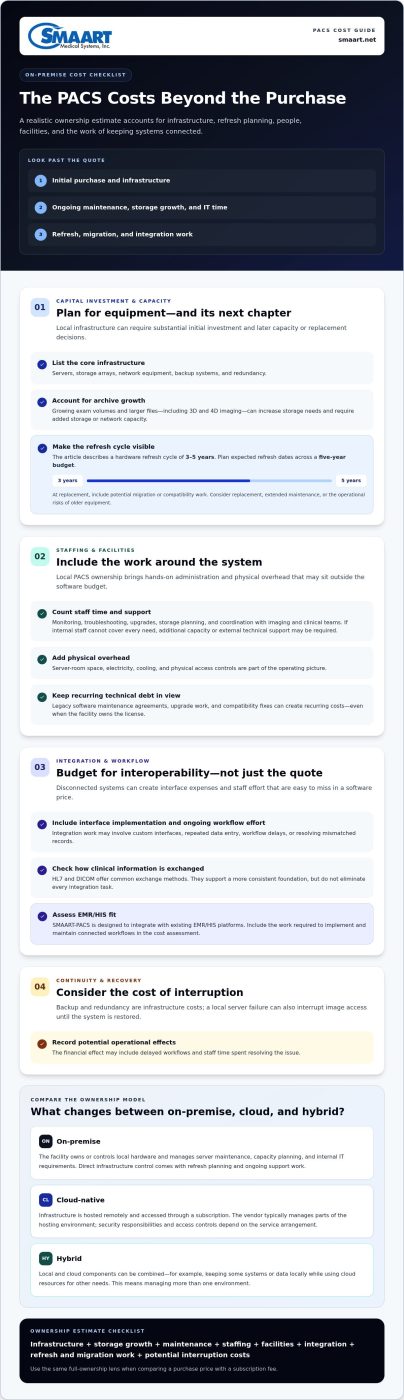
On-premise: The facility owns or controls local hardware and manages server maintenance, capacity planning, and internal IT requirements. This provides direct infrastructure control, but makes refresh planning and ongoing support part of the facility’s workload.
Cloud-native: Infrastructure is hosted remotely and accessed through a subscription-based service. The vendor typically manages parts of the hosting environment, while security responsibilities and access controls depend on the service arrangement. Hybrid models combine local and cloud components. A facility might retain some systems or data locally while using cloud resources for other needs. This can suit organizations with established infrastructure or specific workflow requirements, but it also means managing more than one environment.
The True Cost of Interoperability
The “integration tax” is the added expense and staff effort that can arise when imaging systems don’t exchange information smoothly with an EMR or other clinical platforms. It may show up as custom interface work, repeated data entry, workflow delays, or time spent resolving mismatched records. These costs are easy to miss in a software quote, yet they affect daily operations and the long-term value of a PACS.
Interoperability matters beyond convenience. When clinicians can access prior imaging and related information through connected workflows, they may have more context for decisions and avoid some unnecessary repeat exams. The effect depends on clinical processes, but disconnected systems make existing studies harder to find and use. That can add administrative work and contribute to redundant testing.
Standards such as HL7 and DICOM provide common methods for exchanging healthcare information and imaging data. They don’t eliminate every integration task, but they support a more consistent foundation than isolated, one-off connections. Integrated RIS PACS solutions bring scheduling, reporting, and image workflows into closer alignment. SMAART-PACS is designed to integrate with existing EMR/HIS platforms. Include interface implementation and ongoing workflow effort in your cloud vs on-premise PACS cost assessment, not just the license or subscription.
The Hidden Anatomy of On-Premise PACS Costs
An on-premise PACS can give a facility direct control over its imaging environment, but ownership brings costs beyond the initial purchase. A realistic comparison includes the infrastructure needed to run the system, the people who maintain it, and the physical space that houses it. These expenses can be overlooked when budgets focus mainly on software licensing.
Capital Investment and the Refresh Cycle
The initial outlay may include servers, storage arrays, network equipment, backup systems, and redundancy to keep services running if a component fails. As imaging volumes and file sizes grow, storage and network capacity may need to expand. Hardware also ages. A refresh cycle of three to five years can bring another substantial planning decision: replace equipment, extend its life with additional maintenance, or accept the operational risks of older infrastructure.
Map expected refresh dates across a five-year budget rather than treating the original purchase as a one-time cost. Include migration or compatibility work that could accompany a replacement. This makes the cloud vs on-premise PACS cost comparison more useful than a simple comparison of license and subscription fees.
Staffing, Facilities, and Technical Debt
Local systems need hands-on administration. PACS expertise may be needed for monitoring, troubleshooting, upgrades, storage planning, and coordination with imaging and clinical teams. If internal staff can’t cover every requirement, facilities may need additional capacity or external technical support. Time spent maintaining infrastructure is also time not spent on other IT priorities.
Physical overhead adds another layer: server-room space, electricity, cooling, and physical access controls. These needs may be spread across different budgets, so they can disappear from a PACS-only spreadsheet. Legacy software maintenance agreements, upgrade work, and compatibility fixes add recurring costs, too. Owning a license doesn’t remove these obligations.
Downtime, Cybersecurity, and Recovery
A local server failure can interrupt access to images until the system is restored. The financial effect may include delayed workflows, staff time spent resolving the issue, and postponed work. Recovery planning should account for how backups are created, protected, tested, and restored, not simply whether a backup exists. Local copies also require secure storage and ongoing administration.
Ransomware defenses can involve layered protections, monitoring, staff procedures, and recovery testing. Include these operational needs in infrastructure planning, and understand how locally hosted data affects insurance discussions. Requirements and premiums vary, so don’t treat either as a fixed PACS cost.
- Include: hardware, redundancy, maintenance, refreshes, IT effort, facilities, backup, and recovery planning.
- Separate: one-time acquisition costs from recurring operating costs.
- Project: how storage growth and system replacement could affect the five-year total.
A cloud platform may reduce the need for proprietary local hardware, while zero-footprint viewing can reduce local workstation requirements. Facilities weighing these options can explore how SMAART-PACS supports imaging workflows as part of a broader effort to manage infrastructure overhead.
Cloud PACS Financial Model: Agility, Scalability, and SMAART-SHARE
A cloud PACS shifts some imaging infrastructure expenses from capital purchases to operating expenses. Instead of planning around local server and storage purchases, a facility pays according to the subscription model and terms it selects. That can make budgeting more adaptable as exam volumes change, but the total still depends on factors such as storage, users, implementation, support, and data transfer. Compare what is included over several years, not just the monthly fee.
Zero-Footprint Viewing and Hardware Savings
A zero-footprint viewer runs through a browser rather than requiring dedicated viewing software on every workstation. This can reduce local hardware and installation needs, and help staff access imaging from standard computers. It doesn’t mean every computer is appropriate for diagnostic interpretation. Clinical use depends on the facility’s workflow and equipment requirements. Review how a zero-footprint PACS viewer fits your workflows and workstation plans.
The potential benefit goes beyond avoiding a workstation purchase. Fewer specialized local setups can mean less deployment and maintenance work as viewing locations expand. Browser-based access may also support remote reading workflows, though the effect on staffing or external reading costs depends on how a facility operates. Review licensing, too. If charges vary by user or seat, model the cost of adding clinicians and locations as access needs grow.
Storage Scalability and Data Transfer
Cloud storage can reduce the need to buy capacity far ahead of demand. Rather than sizing local arrays for anticipated peak growth, a facility may be able to adjust storage as its archive expands. That flexibility is useful, but it doesn’t mean storage is unlimited or that every study costs the same to retain and access.
Some storage models distinguish between frequently accessed studies and older archived data. The potential trade-off is lower-cost retention versus the time or expense involved in retrieving less-accessed studies. Review the service terms instead of assuming a particular “hot” or “cold” tier is included. Also examine data egress charges: moving images out of a cloud environment or transferring large volumes may carry fees that affect the total. Estimate expected access and transfer patterns before comparing offers.
Distribution and Operational Responsibility
SMAART-SHARE’s cloud platform removes the need for proprietary hardware. Its QR code-based exam-sharing approach can offer an alternative to distributing studies on physical media. Assess the current cost of media, preparation, handling, and staff time to understand where digital sharing could simplify the process.
Cloud hosting may shift some infrastructure, security, and update tasks to the vendor, but the division of responsibilities depends on the service arrangement. Facilities still need to manage user access, internal procedures, and their own security obligations. For a practical cloud vs on-premise PACS cost comparison, include subscription terms, storage growth, data movement, local hardware savings, and the IT work that remains. This gives decision-makers a clearer view of both flexibility and ongoing responsibilities.
Total Cost of Ownership (TCO) Framework: How to Calculate Your ROI
A useful PACS comparison follows costs beyond the first invoice. Start with what your facility spends today, then forecast how each option could affect operations over the same period. A consistent method helps administrators compare architectures without overlooking staff time, workflow friction, or potential revenue opportunities.
The 5-Year Cost Comparison Framework
Total cost of ownership is the sum of all direct and indirect costs associated with a PACS over a five-year period. Compare the first 12 months with the full 60-month lifecycle. The first year may emphasize setup and migration, while later years can bring subscription accumulation, support, upgrades, storage growth, or infrastructure refreshes. Include the costs of hospital imaging workflow optimization, since process changes and integration affect the value of the technology.
Build the comparison in stages:
- Establish a baseline. Gather current licensing, maintenance, hardware, storage, backup, and integration expenses.
- Add operating effort. Estimate staff hours spent on troubleshooting, image retrieval, manual data entry, and distribution. Use actual workflow observations where possible.
- Project both models. For on-premise, include refresh planning and capacity expansion. For cloud, model recurring subscription charges, storage changes, data transfer, and implementation work.
- Compare outcomes. Track costs alongside turnaround times, completed exams, and administrative workload so the financial view reflects how the system performs in practice.
Keep assumptions visible. If exam volume or storage use may change, create a baseline and a growth scenario rather than relying on one forecast. This makes the cloud vs on-premise PACS cost decision more resilient to changing needs.
Include the Soft Costs and Efficiency Dividend
Time spent chasing prior studies, resolving workflow issues, or repeating manual steps has an operational cost, even if it doesn’t appear as a separate invoice. Radiologist fatigue can also matter: fragmented workflows and avoidable interruptions may affect staff experience. Don’t assign unsupported dollar values to these factors. Record the tasks, time, and workflow impact, then evaluate whether a proposed system could reduce friction.
Faster reporting cycles may help a clinic move results through its workflow sooner, but revenue impact depends on capacity, scheduling, and reimbursement. Treat this “efficiency dividend” as a measurable opportunity, not a guaranteed return. Compare reporting turnaround and appointment capacity before and after changes.
Portals, Image Sharing, and ROI
Patient-facing access and digital exam sharing can reduce reliance on physical media and the staff time involved in preparing, burning, and distributing CDs. A patient portal for medical images may also make it easier for patients and referring providers to access studies, supporting smoother communication. Track media tasks, repeat requests, referral follow-through, and staff time to understand the effect on costs and growth. SMAART-SHARE provides QR code-based exam sharing as an alternative to CD distribution.
For facilities reviewing the financial case for imaging workflow changes, explore how SMAART solutions support imaging operations alongside the TCO factors in this framework.
SMAART-PACS: The Pragmatic Solution for Cost-Conscious Facilities
Legacy PACS can leave facilities managing aging infrastructure, ongoing maintenance, and workflows that no longer fit their needs. Modernizing doesn’t have to mean replacing every system at once. SMAART-PACS offers hospitals and clinics a radiology management software option designed to integrate with existing EMR/HIS environments. The aim is to reduce operational burden while keeping imaging workflows connected.
Modernizing Without the Financial Strain
A cost-conscious decision starts with fit, not a feature checklist alone. Consider what your team needs now, which operational pressures are most costly, and how the system will work with existing clinical platforms. SMAART-PACS is designed for affordability and EMR/HIS integration. Zero-footprint viewing can also reduce local hardware requirements. Include these capabilities in your financial comparison without assuming every deployment will produce the same savings.
Software licensing deserves close attention. Document what the proposed license or subscription covers, how charges may change as use grows, and which operational costs remain with the facility. Predictable terms can make budgeting easier, but don’t assume a model is predictable based on billing cadence alone. Evaluate the full agreement alongside implementation, storage, support, and integration needs. The goal is to select a solution that meets clinical and operational requirements without paying for complexity that doesn’t serve your workflows.
For facilities comparing established enterprise systems with more agile options, brand size alone shouldn’t determine value. Compare fit, integration, access requirements, and total ownership costs. SMAART-PACS provides another option to consider, particularly for organizations seeking a PACS that connects with existing EMR/HIS platforms.
Plan a Measured Transition
Before changing systems, assemble a clear picture of your current environment. Bring imaging, IT, finance, and clinical stakeholders together to map how studies move from acquisition to interpretation, reporting, and sharing. Capture recurring pain points and existing dependencies. This groundwork helps teams set priorities and identify workflows that need to remain uninterrupted during a transition.
Then define the scope. A facility may assess its PACS and RIS needs while also considering cloud-based exam sharing. SMAART-SHARE’s cloud platform removes the need for proprietary hardware, offering a way to explore cloud-based sharing without treating a complete migration as the only modernization path. As you prepare for enterprise PACS solutions, document current integrations, archive requirements, user roles, and image-sharing processes. These details create a stronger foundation for planning and evaluating options.
Use your inventory to compare options against the same priorities: workflow fit, EMR/HIS connectivity, local hardware needs, storage growth, and the costs your team identified. This keeps the decision grounded in your facility’s operating reality rather than a generic feature comparison.
To explore SMAART-PACS, SMAART-RIS, and SMAART-SHARE for your facility, visit SMAART Medical Systems.
Make Your Next PACS Decision With Confidence
Your next PACS decision can do more than replace aging technology. It can help your facility set a clearer direction for imaging operations, budget planning, and future growth. Use your cost analysis to align finance, IT, and clinical leaders around the outcomes that matter most, then evaluate each option against your workflows. That turns cloud vs on-premise PACS cost from a price comparison into a practical decision about long-term fit.
SMAART-PACS is designed to integrate with existing EMR/HIS platforms, and zero-footprint viewing can reduce local hardware requirements. Assess how these capabilities fit your environment and which operational changes your team wants to measure. That keeps the financial case grounded in your facility’s needs rather than an assumed savings outcome.
Frequently Asked Questions
Is cloud PACS more expensive than on-premise over a 10-year period?
It depends on the facility’s growth, usage, and contract terms, so neither model is automatically cheaper over 10 years. Compare recurring subscription and data-transfer charges with on-premise replacements, maintenance, staffing, and facility expenses. Include migration and exit costs in the cloud scenario, too. For a meaningful cloud vs on-premise PACS cost analysis, model expected exam volumes and storage needs, then test how different growth assumptions change the total.
What are the hidden costs of on-premise PACS maintenance?
Beyond a maintenance agreement, budget for staff time, hardware troubleshooting, backup administration, power and cooling, and the work involved in upgrades or replacing aging components. Integration changes can also require technical effort when connected systems are updated. To find costs that may sit outside the PACS budget, review invoices and interview IT and radiology staff about recurring tasks. Record both paid support and internal hours, then separate routine work from one-time projects.
Can cloud-based PACS integrate with my existing EMR system?
Cloud-based PACS can be designed to integrate with existing EMR systems, but the workflow and interface scope matter. Map what information needs to pass between systems, such as patient identifiers, orders, reports, and study links. Then document how exceptions are handled when records don’t match. SMAART-PACS is designed to integrate with existing EMR/HIS platforms, helping facilities plan imaging workflows around their current environment.
How does a zero-footprint viewer reduce my hardware costs?
A zero-footprint viewer can reduce the need to install dedicated viewing software on every workstation, which may lower deployment and maintenance demands. It can also let staff access images through a browser on suitable computers. That doesn’t mean every standard PC is appropriate for diagnostic interpretation; display and workflow needs still matter. Inventory where images are viewed, identify specialized workstations, and assess which roles could use browser-based access before estimating potential hardware reductions.
What happens to my data if I decide to switch cloud PACS vendors?
Your data transition depends on the contract, export tools, supported formats, and migration plan. Before committing, document how studies, reports, and associated metadata can be exported, what assistance is included, and how long access remains available during a transition. Plan for validation by checking a representative set of images and records after migration. Also define retention and deletion responsibilities in writing, so your team knows how the archive will be handled at each stage.
Are cloud PACS systems as secure as on-premise servers for HIPAA compliance?
Security depends on the system’s safeguards and how the facility and vendor manage their responsibilities, not simply where servers are located. Cloud hosting doesn’t automatically make a PACS compliant, and local hosting doesn’t guarantee protection. Work with your privacy and security leads to review access controls, data protection, audit capabilities, incident procedures, and recovery planning. Document who manages each safeguard and how evidence of those processes will be maintained.
How do I calculate the ROI of moving to a cloud-based sharing platform?
Compare the platform’s full costs with the current expense of sharing exams. Track staff time spent preparing physical media, handling repeat requests, and coordinating image delivery, along with supplies and equipment. Then estimate which tasks could change and measure the difference after implementation. Include any effect on referral coordination, but treat additional revenue as a measured outcome rather than an assumed benefit. SMAART-SHARE provides cloud-based medical image sharing without proprietary hardware.
What is the typical hardware refresh cycle for an on-premise PACS?
A common planning range is three to five years, though actual replacement timing depends on equipment condition, capacity, vendor support, and facility requirements. Don’t wait until a server reaches the end of its useful life to budget for replacement. Track warranty and support milestones, storage headroom, performance issues, and compatibility dependencies. A phased refresh plan can help teams forecast spending and coordinate changes with PACS upgrades, archive needs, and clinical operations.
To discuss how SMAART-PACS, SMAART-RIS, and SMAART-SHARE could fit your facility’s radiology workflows, contact SMAART Medical Systems.