Evaluating Radiology Software Vendors: A 2026 Buying Guide
What if the vendor with the longest feature list is the wrong fit for your radiology team? A polished demo can still leave key questions unanswered: where PACS, RIS, and image sharing begin and end, how the software will connect with existing systems, and what will change for clinicians. When evaluating radiology software vendors, start with your real workflows, not a checklist of impressive features.
This guide offers a practical framework for building a shortlist and comparing vendors on the details that affect daily operations. You’ll learn how to define system scope, assess integration and deployment fit, and examine support before making a decision. You’ll also see how connected needs map to SMAART-PACS for image storage and distribution, SMAART-RIS for patient data and scheduling, and SMAART-SHARE for cloud-based image sharing. The goal is to identify software that fits your organization’s requirements without adding unnecessary complexity.
Key Takeaways
- Define your operational needs, users, and existing systems before comparing software features.
- When evaluating radiology software vendors, turn priorities into requirements your team can test and assess objectively.
- Use a comparison matrix to distinguish essential capabilities from features that are simply nice to have.
- Test representative workflows, including image access, scheduling, handoffs, and collaboration, before making a decision.
- Match system scope to the work: SMAART-PACS supports image storage and distribution, while SMAART-RIS manages patient data and scheduling.
Evaluating Radiology Software Vendors Starts with Defining the Right System
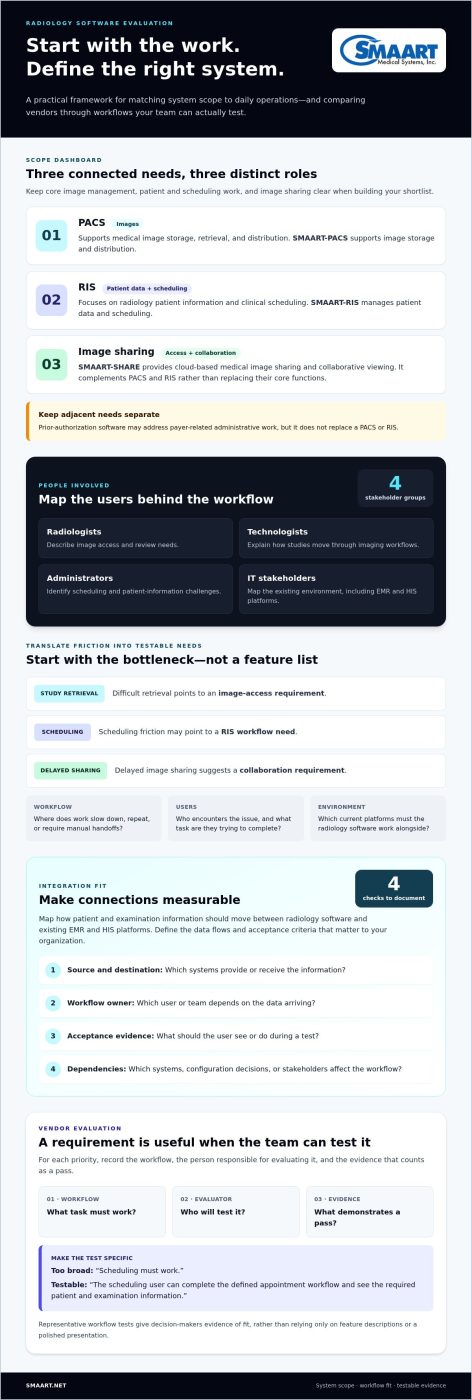
Before comparing vendors, define the operational problem you need to solve. Identify who will use the system, how images and patient information move through your organization, what imaging workflows it must support, and which systems are already in place. This helps you distinguish core radiology platforms from adjacent tools and avoid comparing products with different purposes.
Keep the scope clear. Prior-authorization software, for example, may address payer-related administrative work, but it does not replace a PACS for image storage and distribution or a RIS for patient data and clinical scheduling. Similarly, if your department needs to inventory and inspect protective gear, check out PSA Verify rather than expecting clinical imaging software to manage radiation safety compliance. If specialized operational tasks are separate bottlenecks, record them as distinct requirements instead of assuming every radiology software platform covers them.
Which radiology software category does your organization need?
A PACS supports the storage, retrieval, and distribution of medical images. For a foundational overview, see Picture Archiving and Communication System (PACS). A RIS focuses on radiology patient information and clinical scheduling. These systems support connected work, but they have different core responsibilities. SMAART-PACS supports image storage and distribution, while SMAART-RIS manages patient data and scheduling.
Image sharing is a related but distinct requirement. If clinicians need to share studies beyond the core image-management workflow or collaborate around images, assess those needs separately. SMAART-SHARE provides cloud-based medical image sharing and collaborative viewing. Consider who needs access, what they need to do with shared images, and how sharing fits alongside PACS and RIS. It complements those systems rather than replacing their core functions.
Map the people and workflows affected by the purchase
Include the stakeholders who use or support the workflows. Radiologists can describe image access and review needs; technologists can explain how studies move through imaging workflows; administrators can identify scheduling and patient-information challenges; and IT stakeholders can map the existing environment, including EMR and HIS platforms.
For each bottleneck, note who it affects and which system function may address it. Difficult study retrieval points to an image-access requirement; scheduling friction may point to a RIS workflow need; delayed image sharing suggests a collaboration requirement. These examples turn general complaints into use cases your team can evaluate.
- Workflow: Where does work slow down, repeat, or require manual handoffs?
- Users: Who encounters the issue, and what task are they trying to complete?
- Environment: Which current platforms must the radiology software work alongside?
Use those answers as the starting point for evaluating radiology software vendors, rather than relying on rankings or feature counts. For more workflow context, read the integrated RIS PACS solutions guide.
Evaluate Radiology Software Vendors Against Requirements You Can Test
Turn your priorities into requirements that a vendor can demonstrate. For each one, record the workflow, the person responsible for evaluating it, and the evidence that would count as a pass. “Scheduling must work” is too broad. “The scheduling user can complete the defined appointment workflow and see the required patient and examination information” gives your team a task it can test.
This approach makes comparisons fairer. A written requirement, tested through a representative workflow, gives decision-makers evidence of fit rather than relying on feature descriptions or a polished presentation. Keep each criterion tied to your organization’s actual tasks, systems, and users.
How to assess interoperability and existing-system fit
Map how patient and examination information should move between radiology software and your existing EMR and HIS platforms. For each connection, note what information is expected, which workflow depends on it, who owns the process, and what needs to be in place for testing. The SMAART Medical Systems, Inc. product suite is designed to integrate with existing EMR and HIS platforms. Define the specific data flows and acceptance criteria that matter to your organization.
Use a simple checklist to keep integration requirements concrete:
- Source and destination: Which systems provide or receive the information?
- Workflow owner: Which user or team depends on the data arriving?
- Acceptance evidence: What should the user be able to see or do during a test?
- Dependencies: Which existing systems, configuration decisions, or stakeholders affect the workflow?
For additional context, review the PACS and EMR integration guide. Use it as a prompt to document your own environment, since interface needs can vary between organizations.
How to evaluate security, access, and image sharing
Define access by role and scenario before comparing capabilities. Consider what radiologists, technologists, administrators, and other authorized users need to view or do, and where image sharing or collaborative viewing fits into the process. If browser-based viewing is part of your workflow, the zero-footprint PACS viewer guide offers related context.
Assess security controls against your organization’s requirements. Document the access expectations and image-sharing scenarios you need to evaluate, then record what your team observes. A general security statement alone does not show whether a particular workflow meets your needs.
For additional guidance while assembling your evaluation materials, consult established healthcare IT security standards and compliance frameworks. Keep your decision grounded in requirements your team can verify. Review SMAART Medical Systems, Inc. radiology software to see how PACS, RIS, and image sharing fit together.
Compare Radiology Software Vendors by Workflow, Architecture, and Fit
Compare every vendor against the same requirements and scenarios. Separate must-haves, which the system needs to meet, from differentiators, which may add value but should not make up for a gap in a core workflow. This keeps a long feature list from outweighing practical fit.
What belongs in a radiology software vendor comparison table?
Build one matrix for your shortlist. Give each requirement its own row, and record the same evidence for every vendor. Keep PACS, RIS, and image sharing in separate rows because they address different needs. Include:
- Product scope: Which PACS, RIS, or image-sharing capabilities are included in the proposed system?
- Workflow fit: How does it perform against the clinical and administrative scenarios your team defined?
- Integration: Which EMR and HIS connections are required, and what dependencies still need validation?
- Deployment and access: What approach is proposed, and how does it fit your infrastructure and users?
- Support and ownership: What support model is described, and what ongoing operational responsibilities or costs should your organization account for?
For each row, note the requirement, evidence observed, owner, and status: met, not met, or requires validation. Treat unknowns as open questions, not strengths. Keep them visible until your team has enough evidence to decide. If external material informs a benchmark, record its source, such as this external reference, and distinguish it from evidence gathered by testing the system.
Use identical scenarios for every comparison. For example, have the same user roles complete the same image-retrieval, scheduling, and image-sharing tasks. Record the steps, handoffs, and unresolved issues. Clinical, administrative, and IT stakeholders can then discuss the same evidence instead of comparing different demonstrations.
How to compare cloud, on-premise, and browser-based options
Compare architectures by operational responsibility, access patterns, infrastructure dependencies, and organizational constraints. Consider who manages the environment, how users need to access images, and what existing systems or internal policies shape deployment. Browser-based viewing is one access approach to assess within the broader system design, not a substitute for evaluating PACS or RIS scope.
No deployment model is automatically best for every organization. Weigh each option against the same workflow and ownership criteria, then document trade-offs and open questions. For further deployment context, see the enterprise PACS and cloud storage guide. This approach makes evaluating radiology software vendors more objective and keeps the comparison focused on verified fit.
Validate a Radiology Software Vendor Before Making the Decision
A structured validation process helps clinical, administrative, and IT teams assess the same evidence. Move from documented needs to realistic workflow tests, then review implementation responsibilities and unresolved risks together before approving a vendor.
- Set the baseline. Confirm must-have requirements, acceptance criteria, workflow owners, and existing-system dependencies.
- Prepare test scenarios. Select representative tasks for image access, scheduling, user handoffs, and collaboration. Define the expected outcome for each before the demonstration.
- Run consistent demonstrations. Use the same scenarios across evaluations. Have relevant users perform or closely assess the steps rather than relying on an administrator’s overview.
- Record the evidence. Clinical stakeholders document workflow fit, administrative stakeholders assess scheduling and operational tasks, and IT stakeholders capture integration dependencies and technical questions. Note gaps, workarounds, and items that still need validation.
- Review readiness and approve. Compare findings against the baseline, assign owners to outstanding questions, and seek agreement from the stakeholders responsible for affected workflows before making a decision.
How to run a useful radiology software demonstration
Keep the demonstration practical. For an image-access scenario, define who needs to find a study and what successful retrieval looks like. For scheduling, specify the task and the information the user needs. Include a handoff between roles and a collaboration scenario if image sharing is a requirement. Apply the same scoring notes and evidence standard each time. This helps you see where a workflow succeeds, where users need workarounds, and which integrations affect the result.
How to assess implementation and ongoing support
Before approval, document responsibilities for data migration, training, system configuration, and operational handoffs. Identify who supplies information, who coordinates each activity, and which teams need to prepare. Review how support expectations, issue escalation, and software updates align with your organization’s operating model. Separate assumptions from agreed responsibilities, and flag unresolved dependencies for a decision-maker.
This process turns evaluating radiology software vendors into an evidence-led decision, not a judgment based on presentation quality. It also connects validation to system scope: SMAART-PACS supports image storage and distribution, SMAART-RIS manages patient data and clinical scheduling, and SMAART-SHARE provides cloud-based image sharing and collaborative viewing.
To compare these capabilities with your workflow requirements, review SMAART radiology software.
Find a Radiology Software Vendor That Fits Your Organization
The right choice is the system that meets your documented requirements in the workflows your team actually uses. Bring together test results, integration needs, user feedback, and implementation responsibilities before making the final decision. A vendor’s feature list matters less than evidence that the software fits your clinical and operational priorities.
Use your findings to look for gaps that could create friction after selection. Did the relevant users complete their tasks as expected? Are the required connections with existing systems understood? Do clinical, administrative, and IT teams know what they need to prepare? These questions make evaluating radiology software vendors a decision grounded in organizational fit rather than assumptions.
When SMAART-PACS and SMAART-RIS match your requirements
Map each product to the work your team needs to support. SMAART-PACS provides medical image storage and distribution. SMAART-RIS manages radiology patient data and clinical scheduling. If your requirements include both image management and scheduling, assess each function against its own acceptance criteria and consider how both fit into your wider environment.
SMAART’s product suite is designed to integrate with existing EMR and HIS platforms. Document the information flows and user tasks that matter to your organization, and include those systems in your evaluation. This keeps integration discussions connected to real workflows and makes implementation responsibilities part of the decision.
When cloud-based image sharing is part of the solution
Some organizations need to share medical images and support collaborative viewing alongside core PACS and RIS workflows. SMAART-SHARE provides secure, cloud-based medical image sharing and collaborative viewing. Assess how it fits your intended sharing scenarios, who needs to participate, and how image sharing relates to the rest of your radiology software environment.
Treat image sharing as a defined part of the solution, not a substitute for image storage or scheduling. A clear scope helps your team compare capabilities fairly and avoid adding complexity that does not address a stated need.
With requirements, workflow evidence, integration fit, and implementation readiness in view, you can identify the product scope that aligns with your organization. Explore SMAART radiology management solutions to see how SMAART-PACS, SMAART-RIS, and SMAART-SHARE address connected radiology software needs.
Choose Software That Fits the Work Your Team Does
A sound decision starts with operational requirements, not a vendor’s feature count. Define whether your priority is image management, scheduling, image sharing, or a combination. Then compare vendors using the same workflows, document evidence and unresolved questions, and confirm integration and implementation responsibilities before approving a solution.
This practical framework makes evaluating radiology software vendors more objective and helps you match each need to the right system scope. SMAART-PACS provides medical image storage and distribution. SMAART-RIS supports patient data and clinical scheduling. For collaboration, SMAART-SHARE provides secure cloud-based image sharing and collaborative viewing. SMAART solutions are designed to integrate with existing EMR and HIS platforms.
Explore how these capabilities could align with your organization’s requirements. Explore SMAART radiology software solutions and take the next step toward a better-informed decision. With clear priorities and workflow evidence, your team can move forward with confidence.
Frequently Asked Questions
What should I look for when evaluating radiology software vendors?
Start with the workflows your organization needs to improve, then compare each vendor against those needs. Define must-have requirements for product scope, integration, user access, deployment, support, and implementation responsibilities. For example, specify who needs to retrieve images or manage appointments and what a successful task looks like. Use the same scenarios for every system, then record observed evidence, gaps, and dependencies. This keeps the decision focused on operational fit, not feature-list length.
How do I compare PACS and RIS vendors?
Compare PACS and RIS according to the different jobs each system performs. PACS supports medical image storage and distribution; RIS manages radiology patient information and clinical scheduling. Test each system against the workflows it will support, then assess how required information connects with existing EMR and HIS platforms. If your organization needs both, evaluate how the end-to-end workflow functions across them rather than judging isolated features alone.
What happens if radiology software does not integrate with our EMR?
Poor integration can leave systems disconnected, create duplicate data entry, or add manual steps for staff. Before selecting software, map which patient and examination information needs to move between the radiology system and your EMR. Identify workflow owners, dependencies, and the expected result for each data flow. Include IT and affected clinical or administrative users in validation. Don’t treat a general compatibility statement as evidence that your specific workflow will work.
Is cloud-based radiology software right for every clinic?
No. The right deployment approach depends on your infrastructure, access patterns, operational responsibilities, organizational requirements, and the workflows the system must support. Compare cloud and on-premise options against those factors rather than assuming one model is best for every clinic. Include image access, collaboration, integration with existing systems, and ongoing support in the evaluation. The best fit is the approach your organization can operate effectively while supporting users’ needs.
How can we evaluate a radiology software demonstration?
Prepare representative clinical and administrative scenarios before the demonstration, and define what a successful outcome looks like for each. Include the users who handle imaging, scheduling, operations, and IT. Observe how they complete the same tasks across vendor demonstrations, noting workarounds, gaps, and integration dependencies. Score results against agreed acceptance criteria. Consistent scenarios make differences easier to identify and give decision-makers useful evidence for the final choice.
How much does radiology software cost?
Radiology software costs depend on product scope, deployment, integrations, implementation needs, support, and ongoing licensing or subscription terms. A headline license figure alone won’t show the full ownership picture. Build a total-cost view that includes the resources and services your organization expects to use across the software lifecycle. Ask finance, IT, and operational stakeholders to apply the same assumptions when comparing options, and use the proposal to verify specific figures.
Should a small clinic choose an all-in-one radiology software platform?
Choose an all-in-one platform only if its included capabilities align with the clinic’s actual workflows. A combined approach may simplify coordination, while unused or unnecessary features can add complexity. First define needs for image storage and distribution, patient information, scheduling, and image sharing. Then compare an integrated platform with connected specialized tools against those requirements and your current systems. The right choice is the one that supports the work without adding avoidable operational burden.