How to Justify a PACS Replacement: Build a Defensible Business Case
What if the strongest case for replacing your PACS has little to do with its age? To understand how to justify a PACS replacement, leadership needs evidence that connects system limitations to operational impact, lifecycle costs, and organizational risk. A dated interface alone may not make the decision urgent, but recurring workarounds, support demands, integration gaps, and workflow constraints can add up.
It’s reasonable to be cautious. A replacement requires investment, migration planning, and coordination across clinical and IT teams. Stakeholders may disagree about whether the disruption is worthwhile. Rather than minimizing those concerns, compare the current state with a clearly defined future state. Include the cost of keeping the existing system and the practical demands of transition.
This article explains how to build a defensible, measurable business case. You’ll learn how to document workflow pain, assess total cost of ownership and risk, define requirements, and account for data migration, integrations, and implementation effects. The result is a decision framework for weighing the case for change against the realities of making it happen.
Key Takeaways
- Separate PACS age from evidence of operational strain, such as recurring workarounds, support demands, and workflow bottlenecks.
- Establish a current-state baseline across technical performance, user experience, workflow, risk, and lifecycle costs before comparing options.
- Assess continued use, targeted optimization, an upgrade, and full replacement against the same organizational requirements.
- Build a leadership-ready case that makes assumptions, alternatives, transition risks, and the decision request clear.
- Turn documented needs into evaluation criteria for PACS, RIS, and image sharing, then consider how these systems may work together.
How to justify a PACS replacement when the current system still works
A PACS can remain online and still make everyday work harder. Staff may repeat steps to find prior images, switch between systems to complete a task, or rely on manual workarounds when a workflow stalls. Those frustrations matter, but a credible replacement case shows how often they occur, whom they affect, and which operational needs remain unmet.
Separate the system’s age from its actual performance. A newer system can be a poor fit, while an older one may still meet current needs. PACS supports image storage, retrieval, and communication, as outlined in this Picture Archiving and Communication System (PACS) overview. The question is whether your system still supports the work your organization needs it to do, including image access, collaboration, and day-to-day radiology operations.
Look for signals to investigate, not automatic triggers for replacement:
- Recurring delays or extra steps in common imaging workflows.
- Manual workarounds staff depend on to access or share images.
- Repeated support requests for the same issue, or difficulty resolving persistent problems.
- User feedback pointing to friction across roles, teams, or locations.
- Gaps between current PACS capabilities and documented integration or operational requirements.
One complaint may describe an isolated incident. A pattern across shifts or departments may point to a broader constraint. For each issue, record when it occurs, which workflow it affects, who is impacted, and how staff work around it. This helps distinguish inconvenience from a persistent operational problem and gives stakeholders a shared starting point.
Which PACS limitations create a credible replacement case?
Focus on observable effects rather than general labels such as “slow” or “outdated.” Note where image access is delayed, collaboration requires extra steps, or routine work depends on manual intervention. Compare reports from radiologists, technologists, and IT teams. If the same friction recurs across people or locations, document the pattern. If it’s isolated, investigate the specific cause before treating it as a system-wide gap.
Is an aging PACS enough reason to replace it?
Age alone doesn’t establish that a PACS is no longer fit for purpose. Consider whether it meets current requirements, whether support and maintenance remain workable, and what lifecycle exposure comes with continued use. Age can prompt a review, but the decision should rest on evidence about capability, supportability, and operational fit. A PACS replacement case rests on documented gaps, not a birthday.
This distinction keeps the decision strategic rather than reactive. A single complaint shouldn’t dictate a major technology change, and a functioning system shouldn’t be exempt from scrutiny. The practical question is whether persistent, documented constraints justify evaluating replacement alongside less disruptive alternatives. That assessment sets up the next step: building a baseline leadership can use to compare options consistently.
Build the evidence: measure PACS performance, workflow, and risk
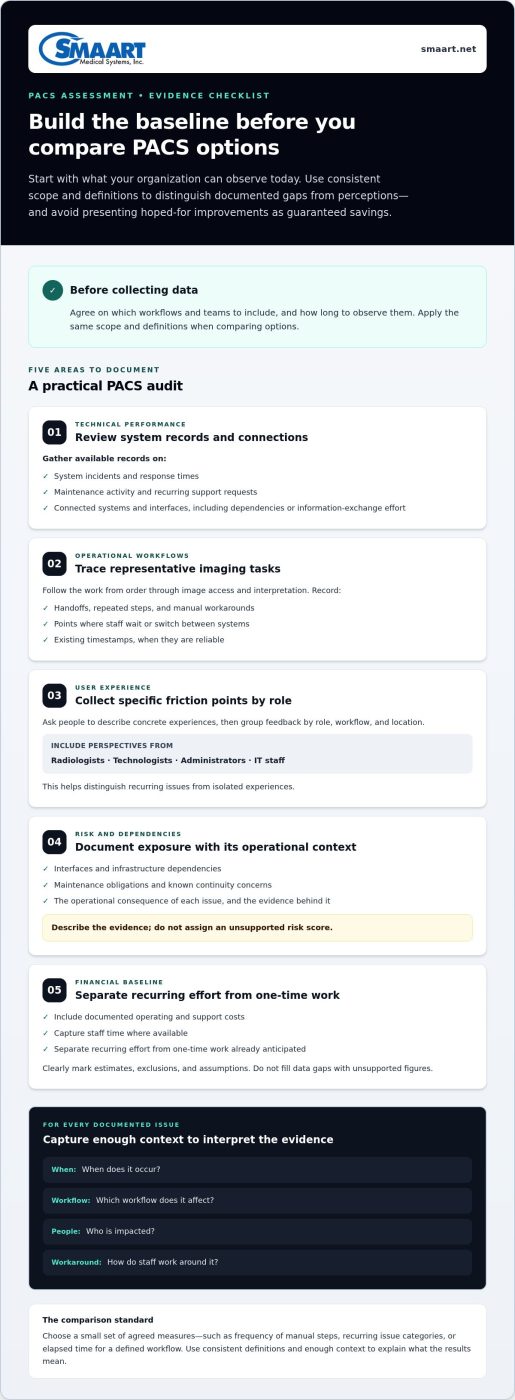
A persuasive assessment starts with a baseline, not a forecast. Gather what your organization can observe today, then use the same scope and definitions when comparing options. This helps identify genuine gaps, separate measured facts from staff perceptions, and avoid presenting hoped-for improvements as guaranteed savings.
Use this audit as a starting point. Before collecting data, agree with stakeholders on which workflows and teams to include and how long to observe them.
- Review technical performance. Gather available records on system incidents, response times, maintenance activity, and recurring support requests. Inventory connected systems and interfaces, noting where information exchange or dependencies create extra effort.
- Map operational workflows. Trace representative imaging tasks from order through image access and interpretation. Record handoffs, repeated steps, manual workarounds, and points where staff wait or switch between systems. Use existing timestamps where they’re reliable.
- Collect user experience evidence. Ask radiologists, technologists, administrators, and IT staff to describe specific friction points. Group feedback by role, workflow, and location to distinguish recurring issues from isolated experiences.
- Inventory risk and dependencies. Document interfaces, infrastructure dependencies, maintenance obligations, and known continuity concerns. Describe the operational consequence of each issue and the evidence behind it rather than assigning an unsupported risk score.
- Establish the financial baseline. Separate recurring operating and support effort from one-time work already anticipated. Include documented costs and staff time where available. Mark estimates, exclusions, and assumptions clearly rather than filling gaps with unsupported figures.
What operational evidence should the PACS audit capture?
Choose a small set of agreed measures that reflect actual work, such as the frequency of manual steps, recurring issue categories, or elapsed time for a defined workflow. The goal isn’t to measure everything. Apply consistent definitions throughout the observation period and capture enough context to explain what the results mean. Pair the measures with staff examples, not anecdotes alone.
How should IT and financial risks enter the assessment?
Separate what the organization spends or manages now from what a future approach may require. Current support effort, maintenance obligations, and known dependencies belong in the baseline. Migration, testing, training, and transition planning belong in the replacement scenario. Label projected requirements as assumptions until validated. This keeps unlike costs separate and makes uncertainties visible to decision-makers.
Measured current-state data describes what happens today; projected future-state benefits describe what may happen under stated assumptions. Keep those claims distinct in charts and leadership summaries. When translating findings into requirements, compare them with the documented capabilities and integration needs of solutions such as SMAART-PACS imaging software. A clear baseline gives the next decision a fair foundation, whether the organization considers optimization, an upgrade, or replacement.
Compare PACS replacement with optimization, upgrade, or continued use
A full replacement isn’t the only response to a documented PACS gap. Compare it with less disruptive options against the same requirements, including workflow fit, integration needs, lifecycle implications, and transition complexity. A structured comparison shows whether a focused change can address the problem or would leave important needs unresolved.
| Option | Workflow and integration fit | Lifecycle and transition considerations |
|---|---|---|
| Continued use | Fits when current workflows and connections meet requirements; known friction remains. | Avoids a system change now, but ongoing support and maintenance needs continue. |
| Targeted optimization | May address specific process, configuration, or training gaps. | Typically narrower in scope; assess whether underlying system limitations remain. |
| Upgrade | May address defined capability or compatibility needs within the existing environment. | Requires upgrade planning and testing; confirm whether it covers the full requirements set. |
| Full replacement | Can be evaluated when persistent gaps affect multiple workflows or integration needs. | Requires transition planning, including migration, implementation, and user readiness. |
This comparison doesn’t assume one option is best. For each, record which documented requirements it would meet, which it would leave open, and what evidence supports that judgment. Include transition effort rather than treating it as a reason to avoid replacement by default. A broader hospital imaging workflow optimization strategy can help teams examine process issues before concluding that technology change is necessary.
When might an upgrade or workflow change be enough?
Consider a smaller intervention when the gap is specific and plausibly addressable through configuration, staff training, or a process adjustment. For example, if a recurring delay stems from an unclear handoff or inconsistent workflow, changing the process may be a better first test than replacing the PACS. Define the expected result and review the same measure afterward. If the issue persists, affects other workflows, or reflects a capability the current system cannot support, the intervention hasn’t resolved the underlying requirement.
When does replacement better match the requirements?
Replacement deserves closer evaluation when material gaps persist after reasonable optimization has been assessed, especially when they span image access, connected systems, and routine operations. Treat these needs as linked: a change that improves one task but leaves essential integrations or workflows unsupported may not solve the broader problem. For organizations assessing combined imaging and information workflows, integrated RIS PACS solutions offer a useful way to consider requirements across systems.
That’s the practical test for how to justify a PACS replacement: show why smaller options don’t adequately address the documented gaps, and explain what replacement must deliver. Next, turn that comparison into a recommendation leaders can evaluate, with assumptions and transition considerations stated plainly.
Turn the PACS assessment into a leadership-ready business case
Leadership needs more than a list of technical complaints. A strong proposal connects documented PACS gaps to organizational requirements, compares reasonable alternatives, and makes the decision clear. Explain what needs to change, why it matters, what implementation involves, and what approval you’re requesting. Keep evidence, assumptions, and projections distinct so decision-makers can assess the case without relying on promised savings or unsupported return-on-investment figures.
What belongs in a PACS replacement proposal?
Organize the recommendation so leaders can follow the logic from current state to decision. Cover the problem and evidence, affected workflows, requirements, alternatives, risks, and requested action. Include consequences of inaction only where documented operational or lifecycle findings support them.
- Executive summary: State the decision requested, the main evidence, and why action is being considered now.
- Current state and requirements: Summarize documented gaps and define functional, integration, security, support, and operational needs.
- Options and financial assumptions: Show alternatives considered, cost categories, assumptions, exclusions, and dependencies. Distinguish one-time transition items from recurring operating considerations.
- Risks and response: Identify unresolved concerns, such as migration scope, interface dependencies, continuity, training, and governance, along with how each will be assessed or managed.
- Decision requested: Specify whether leadership is being asked to approve further evaluation, funding, a project phase, or another defined next step.
Make uncertainty visible. If an estimate depends on migration volume, staff effort, or a future workflow, label it as an assumption and identify who will validate it. This lets stakeholders challenge the inputs without losing sight of the decision itself.
How can the case make transition risk easier to assess?
Describe the transition in practical terms. Define the data and image history in scope, who will validate migrated information, which interfaces need testing, and how teams will prepare for changed workflows. Set out continuity planning and governance responsibilities before implementation begins. If deployment model is part of the decision, compare its operational and lifecycle implications with the other requirements; an enterprise PACS cloud-storage strategy can help frame that discussion.
Agree on decision gates before work starts, such as sign-off on requirements, migration validation, integration testing, and readiness to proceed. Then define a post-implementation review using the same measures established in the baseline. Set a review point with stakeholders and compare observed workflow, support, and operational results with the original evidence and stated expectations. Report gaps as well as progress.
This is how to justify a PACS replacement without hiding the hard parts: make the rationale traceable, show how transition risks will be evaluated, and give leadership measurable checkpoints. Apply the same functional, integration, support, and lifecycle criteria to SMAART-PACS as to every option under consideration.
Evaluate replacement options and plan the next PACS decision
Once the organization has defined its requirements, use them to evaluate options consistently. A checklist keeps the process grounded in documented needs instead of attractive features that don’t address the original gaps. For each criterion, record whether it’s essential or preferred, how it will be assessed, and what evidence supports the evaluation.
- Clinical and workflow fit: Assess image storage, distribution, diagnostic viewing, access, and the workflows staff need to complete.
- Interoperability: Identify required connections to EMR, HIS, and other systems, then define how each integration need will be evaluated.
- Security and support: Document organizational requirements and assess available information against them.
- Lifecycle and transition: Compare operating and support considerations alongside implementation, migration, training, and continuity needs.
- Financial fit: Evaluate the financial model against approved assumptions and the organization’s planning requirements.
Which requirements should guide a PACS evaluation?
Start with the essential tasks the system must support, then assess how well each option aligns with them. If radiologists need diagnostic access through a browser, include that as a specific requirement rather than assuming every viewer works the same way. A zero-footprint PACS viewer guide can help clarify what to consider in that evaluation. Keep the criterion tied to your organization’s use case.
Score each requirement using a consistent scale and ask evaluators to document the basis for their assessment. Separate confirmed capabilities from open questions. This creates a useful record for comparing options and helps surface gaps before selection rather than during implementation planning.
How does SMAART fit a replacement evaluation?
Evaluate SMAART-PACS against the same criteria as every option on your shortlist. It is a comprehensive image storage and distribution system designed to integrate with existing EMR and HIS platforms. Assess how its capabilities and integration scope align with your documented workflows and technical environment. Compare support expectations, lifecycle needs, and financial requirements against your organization’s criteria as well.
Consider related systems where they match identified needs. SMAART-RIS manages patient data and clinical scheduling, and is built to work with EMR and HIS platforms. It may be relevant when requirements include radiology information workflows. SMAART-SHARE is a cloud-based platform for secure medical image sharing and collaborative viewing, making it relevant when image sharing is an organizational need. Assess each function on its own before considering how the systems may work together.
The next decision doesn’t have to be a final purchase approval. It may be approval to evaluate options, validate integration requirements, or plan a transition assessment. Keep that step tied to the evidence and decision gates already established. Explore SMAART radiology software solutions as part of your evaluation, using your documented workflow, integration, support, and financial criteria.
Make the next PACS decision with confidence
A replacement decision doesn’t have to begin with a commitment to change. It can begin with a focused next step: align clinical, operational, and IT stakeholders on the requirements that matter most, then decide what evidence or evaluation would resolve the remaining questions. That keeps momentum without asking leadership to approve more than the case supports.
Knowing how to justify a PACS replacement means making the decision traceable, not forcing a particular outcome. Keep the criteria visible as you move from assessment to evaluation, and revisit them if organizational needs or implementation assumptions change. A clear process gives stakeholders room to make a considered decision while keeping the focus on practical needs.
Discuss your PACS requirements with SMAART Medical Systems, Inc. and explore a next step that fits your organization’s priorities. A grounded assessment and thoughtful evaluation process can help your team move forward with greater clarity.
Frequently Asked Questions
How do you build a business case for replacing a PACS?
Build the case by tying a specific organizational need to evidence, a decision, and a way to review the outcome. A practical approach to how to justify a PACS replacement is to state the problem in one sentence, attach records or workflow examples that demonstrate it, and explain why the proposed option addresses the requirement better than alternatives. Identify who owns each assumption, and make clear whether leadership is approving evaluation, funding, or implementation.
Is an outdated PACS a good enough reason to replace it?
Not by itself. Age is a prompt to examine supportability and fit, not proof that replacement is necessary. An older PACS may still meet a clinic’s needs if it supports required workflows and remains supportable. A newer system may still fall short. Focus on whether current requirements are met, whether known issues can be resolved, and whether lifecycle concerns have a practical effect on the organization.
What metrics should a hospital use to evaluate its current PACS?
Choose measures that reflect the hospital’s actual workflows and can be collected consistently. Useful examples include the frequency and type of PACS-related support tickets, time to complete a defined image-retrieval task, number of manual handoffs, and rate of workflow exceptions. Pair quantitative measures with structured feedback from users. Define each metric clearly, including what counts as an exception, so teams can compare results without changing the measurement method.
Can a PACS be replaced without disrupting radiology operations?
No transition should be treated as disruption-free, but planning can help teams identify and manage operational impact. Map critical workflows, schedule migration and testing activities, assign responsibility for validating image availability, and define how staff will handle issues during transition. Test interfaces and representative workflows before relying on the new environment. Establish escalation and continuity procedures in advance, then use clear readiness criteria to decide whether each phase can proceed.
What should a PACS replacement request for proposal include?
A PACS request for proposal should turn organizational needs into responses that can be compared consistently. Include functional requirements, expected integrations, image migration scope, security and access needs, support expectations, implementation responsibilities, training, and transition planning. Ask respondents to distinguish standard capabilities from configuration or additional work, and to describe dependencies and assumptions. Include evaluation criteria and a response format so reviewers can assess each proposal against the same priorities.
How do you compare PACS replacement with an upgrade?
Compare both options against the same requirements and test cases. An upgrade may be suitable if it addresses the documented gaps while preserving the workflows and integrations the organization needs. Replacement may merit evaluation if key requirements remain unmet or the upgrade path leaves important dependencies unresolved. Compare implementation effort, lifecycle implications, migration needs, and the risks of carrying forward existing limitations. Record which requirements each path satisfies and where uncertainty remains.
Who should be involved in approving a PACS replacement?
Approval should reflect the people responsible for clinical use, technical fit, operational readiness, and organizational resources. Involve radiologists, technologists, radiology administrators, IT and security staff, and finance or executive leadership. Include representatives who manage connected systems, since interface decisions can affect workflows beyond radiology. Give each stakeholder a defined review role, such as validating clinical requirements, confirming dependencies, or approving funding, so concerns surface before a final decision.