Medical Imaging Exam Sharing Solutions: A 2026 Guide to Connected Care
What if sharing an imaging exam didn’t mean chasing discs, links, and access instructions across organizations? Medical imaging exam sharing solutions should help authorized care teams reach the relevant studies through a clear, workable process.
That can be harder than it sounds. A recipient may not be able to view the images, an exchange may not fit existing PACS or EMR workflows, or teams may be unclear about who manages access and safeguards. Ease of sharing matters, but it needs to work alongside privacy, security, and day-to-day clinical needs.
This 2026 guide explains how to evaluate medical imaging exam sharing solutions for secure access, clinical usability, interoperability, and operational fit. You’ll learn what to ask about viewing exams, connecting with established systems, and assigning responsibilities before adoption. We’ll also consider where a cloud-based option such as SMAART-SHARE may fit, so you can assess ways to reduce exchange friction while supporting existing workflows.
Key Takeaways
- Medical imaging exam sharing solutions vary in recipient access, workflow effort, interoperability, and administrative control.
- Trace an exam from its source system to the recipient’s review to find access barriers before they disrupt a handoff.
- Compare physical media, direct exchange, portals, and cloud-sharing platforms against the needs of your teams and partner organizations.
- Before rollout, assess permissions, safeguards, audit records, retention, and support responsibilities.
- Confirm how a solution’s standards support and integrations fit your current PACS, EMR, and clinical workflows.
Why medical imaging exam sharing solutions matter across care settings
An imaging study can be complete and stored, yet still be out of reach for the clinician who needs to review it. A referral to another facility, a request for a second opinion, or a follow-up appointment may require images and related information to move between organizations. If staff rely on manual handoffs or unclear instructions, arranging access becomes a separate task instead of a smooth part of care coordination.
Medical imaging exam sharing is the transfer of, or provision of authorized access to, an imaging study and its related information for review by an intended recipient. Sharing is not the same as storage: a PACS or archive retains and manages imaging data, while sharing enables another authorized person or facility to access a study. A Vendor Neutral Archive (VNA) is a related storage and management concept, but having an archive does not by itself ensure an outside recipient can access a study. Diagnostic viewing is the display of images for clinical review. Interpretation and diagnosis are clinical activities, not sharing functions. Sharing software does not perform an imaging exam or replace a radiologist’s judgment.
What does medical imaging exam sharing include?
A shareable exam may include image files, study details such as the exam date and type, and an associated report when available and appropriate to share. The recipient might be a patient, referring clinician, specialist, or another facility. The sender also needs to provide a usable access method and instructions that match the recipient’s role and workflow. What a recipient can view or do depends on the platform and supported workflows, so don’t assume image access also includes reports, diagnostic tools, or other functions.
Where do traditional sharing workflows create friction?
Friction often appears at the handoff. Staff may need to export a study, send it through a separate channel, relay instructions, and follow up if the recipient can’t open or locate the files. Systems may handle formats and access differently, while vague directions can leave recipients unsure how to proceed.
A link alone doesn’t guarantee useful access. It may require an account, compatible software, or steps the recipient doesn’t know to take. A workable process makes clear who is authorized, how to open the exam, and whether the recipient can review it in context. Successful exchange means more than sending data. It means helping the right care team access the relevant material through a process they can use.
How medical imaging exam sharing solutions move studies between systems
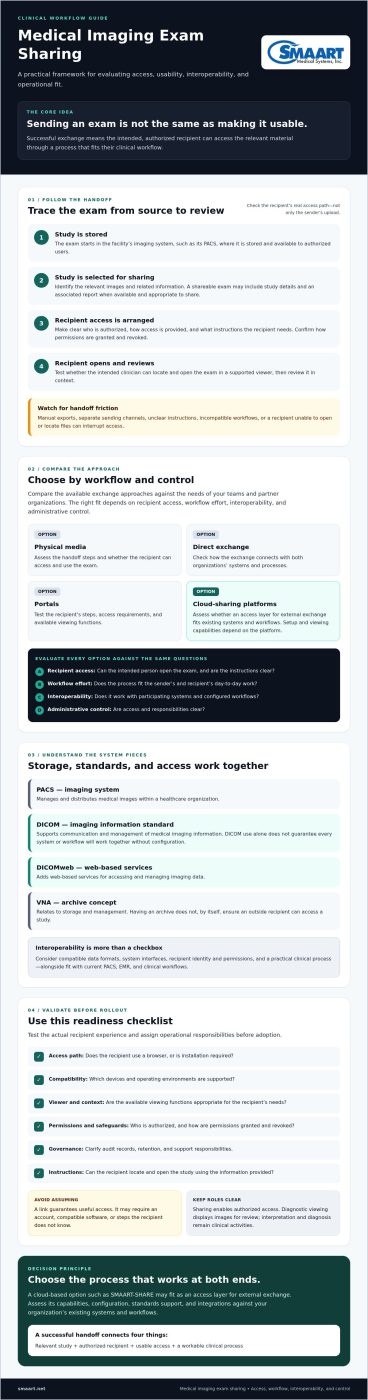
An imaging exam typically starts in a facility’s imaging system, where it is stored and made available to authorized users. For external sharing, the organization needs a process to select the study, arrange recipient access, and provide clear instructions. The recipient then opens the exam in a supported viewer and reviews it in context. Each step matters: a transferred file isn’t useful if the intended clinician can’t access it or fit it into their workflow.
How do PACS, DICOM, and cloud sharing fit together?
A Picture Archiving and Communication System (PACS) manages and distributes medical images within a healthcare organization. DICOM is a standard for communicating and managing medical imaging information, but using DICOM does not guarantee that every system or workflow will work together without configuration. DICOMweb adds web-based services for accessing and managing imaging data. Depending on its capabilities and how participating systems are configured, a cloud-sharing platform can provide an access layer for external exchange.
Think of interoperability as several pieces working together, not a single checkbox: compatible data formats, system interfaces, recipient identity and permissions, and a practical clinical process. A cloud-based sharing platform may let authorized recipients access shared radiology results without using the sender’s proprietary hardware. Available viewing functions and setup depend on the platform.
What should recipients experience when opening a shared exam?
Test the recipient’s actual path, not just the sender’s upload process. Check whether access works through a browser or requires installation, which devices and operating environments are supported, and whether the viewer offers the functions recipients need. Confirm how permissions are granted and revoked. Make the instructions specific enough that a recipient knows how to locate and open the study. These details determine whether access fits the receiving organization’s workflow.
Browser-based viewing can reduce installation steps in some workflows, but “browser-based” doesn’t automatically mean every device, study type, or diagnostic function is supported. For a closer look at these considerations, see this zero-footprint PACS viewer guide.
SMAART-SHARE is a cloud-based platform for medical image sharing and collaborative viewing. When comparing exchange approaches, review SMAART radiology software alongside your existing PACS and EMR workflows, and verify current access, integration, and viewing capabilities with the vendor.
Compare medical imaging exam sharing solutions by workflow and control
Each exchange method addresses a different access need. Compare options against the same criteria instead of assuming one approach will suit every referral or recipient. The right fit depends on where exams need to go, which systems are already in place, and how recipients are expected to review studies.
Method
Access and workflow
Interoperability, control, and support
Physical media
A disc provides a tangible handoff and may be useful when recipient access or connectivity is limited. Staff must prepare and deliver it, and recipients need a compatible way to view its contents.
Exchange depends less on a live system connection, but tracking, updates, and access management may require manual processes. Confirm who prepares, transports, and supports the media.
Direct system exchange
Connected systems can support exchange between organizations, but setup and workflow depend on the systems involved.
Check supported standards, interfaces, identity handling, and responsibilities with each vendor. A technical connection alone doesn’t ensure recipients can find and use the exam.
Portals
A portal can make patient access part of the sharing process. The experience depends on account setup, instructions, and the portal’s available functions.
Assess which users it serves, what content it exposes, and how staff manage access and support. For more context, see this patient portal and exam-sharing guide.
Cloud-sharing platforms
These platforms are worth evaluating for external access and collaboration, subject to the recipient’s connectivity and the platform’s supported viewing workflow.
Review permissions, access duration, auditability, integrations, and support needs. Confirm how the platform works with current systems rather than assuming compatibility.
When might physical media, portals, or cloud sharing fit?
Physical media may remain practical when a recipient has limited connectivity or lacks access to an exchange system. A portal may suit workflows where patients need a direct role in accessing or sharing exams. Cloud sharing may be worth evaluating when teams need an external access path or collaborative viewing. These approaches can coexist. Match the method to the recipient and task.
Which evaluation criteria reveal the best fit?
Start with your actual sharing patterns: who receives exams, how often, across which organizations, and through which PACS workflows. Then assess practical controls and requirements:
- Can intended recipients access the right studies, and can access be managed or expire?
- Are activity records available at a level that meets organizational needs?
- Which integrations and standards are supported in your specific configuration?
- Who handles setup, recipient questions, and ongoing administration?
Verify answers with vendors and test representative recipient workflows before choosing. This grounds the comparison in operational needs rather than feature lists alone.
Evaluate security, interoperability, and rollout before sharing exams
A reliable rollout starts before a platform goes live. Compare medical imaging exam sharing solutions against real workflows, technical requirements, and organizational responsibilities. HIPAA obligations depend on the organization and context, so involve qualified privacy and legal advisors to confirm which requirements apply. Treat vendor statements as claims to verify, not as a substitute for your own review.
What should a security and governance review cover?
Ask vendors to document how the platform handles identity, permissions, data transmission, access logs, retention, and incident response. Clarify who manages each control and which records your organization can review. Have privacy, security, and legal teams assess contractual terms, including business associate responsibilities where applicable. Don’t describe a platform as compliant or certified unless you have current evidence for the specific claim.
Interoperability also needs hands-on validation. Confirm the interfaces and standards the vendor supports in your configuration, then test the actual exchange with your PACS, EMR, and relevant recipient workflows. An integration listed in product materials may not cover every system, study type, or access path your teams use. For background on aligning radiology processes, see this integrated RIS and PACS workflow guide.
How can teams pilot sharing without disrupting care?
Use a staged evaluation and assign an owner to each step:
- 1. Map workflows. Identify who sends and receives exams, how access is requested, and where handoffs happen.
- 2. Confirm requirements. Document security, privacy, retention, integration, and support needs with the appropriate teams.
- 3. Test access. Use representative systems and recipients to check permissions, instructions, image viewing, and failure handling.
- 4. Pilot. Start with selected referral or follow-up scenarios and a defined group of participating users.
- 5. Review. Compare completion rates, access issues, staff effort, and recipient feedback with a baseline. Decide what needs adjustment before expanding.
Assign responsibility for training, troubleshooting, escalation, and periodic review before the pilot begins. Then a failed login or unclear instruction has a clear owner instead of becoming another manual handoff. SMAART-SHARE is a cloud-based platform for image sharing and collaborative viewing. Verify its current controls and capabilities against your requirements, and include SMAART-SHARE in your evaluation if it fits your needs.
Choose a future-ready medical imaging exam sharing solution
The right choice is one care teams can use, that works with relevant systems and recipients, and that your organization can govern over time. A polished feature list isn’t enough. Evaluate medical imaging exam sharing solutions against the workflows and requirements you’ve mapped, then verify how each option performs in practice.
“Future-ready” doesn’t mean predicting exactly how imaging exchange will change. It means asking whether a solution can adapt as your organization adds referral partners, locations, or collaboration needs. Check how the vendor manages standards support, integrations, updates, and service support. Ask how changes are communicated and what they may require from your IT and clinical teams. Treat roadmap statements as plans to assess, not guarantees of future capability.
What makes a solution adaptable as sharing needs change?
Consider whether workflows can accommodate different recipient types and facilities without creating a separate, difficult process for each. Ask which standards and interfaces are currently supported, how compatibility is tested, and how updates are managed. Clarify who handles configuration questions and ongoing support. These questions help distinguish demonstrated capabilities from features that are planned or depend on specific conditions.
How can SMAART-SHARE fit into an evaluation?
SMAART-SHARE is SMAART Medical Systems, Inc.’s cloud-based platform for medical image sharing and collaborative viewing. It is designed to distribute radiology results without proprietary hardware. That makes it a relevant option to include when comparing external exchange approaches, but it doesn’t establish how it will fit every organization’s environment.
Use your requirements list to guide the review. Confirm compatibility with your PACS, EMR, and recipient workflows, and ask the vendor to document current access controls, security measures, and integration capabilities. Test the viewing and collaboration functions your teams need, and have the appropriate technical, privacy, and operational stakeholders assess the evidence. This keeps the decision grounded in your configuration rather than general product descriptions.
Once your evaluation criteria are clear, compare platforms on equal terms and identify where further validation is needed. Review SMAART-SHARE as part of your assessment of medical imaging exam sharing solutions.
Make exam sharing work for your care teams
The strongest medical imaging exam sharing solutions make relevant studies usable for authorized recipients while fitting the organization’s existing workflows. Compare options by recipient access, interoperability, governance, and the support they require. Then test the complete exchange, from your PACS and EMR workflows to the recipient’s viewing experience, before expanding the rollout.
Security and operational responsibilities deserve the same attention as technical features. Confirm current capabilities with vendors, involve the appropriate privacy and IT stakeholders, and use a pilot to identify access barriers and workflow friction early.
SMAART-SHARE is a cloud-based platform for image sharing and collaborative viewing, designed to distribute radiology results without proprietary hardware. As you assess its fit, verify product capabilities, security controls, and compatibility with your environment. Explore SMAART-SHARE against your requirements list. With a clear evaluation process, your team can make an informed choice and build a more connected path for sharing exams.
Frequently Asked Questions
What are medical imaging exam sharing solutions?
Medical imaging exam sharing solutions help authorized recipients access imaging studies and, depending on the platform, related information or collaborative viewing tools. They can support exchanges among patients, clinicians, and healthcare organizations. Before choosing one, check how it transfers a study or grants access, what recipients need to open exams, and whether images and related information fit their intended workflows. Capabilities vary by platform and configuration.
How can healthcare organizations share medical images securely?
Start by defining who needs access, which exams they need, and how long access should remain available. Ask vendors to document identity controls, permissions, transmission safeguards, audit records, data retention, and incident processes. Review contractual responsibilities with qualified privacy and security teams, and test the workflow with representative users. HIPAA obligations depend on the organization and use case, so verify applicable requirements with qualified advisors rather than relying on general marketing claims.
Can medical images be shared without a physical CD?
Yes. Organizations can use portals, direct system exchange, or cloud-based sharing platforms instead of relying only on physical media. The right method depends on recipient access, system compatibility, connectivity, security needs, and clinical workflows. Test whether recipients can open and review the actual study, not just whether a file or link can be sent. Clear access instructions and a troubleshooting process help make the exchange usable.
What should a medical image sharing platform include?
Requirements vary, but assess recipient usability, supported imaging standards, access administration, integration fit, auditability, data handling, support, and governance. Confirm that intended users can view studies and use the functions their workflows require. Ask vendors to demonstrate relevant capabilities and provide current documentation. Don’t assume every platform offers the same controls, interfaces, or integrations, or that a listed connection will work in your specific configuration.
Is cloud-based medical image sharing secure?
Cloud deployment alone doesn’t establish whether a service is appropriate or secure for your organization. Review documented safeguards, identity and permission controls, data handling, audit capabilities, incident processes, and contractual terms. Involve privacy, security, and legal stakeholders to assess how the service would be used and which requirements apply. Ask vendors for current, specific evidence about their capabilities, and avoid relying on broad assurances or unverified compliance claims.
How do PACS and medical image sharing platforms differ?
A PACS generally supports the storage, management, and distribution of medical images within imaging workflows. A sharing platform may help authorized recipients outside the originating organization access studies or collaborate on viewing them. Some products combine or connect these functions, but capabilities vary. Check how each system works with your existing PACS and EMR environment, and ask vendors to confirm supported interfaces, configurations, and workflows before assuming compatibility.
How can a clinic evaluate a medical imaging exam sharing solution?
Map current referral and exchange workflows, identify recipient groups, and define security and interoperability needs. Compare options using consistent criteria, then test representative scenarios with staff and external recipients. During a pilot, track whether recipients can access exams, where issues arise, and what staff effort is required. Review feedback and findings with clinical, IT, privacy, and operational stakeholders before making a broader implementation decision. This process helps match a solution to real workflows.