Zero Footprint PACS Viewer: The Guide to Browser-Based Diagnostic Viewing
What if your most powerful diagnostic tool wasn’t a five-thousand-dollar workstation, but simply the web browser you’re using right now? For years, radiologists and IT managers have accepted a frustrating trade-off. High-performance imaging required heavy local installations, constant software patches, and the persistent security headache of cached patient data on portable laptops. You’ve likely felt the strain of maintaining these “thick client” systems while trying to provide fast, reliable care across multiple locations. A zero footprint PACS viewer changes that equation entirely by moving the heavy lifting to the server, delivering diagnostic-quality images without leaving a single byte of data behind on the local device.
It’s time to stop fighting with slow VPNs and outdated browser plugins. In this guide, you’ll discover how zero footprint technology provides secure, high-performance access to medical images from any device. We’ll break down the shift toward cloud-native platforms like SMAART-PACS, which help facilities reduce IT overhead and meet the mandatory AES-256 encryption requirements of the 2026 HIPAA Security Rule. You’ll learn how this approach enables seamless EMR integration and empowers radiologists to read from anywhere with total confidence and speed.
Key Takeaways
- Understand why a true zero footprint PACS viewer requires no Java, Flash, or local plugins to deliver diagnostic-grade performance.
- Learn how server-side rendering eliminates local data caching, ensuring sensitive patient information never remains on a remote device.
- Discover how to achieve OS-agnostic viewing capabilities across Mac, Linux, and mobile devices without sacrificing speed or image quality.
- Streamline your clinical workflow by integrating browser-based diagnostic tools directly into your existing EMR or HIS platforms.
- Explore how SMAART-PACS and SMAART-SHARE provide an affordable, high-performance alternative to complex legacy imaging systems.
What is a Zero Footprint PACS Viewer?
A zero footprint PACS viewer is a diagnostic-grade medical image viewer designed to run entirely within a standard web browser. Unlike traditional software that requires a heavy installation on a specific workstation, this technology allows clinicians to access and manipulate high-resolution DICOM images using nothing more than a secure URL. It represents a fundamental shift in how imaging departments manage their hardware and software assets, moving away from local dependencies toward a more agile, server-side architecture. SMAART Medical Systems, Inc. utilizes this approach to ensure that diagnostic power is available wherever a secure internet connection exists.
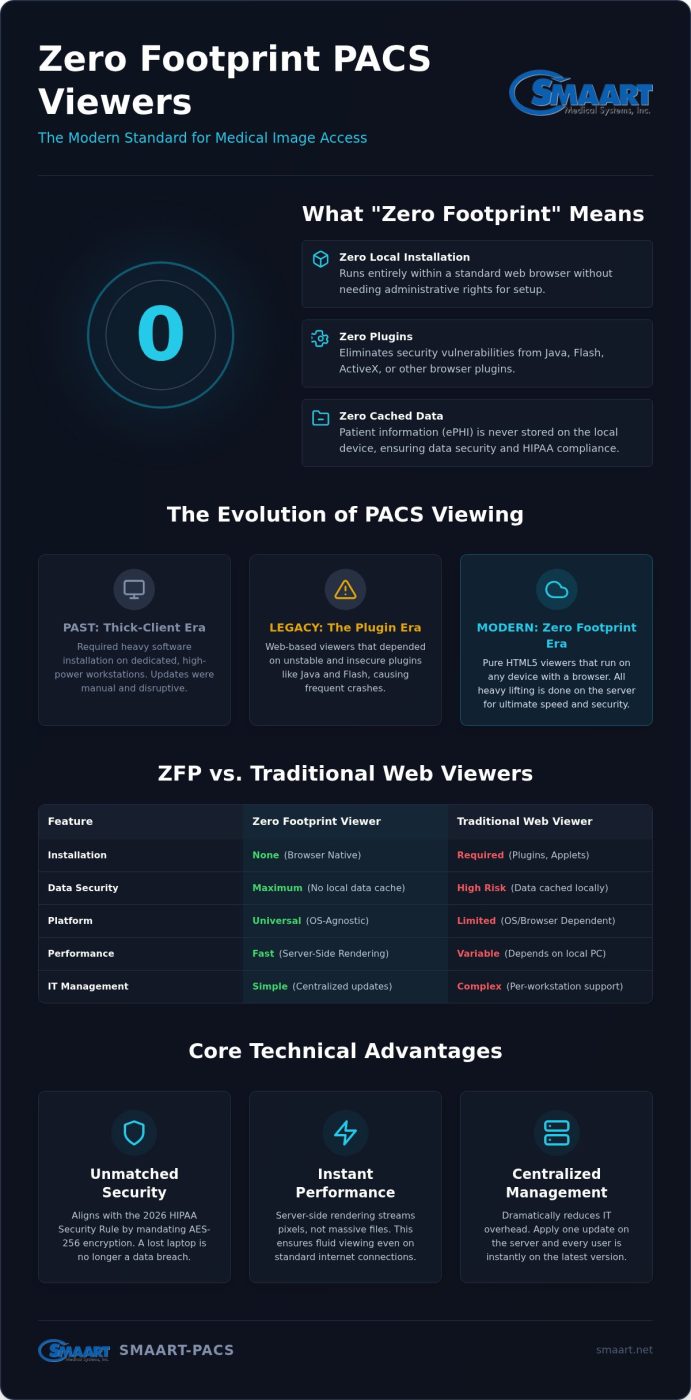
The “zero” in its name refers to a strict technical requirement: the viewer requires no Java applets, no Flash, no ActiveX, and absolutely no local plugins. This is a massive relief for IT departments. Because there’s no software to install, you don’t need administrative rights on the local machine to start a reading session. A zero footprint PACS viewer functions by streaming DICOM data directly to the browser window. It doesn’t leave a trail of patient data in the local cache, which is a critical advantage for maintaining HIPAA compliance on shared devices or portable laptops.
The Evolution of PACS Viewing
Modern imaging has come a long way from the era of dedicated, bulky workstations. In the early days, a Picture Archiving and Communication System (PACS) relied on “thick-client” software that had to be manually updated on every single computer. This led to the “Plugin Era,” where web-based viewers existed but required constant updates to Java or Silverlight. These plugins were notorious for creating security vulnerabilities and crashing browsers. Modern HTML5 and JavaScript technology finally replaced these unstable tools, allowing for a pure, browser-native diagnostic experience that is both faster and more secure.
Universal Access and Mobility
True mobility means your diagnostic power isn’t tethered to a physical radiology reading room. Whether you’re using a tablet in a patient’s room, a smartphone in a hallway, or a home laptop for overnight calls, the experience remains consistent. This flexibility breaks the traditional barriers of imaging. It allows for a more responsive care environment where specialists can provide consultations from anywhere with an internet connection. By centralizing all processing on the server and delivering pixel-perfect images through a browser, zero footprint technology enables 2026-era remote radiology workflows that prioritize instant access and data security over physical hardware limitations.
Technical Advantages: Speed, Security, and Scalability
A zero footprint PACS viewer moves the heavy computational load from the user’s laptop to a robust central server. This architecture ensures that even massive 3D datasets load instantly. Instead of forcing a clinician to download a multi-gigabyte DICOM file, the browser only receives the specific pixels needed for the current view. This bandwidth optimization allows for diagnostic-quality performance even on standard home internet connections, making remote reading as fluid as an on-site session.
IT managers find immediate relief in centralized management. Traditional systems require per-workstation updates and constant troubleshooting for local software conflicts. With a server-side model, you apply a single update at the source. Every user instantly has the latest version. This drastically reduces administrative burden and eliminates the need for expensive high-end graphics cards in every remote reading station. It’s a pragmatic shift that turns any capable device into a high-performance diagnostic tool. Understanding the full scope of radiology viewing software features and modern standards can help IT managers make more informed decisions when evaluating server-side architectures against legacy workstation deployments.
Security and HIPAA Compliance
Security is perhaps the most compelling reason for the “zero trace” approach. Because no patient data is cached locally, a lost or stolen laptop no longer represents a catastrophic data breach. This architecture aligns perfectly with the 2026 HIPAA Security Rule update, which mandates AES-256 encryption for all electronic Protected Health Information (ePHI) at rest. Modern systems like SMAART-PACS simplify this by handling encryption and multi-factor authentication at the server level, providing comprehensive audit logs for every image view and manipulation without extra effort from the end user.
Optimizing Performance for Remote Reading
Remote reading often suffers from fluctuating internet speeds. Modern ZFP viewers solve this by using intelligent pre-fetching to stay one step ahead of the radiologist. While the current slice is being analyzed, the system background-loads the next series. This creates a seamless flow that feels local but operates globally. It’s a reliable solution for clinics looking to modernize their infrastructure without a massive hardware overhaul. If you are ready to see these efficiencies in action, exploring modern PACS solutions can help your facility transition to a faster, more secure workflow.
ZFP vs. Traditional Web Viewers: Understanding the Difference
Many providers use the term “web-based” loosely. A traditional web viewer often hides a “thick client” core behind a browser plugin. This creates a false sense of mobility while maintaining the same technical headaches. A true zero footprint PACS viewer is fundamentally different. It relies on pure HTML5 and JavaScript code. This means it runs natively in the browser without asking for permission to install extra software. It executes entirely in the computer’s memory and leaves no permanent trace on the hard drive, providing a cleaner security profile than legacy systems that cache patient data locally.
Legacy web viewers frequently tie users to a specific operating system or browser version. If your viewer requires ActiveX, you’re stuck with Windows. If it needs a specific version of Java, a simple browser update can break your entire workflow. ZFP technology is OS-agnostic. It works perfectly on a Mac at home, a Linux station in the lab, or an iPad in the clinic. You gain the freedom to choose your hardware based on performance and price rather than software limitations.
- Traditional Viewers: Require Java, Silverlight, or ActiveX plugins to function.
- Zero Footprint: Runs on native HTML5 and JavaScript without any installations.
- Traditional Viewers: Often cache sensitive patient data on the local disk.
- Zero Footprint: Executes in memory; no data remains after the browser closes.
- Traditional Viewers: Limited to specific browsers or operating systems like Windows.
- Zero Footprint: Universal compatibility across Windows, macOS, iOS, and Android.
The ‘Plugin’ Trap
Java and Silverlight were once industry standards, but they’ve become major security liabilities. They require constant patching and manual oversight. IT teams often find themselves in “Update Hell,” where they must block browser updates to keep an old PACS viewer functioning. This leaves the entire network vulnerable to outside threats. SMAART-PACS avoids this vendor lock-in by using open web standards. You get a stable diagnostic environment that doesn’t crash when Chrome or Firefox releases a new version.
Total Cost of Ownership (TCO)
Financial pragmatism is central to modern radiology management. Traditional viewers often demand specialized local processing power to render complex 3D volumes. This forces clinics to buy expensive hardware with high-end GPUs for every reading station. With a zero footprint PACS viewer, the rendering happens on the server. You can use standard diagnostic monitors connected to mid-range PCs or even mobile devices. This shift significantly lowers the entry price for a high-performance imaging environment.
IT labor is another hidden cost of legacy systems. Consider the hours involved in deploying and testing software on 50 different workstations. It’s a massive drain on resources. Centralized ZFP systems eliminate this deployment phase entirely. You can add new users or expand to new locations without touching a single local machine. This scalability ensures that your infrastructure grows with your practice, not against your budget. It’s about achieving elite expertise with a humble, efficient service model.
Implementing a Zero Footprint Viewer in Your Clinic
Transitioning from a legacy system to a modern imaging workflow doesn’t have to be a multi-year enterprise struggle. Most clinics hesitate because they fear the downtime associated with a total infrastructure overhaul. A zero footprint PACS viewer simplifies this transition by shifting the focus from individual workstations to a centralized server. Instead of upgrading fifty separate computers, you focus on one high-performance core. This approach provides immediate relief for IT teams who are tired of troubleshooting local software conflicts and driver issues on aging hardware.
The implementation process begins with a thorough assessment of your current DICOM infrastructure. Since the rendering happens at the source, your server capacity must handle concurrent diagnostic sessions without latency. You’ll also need to configure granular user permissions and remote access protocols. This ensures that only authorized personnel can initiate a session, maintaining a tight security perimeter that aligns with the latest 2026 HIPAA requirements for multi-factor authentication and AES-256 encryption.
EMR and RIS Integration
A unified patient record is the ultimate goal of any modern clinic. SMAART-RIS and SMAART-PACS are designed to work in tandem, creating a seamless bridge between scheduling and diagnostic viewing. Radiologists can launch images directly from the patient’s clinical record within the EMR. This bidirectional data flow ensures that reports, images, and scheduling notes are always synchronized. It eliminates the need to toggle between different applications, which reduces the risk of clerical errors and speeds up the entire diagnostic cycle.
IT Infrastructure Requirements
While a zero footprint PACS viewer reduces the need for high-end local hardware, it does place specific demands on your central server. High-performance server-side rendering requires robust CPU and GPU resources to handle 3D datasets and large study volumes. You don’t need a massive local network pipes because the system only streams the necessary pixels, but stability is paramount. We recommend implementing redundancy and failover strategies, especially for cloud-based viewing, to ensure that your diagnostic tools are available 24/7 without interruption.
Training your staff on a ZFP system is remarkably straightforward. Most clinicians are already comfortable using a web browser, so the learning curve is significantly shorter than with complex thick-client workstations. There’s no new software interface to master on every machine. If you’re ready to leave legacy hardware behind and move to a more agile system, contact us to discuss your implementation strategy and see how our team can support your transition.
Why SMAART-PACS is the Modern Standard for ZFP Viewing
SMAART-PACS isn’t just another software package. It’s a strategic response to the bloat and complexity of traditional imaging systems. By utilizing a high-performance zero footprint PACS viewer, SMAART Medical Systems, Inc. decouples diagnostic power from physical hardware. This allows clinics to operate with the same technical authority as large hospital networks without the crushing overhead. We prioritize fiscal responsibility by eliminating the need for recurring local workstation maintenance and expensive GPU upgrades. Our solution delivers a full-feature experience at a clinic-friendly price point, ensuring that quality care remains accessible.
Seamlessness is a core pillar of our philosophy. Our proprietary SMAART-SHARE platform works in tandem with the viewer to distribute results instantly across the cloud. You don’t need proprietary hardware or complex VPN configurations to share images with referring physicians or patients. It’s a streamlined approach that respects your time and your budget. By centralizing the diagnostic process, we help you reclaim hours previously lost to technical friction and administrative lag.
- Fiscal Relief: Reduce IT overhead by moving away from expensive, high-maintenance local workstations.
- Operational Speed: Launch studies instantly from any browser without waiting for software to load or update.
- Secure Distribution: Share images via SMAART-SHARE without leaving a data trail on recipient devices.
- National Support: Access expert partnership focused on your clinic’s long-term success and technical stability.
The SMAART Medical Systems, Inc. Difference
We bridge the gap between technical IT requirements and high-level administrative goals. Many legacy vendors offer generic products that ignore the specific pressures of a mid-sized clinic. SMAART Medical Systems, Inc. challenges these norms by providing pragmatic solutions that reduce radiology overhead. Our zero footprint PACS viewer ensures that your IT team spends less time on software patches and more time on high-value projects. It’s about moving from a transactional vendor relationship to a true expert partnership that values your ongoing success.
Next Steps for Your Facility
Modernizing your imaging workflow starts with a clear-eyed look at your current Total Cost of Ownership (TCO). Hidden legacy costs like local storage maintenance, manual software deployments, and aging workstations often drain more resources than the software itself. We invite you to evaluate your current infrastructure and see where a browser-based approach could provide immediate relief. Requesting a personalized demo allows you to see exactly how our tools fit into your specific clinical environment. It’s time to Modernize your radiology workflow with SMAART-PACS and experience a more efficient, secure, and affordable way to read studies.
Future-Proof Your Diagnostic Workflow
The transition toward browser-native technology is more than a convenience; it’s a strategic necessity for clinics aiming to thrive in an increasingly digital landscape. By adopting a zero footprint PACS viewer, your facility effectively eliminates the technical debt associated with local software management while significantly enhancing data security. You’ve seen how this transition supports the high-performance demands of modern radiology without the traditional hardware constraints that often slow down patient care.
SMAART Medical Systems, Inc. is committed to this modernization. Our platform provides a comprehensive suite of tools, including seamless EMR/HIS integration and the SMAART-SHARE cloud distribution system, all designed to reduce your operational strain. We prioritize technical authority and client-focused support to ensure your practice remains agile and secure as industry standards continue to evolve. Our team is dedicated to providing the relief and efficiency your radiology department deserves.
Take the final step toward a more efficient, hardware-independent future. Request a SMAART-PACS Demo and Reduce Your IT Overhead to see how our solutions can transform your daily operations. We look forward to partnering with your facility to achieve a more streamlined and secure diagnostic environment.
Frequently Asked Questions
Is a zero footprint PACS viewer as fast as a traditional workstation?
Yes, a zero footprint PACS viewer matches or exceeds traditional workstation speeds for remote users. By utilizing server-side rendering, the system only transmits the specific pixels you see rather than downloading massive DICOM files. This eliminates the “loading bar” frustration common in legacy web viewers. You get instant access to high-resolution images without the need for high-end local GPUs or expensive hardware upgrades.
Do I need to install any software on my computer to use SMAART-PACS?
You don’t need to install any software, plugins, or applets to use SMAART-PACS. The viewer runs entirely within your existing web browser using native HTML5 and JavaScript. This approach removes the need for administrative rights on local machines. It also ends the cycle of manual software updates on individual workstations, providing immediate relief for your IT staff and reducing operational friction.
Can I use a zero footprint viewer for primary diagnostic reading?
Yes, you can use a zero footprint viewer for primary diagnostic reading as long as the software is FDA-cleared and used with calibrated diagnostic monitors. SMAART-PACS provides the high-fidelity imaging required for clinical interpretation. It gives radiologists the freedom to read from home or satellite clinics while maintaining the same professional standards found in a traditional hospital reading room.
How does zero footprint technology improve HIPAA compliance?
Zero footprint technology improves HIPAA compliance by ensuring that no Protected Health Information (ePHI) is ever stored on the local device’s hard drive. Since the data remains on the secure central server, a lost or stolen laptop doesn’t result in a data breach. This architecture simplifies meeting the 2026 HIPAA Security Rule mandates for AES-256 encryption at rest and mandatory multi-factor authentication.
Will SMAART-PACS integrate with my existing EMR system?
SMAART-PACS integrates seamlessly with most existing EMR and HIS platforms through standard protocols like HL7 and FHIR. This allows clinicians to launch images directly from the patient’s clinical record. We focus on creating a unified workflow that reduces clerical errors and ensures that reports and images are always synchronized across your entire facility, regardless of the underlying infrastructure.
Can I view 3D reconstructions and PET/CT fusion in a ZFP viewer?
Yes, advanced tools like 3D reconstructions and PET/CT fusion are fully supported in a modern zero footprint PACS viewer. Because the server handles the complex rendering, you can manipulate these large datasets on standard PCs or mobile devices. You don’t have to sacrifice advanced clinical functionality for the sake of mobility or browser-based access, ensuring comprehensive diagnostic support.
What happens if my internet connection is slow or unstable?
The system is designed to maintain performance even on slower or fluctuating internet connections. It uses intelligent pre-fetching to background-load the next series while you analyze the current image. Bandwidth optimization ensures that only the necessary pixel data is streamed, preventing the lag often associated with remote DICOM viewing. This creates a reliable, fluid experience for off-site specialists and remote readers.
Do I need a specific browser like Chrome or Edge to use a ZFP viewer?
No, you aren’t tethered to a specific browser or operating system. SMAART-PACS is built on open web standards, making it compatible with Chrome, Edge, Safari, and Firefox. It works across Windows, macOS, Linux, iOS, and Android. This flexibility allows your team to use the hardware they already own without worrying about version conflicts or proprietary software lock-in.