Radiology Scheduling Software: A Practical Guide to Smoother Imaging Workflows
What if the biggest scheduling improvement isn’t adding more appointments, but making the information around each one easier to coordinate? When patient details, exam requirements, and appointment updates sit in disconnected systems, staff spend time filling the gaps. Radiology scheduling software can bring those moving parts into a clearer workflow, though it can’t remove every cause of a missed appointment.
Cancellations and no-shows leave gaps to manage, while manual coordination adds work to an already busy day. The goal isn’t to expect software to fix every challenge. It’s to make appointment information more consistent, give staff better visibility, and support a reliable process for keeping imaging workflows moving.
This guide explains how radiology scheduling software connects patients, appointments, and imaging operations. You’ll learn what to look for in a scheduling workflow, how to assess missed appointments without relying on software alone, and why integration matters. We’ll also explore how RIS scheduling can fit alongside existing EMR and HIS platforms, including SMAART-RIS, which manages patient data and clinical scheduling and is designed to work with those systems.
Key Takeaways
- Map how appointment requests, patient details, exam requirements, and follow-up move through your practice before changing the scheduling process.
- Use radiology scheduling software to organize appointment information, while recognizing that patient circumstances and appointment changes can still lead to missed visits.
- Assess workflow fit, information flow, integration needs, usability, and staff responsibilities when evaluating scheduling tools.
- Think beyond a standalone calendar: RIS scheduling can connect appointment coordination with broader radiology workflows.
- SMAART-RIS manages patient data and clinical scheduling, and is designed to work alongside existing EMR and HIS platforms.
What radiology scheduling software does in an imaging practice
One appointment can involve more than finding an open time. Staff may need to match a patient and requested exam with the appropriate imaging location, equipment, and appointment slot, while keeping relevant information accessible to the team. When those details sit in separate places, coordination can require extra calls and manual updates.
Radiology scheduling software organizes imaging appointments alongside the patient and exam information teams need to coordinate next steps in care. That’s different from a general-purpose calendar: the appointment is connected to an imaging exam and its workflow, rather than treated as a time slot alone. The information and functions available depend on the system and the practice’s requirements.
How radiology scheduling differs from general appointment booking
A general medical booking tool may focus on who is coming and when. Imaging teams also need to consider which exam is planned and what that exam requires. For example, a practice scheduling an MRI may need to account for the appropriate scanner and the exam’s preparation instructions. Aligning these details helps staff coordinate the appointment deliberately.
Radiology scheduling software can organize appointment details and connect them with patient records in a Radiology Information System. Patient scheduling is one of the functions associated with a Radiological Information System (RIS). Because RIS and scheduling tools differ, assess whether their functions match your practice’s actual workflow. Consider what information staff need to see, which steps they perform, and how appointment changes are recorded.
Where scheduling fits in the radiology workflow
Scheduling is an early link in a broader chain. Appointment details and patient information help the team prepare for an imaging visit. The exam then produces images that need to be handled within the imaging workflow. A RIS supports administrative and clinical workflow information, while a PACS focuses on storing and distributing medical images. They serve related purposes, but PACS is not a substitute for appointment management.
When these systems exchange relevant information, staff may get a more connected view of the work. The result depends on how systems are configured and integrated, not on a calendar alone. For a closer look at how these components can work together, see this guide to integrated RIS PACS solutions.
Scheduling tools can support coordination, but they can’t guarantee that patients attend or prevent every delay. Better organization helps teams manage the process, while patient circumstances, appointment changes, and other operational factors still matter.
How radiology scheduling software supports the appointment workflow
A clear appointment workflow helps staff move from a request to a scheduled exam without losing track of key details. Radiology scheduling software can support that process by keeping appointment information connected to patient and exam information. The specific steps depend on practice policies, exam types, and the systems involved.
From appointment request to a scheduled imaging exam
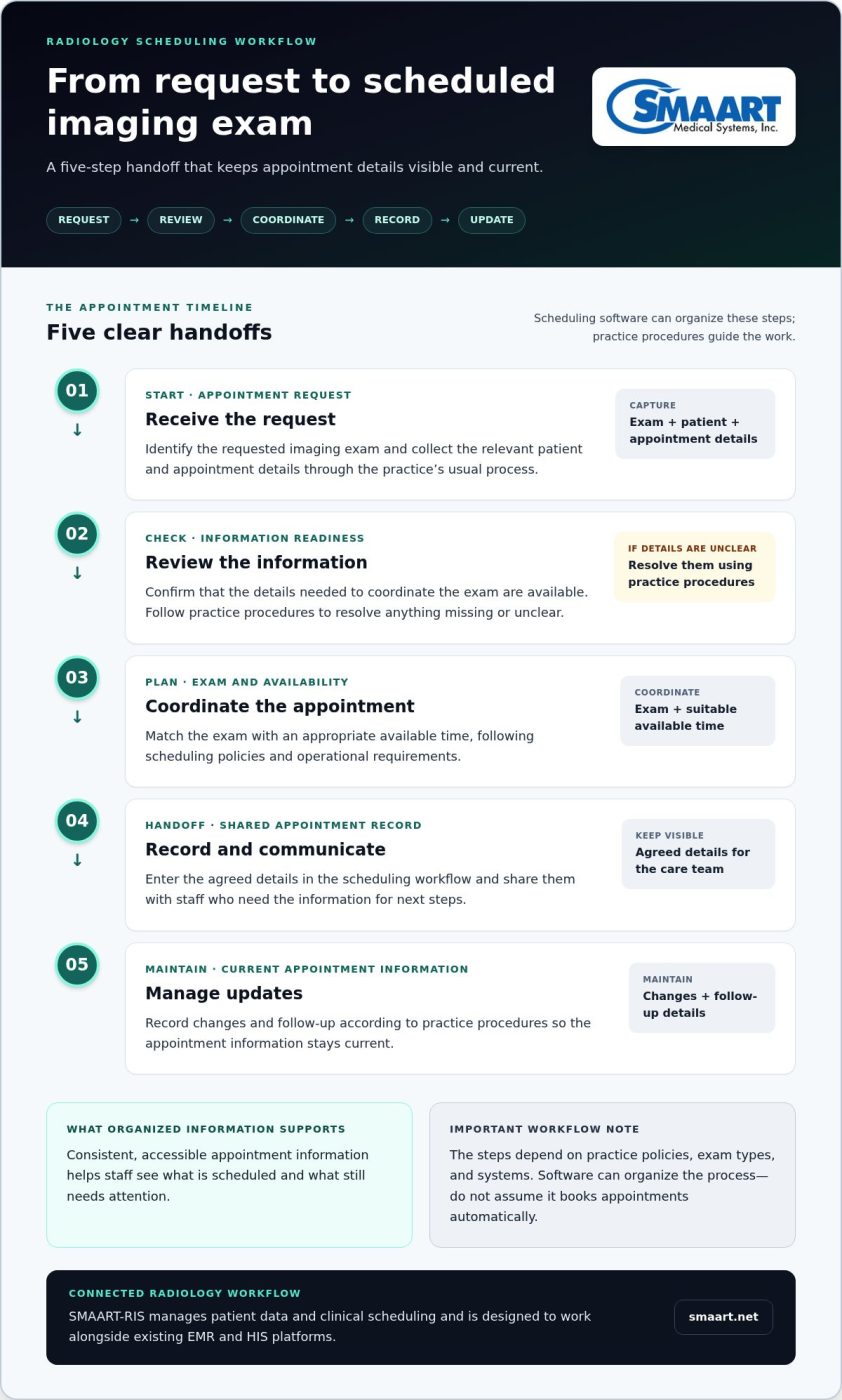
Start with the practice’s established process, then make each handoff clear. Staff need to gather and review the information required to arrange the requested exam, coordinate a suitable time, and record the appointment where the team can access it. Software can organize these steps, but don’t assume it books appointments automatically.
- Receive the request. Identify the requested imaging exam and collect the relevant patient and appointment details through the practice’s usual process.
- Review the information. Confirm that the details needed to coordinate the exam are available. Follow the practice’s procedures to resolve missing or unclear information.
- Coordinate the appointment. Match the exam with an appropriate available time, following scheduling policies and operational requirements.
- Record and communicate the appointment. Enter the agreed details in the scheduling workflow and share them with staff who need them for the next steps.
- Manage updates. Record changes and follow-up according to practice procedures, so the appointment information stays current.
Consistent, accessible information helps staff see what’s scheduled and what still needs attention. A practical review of streamlining the imaging pipeline from the Radiological Society of North America also highlights the value of examining processes across the imaging workflow, rather than treating each task in isolation.
Connecting scheduling with EMR and HIS information
Scheduling may rely on information held in an electronic medical record (EMR) or hospital information system (HIS). Connecting these workflows can help reduce disconnected records and repeated information handling, depending on how the systems are configured. Integration is a design goal, not a guarantee that every system automatically exchanges every data field. For more context, read this guide to interfacing PACS with EMR.
RIS scheduling connects imaging appointments with the patient and workflow information a radiology team uses to coordinate an exam. SMAART-RIS manages patient data and clinical scheduling and is designed to work with existing EMR and HIS platforms. Explore SMAART-RIS for radiology scheduling as an example of scheduling within a connected radiology workflow.
Can radiology scheduling software reduce no-shows on its own?
No. Radiology scheduling software can help staff coordinate appointment information, but it can’t control every reason a patient misses an exam. A patient’s circumstances may change, they may have difficulty getting to the imaging location, or they may need to reschedule. Those factors are beyond a scheduling system’s control.
Software may support attendance workflows, but it can’t guarantee fewer no-shows. Its role is to help teams manage the information and processes around appointments. Whether those processes improve attendance depends on how they’re designed and used, as well as circumstances outside the practice’s control.
Which attendance challenges scheduling workflows can address
Clear appointment details and consistent communication can make it easier for patients and staff to understand what’s scheduled and what happens next. Practices can define how reminders, confirmations, cancellation notices, and follow-up are handled. These are workflow practices; the specific tools and responsibilities depend on the practice’s systems and policies.
Visibility matters, too. If staff can see that an appointment has been cancelled or changed, they can follow the practice’s process for managing the open slot and updating related information. That may help the team respond in an organized way, but it doesn’t ensure another patient can take the time or that the original patient will attend a rescheduled appointment.
What scheduling software cannot control
Patients may miss appointments for personal, health, transportation, or other reasons that software can’t predict or resolve. Appointment details can change, and communication may not reach a patient as intended. Treat these as operational realities, not simply software failures.
Radiology scheduling software can make information easier to coordinate, but it can’t guarantee attendance or eliminate every delay. Don’t treat reminders or any single feature as a complete no-show solution. Instead, review whether the practice’s communication and change-management steps are clear, consistently applied, and workable for staff.
If the practice tracks attendance, use measures only when the underlying data is reliable and definitions stay consistent. For example, define a no-show separately from a patient cancellation or a practice-initiated change. Then review patterns in context, such as differences in exam type, location, or scheduling process. A change in recorded no-shows may reflect changed definitions or workflows, not necessarily a software effect.
The practical goal is better visibility and a more dependable response when appointments change. Software can support that work, but thoughtful processes and attention to patient circumstances remain essential.
How to assess radiology scheduling software for your workflow
Start with the work your team already does. A clear picture of current tasks, handoffs, and friction points gives you a practical basis for assessing radiology scheduling software. It also helps distinguish genuine workflow needs from features that may not address day-to-day challenges.
Questions to map before evaluating a scheduling workflow
Document the path from a request to a scheduled exam and any changes that follow. Include the people involved, the information they use, and where responsibility passes from one role to another. Note recurring bottlenecks, such as duplicate data entry or uncertainty about which appointment details are current.
- Workflow fit: Who receives requests, schedules exams, and handles changes? Which steps are manual or regularly repeated?
- Patient and exam information: What details do staff need at each stage, and where do they find or record them?
- Handoffs: How does information move between scheduling staff and other radiology workflow roles?
- Staff responsibilities: Who updates appointment information, resolves missing details, and follows the practice’s procedures when plans change?
Use these answers to describe the workflow you need to support, not just the screens you want. For a broader view of how scheduling connects to imaging operations, see this guide to hospital imaging workflow optimization.
Integration, usability, and implementation considerations
Review how scheduling fits with existing EMR and HIS workflows. Identify which patient or appointment information needs to move between systems, which system should be the source of record, and where staff currently re-enter data. These requirements can guide an integration discussion without assuming a particular technical standard or that every data element will transfer automatically.
Assess usability with the people who handle the work. Can they find the information they need and understand their next steps? Consider implementation planning, staff training, and data consistency as distinct workstreams. Clear responsibilities and consistent information practices matter alongside the software.
Set operational measures before adoption so you can evaluate the process consistently afterward. Depending on what the practice can reliably record, measures might include appointment changes, incomplete scheduling details, or time spent on defined tasks. Agree on what each measure means and how it will be collected. Treat changes as observations, not promised outcomes, and interpret them alongside workflow or policy changes. Similar operational tracking principles apply across other clinical sectors; for example, veterinary teams utilize Helpful.vet to access interactive workflow tools and clinic benchmarks.
Include privacy and security in the facility’s review of its systems, access practices, and information-handling needs. A structured assessment makes trade-offs easier to discuss and supports a more grounded decision. To explore a RIS designed to manage patient data and clinical scheduling alongside existing EMR and HIS platforms, explore SMAART-RIS.
How SMAART-RIS fits radiology scheduling into a connected workflow
Scheduling works best when appointment coordination connects to the information staff use across the imaging workflow. SMAART-RIS is a radiology information system that manages patient data and clinical scheduling. Rather than treating appointments as entries on a standalone calendar, it places scheduling within a broader system for radiology workflow information.
What SMAART-RIS contributes to clinical scheduling
For an imaging practice, patient and appointment details need to support clear coordination from scheduling through the next steps in the exam workflow. SMAART-RIS manages patient data and clinical scheduling to support that need. It is designed to work with existing EMR and HIS platforms, helping practices consider how scheduling information fits into their established systems and processes.
That’s the key distinction when evaluating radiology scheduling software: the goal is not simply to fill a time slot, but to manage scheduling as part of the radiology information environment. How information is shared depends on the systems and their configuration. Assess a connected design against your practice’s actual workflows, integration requirements, and staff responsibilities.
Connecting RIS scheduling with the wider imaging environment
RIS and PACS support different parts of imaging operations. RIS is associated with patient data and clinical scheduling; PACS supports image storage and distribution. These distinct roles show why scheduling is one part of a wider workflow, not a complete account of everything that happens before, during, and after an imaging exam.
SMAART-PACS supports image storage and distribution as part of radiology workflows. Keeping these functions distinct helps teams assess how appointment information and imaging information fit together, without assuming that one system handles every task. Focus on what information staff need, where it belongs, and how connected systems can support the established process.
Software can organize and support workflow information, but it can’t control every factor affecting attendance or prevent every delay. SMAART-RIS brings patient data and clinical scheduling into a system designed to work with existing EMR and HIS platforms. Consider how that design fits your operational requirements and integration plans.
For an overview of the broader offering, explore SMAART radiology software solutions.
Build a more connected imaging workflow
Effective scheduling depends on more than finding an open appointment slot. The right process connects patient and exam information, clarifies staff handoffs, and fits the systems your practice already uses. Radiology scheduling software can support that coordination, but it can’t guarantee attendance or eliminate every delay. Clear workflows and realistic measures remain essential.
When assessing options, map how appointment information moves through your practice and identify where integration, usability, or staff responsibilities need attention. SMAART-RIS manages patient data and clinical scheduling and is designed to work with existing EMR and HIS platforms. SMAART-PACS supports medical image storage and distribution, complementing scheduling within the broader imaging environment.
A connected approach can give your team a clearer foundation for coordinating imaging work, without expecting software alone to solve every operational challenge. Explore SMAART radiology software solutions to learn more about SMAART-RIS and SMAART-PACS. With a practical understanding of your workflow, you can take the next step toward a more consistent and manageable scheduling process.
Frequently Asked Questions
What is radiology scheduling software?
Radiology scheduling software organizes imaging appointments alongside the patient and exam information staff use to coordinate the visit. Unlike a general calendar, it supports imaging-specific workflows, such as connecting an appointment with the requested exam and the details the practice needs to manage it. Available functions vary by system. The aim is to help teams coordinate scheduling information within radiology operations, not simply reserve a time slot.
How does radiology scheduling software work?
It supports a practice’s process for handling an imaging request, reviewing relevant patient and exam details, coordinating an available appointment time, and recording updates for staff. In an RIS, scheduling can sit alongside patient and clinical workflow information, helping teams manage appointments within the wider radiology process. The exact steps depend on the practice’s policies, exam types, staff responsibilities, and connected systems.
Can radiology scheduling software reduce no-shows?
It can support attendance processes, but it can’t guarantee fewer no-shows. Clear appointment information, consistent communication, and visible records of cancellations or changes may help staff follow established procedures. Patient circumstances and other factors remain outside a software system’s control. Practices can review attendance patterns, but should define measures consistently and interpret results in context rather than assuming a software feature caused a change.
Does radiology scheduling software integrate with an EMR or HIS?
Some systems are designed to work with EMR or HIS platforms, with the goal of connecting relevant patient and scheduling information across workflows. The details depend on the systems, their configuration, and the facility’s requirements. Before implementation, identify which information needs to move between systems, where it should be maintained, and how staff will handle exceptions. SMAART-RIS is designed to work with existing EMR and HIS platforms.
What should a radiology practice look for in scheduling software?
Look for a fit with your actual appointment workflow, including how staff manage patient and exam information, schedule appointments, and handle changes. Consider whether the system is usable for the people doing the work and how it fits with existing EMR or HIS processes. Map handoffs and staff responsibilities before comparing tools. Clear requirements make it easier to assess integration needs and avoid choosing features that don’t address operational priorities.
Is radiology scheduling software part of an RIS?
Scheduling can be a function within a Radiology Information System (RIS), which supports patient and clinical workflow information in radiology. This makes it possible to manage appointment coordination as part of a broader information workflow rather than as a separate calendar. Systems differ in their capabilities. SMAART-RIS manages patient data and clinical scheduling and is designed to work with existing EMR and HIS platforms.
How can a radiology practice improve its scheduling workflow?
Start by mapping who handles appointment requests, which details they need, and how information passes between staff. Note repeated manual steps, unclear handoffs, or common points where details go missing. Then define a small set of operational measures using consistent data, such as appointment changes or incomplete scheduling information. Review results alongside changes in policies and workflow, so the team can identify practical adjustments without assuming software alone will solve every issue.