Radiology Software for Multi-Site Clinics: 2026 Guide
A shared radiology platform should connect clinic locations without forcing every site to work in exactly the same way. Yet choosing radiology software for multi-site clinics can feel like a trade-off: standardize scheduling and image access, or preserve the local workflows staff rely on. You shouldn’t have to accept disconnected systems or disruptive change as the price of growth.
If your locations use different processes, staff need dependable access to images and patient information wherever they work, and integration requirements aren’t clear until late in selection, those concerns are well-founded. Start with how your clinics operate today. Then test whether a platform can support consistent workflows while accommodating site-specific needs.
This 2026 guide provides a practical framework for comparing radiology software across locations. You’ll learn what to assess in scheduling, image access, EMR and HIS integration, data migration, and security, and how to identify operational risks early. It also outlines a phased implementation approach, so your team can plan for validation, site readiness, and a controlled transition rather than treating rollout as a single switch.
Key Takeaways
- Identify which imaging and administrative workflows should be consistent across locations, and which need to remain site-specific.
- Understand how PACS, RIS, and image sharing address distinct needs before comparing platforms.
- Use a structured evaluation of interfaces, user roles, image volumes, and site-level exceptions to surface fit and integration questions early.
- Assess radiology software for multi-site clinics against validated requirements, rather than assuming one platform will fit every location without configuration.
- Plan a phased rollout that includes stakeholder discovery, a pilot, broader deployment, and a post-launch review.
Radiology Software for Multi-Site Clinics: What Changes as You Add Locations?
Adding locations changes more than the number of users. Each clinic may have its own scheduling habits, referral routes, imaging equipment, staffing patterns, and patient volume. When processes depend on separate systems or informal workarounds, staff may have difficulty finding images, coordinating appointments, and understanding activity across the clinic group.
Multi-site radiology software supports imaging workflows across clinic locations through shared access and administration, while allowing appropriate differences in how each site operates. That’s different from simply buying more licenses: the group needs to assess how information moves between locations and which processes should be consistent. For example, a PACS supports medical image storage and distribution. The Picture Archiving and Communication System (PACS) overview provides background on this system category and its relationship to other healthcare systems.
Which workflows become harder across clinic locations?
Small variations can become operational friction when patients, staff, or images move between sites. One location may receive referrals through a different process, while another uses different appointment rules or handles result distribution differently. If staff can’t reliably access relevant images or patient information across locations, they may need to track down records manually or repeat coordination steps.
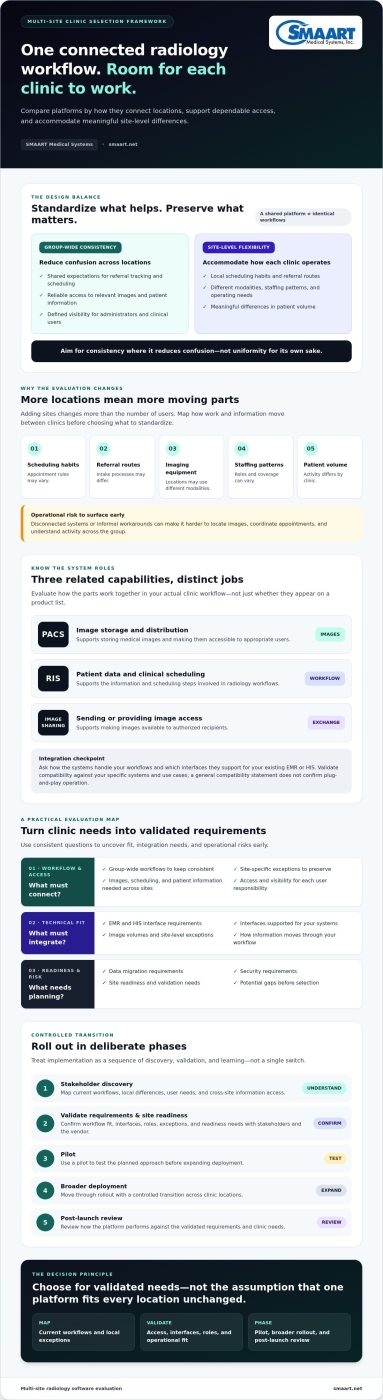
Map workflows before deciding what to standardize. Common group-wide processes might include referral tracking, scheduling conventions, and expectations for image access. Preserve meaningful site-level differences, too: locations may have different modalities, staffing, operating patterns, or patient volumes. The goal is consistency where it reduces confusion, not uniformity for its own sake.
What should a clinic group expect shared software to do?
Treat shared access and consistent processes as evaluation goals, not automatic outcomes. Ask vendors to demonstrate how users can access information across locations and how site-specific permissions or workflows could be handled. Confirm the details, including available user roles and reporting options, with the vendor.
Administrators may need group-level visibility to compare activity or coordinate operations, while staff need access suited to their responsibilities and location. Define these needs in advance. A useful discovery checklist includes:
- Which workflows should be consistent across the group?
- Which exceptions must remain specific to a location?
- What image, scheduling, and patient information must be accessible across sites?
- What visibility and access do administrators and clinical users need?
These answers give your team a practical basis for evaluating radiology software for multi-site clinics. They also help surface gaps before selection, so a shared platform can connect locations without overlooking each clinic’s operational needs.
How PACS, RIS, and Image Sharing Fit a Multi-Site Clinic Workflow
Radiology workflows rely on related systems with distinct jobs. PACS stores and distributes medical images; RIS manages patient data and clinical scheduling; image sharing supports sending or making images available to authorized recipients. Keeping those roles clear helps a clinic group evaluate what it needs without assuming one system automatically covers every task.
Where PACS and RIS meet in a clinic group’s workflow
A typical process begins with patient and appointment information handled through scheduling workflows. After imaging, the resulting studies need to be stored and made accessible to appropriate users. Across multiple locations, the key question is how information should move between these steps, not simply whether both system categories appear on a vendor’s product list.
Ask vendors to explain how their systems handle your workflows and which interfaces they support for your existing EMR or HIS. Integration needs to be validated for your specific systems and use cases. A general compatibility statement doesn’t confirm plug-and-play operation. For a deeper look at the relationship between these functions, see this guide to integrated RIS PACS solutions.
Central standards can support consistent scheduling and image handling across the group, while site-level configuration may still be needed for differences in staffing, modalities, or local processes. Confirm which workflows and settings can vary by location, and how those differences affect shared access and administration.
When browser-based viewing and cloud sharing matter
Staff working across sites may need access to imaging information beyond the location where a study was created. Browser-based viewing and cloud image sharing may be relevant, but they aren’t interchangeable. Diagnostic viewing has different requirements from sharing images with a referring provider or another external recipient. Confirm the intended use, access controls, and supported workflow for each.
A browser-based viewer guide can help your team frame questions about browser-based diagnostic viewing. Don’t infer diagnostic suitability, device support, or access performance from the term “browser-based” alone. Ask the vendor to demonstrate the specific use case and clarify what is required for your clinical workflow.
For radiology software for multi-site clinics, assess each function separately, then test how the pieces work together across locations. SMAART Medical Systems offers SMAART-PACS for image storage and distribution, SMAART-RIS for patient data and scheduling, and SMAART-SHARE for cloud-based image sharing. Review SMAART’s radiology software options as part of your evaluation, and confirm integration scope and multi-location configuration details directly.
Can One Radiology Platform Serve Every Clinic Location?
A shared platform can support consistent workflows across a clinic group, but whether it fits every location depends on your requirements and how the system handles variation. One location may have different modalities, referral patterns, staffing roles, or existing systems from another. The aim isn’t to make every clinic identical. It’s to make shared processes dependable while preserving differences that matter to care and operations.
Set group-wide requirements for essential functions, then configure only the local differences that have a clear operational or clinical reason. This helps teams avoid two extremes: disconnected systems that complicate oversight, and rigid standardization that forces clinics into unsuitable workflows.
Which capabilities should be consistent across locations?
Start by identifying requirements that affect coordination across the group. These may include how patients and studies are identified, who needs access to images, how scheduling information is handled, and what administrators need to oversee. Don’t assume reporting or cross-site access needs are the same for every role. Ask clinical, administrative, and IT stakeholders what they need to do and see.
Then validate how the proposed system supports those requirements. Ask the vendor to demonstrate user permissions, location-level settings, and any reporting options your team expects to use. A feature name alone doesn’t confirm that access can be configured in the way your clinic group needs.
Which differences may justify site-level configuration?
Compare each location’s modalities, referral routes, staffing responsibilities, and existing systems. Some differences are necessary: a clinic’s equipment or care processes may call for a distinct workflow. Others may be habits that developed around older tools and could be simplified. Document each exception, why it’s needed, and who owns the decision so local needs remain visible during selection.
Decision guide
- Standardize group-wide: Patient and study identification, core access expectations, and administrative processes that must work consistently across locations.
- Assess for local configuration: Modality-specific steps, referral variations, role assignments, and existing-system requirements that differ by clinic.
- Challenge before preserving: Legacy workarounds or preferences that add complexity without meeting a distinct clinical or operational need.
For radiology software for multi-site clinics, test the proposed approach against real workflows from more than one location. A shared platform should make common work easier to coordinate, while giving the group a clear, verified way to address justified site-level differences.
How to Evaluate and Roll Out Radiology Software Across Multiple Clinics
A structured evaluation reduces surprises. Move from discovery to a representative pilot, then expand in phases after the team has reviewed the results and addressed key issues. For broader process-planning context, see this guide to hospital imaging workflow optimization.
- Bring the right people into discovery. Include clinic administrators, radiology staff, IT, and stakeholders responsible for EMR or HIS integration. Gather workflows from each location, noting what’s shared and where exceptions matter.
- Document requirements and current systems. Record scheduling and image workflows, user roles, image volumes, site-level exceptions, and current EMR and HIS environments. Ask vendors which interfaces they support and what integration scope applies to your systems and use cases.
- Set measurable evaluation goals. Define what the group needs to assess, such as whether staff can follow the intended workflow, whether required information is available to the right users, and whether reporting meets administrative needs. Establish how you’ll check each goal without assuming a particular improvement.
- Map migration and dependencies. Clarify who is responsible for moving images and workflow information, which decisions or technical dependencies must be addressed, and what acceptance criteria will indicate readiness. Confirm migration scope with the vendor rather than assuming all historical data transfers in the same way.
- Run a representative pilot. Choose a location or workflow that can test important requirements, including relevant interfaces, user roles, and site-specific exceptions. Gather feedback from the people doing the work. Use findings to resolve gaps and refine the rollout plan before expanding.
- Roll out in phases, then review. Plan timing with the vendor and each clinic. Prepare role-based training and clear feedback channels for every location. Confirm support scope and contingency plans in advance. After each phase, review user feedback, workflow issues, and outstanding requirements before proceeding or adjusting the plan.
A pilot is useful only if it represents real operating conditions. If a group has different modalities or staffing patterns, include those variations in the evaluation plan or document how they’ll be tested. Keep an owner and next step beside every open question, especially for interfaces, migration responsibilities, and configuration needs. That gives the team a practical way to track risks instead of carrying assumptions into rollout.
Use this process to assess radiology software for multi-site clinics against your documented needs, not a generic feature list. Explore SMAART radiology software options as part of your vendor evaluation, and confirm integration, migration, support, and rollout details directly.
How SMAART Medical Systems Fits a Multi-Site Clinic Software Evaluation
Once your clinic group has defined its workflows, integration needs, and site-level exceptions, compare products against those requirements. SMAART Medical Systems offers three distinct software products to consider: SMAART-PACS, SMAART-RIS, and SMAART-SHARE. Each has a different role in a radiology workflow, so assess it against the need it is intended to address rather than assuming the products provide interchangeable or automatically combined capabilities.
Match SMAART products to the needs identified by each clinic
- SMAART-PACS supports medical image storage and distribution. Evaluate it against your group’s image-management and access requirements.
- SMAART-RIS manages patient data and clinical scheduling. Compare it with the scheduling and patient-information workflows your locations need to support.
- SMAART-SHARE provides cloud-based medical image sharing. Consider it if your requirements include sharing images, and confirm that its specific sharing workflow fits your use case.
SMAART software is designed to integrate with existing EMR and HIS platforms. That design goal doesn’t confirm that a particular interface or workflow will work in your environment. Before selecting a product, provide the vendor with details about your existing systems and ask which interfaces are supported, what the integration covers, and what must be validated for each location.
What to confirm before requesting a product discussion
Prepare a concise picture of your clinic group so the conversation can focus on fit. Include the locations involved, existing EMR and HIS platforms, current workflows, required user roles, and site-specific exceptions. List your integration questions and note where workflows or systems differ between clinics.
Then ask for details that aren’t established by a product’s general description. Confirm deployment options, image and workflow migration responsibilities, security information, support scope, and how multi-location configuration is handled. Clarify any requirement that affects clinical operations or access before treating it as supported. This discovery helps identify gaps early and gives your team a clearer basis for deciding whether the products match its needs.
If you’re assessing radiology software for multi-site clinics, a product discussion can be a practical next step once your requirements are documented. Discuss your multi-site radiology software needs and bring your questions about systems, workflows, integration, and location-specific requirements.
Choose a Platform That Connects Your Clinics
The right radiology software for multi-site clinics should support shared workflows without erasing the differences that matter at each location. Start with clear requirements, verify how the system handles your interfaces, access needs, and local exceptions, then use a representative pilot to test fit before wider rollout.
Keep the software roles distinct as you evaluate options: SMAART-PACS supports medical image storage and distribution, SMAART-RIS manages patient data and clinical scheduling, and SMAART-SHARE provides cloud-based image sharing. Confirm how each product fits your workflows and existing systems rather than assuming compatibility or configuration details.
With requirements documented, you can compare options more confidently and identify questions early. Discuss your multi-site radiology software needs with SMAART Medical Systems to explore product fit for your clinic group. A thoughtful evaluation is a practical first step toward more connected operations across your locations.
Frequently Asked Questions
What is radiology software for multi-site clinics?
Radiology software for multi-site clinics supports imaging-related workflows across more than one clinic location. Depending on the systems selected, this can include managing patient data and scheduling, storing and distributing medical images, and sharing images with recipients. The goal is to evaluate how information and workflows can connect across sites while allowing for legitimate local differences. Confirm specific access, reporting, and configuration capabilities with each vendor.
Can one PACS support multiple clinic locations?
One PACS may support workflows across multiple locations, but suitability depends on the system’s capabilities and the clinic group’s requirements. Ask vendors to demonstrate how images from each site are stored, accessed, and distributed, and how user permissions and location settings work. Also review image volumes, existing systems, and site-specific needs. Validate the proposed setup with your actual workflows before assuming a shared PACS will fit every clinic.
What is the difference between PACS and RIS software?
PACS is the system category for medical image storage and distribution. RIS manages patient data and clinical scheduling. They address related but distinct parts of the radiology workflow, so a clinic group should assess each function separately and determine how information needs to move between systems. SMAART-PACS supports image storage and distribution, while SMAART-RIS manages patient data and clinical scheduling. Confirm integration details for your environment with the vendor.
How do multi-site clinics choose radiology software?
Start by documenting workflows, existing systems, user roles, image volumes, and differences between locations. Include clinic administrators, radiology staff, IT, and relevant integration stakeholders in discovery. Then compare vendors against defined requirements, ask for interface and configuration details, and test representative workflows in a pilot before wider adoption. This process helps distinguish essential group-wide capabilities from local preferences and surfaces migration or operational questions before rollout.
Does radiology software integrate with an existing EMR or HIS?
Some radiology software is designed to integrate with existing EMR or HIS platforms, but compatibility and scope depend on the specific systems and workflows involved. Ask vendors which interfaces they support for your EMR or HIS, what information can be exchanged, and what validation is required. Avoid treating a general integration statement as proof that a particular connection is ready to use. Confirm details for every relevant clinic environment.
What should clinics consider when moving radiology workflows to a shared system?
Plan the transition around workflow mapping, image and data migration, integrations, user access, training, and acceptance criteria. Assign owners to migration tasks and clarify dependencies with the vendor. A representative pilot can help reveal gaps in real workflows before broader deployment. Also confirm the vendor’s deployment, security, support, and contingency-planning details. Keep a process for collecting feedback from each clinic and addressing issues as rollout progresses.
How can a clinic group standardize workflows without disrupting local operations?
Standardize processes that need to work consistently across the group, such as core identification and shared access expectations, while documenting justified site-level variations. Compare each location’s modalities, referral patterns, staffing roles, and existing systems to understand which differences are operationally necessary and which reflect legacy habits. Record each exception, its reason, and an accountable owner. Validate the proposed configuration with staff from affected clinics before wider adoption.