Radiology Software for Rural Hospitals: Practical Fit Guide
What if the best radiology software for rural hospitals isn’t the system with the longest feature list, but the one that fits the team and technology already in place? When IT and radiology staff are stretched thin, a complex platform can add work instead of easing it. Connectivity limits, existing equipment, and integration needs can also make implementation harder to plan.
Those concerns are practical, not signs that a hospital should settle for less. Start with everyday workflows, available staff, and how images and information need to move between systems. This guide explains how to assess software against those realities and identify requirements that support current operations without adding unnecessary complexity.
You’ll learn how PACS, RIS, and image sharing support different parts of the imaging workflow, including how SMAART-PACS, SMAART-RIS, and SMAART-SHARE address image storage and distribution, patient data and scheduling, and cloud-based image sharing. You’ll also find guidance on connectivity, security and continuity questions, integration with existing EMR and HIS platforms, and a phased approach to evaluation and implementation.
Key Takeaways
- Evaluate radiology software for rural hospitals against staffing, connectivity, and actual clinical workflows, not feature counts alone.
- Map each step of the exam journey to clarify how scheduling, image storage, distribution, and sharing should work together.
- Separate essential requirements from desirable features to keep the evaluation focused on practical operational fit.
- Use a phased rollout plan with clear responsibilities across radiology, IT, administration, and clinical teams.
- Assess how SMAART-PACS, SMAART-RIS, and SMAART-SHARE support image management, scheduling, and image-sharing workflows.
Radiology software for rural hospitals: start with real operating constraints
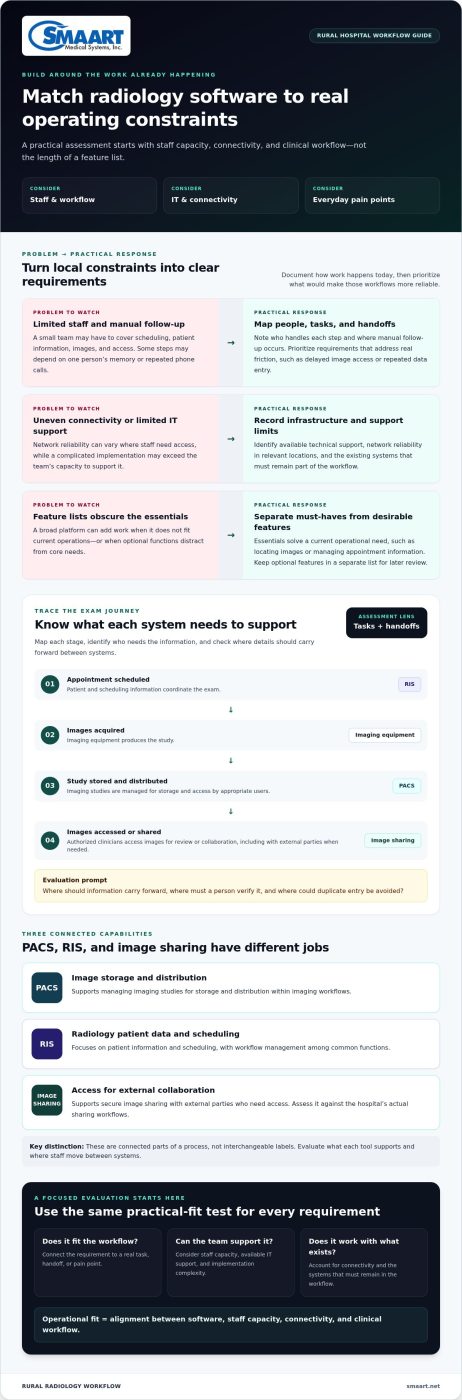
Modern imaging depends on timely access to images and information. But a rural hospital may have a small radiology team, limited IT capacity, uneven network reliability, and little room to absorb a complicated implementation. Software that looks comprehensive on a feature list can still create extra work if it doesn’t match how the hospital operates.
Radiology software brings together tools for managing images, scheduling exams, providing access, and coordinating imaging workflows. Before comparing products, separate essential requirements from optional features. Essentials address a current operational need, such as finding images or managing appointment information. Optional features may be useful later, but shouldn’t distract from core workflows or exceed the team’s capacity to support them.
Operational fit is the alignment between software, staff capacity, connectivity, and clinical workflow. Use that definition to guide the assessment. The goal isn’t to replicate a larger hospital’s technology stack. It’s to identify what your facility needs to do reliably with the people, systems, and infrastructure it has.
Which rural hospital constraints should shape the software requirements?
Start with the work as it happens today. Document imaging volume, modalities, staffing coverage, and how an exam moves through scheduling, image capture, review, and sharing. Include the people who handle each step. A process that depends on one staff member’s memory may need a different solution than one with a consistent handoff.
- Staff and workflow: Note who schedules exams, manages patient information, handles images, and coordinates access. Identify steps that rely on manual follow-up.
- IT and connectivity: Record available technical support, network reliability where staff need access, and existing systems that must remain part of the workflow.
- Pain points: Capture specific friction, such as delayed image access, repeated data entry, or phone calls used to coordinate routine information.
Turn those observations into a short must-have list. For example, if staff re-enter scheduling details in multiple places, prioritize a workflow that addresses that handoff. Keep desirable features in a separate list for later review. This makes trade-offs visible and grounds the evaluation in daily operations.
How do PACS, RIS, and image sharing differ?
A PACS supports medical image storage and distribution within imaging workflows. A RIS focuses on radiology patient data and scheduling. The Radiological Information System (RIS) overview describes common RIS functions, including scheduling and workflow management. Image sharing supports secure collaboration with external parties who need access to images. These capabilities serve different needs, so assess each against the tasks and handoffs in your current workflow.
Think of these categories as connected parts of a process, not interchangeable labels. Ask which tool supports each step, where staff must move between systems, and what information needs to follow an exam. That workflow map is a practical starting point for comparing solutions.
How rural radiology software connects images, schedules, and clinical teams
An imaging exam creates information at several points: an appointment is scheduled, images are acquired, a study is stored, and authorized clinicians access it for review or collaboration. Radiology software for rural hospitals should make these handoffs clear without assuming that every task happens in one department or one system.
That context matters. Rural facilities may need to coordinate care across distance while working within local staffing and infrastructure limits. The FDA on Rural Health provides broader context on rural health access challenges. For software planning, translate those challenges into practical questions: who needs each piece of information, when do they need it, and how should it reach them?
Where do PACS and RIS fit into the imaging workflow?
The RIS supports radiology patient data and scheduling. The PACS manages imaging studies for storage and distribution. In a typical workflow, staff use scheduling information to coordinate an exam, imaging equipment produces the study, and the PACS stores images and makes them available to appropriate users. RIS and PACS integration can connect these steps and reduce repetitive handoffs when configured around the hospital’s actual process.
Consider a common friction point: a schedule changes, but staff must update information in more than one place or notify colleagues manually. During evaluation, trace what happens to appointment details and study information as the exam moves between systems. Note where information should carry forward, where a person needs to verify it, and where duplicate entry can be avoided. Integrated RIS-PACS workflows can connect these functions. The integrated RIS PACS solutions guide explores that relationship in more detail.
How can image access support distributed clinical collaboration?
Browser-based viewing is one way to access images through a web browser rather than relying only on a locally installed viewer. It describes an access approach, not a clinical policy. Hospitals still need to define which users may view studies, which workflows require formal interpretation, and how access fits existing clinical governance. Software can support access, but it doesn’t replace qualified clinical judgment or established responsibilities.
For collaboration beyond the hospital, image sharing can give authorized external care teams a way to view studies. Define the purpose of sharing, the intended recipients, and the process for connecting an image to the right patient and encounter. These steps help teams coordinate access without treating image availability as a substitute for communication or clinical review. SMAART-SHARE provides cloud-based image sharing and collaborative viewing.
Browser-based tools and image-sharing workflows address related but distinct access needs. The zero-footprint PACS viewer guide covers browser-based viewing in more detail. For context on how these workflow components relate to existing clinical systems, explore SMAART radiology software, designed to integrate with EMR and HIS platforms.
How to evaluate rural hospital radiology software beyond the feature list
A feature checklist can show what a system does, but not whether it fits a hospital’s day-to-day work. A rural software evaluation should compare operational requirements before feature lists. Start with the tasks staff must complete, the systems the software needs to connect with, and the conditions that could affect access or continuity. Then classify each requirement as essential, desirable, or outside the current project.
For radiology software for rural hospitals, this approach prevents attractive extras from overshadowing basic needs. A capability is essential if its absence would block a required workflow, create avoidable manual work, or conflict with the hospital’s governance requirements. Desirable features may support future plans, but shouldn’t drive the decision before current needs are met.
Which technical and workflow criteria belong in an evaluation?
Build a shared requirements record with radiology, IT, administration, and relevant clinical stakeholders. Document modalities, data flows, existing EMR and HIS interfaces, user roles, and who needs image access. For each proposed workflow, trace staff steps from start to finish. Mark repeated entry, handoffs, approvals, and exceptions, then assess whether the software removes steps or adds new ones.
Use a comparison table to keep discussions consistent across systems and departments:
| Area | What to assess | Priority prompt |
|---|---|---|
| Workflow fit | Scheduling, image handling, review, and handoffs | Does it support required steps without adding avoidable work? |
| Integration | EMR/HIS interfaces and information flow | Which data moves between systems, and where is it entered? |
| Access | Users, locations, and expected image access | Who needs access, and for what purpose? |
| Security and governance | Access controls, audit needs, and data management | How will requirements be documented and reviewed? |
| Support and continuity | Available support capacity and interruption procedures | Who handles issues, and what happens if connectivity is disrupted? |
| Growth | Planned changes in volume, modalities, or workflow | Can the requirements be revisited as needs change? |
Treat security, data governance, and continuity as documented requirements, not assumptions. Record the hospital’s policies and review them with the responsible stakeholders. Don’t presume that a particular deployment model or feature automatically addresses them.
How should hospitals compare deployment and continuity needs?
Compare deployment approaches against the facility’s infrastructure, network reliability, governance needs, and capacity to support the system. Focus on operational consequences: what staff need to access, which workflows depend on a connection, and who coordinates next steps if access is interrupted. Document normal procedures and escalation paths before rollout so continuity planning reflects actual responsibilities.
Broader process mapping can reveal bottlenecks beyond the software itself. The hospital imaging workflow optimization guide offers a wider framework for examining how people, information, and systems interact. Use those findings to refine priorities, then compare solutions against the same requirements rather than counting features.
A practical readiness and rollout plan for rural radiology software
A clear rollout plan helps a small team manage change without losing sight of routine work. Before implementation, identify who owns decisions, which workflows must be tested, and how staff will raise issues. Phased implementation makes responsibilities and workflow validation visible before broader adoption.
What should happen before software selection and implementation?
Build a shared inventory of systems, imaging modalities, interfaces, user groups, and workflow dependencies. Then prioritize requirements with radiology, IT, administration, and clinical stakeholders. Record planning questions about data migration, training, governance, and continuity, and assign owners so they don’t become last-minute tasks.
- Discover current workflows. Radiology staff describe how exams move through scheduling, image handling, review, and sharing. Note exceptions and workarounds the new process must address.
- Confirm the technical picture. IT documents existing systems, interfaces, user roles, connectivity dependencies, and relevant support resources. Administration tracks project decisions and outstanding risks.
- Prioritize requirements. Radiology, clinical stakeholders, IT, and administration agree on essential workflows and distinguish them from later enhancements. Assign an owner to each requirement.
- Validate before expansion. IT and radiology test interfaces, access roles, and representative workflows using agreed scenarios. Clinical stakeholders review whether access and handoffs match intended practice. Resolve issues before adding broader user groups.
- Train, launch, and review. Schedule role-specific training around staff availability. Administration coordinates readiness, while designated radiology and IT contacts collect questions and monitor workflow problems after launch.
How can a small team manage change without adding avoidable burden?
Use a phased schedule that reflects real staff availability, not an idealized calendar. Start with a defined group and a small set of representative tasks. Make it easy to report a problem, identify who will triage it, and explain how updates will be shared. Keep the initial scope focused, then add users or workflows after reviewing the first phase.
- Radiology: validates day-to-day imaging workflows and flags operational issues.
- IT: coordinates interface and access testing and tracks technical issues.
- Administration: maintains priorities, decisions, ownership, and rollout timing.
- Clinical stakeholders: review access needs and workflow handoffs relevant to their teams.
After launch, review adoption, support requests, and recurring workflow problems with these owners. Look for patterns, such as confusion around a particular handoff or repeated access questions, then assign corrective actions and revisit them. This feedback loop helps the hospital refine processes without placing the full burden on one person.
A rollout plan works best when it reflects the hospital’s requirements and available capacity. SMAART radiology software brings together PACS, RIS, and image-sharing tools for consideration in your workflow planning.
How SMAART radiology software can support rural hospital workflows
Once a hospital has documented its workflows and priorities, match requirements to specific software capabilities. SMAART’s radiology software for rural hospitals includes tools for image storage and distribution, radiology patient data and scheduling, and cloud-based image sharing. Each supports a distinct part of the workflow, so assess them against the needs your team identified rather than treating them as interchangeable.
Which SMAART tools align with common rural hospital requirements?
SMAART-PACS supports medical image storage and distribution. Map it to requirements for managing imaging studies and making them available to appropriate users. SMAART-RIS manages patient data and clinical scheduling, supporting radiology workflow and appointment needs. SMAART software is designed to integrate with existing EMR and HIS platforms, which is relevant when planning how patient and workflow information relates to current systems.
SMAART-SHARE provides secure, cloud-based image sharing and collaborative viewing. Use it for workflows where authorized external care teams need to view images for collaboration. Consider each capability separately, then examine the handoffs between them. For example, document how scheduling information, stored images, and shared studies should relate, and identify the staff and systems involved at each point.
A practical fit assessment connects each requirement to an intended software role:
- Image management: Identify storage and distribution needs that SMAART-PACS can support.
- Radiology information: Map patient data and scheduling requirements to SMAART-RIS.
- Collaboration: Match image-sharing needs with SMAART-SHARE, including who needs access and for what purpose.
- System relationships: Record how the hospital’s existing EMR and HIS platforms fit into the desired workflow.
This mapping keeps product discussions focused and makes gaps easier to spot. A requirement may call for configuration, a workflow decision, staff training, or coordination between systems, not just a product capability. Keep clinical responsibilities, access permissions, and the hospital’s governance processes in view as you evaluate how information will move.
How can hospitals move from evaluation to a focused discussion?
Bring a concise summary of current workflows, existing systems, staffing constraints, and prioritized requirements. Include representative scenarios, such as scheduling an exam, storing and distributing its images, or sharing a study with an authorized external care team. This gives the discussion practical context and connects each scenario to relevant SMAART software capabilities.
Use the discussion to clarify which workflow needs each tool addresses, how existing EMR and HIS platforms factor into the design, and what questions the hospital should resolve during planning. That keeps attention on operational fit rather than a generic feature tour.
SMAART-PACS, SMAART-RIS, and SMAART-SHARE support image management, radiology information, and cloud-based sharing workflows.
Turn your software priorities into a confident next step
Turn your evaluation into a focused conversation by bringing forward your team’s priorities, workflow questions, and implementation considerations. That gives you a practical basis for exploring radiology software for rural hospitals against your operating needs, rather than starting with a generic feature list.
SMAART-PACS supports image storage and distribution, SMAART-RIS manages radiology patient data and scheduling, and SMAART-SHARE enables cloud-based image sharing and collaborative viewing. Map these capabilities to your workflows and existing systems, then identify the questions your team wants to resolve.
Explore SMAART radiology software and take the next step toward tools aligned with your hospital’s imaging workflows.
Frequently Asked Questions
Is cloud PACS suitable for a rural hospital with limited connectivity?
It can be suitable if the hospital’s network can support the image access its workflows require, but connectivity should be measured and tested rather than assumed. Record where staff need to view studies, how connection quality varies, and what happens during an outage. Include these scenarios in a practical evaluation of radiology software for rural hospitals. Confirm how staff will follow approved downtime procedures and regain access when service returns.
Can a rural hospital connect existing imaging equipment to new radiology software?
Often, but the answer depends on the equipment, its interfaces, and the software’s technical requirements. Start by recording each modality’s manufacturer, model, software version, and current connection method. Have the hospital’s technical team document how studies are sent today, then validate representative exams in a test workflow before relying on the new connection. Check image details and patient identifiers so staff can spot mismatches before broader use.
Does a rural hospital need both PACS and RIS software?
Not every hospital has the same requirements, so assess the tasks that need software support. A facility managing image storage and distribution may prioritize PACS capabilities; scheduling and radiology patient-data workflows may call for RIS capabilities. If both sets of needs matter, map how they should work together and where staff currently transfer information. Base the decision on required workflows, existing systems, and the team’s ability to support them.
How can a small radiology team prepare for a software transition?
Protect staff capacity by identifying a project lead and a backup for key decisions, then reserve time for workflow review, testing, and training. Choose a few representative users to test common tasks and report confusing steps. Keep a short issue log with an owner and next action for each item. Schedule training around actual coverage needs, and share concise updates so staff know what changes, when, and where to get help.
What should a rural hospital include in a radiology software RFP?
Include the hospital’s workflows, user roles, modalities, current systems, interface needs, image-access scenarios, and prioritized requirements. Ask respondents to explain how their proposed approach addresses each requirement, including implementation responsibilities, training, data handling, security controls, support processes, and continuity planning. Request a demonstration based on representative hospital scenarios rather than a generic feature tour. This makes responses easier to compare and surfaces assumptions that could affect rollout.
How should a rural hospital plan radiology image migration?
Begin with an inventory of image archives, study volumes, formats, associated records, and staff access needs. Decide which studies need to be available in the new environment and how older studies will be accessed. Plan a sample migration, then verify that selected studies can be found and opened with the expected patient and exam information. Assign owners for exception handling, reconciliation, and approval before setting the final transition sequence.
What happens to radiology workflows during a PACS transition?
Some tasks may temporarily follow different steps while systems and staff move to the new workflow. Before the change, document how new exams will be stored, how staff will locate prior studies, and which process applies if access is interrupted. Test those scenarios with the people who perform them, communicate the transition steps, and provide a clear route for reporting problems. Review early issues promptly and assign follow-up owners.