Radiology Workflow Automation Software: A Practical Guide
Radiology delays often start between systems, not inside the scanner. Radiology workflow automation software can reduce repetitive handoffs and duplicate work, but it shouldn’t take clinical judgment out of clinicians’ hands. The practical goal is to automate routine coordination while keeping exceptions and care decisions under human oversight.
If your team manually moves orders, images, and reports between disconnected systems, small gaps can disrupt the workflow. This guide explains which repeatable tasks may suit automation, how workflow automation differs from AI image interpretation, and where human review remains essential.
You’ll also find a practical framework for assessing integration, oversight, and fit with your clinical and IT processes. Connected systems play different roles: SMAART-PACS supports image storage and distribution, SMAART-RIS manages patient data and clinical scheduling, and SMAART-SHARE provides secure cloud-based image sharing. These products are designed to integrate with existing EMR and HIS platforms, making them relevant components to consider when evaluating a connected radiology software environment.
Key Takeaways
- Identify repeatable handoffs that may benefit from automation, while keeping clinical interpretation and exceptions under human control.
- Map each workflow as a trigger, rule, action, and status update, then decide where staff need to review exceptions.
- Compare rule-based automation, AI-assisted workflows, and manual review by predictability, explainability, and level of human involvement.
- Evaluate radiology workflow automation software against your workflow map, integration needs, usability, exception visibility, auditability, and change-management plan.
- Assess how PACS, RIS, and image-sharing systems fit into a connected workflow, and distinguish their core roles from any workflow automation capabilities.
What Radiology Workflow Automation Software Does, and Where It Fits
Radiology workflow automation software coordinates routine actions across systems and teams. Depending on how it is configured and connected, it can move information, update statuses, or send notifications according to defined rules. It does not, by itself, interpret images or make clinical decisions. Automation can help a study reach the right stage or person, while qualified staff remain responsible for evaluating findings and deciding what happens next.
A radiology exam involves connected steps, from scheduling and order entry through image availability, reporting, and communication. Automation may link administrative, imaging, and reporting tasks so staff do not have to repeat the same handoff manually. For example, a system might update a worklist after receiving an order, then reflect a status change when a step is completed. Whether it can do so depends on system connections and local configuration, not the label “automation.”
PACS is one part of this environment. A Picture Archiving and Communication System (PACS) stores and distributes medical images, while other systems may handle scheduling, patient data, or reports. The workflow depends on how these components exchange information and on the organization’s processes. A useful solution should fit those processes rather than assume every handoff can be automated in the same way.
Which radiology tasks are suitable for automation?
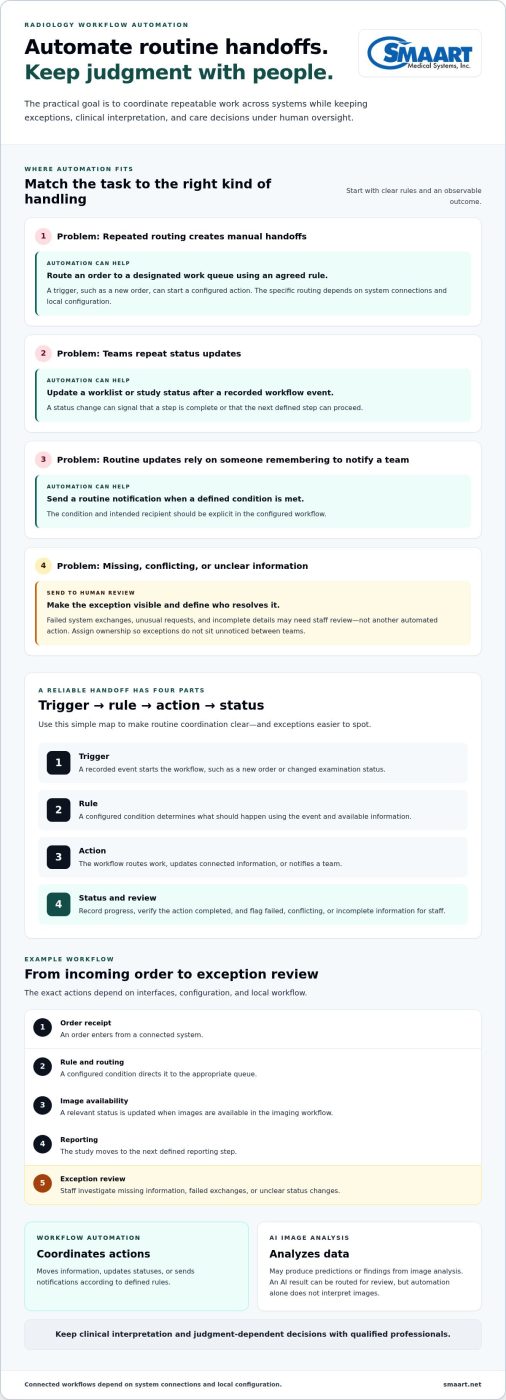
Start with tasks that follow clear, repeatable rules and have an observable outcome. Examples include routing an order to a work queue, updating a study’s status, or sending a routine notification when a defined step is complete. The value is more consistent handoffs, not a promised time or cost saving.
- Routing: Direct an item to a designated queue based on an agreed rule.
- Worklist updates: Reflect a status change after a recorded workflow event.
- Routine notifications: Alert the appropriate team when a defined condition is met.
Exceptions need a clear path back to staff. Missing information, conflicting details, an unusual request, or a failed system exchange may require review rather than another automated action. Keep clinical interpretation and judgment-dependent decisions with qualified professionals. Before automating a task, define who handles exceptions and how the workflow signals that human review is needed.
How automation differs from radiology AI
Workflow automation coordinates actions across people and software. AI analyzes data to produce predictions or findings, such as an output based on image analysis. The two can coexist: an AI result might be passed through a workflow that routes it for review. But automation alone does not imply image analysis, and an AI capability does not guarantee that surrounding handoffs are coordinated.
Assess each capability by its actual role. Ask whether it moves information, analyzes it, or does both, and identify where a person reviews the result. This keeps the scope clear and helps teams distinguish operational support from clinical interpretation.
How Radiology Workflow Automation Connects Systems and Handoffs
A workflow moves reliably only when each handoff carries the right context and someone can see what happened next. Radiology workflow automation software can coordinate that movement through a sequence: a trigger starts the process, a rule determines what should happen, an action moves or updates information, and a status change records progress. If an action fails or information is unclear, the process needs an exception path for staff review.
Consider an order arriving from a scheduling or health information system. A configured rule might route it to a designated work queue. Once the examination is completed and images are available, another status update may signal that the next step can proceed. The precise actions depend on the interfaces, configuration, and workflow in place. A connection between systems does not automatically mean every field or status can pass between them.
What happens when software triggers a workflow action?
A trigger can be a new order, a changed examination status, or another recorded event. The rule uses that event and available information to decide whether to route work, update a connected system, or notify a team. Staff need a way to verify that the action completed and identify failed, conflicting, or incomplete information. Define who reviews each exception so it does not sit unnoticed between teams.
A compact example shows how the handoffs fit together:
- Order receipt: An order enters the workflow from a connected system.
- Rule and routing: A configured condition directs it to the appropriate queue.
- Image availability: The relevant status is updated when images are available in the imaging workflow.
- Reporting: The study moves to the next defined reporting step.
- Exception review: Staff investigate missing information, failed exchanges, or unclear status changes.
Assign an owner to each handoff, even when software performs the action. For example, name the team responsible for monitoring an unprocessed order and the role that resolves an interface error. Clear ownership gives staff a practical route to follow when the expected status does not appear.
Why interoperability matters to automation
Different standards support different kinds of exchange. DICOM is used for medical imaging data. HL7 messaging and FHIR support the exchange of health information, such as order or status context. These standards do not make every connection automatic: interface design and system configuration determine which information can move, in what direction, and how updates are represented. For broader context on connected systems, see this guide to integrated RIS and PACS.
Map the specific fields and events each handoff depends on, then decide how staff will recognize a missing or mismatched update. SMAART’s radiology software is designed to integrate with existing EMR and HIS platforms. SMAART-PACS supports image storage and distribution, SMAART-RIS manages patient data and clinical scheduling, and SMAART-SHARE provides secure cloud-based image sharing. Explore radiology software to see how these systems fit into a connected software environment.
Radiology Workflow Automation: Rules, AI, and Human Oversight Compared
Choose an approach based on the task, not the technology label. A predictable administrative handoff may suit a fixed rule. A task that analyzes image or clinical data may involve AI. A judgment-dependent decision calls for qualified staff. These approaches can work together, but none is automatically the right fit for every step.
| Approach | Good fit | Predictability and exceptions | Human involvement |
|---|---|---|---|
| Rule-based automation | Repeatable actions with defined conditions, such as routing a completed item to an assigned queue. | Usually predictable when inputs match the configured rule. Missing information or conflicting conditions should trigger an exception path. | Staff define and maintain the rules, monitor exceptions, and verify that the workflow behaves as intended. |
| AI-assisted workflow | Tasks involving model-generated analysis or prioritization, such as flagging an image pattern for review. | Outputs are based on model analysis and may need interpretation in context. Teams need a way to review uncertain or unexpected results. | A qualified clinician reviews clinical outputs. AI supports assessment, but does not replace professional judgment or final reporting. |
| Manual review | Ambiguous, unusual, or judgment-dependent cases where a person must assess context. | Can account for nuance, but depends on clear ownership and reliable information reaching the reviewer. | The assigned staff member evaluates the case and records the decision or next step. |
When are rules-based workflows a better fit than AI?
Rules are a practical fit when the condition and action can be stated clearly: if a required status is present, route the item to a specific queue. This differs from asking software to interpret an image or estimate clinical significance. Use AI for tasks that call for model-generated analysis or prioritization, with a defined review process. If inputs are incomplete or rules conflict, send the work to a named staff role instead of letting an uncertain action proceed.
Evaluate each option with four questions: Can the team predict what it will do? Can staff see why an action or output occurred? What happens when a case falls outside the expected pattern? Who must review the result? A rule may be easy to explain but limited to its conditions. AI may support analysis, but its output needs clinical context. Manual review accommodates nuance, yet still needs clear processes and accountability.
How should teams preserve oversight and accountability?
Assign owners for monitoring exceptions, approving workflow changes, and reviewing outcomes. Keep an audit trail that records actions, timestamps, and responsible users so staff can trace what happened and when. For AI-assisted tasks, make the distinction between a model output and a clinician’s decision visible in the process. The aim is not to remove people from the workflow. It is to make routine coordination clearer while keeping clinical and operational decisions understandable and accountable.
Radiology workflow automation software should support decisions, not obscure them. Before implementation, document which actions can proceed automatically, which require review, and who is responsible when the workflow stops or produces an unexpected result.
How to Evaluate Radiology Workflow Automation Software
Start with the work, not a feature list. Map one current workflow from its first trigger to its final handoff. Record where staff re-enter information, wait for another team, or resolve unclear statuses. Name an owner for each step, including exceptions. This gives clinical, operational, and IT teams a shared picture of the problem before they compare solutions.
Set a baseline before making changes. Choose measures that reflect the friction you want to address, such as task completion, exception rates, handoff delays, or staff feedback. Define how each measure will be collected and who will review it. These starting points help distinguish a workflow improvement from a change that simply moves effort elsewhere.
Which integration and governance questions should buyers answer?
Inventory the systems involved, including PACS, RIS, EMR, HIS, and relevant interfaces. Identify which system owns each piece of data and which status updates need to move between systems. Then document how staff will access the workflow, how actions will be audited, what happens during downtime, and who handles escalations. For broader operational context, use this guide to hospital imaging workflow strategy.
Evaluate the day-to-day experience as well as the technical connection. Can users see an item’s status and recognize when it needs attention? Can they understand what action was taken and who owns the next step? Make exception visibility and auditability part of the requirements, not details to revisit after implementation. Also plan for change management: staff need clear role definitions, training, and a way to report workflow problems.
How can teams test automation before scaling it?
Choose a bounded, repeatable workflow with visible friction and manageable risk. Document its current steps, owners, baseline measures, and known exceptions. Configure only the changes needed for that workflow, then review the results with the people who perform and support the work. A focused pilot makes it easier to spot mismatched rules or confusing handoffs before they affect a wider process.
- Agree on measures: Track task completion, exception rates, handoff delays, and staff feedback using locally defined methods.
- Review the exceptions: Look for missing information, failed actions, and cases routed to the wrong next step.
- Refine before expanding: Adjust rules, ownership, or instructions, then assess the workflow again before applying the approach elsewhere.
Set success criteria before the pilot begins, and include safeguards for cases that require human review. If the workflow creates new work, hides unresolved items, or leaves ownership unclear, address those problems before expanding it. SMAART’s radiology software is designed to integrate with existing EMR and HIS platforms. SMAART-PACS supports image storage and distribution, while SMAART-RIS manages patient data and clinical scheduling. Explore SMAART radiology software as you assess how these systems fit your organization’s needs.
How SMAART’s Radiology Software Fits a Connected Workflow
Radiology operations rely on systems that handle different parts of the imaging process. To assess a software environment, map each system to its role, then identify how information needs to move between them. SMAART-PACS, SMAART-RIS, and SMAART-SHARE support distinct parts of that environment and can be considered as components of a connected radiology software setup.
Map SMAART products to the workflow components they support
SMAART-PACS supports medical image storage and distribution. In a workflow map, place it where images need to be stored and made available through the imaging environment. SMAART-RIS manages patient data and clinical scheduling, supporting those operational needs in the radiology workflow. SMAART-SHARE provides secure cloud-based image sharing, supporting image access and exchange alongside PACS image storage and distribution.
These roles help teams clarify what their systems are responsible for before deciding where handoffs or automation may fit. For example, a workflow map can show where scheduling and patient data are managed, where images are stored and distributed, and where cloud-based image sharing is needed. It should also identify the systems that supply or receive information at each step. That makes integration requirements easier to discuss and keeps system roles clear.
SMAART solutions are designed to integrate with existing EMR and HIS platforms. For an organization evaluating radiology workflow automation software, this integration context matters. The workflow’s rules, configuration, and human review responsibilities should also be defined as part of the evaluation.
Plan a practical next step for your team
Bring the workflow map into a discussion with clinical, operational, and IT stakeholders. Confirm what each system manages, what information needs to pass between systems, who owns each handoff, and how staff will recognize an exception. Then connect those requirements to the measures your team defined, such as task completion, handoff delays, exception handling, or staff experience. This keeps product evaluation grounded in the work your organization needs to support.
Separating core system roles makes it easier to assess the wider workflow. PACS supports image storage and distribution; RIS manages patient data and clinical scheduling; and image-sharing software supports secure cloud-based exchange. Your team can consider how these functions fit with existing EMR and HIS platforms, local processes, and oversight expectations.
Explore SMAART’s radiology software solutions against your workflow map and integration needs. Bring your team’s requirements and start a conversation about how SMAART-PACS, SMAART-RIS, and SMAART-SHARE can support your organization’s radiology environment.
Build a Workflow That Fits Your Team
The next step is not automating everything. Choose one workflow your team wants to improve, define what success looks like, and keep clinical judgment and accountability visible as the process evolves. With that foundation, you can assess how radiology workflow automation software fits the way your organization works today and where it wants to go.
Use your workflow map and integration requirements to guide the evaluation. Consider how SMAART’s radiology software could fit into your existing environment, alongside the people, processes, and systems your team relies on. A focused review can turn operational challenges into a clear, manageable plan.
Explore SMAART’s radiology software solutions and take the next step toward a more connected workflow. Start with the systems and handoffs your team wants to improve.
Frequently Asked Questions
Does radiology workflow automation software interpret medical images?
No. Workflow automation and image interpretation are separate functions. Automation can coordinate an operational step, such as making a study available in a queue, while interpretation requires clinical expertise. Some workflows connect to AI tools that analyze images, but that connection does not mean the automation platform interprets scans. Before implementation, document which outputs are operational signals and which are clinical findings, and specify who reviews each finding.
What do DICOM, HL7, and FHIR have to do with radiology workflow automation?
They help systems represent or exchange different kinds of healthcare information. DICOM relates to medical imaging, while HL7 and FHIR support health information exchange. For a practical review, trace one item, such as an order, and note which system creates it, what identifiers accompany it, and where status updates need to appear. This can reveal mismatched fields or handoffs that need interface work before automation can use them reliably.
Can radiology workflow automation software work during a system outage?
Not necessarily. Outage behavior depends on system design, configuration, and local procedures, so teams should plan for interruptions rather than assume tasks continue normally. Document which steps pause, how staff identify delayed or failed actions, and who coordinates the manual fallback. After service resumes, assign responsibility for reconciling queued work against tasks handled manually. Test this scenario with the relevant teams before relying on the process.
How can a radiology team measure whether workflow automation is helping?
Compare a defined workflow before and after a change using measures tied to its original problem. For example, a team addressing missed handoffs could track the interval between two specified status events, incomplete tasks, and staff feedback about rework. Use the same definitions and collection method each time, and review results over an agreed period. Note workload or process changes too, since software may not explain every difference.
Is radiology workflow automation software appropriate for a small imaging clinic?
It may be useful if a clinic has a recurring coordination problem that software can address without adding excessive oversight. Start by documenting one bottleneck, such as repeated follow-up on incomplete orders, then identify the staff time and exception process needed to manage it. A focused pilot can show whether the change eases that task or adds steps. The clinic’s existing systems and staffing shape the fit.
How should teams protect patient information in automated radiology workflows?
Review how patient information is accessed, changed, transmitted, and recorded across connected systems. Map which roles need access, how permissions are managed, what audit records are available, and who handles a suspected incident. Include data retention and vendor access in the review. Security depends on the complete operating environment, not simply whether a workflow is automated or cloud-based, so involve the organization’s security and compliance experts in planning.