Reducing Radiology Overhead: 2026 Efficiency Guide
What if the biggest opportunity to lower radiology costs isn’t cutting clinical resources, but removing the outdated systems that slow your team down? If you’re asking how to reduce radiology overhead without compromising patient care, start with the expenses and friction built into fragmented workflows: maintaining on-premise servers, managing appointments by hand, and burning CDs to share images.
Those costs add up in staff time, IT upkeep, and avoidable administrative work. And when disconnected systems force teams to repeat tasks or track information across platforms, technical debt can become part of the daily routine. You’re right to look for savings that don’t create new bottlenecks.
This guide explores how integrated, cloud-native software can help shift technology spending from large capital investments toward more predictable operating expenses while streamlining everyday work. We’ll look at ways SMAART-PACS can reduce the burden of on-premise storage, SMAART-RIS can support more efficient scheduling and billing workflows, and SMAART-SHARE can replace the cost and hassle of physical imaging CDs. The goal is a leaner operation with fewer disconnected tools and more time for patient care.
Key Takeaways
- To understand how to reduce radiology overhead, look beyond purchase price and assess the ongoing costs of legacy infrastructure, staff time, and physical image sharing.
- Disconnected RIS and PACS workflows can create duplicated data entry and extra administrative work; integration can help simplify routine tasks.
- Compare the full cost of on-premise and cloud storage, including maintenance, upgrades, and the effort required to manage imaging data.
- A shift from large upfront technology investments to predictable operating expenses may make budgeting easier; assess the financial implications with your finance team.
- Explore how SMAART-PACS, SMAART-RIS, and SMAART-SHARE can support lower-overhead storage, smoother administrative workflows, and digital image sharing.
Identifying the “Technical Debt” in Radiology Infrastructure
Radiology overhead is more than the price of imaging software. It includes the people-hours spent on manual scheduling and data entry, the IT resources required to maintain servers, and the physical media used to move images between facilities. When these parts rely on disconnected, aging systems, routine tasks create a steady operational drag.
A Picture archiving and communication system (PACS) stores and manages medical images. But the system’s total cost isn’t limited to its initial purchase. On-premise infrastructure also requires space, power, cooling, maintenance, and a plan for hardware replacement. The 2026 estimates from Braid Health and Medicai put initial on-premise PACS hardware, software, and implementation for a single site at $70,000 to more than $500,000, depending on scale and complexity. Ongoing upkeep adds to that investment.
Status quo maintenance can feel less disruptive than modernization, but it leaves existing inefficiencies in place. Staff may enter the same patient details in separate systems, locate information in paper records, or resolve mismatches by hand. These are labor costs, even when they don’t appear as a separate technology charge. To assess how to reduce radiology overhead, count the time spent on these workarounds alongside IT and infrastructure expenses.
The Financial Impact of Legacy Server Maintenance
Build a full lifecycle estimate rather than comparing only purchase prices. If your organization plans hardware refreshes every three to five years, divide each expected replacement and implementation expense across that period, then add power, cooling, maintenance, and IT labor. Also account for downtime risk: older systems without redundancy can interrupt access to imaging and force staff to rely on slower workarounds. The impact depends on your setup, so document recovery plans and operational dependencies.
Eliminating the Physical Media Tax
A radiology CD has costs beyond the disc: burning equipment, supplies, staff time to prepare and verify the study, packaging, and postage when required. If a disc is missing or images don’t reach a referral provider, staff may need to resend them or coordinate another transfer. Patients can be left carrying media between appointments. Digital-first sharing can reduce these steps; SMAART-SHARE is designed to replace CD-based image delivery with cloud sharing.
Paper records and manual data entry add another layer of friction. Re-entering demographics, appointment details, or billing information increases administrative effort and creates more opportunities for errors. Integrated workflows and connections with existing EMR and HIS platforms can help reduce duplicate handling. Modernization isn’t just a server decision. It’s a chance to remove recurring tasks that keep staff focused on managing systems instead of supporting patient care.
Streamlining Workflow with Integrated RIS-PACS Solutions
Disconnected systems make staff bridge the gaps. A technologist may update one system after an exam, while administrative staff re-enter patient details elsewhere and billing teams reconcile information again before submitting a claim. Each handoff takes time and creates another chance for inconsistent records. Integrated RIS-PACS solutions can connect scheduling, exam status, imaging, and billing workflows, helping reduce duplicate work and keep information moving through the diagnostic loop.
That connection can also make the patient journey easier to manage. A RIS with scheduling tools and automated reminders can help staff confirm appointments and follow up with patients, potentially reducing avoidable no-shows. The exact automation available varies by system, so assess whether it fits your appointment process and communication preferences. The goal is less time spent making repetitive calls and tracking appointments manually, not adding another disconnected tool.
The Power of EMR and HIS Interoperability
When a RIS and PACS exchange information with existing EMR or HIS platforms, staff can avoid entering the same demographics and insurance details in multiple places. Bi-directional data flow can help keep relevant information aligned across systems, reducing corrections and manual checks. Solutions from organizations like FrontRunnerHC, Inc. also demonstrate how automating patient coverage verification and demographic data can protect healthcare reimbursement workflows. Ask vendors to demonstrate how orders, patient details, exam status, and results move through your actual process. This is a practical way to assess hospital imaging workflow improvements before committing to a change.
For clinics and hospitals looking at how to reduce radiology overhead, the labor impact matters as much as the software footprint. SMAART-RIS is designed to support scheduling and billing workflows, while SMAART-PACS supports image management. SMAART Medical Systems’ solutions can integrate with existing EMR and HIS platforms, helping reduce friction between administrative and imaging workflows.
Automation in Reporting and Dictation
Reporting steps can also affect turnaround and administrative workload. Voice recognition, standardized report templates, and coding support may help reduce repetitive documentation and rework, but capabilities differ by platform. Before selecting software, confirm which functions are included, how they fit your radiologists’ process, and what review remains necessary. Automation should support clinical judgment and accurate documentation, not bypass them.
Map the full path from order to final bill. Note where staff re-enter information, wait for an approval, correct a mismatch, or manually move a report forward. Those handoffs reveal where integration could save effort and where a process change may be enough. To explore how integrated imaging and workflow software could fit your operation, review SMAART Medical Systems’ radiology solutions.
Transitioning to Cloud-Based Storage and Image Sharing
Moving imaging data to the cloud can change the cost structure, but it isn’t automatically cheaper for every practice. Compare total cost of ownership (TCO) across the same time period. For on-premise PACS, include hardware refreshes, maintenance, power, cooling, backup systems, and IT labor. For cloud storage, account for subscription terms, data migration, storage growth, retrieval or transfer charges, and the network capacity needed to access studies.
DICOM studies vary in size and volume, so estimate storage needs using your own archive and projected exam growth. Ask vendors how pricing changes as data accumulates, what’s included in storage and backup, and how you can retrieve or export studies. This makes the comparison more useful than judging by an initial quote alone. Cloud sharing may also reduce reliance on VPN tunnels for image exchange, but confirm the access method, security controls, and any remaining network requirements before planning to retire existing connections.
SMAART-SHARE: Replacing CDs with Cloud Links
SMAART-SHARE provides cloud-based image sharing, offering an alternative to distributing studies on physical media. For any sharing platform, confirm how patients and referring physicians access images, whether recipients need proprietary software, and how access is controlled. If QR codes or self-service portals are important to your workflow, verify that those functions are supported before assuming they’re included. A well-designed digital process can reduce front-desk steps while making image access more convenient.
Leveraging a Zero-Footprint PACS Viewer
A zero footprint PACS viewer is designed to display images through a browser without installing a full viewer on each workstation. Depending on its capabilities and your security configuration, this approach may simplify software deployment and support access from approved locations. Check diagnostic requirements, device compatibility, user access controls, and whether local workstation specifications still meet clinical needs.
Cloud hosting doesn’t transfer every security responsibility to a vendor or remove the need for organizational oversight. HIPAA-covered organizations should review vendor safeguards, access management, backup and recovery processes, audit logging, and applicable contractual terms with their privacy and security teams. Ask how responsibilities are divided and what evidence is available for your own risk assessments.
For organizations assessing how to reduce radiology overhead, the strongest comparison is a practical one: total lifecycle costs, staff effort, image access, and security responsibilities. SMAART-PACS supports cloud-native image management, while SMAART-SHARE supports digital image sharing. Explore SMAART’s radiology software solutions as part of that evaluation.
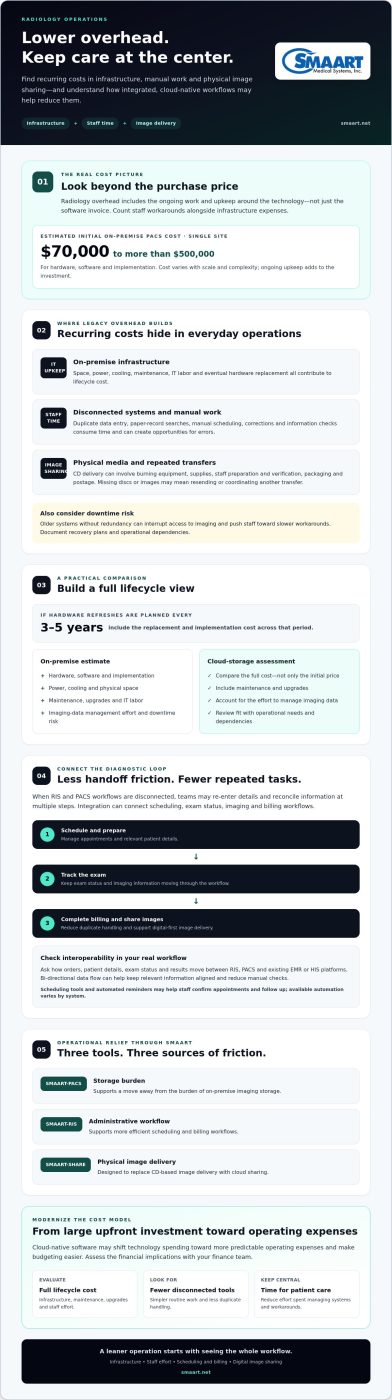
Modernizing Financial Models: From CapEx to OpEx
Moving from a large upfront technology purchase to a subscription can make radiology costs easier to plan, but the payment model alone doesn’t guarantee savings. Compare the full agreement with the costs of ownership: implementation, migration, maintenance, upgrades, internal IT time, and any fees tied to storage or usage. A predictable monthly payment is useful only when you understand what it covers and how it may change as your needs grow.
Ask vendors to clarify whether routine software updates, support, and system maintenance are included, and whether additional work carries separate charges. A well-defined subscription can reduce the “upgrade tax” of periodic major purchases and help limit exposure to technology obsolescence. It won’t remove the need for internal oversight. Your team still needs to review access, workflows, vendor responsibilities, and continuity plans.
The ROI of Software-as-a-Service (SaaS)
To assess return on investment, compare expected subscription expenses against the complete cost of your current setup, including staff time spent coordinating upgrades and resolving infrastructure issues. Model more than one usage scenario, such as changes in study volume or storage needs. Also review contract length, renewal terms, price adjustments, data export, and migration responsibilities. For a defensible budget, separate predictable recurring charges from one-time transition costs.
OpEx may offer accounting or tax treatment advantages, but those depend on an organization’s circumstances and applicable accounting rules. Ask your finance team or tax adviser to assess the implications rather than assuming subscriptions are automatically more favorable. Leasing and financing may also be available through third parties, but compare total payments, terms, and obligations carefully. SMAART Medical Systems offers SMAART-PACS, SMAART-RIS, and SMAART-SHARE; confirm the applicable commercial terms directly rather than assuming a financing option.
Reducing Billing and Administrative Overhead
Financial efficiency also depends on how well systems support daily work. An integrated RIS may help organize scheduling and billing workflows, while cleaner information moving between systems can reduce manual corrections. Ask vendors to demonstrate how their software handles prior authorization steps, claim data, and exceptions. Don’t assume these tasks are fully automated or that automation will prevent denials; verify the specific capabilities and keep staff review in the process.
Digital access to imaging information may also reduce routine calls about obtaining or sharing studies. Explore how patient portals for medical images can fit your communication workflow, and confirm exactly what a platform supports. To discuss how SMAART-PACS, SMAART-RIS, and SMAART-SHARE may fit your operational and budgeting goals, explore SMAART Medical Systems’ radiology solutions. A careful cost comparison is a practical step in deciding how to reduce radiology overhead without trading predictable expenses for unclear commitments.
Implementing SMAART Solutions for Operational Relief
Modernization works best when it follows the way your team actually handles imaging, not when it simply replaces one set of tools with another. SMAART-PACS, SMAART-RIS, and SMAART-SHARE address connected parts of the radiology workflow: image management, operational processes, and digital image sharing. Together, they can help reduce reliance on fragmented systems while giving a facility a clearer path toward paperless, CD-less operations.
SMAART-PACS provides cloud-native image management, supporting the diagnostic workflow without the overhead of maintaining local PACS infrastructure. SMAART-RIS supports administrative work such as scheduling and billing, while SMAART-SHARE provides an alternative to physical image delivery. As volume grows, connected software may help a facility handle more work without adding the same amount of manual coordination. It can’t guarantee that administrative headcount will remain unchanged; track workload and staffing needs as processes evolve. For practices seeking to further lower administrative overhead and streamline revenue operations, check out Tausch Medical for specialized billing outsourcing.
Seamless Integration with Existing Infrastructure
SMAART solutions can integrate with existing EMR and HIS platforms. Before implementation, map how orders, patient information, images, and results move through your current environment. Confirm which data flows between systems, how exceptions are handled, and what testing is needed before staff rely on the new workflow. Involve technologists, radiologists, registration, and billing teams early. Their input can surface practical needs that a technical plan alone may miss.
Plan training around each team’s daily tasks. For example, registration staff may need to understand scheduling steps, while radiologists focus on image access and reporting workflows. Ask for demonstrations using realistic scenarios, and clarify how workflows can be configured to fit clinical operations. This makes it easier to identify training needs and areas where process changes are required.
Long-Term Partnership and Support
Support and product updates can affect the long-term value of any radiology platform, but the details vary by agreement. Before choosing a solution, ask how support requests are handled, what response expectations apply, how updates are communicated, and what assistance is available during transitions. Confirm these terms directly rather than assuming a particular level of service or update schedule.
Build a practical modernization roadmap. Start by documenting recurring costs and staff workarounds, then prioritize a workflow to improve, define success measures, and plan data migration, integration testing, and staff onboarding. Review results after implementation, including duplicate data entry, time spent coordinating image access, and manual scheduling or billing tasks. This measured approach can help your team determine how to reduce radiology overhead while keeping clinical needs central, and identify the next step toward a leaner operation.
Build a Leaner Radiology Operation
Reducing overhead isn’t about cutting corners. It’s about removing the friction that makes essential work more expensive: disconnected workflows, aging infrastructure, and manual processes that consume staff time. The practical path is to assess total costs, connect administrative and imaging workflows, and choose a financial model your organization can plan around.
For teams evaluating how to reduce radiology overhead, modern cloud-native architecture can ease dependence on local infrastructure. Seamless EMR and HIS integration can help information move through existing workflows, while SaaS pricing models can support more predictable budgeting. SMAART-PACS, SMAART-RIS, and SMAART-SHARE bring together image management, operational workflows, and digital sharing.
Every facility’s needs are different. Start by identifying the most costly bottlenecks, then evaluate how a software change would affect staff workload, system requirements, and ongoing expenses. Request a SMAART Workflow Audit and Software Demo to explore the options for your operation. With a clear plan and the right-fit tools, your team can reduce avoidable complexity and focus more energy on patient care.
Frequently Asked Questions
What is the biggest contributor to radiology overhead in 2026?
There isn’t one biggest contributor for every facility, but legacy infrastructure and the manual work around disconnected systems are common cost drivers. Server upkeep, duplicate data entry, paper-based processes, appointment follow-ups, and physical image delivery can all consume resources. To pinpoint your largest expense, review technology and staffing costs alongside workflow delays and rework. The best place to start is where recurring costs and repetitive tasks overlap.
How much can a clinic save by switching from CDs to cloud-based image sharing?
There’s no reliable savings amount without knowing your clinic’s image volume, delivery process, and sharing platform costs. Estimate your current cost per disc by including media, equipment, staff time, packaging, postage, and effort spent handling missing or unusable discs. Then compare that figure with the full cost of digital sharing, including implementation and ongoing fees. This gives your team a clinic-specific estimate rather than an unsupported industry average.
Does cloud-based radiology software meet HIPAA compliance standards?
Cloud hosting alone doesn’t establish HIPAA compliance. A facility must assess how the software and its vendor handle protected health information, including user access, security controls, audit records, backups, and incident processes. Review applicable agreements, such as a business associate agreement where required, with your privacy and security teams. Ask the vendor to explain its safeguards and responsibilities, then evaluate them against your organization’s policies and compliance obligations.
Can I integrate SMAART-RIS with my existing EMR system?
Yes. SMAART-RIS is designed to integrate with existing EMR and HIS platforms. Before implementation, confirm which systems and data workflows are in scope, such as patient demographics, orders, scheduling information, and results. Ask how data is exchanged, what testing is needed, and how exceptions are handled. A workflow review with clinical and administrative staff can help identify integration requirements early and clarify where processes may need adjustment.
What is the difference between CapEx and OpEx in radiology software financing?
CapEx generally refers to a large upfront investment in assets or technology, while OpEx refers to recurring operating expenses, such as a software subscription. A subscription may make budgeting more predictable, but terms can vary. Compare the full agreement with ownership costs, including implementation, upgrades, maintenance, renewal terms, and data migration. Tax and accounting treatment depends on your organization, so consult your finance team or tax adviser before deciding.
How does a zero-footprint PACS viewer reduce IT maintenance costs?
A zero-footprint viewer is designed to display images through a browser without installing a full application on each workstation. That can reduce the work involved in deploying and updating local viewer software across devices. It doesn’t eliminate all IT requirements: facilities should still verify browser and workstation compatibility, network needs, security controls, and diagnostic suitability. Ask the vendor to demonstrate the viewer in your intended clinical workflow before adopting it.
Will automating scheduling significantly lower my staffing costs?
Scheduling automation can reduce repetitive tasks, such as manual appointment coordination and reminder follow-ups, but it doesn’t guarantee lower staffing costs. The effect depends on current workload, patient response, and how well the tools fit your process. Track staff time spent scheduling, appointment changes, reminder follow-ups, and no-show handling before and after implementation. Use those results to determine whether automation frees capacity, reduces overtime, or improves how staff time is allocated.
What are the first steps to auditing my radiology department’s overhead?
Start by gathering recurring technology expenses, staffing time tied to manual work, and costs associated with physical image delivery. Map the patient and imaging workflow from order through scheduling, exam, reporting, sharing, and billing. Mark repeated data entry, handoffs, delays, and workarounds. Then rank issues by frequency and operational impact, and establish a baseline to compare against after changes. Involve IT, clinical, and administrative staff so the audit reflects day-to-day work.