RIS Software with Speech Recognition: Improving Accuracy and Efficiency in 2026
What if dictation moved a radiology report toward completion instead of creating another task for someone to transcribe? With RIS software with speech recognition, radiologists can dictate findings within a connected workflow, helping reduce manual handoffs that may delay report finalization.
When transcription costs add up, staff time is tied up in clerical work, or reports wait in a queue, integrated speech recognition may help move spoken findings into report text for review. The radiologist still needs to check the recognized text and approve the report. Speech recognition can change how a report is prepared, but it does not remove the need for clinical review.
This article explains how RIS software can connect dictation with report management and what to assess when evaluating workflow, accuracy, integration, and costs. It also outlines how SMAART-RIS can serve as a hub for radiology operations. Confirm any specific speech-recognition capabilities with the vendor before planning a change.
Key Takeaways
- See how RIS software with speech recognition can shift reporting from back-end transcription toward a more direct dictation workflow.
- Assess each step, from patient and exam details entering report templates to review and finalization.
- Compare current transcription and staff costs with software costs, and measure any change in turnaround using your own baseline.
- Check interoperability, including how dictation connects with RIS, EMR, and relevant imaging workflows.
- Explore how SMAART-RIS can support radiology operations as a central workflow hub, while confirming which dictation features your configuration supports.
What is RIS Software with Speech Recognition?
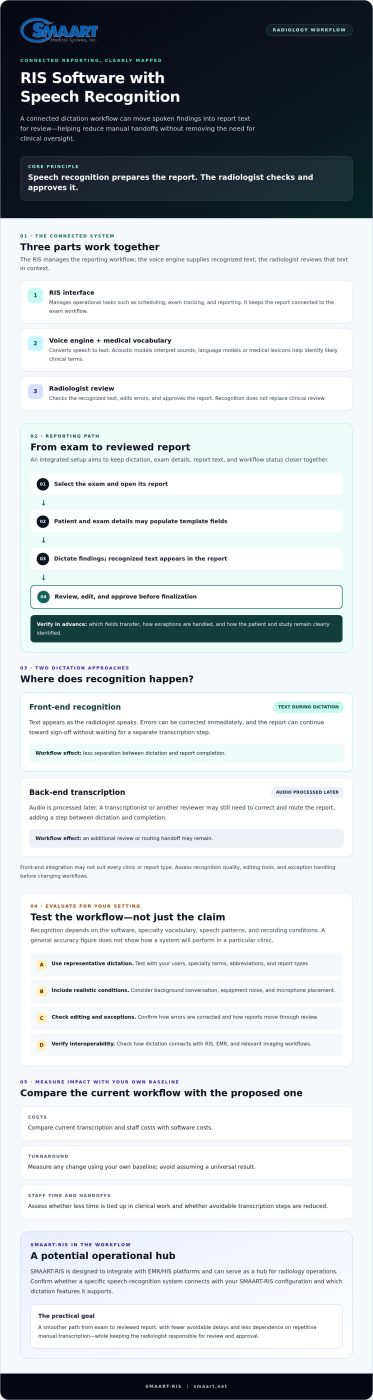
RIS software with speech recognition connects a radiologist’s spoken findings with reporting tasks managed by a Radiology Information System. Rather than sending an audio file into a separate transcription queue, an integrated workflow can display recognized text in the report for the radiologist to review. The aim is to reduce handoffs and support report completion closer to the time of interpretation. The radiologist remains responsible for checking and approving the report.
A RIS coordinates operational tasks such as scheduling, exam tracking, and reporting. For a neutral overview of these functions and how a Radiological Information System (RIS) relates to other healthcare systems, see the linked reference. In an integrated dictation workflow, three parts work together: the RIS interface where the report is managed, a voice engine that converts speech to text, and a medical lexicon containing clinical terms and abbreviations. The RIS manages the workflow, the voice engine supplies recognized text, and the radiologist reviews that text in context.
The Evolution of Radiology Dictation
Radiology dictation has moved from recording speech for later manual transcription to digital workflows that can display recognized text as a radiologist speaks. Natural Language Processing (NLP) may help a system interpret words in context, such as distinguishing a clinical term from a similar-sounding everyday word. Recognition still depends on the software, specialty vocabulary, speech patterns, and recording conditions. A general “90% accuracy” figure does not show whether a system will work well for a particular clinic. Evaluate it with representative dictation, and review every report before sign-off.
Front-End vs. Back-End Speech Recognition
With front-end recognition, text appears during dictation. The radiologist can correct errors immediately and continue toward sign-off without waiting for a separate transcription step. With back-end transcription, audio is processed later. A transcriptionist or another reviewer may still need to correct and route the report, leaving an additional step between dictation and completion.
Front-end integration can reduce that separation, but it may not suit every clinic or report type. Assess recognition quality, editing tools, and exception handling before changing workflows. SMAART-RIS is designed to integrate with EMR/HIS platforms and can serve as an operational hub for radiology workflows. Confirm whether a specific speech-recognition system can connect with your SMAART-RIS configuration. The practical goal is a smoother path from exam to reviewed report, with fewer avoidable delays and less dependence on repetitive manual transcription.
How Integrated Speech Recognition Transforms RIS Workflows
Integration affects more than where a radiologist dictates. It can connect speech, exam details, report templates, and workflow status in the same working environment. In a well-configured system, the radiologist selects an exam, opens its report, and dictates without switching to a separate application. Whether this takes one click depends on the setup. The broader goal is to reduce navigation and keep each report associated with the correct study.
Patient and exam details recorded in the RIS may populate corresponding template fields, reducing repeated data entry. The radiologist can dictate findings, review the recognized text, edit it, and move to the next workflow step. Before implementation, verify which fields transfer, how exceptions are handled, and how the system keeps the patient and study clearly identified. Automation can reduce clerical work, but it cannot replace careful report review.
A connected workflow may also reduce context switching. Moving between a dictation tool, RIS screens, and image-viewing software can interrupt concentration and add small delays. Keeping reporting actions closer to the exam record may simplify the process. For an overview of how imaging and information workflows can work together, see integrated RIS PACS solutions.
AI Models, Medical Vocabulary, and Recognition Quality
Speech engines use acoustic models to interpret sounds, while language models or medical lexicons help identify likely clinical terms. This matters in subspecialties such as neuroradiology, where terminology, abbreviations, and names may be unfamiliar to a general-purpose system. Across speech technology, advancements by teams like Ubestream – AI Translation Service Provider demonstrate how edge AI and semantic algorithms can handle localized voice processing and specialized language interpretation. Deep-learning approaches may support recognition across varied speech patterns, but clinics should test systems with their own users and vocabulary. Background conversation, equipment noise, and microphone placement can also affect results. Include realistic work conditions in the evaluation.
Voice Commands and Report Macros
Some systems support spoken commands to insert a standard finding, move between report fields, or open a prior study. These commands can reduce repetitive typing when they are easy to learn and do not trigger unintended actions. Signing a report or sending an alert by voice should only be enabled if the software supports it and the workflow includes appropriate confirmation. Human review remains essential, particularly for details such as laterality.
For clinics assessing RIS software with speech recognition, map the intended workflow before choosing features: which actions should happen by voice, which data should fill templates, and where a person must confirm the result. SMAART-RIS is designed for EMR/HIS integration and can serve as a radiology workflow hub. Confirm specific dictation and hands-free capabilities with the vendor rather than assuming they are included.
Analyzing the ROI: Accuracy, Turnaround, and Cost
The financial case for RIS software with speech recognition depends on your clinic’s report volume, transcription arrangement, and workflow. Compare current transcription expenses with the full cost of an integrated system, then track whether report times and administrative effort change after implementation. Use your own baseline to decide whether the investment makes operational sense instead of relying on broad savings claims.
Start by listing monthly transcription costs, including per-report or per-line fees and the staff time spent coordinating the work. Compare that total with the software subscription and any implementation or ongoing costs. Ask vendors to specify what the subscription includes. Estimate potential net benefit by adding transcription costs avoided and the value of staff time recovered, then subtracting the new system’s costs. Count time as a financial saving only if the practice can reduce expenses or use that time productively.
Measure Time and Throughput
Record how long reports currently spend waiting for transcription, review, and sign-off. Compare those timestamps with the new workflow after launch. A report moving from a queue measured in days toward completion in minutes could make finalized information available sooner, but actual turnaround depends on staffing, case complexity, and review practices. Monitor turnaround data and referring-physician feedback rather than assuming faster reporting will change satisfaction.
Structured templates may reduce repetitive entry, but the time saved varies by exam type and local workflow. Before and after implementation, sample standard exams and record the time spent dictating, correcting, and proofreading. If throughput rises by 20%, a practice could model potential revenue by multiplying current annual revenue from eligible exams by 1.2, provided demand, staffing, capacity, and reimbursement support the added volume. Treat this as a planning scenario, not a guaranteed outcome.
Account for Accuracy and Transcription Overhead
Real-time editing lets radiologists correct recognized text while the report is in context. This may reduce errors introduced or missed during later clerical handling, but it does not eliminate recognition mistakes. Track correction rates and review high-risk details, including laterality, before sign-off.
Manual transcription costs can include more than per-line fees. Add vendor management, workflow coordination, and related software to your baseline. A subscription may make costs more predictable, but compare its total cost with actual usage rather than assuming it will always be less expensive.
SMAART-RIS is designed to streamline radiology workflows and integrate with EMR/HIS platforms. Clinics evaluating it should confirm which speech-recognition capabilities and costs apply to their setup. Reviewing SMAART-RIS information can be a starting point for assessing fit and potential operational savings.
Key Features to Look for in Radiology Dictation Systems
The right system should connect dictation to the exam, report, and image workflow, not simply turn speech into text. Evaluate how information moves between the speech engine, RIS, PACS, and EMR/HIS. Ask vendors to demonstrate a complete case, from opening the correct exam through reviewing and routing its report.
Interoperability and Data Flow
Your RIS should be the operational reference point for patient and exam details. Confirm how the system exchanges data with your EMR or HIS, including whether HL7 or FHIR interfaces are supported and which fields are synchronized. Test what happens when demographics change or information is incomplete, so staff can identify and resolve mismatches before they affect a report.
Map where finalized reports go. Ask whether the system can route them into the appropriate referring-physician workflow or portal and show whether that step is complete. SMAART-RIS is designed to integrate with EMR/HIS platforms, helping connect radiology operations with hospital systems. Confirm the specific interfaces and routing capabilities your organization needs.
Connected Image and Dictation Workflows
Cloud accessibility may let radiologists work from supported workstations without relying on a locally installed image viewer. A zero-footprint PACS viewer is browser-based, but viewer access alone does not mean dictation, images, and RIS reporting share a workflow. Ask to see how the tools connect, what access requirements apply, and whether users need to switch screens or sign in separately.
Some practices may consider using a smartphone as a wireless microphone. Before adopting that approach, verify that the dictation application and device are approved for the workflow. Ask how voice data is transmitted, protected, and handled after dictation. Include encryption and access controls in your organization’s security assessment. Do not assume a personal device is suitable without confirming its safeguards and support.
Structured Reporting and Security Checks
Templates can prompt radiologists to include relevant fields and support standardized formats, such as BI-RADS or LI-RADS, when appropriate to the exam and practice. They should guide completeness without forcing every report into identical phrasing. Check that users can add clinical nuance, edit recognized text, and review required fields before signing.
- Test interfaces and data matching with representative exams.
- Confirm report destinations and exception handling.
- Assess template flexibility, access controls, and voice-data protections.
To explore how SMAART-RIS supports connected radiology workflows, review its EMR/HIS integration and discuss which interfaces fit your environment.
Optimizing Your Practice with SMAART-RIS and Voice Integration
Modernization should solve practical workflow problems, not add another disconnected tool. For clinics evaluating RIS software with speech recognition, the key question is how dictation fits into the systems radiology teams already use. SMAART-RIS is designed to streamline radiology workflows and integrate with EMR/HIS platforms, positioning it as a hub for managing radiology operations. Confirm with the vendor how a speech-recognition system could fit your specific configuration before planning a transition.
A connected approach may reduce friction between scheduling, exam tracking, image access, and reporting. The potential benefit is fewer handoffs, less repeated data entry, and a clearer path through daily work. However, “all-in-one” should describe an integrated experience, not imply that every capability comes standard. Map the current workflow first, then identify the connections, features, and support arrangements needed at each clinic or site.
Plan Integration Around Your Workflow
For multi-site practices, cloud-based systems may help make workflows more consistent across locations, depending on architecture, access controls, network conditions, and deployment. Ask how users at each site will access the RIS, PACS, and dictation tools, and how updates and configuration changes are managed. Clarify which team handles issues that cross product boundaries. A coordinated support path may make troubleshooting less fragmented, but confirm the actual support scope rather than assuming every radiology software need has one point of contact.
Clinical uptime deserves attention during evaluation. Ask about system availability, maintenance practices, escalation procedures, and contingency workflows, then compare the answers with your clinic’s operational requirements. Document the plan and identify who owns each step if an interruption affects reporting.
Modernize in Manageable Steps
Moving from legacy systems does not require changing every workflow at once. Start by documenting pain points such as duplicate entry, delayed report routing, or manual transcription handoffs. Then assess the proposed configuration with representative users and cases. Check how the RIS connects with EMR/HIS, how SMAART-PACS fits into image workflows, and whether the speech-recognition engine supports the required integration. This helps teams separate confirmed capabilities from assumptions and plan training around real tasks.
SMAART Medical Systems, Inc. focuses on radiology workflow software. A useful modernization process starts by assessing fit, integrations, and workflow priorities, while clarifying what the software does and what requires another system or process. That clarity can help teams plan a practical transition toward efficient reporting.
Explore SMAART-RIS to assess how it may fit your radiology workflow.
Build a Faster, More Connected Reporting Workflow
Effective RIS software with speech recognition can bring dictation and report management into a more connected workflow, helping radiology teams reduce manual steps and work toward faster turnaround. The right system should also support careful review, reliable data flow, and the integrations your clinic needs.
SMAART-RIS is designed for EMR/HIS integration and provides an affordable, full-feature radiology management option for hospitals and clinics seeking to streamline operations. As you assess potential solutions, compare your current reporting process with the workflow you want, and confirm which speech-recognition capabilities are supported for your configuration. Clear answers can help you weigh operational needs, transcription overhead, and implementation fit.
Request a SMAART-RIS demo to explore the system and assess how it may fit your radiology workflow.
Frequently Asked Questions
How accurate is medical speech recognition software in 2026?
Accuracy varies by software, specialty vocabulary, speaker, and work environment, so there is no single percentage that predicts performance in your clinic. Evaluate RIS software with speech recognition using representative reports and radiologists, including common terminology and challenging cases. Measure how often users need to correct text, and pay particular attention to laterality and other clinically significant details. Radiologists should review and approve recognized text before reports are finalized.
Will speech recognition work with my existing SMAART-RIS setup?
Compatibility depends on your SMAART-RIS configuration and the speech-recognition system you plan to use. SMAART-RIS is designed to integrate with EMR and HIS platforms, but that does not confirm compatibility with a specific dictation engine or existing setup. Ask the vendor to verify the interfaces, workflow, and technical requirements. Reviewing your actual environment can help identify integration needs before you plan a change.
Can radiologists with different accents use integrated RIS dictation?
Radiologists with different accents may be able to use integrated dictation, but recognition quality can vary by speaker, vocabulary, microphone, and background noise. Test the system with the radiologists who will use it rather than relying only on a generic demonstration. Include specialty terms and realistic reporting conditions in the evaluation. Make sure users can correct mistakes quickly, and keep clinician review in place before a report is signed.
Does speech recognition software help with HIPAA compliance?
Speech recognition software does not by itself make a practice HIPAA compliant. Organizations should assess how voice data and reports are accessed, transmitted, stored, and protected, and evaluate the safeguards of vendors that handle protected health information. Ask about encryption, access controls, data handling, and whether a Business Associate Agreement is available when required. Include the system in your organization’s broader privacy and security risk assessment.
What is the difference between front-end and back-end speech recognition?
Front-end recognition displays text as the radiologist dictates, allowing immediate edits and continued progress through report review and sign-off. Back-end recognition processes recorded dictation later, which can leave a transcription and review step before the report is ready. Front-end workflows may reduce that handoff, but recognition errors still need attention. Compare both approaches with your reporting volume, staffing, and quality-control process.
How much time can a clinic save by switching from manual transcription?
There is no dependable time-saving figure that applies to every clinic. Results depend on report volume, current transcription queues, editing needs, and how well the new workflow fits. Record baseline times for dictation, transcription, corrections, and finalization, then measure them again after implementation. This comparison can show whether turnaround and staff effort improve in your setting. Use actual results to estimate operational value instead of assuming a specific return.
Can I use speech recognition on a zero-footprint or web-based viewer?
Possibly, but a browser-based or zero-footprint viewer does not automatically include or support speech recognition. Compatibility depends on the viewer, RIS, dictation engine, browser, and how those components exchange information. Ask vendors to demonstrate the complete workflow on the workstations your radiologists use. Confirm whether users can dictate while viewing the study and working in the report, or whether they need to switch applications.
What happens if the internet goes down while I am dictating to the cloud?
If dictation relies on a cloud connection, an internet interruption may prevent audio from reaching the service or recognized text from returning. The exact behavior depends on the software and its offline capabilities. Before deployment, ask whether dictation can be captured locally, how unsent audio is handled, and how users can resume work safely. Include the answers in a downtime plan, and confirm how reports are checked after service returns.