Interfacing PACS with EMR: A Practical Guide to Reliable Integration
What if a PACS and EMR appear connected, but imaging orders, study status, and results still don’t line up? Interfacing PACS with EMR involves more than establishing a technical connection. Information needs to move in a way that supports how care teams place orders, access images, and review reports.
The process can feel opaque because information may move between systems in different ways, and teams need to know which system owns each detail. A workflow gap can leave staff chasing updates or unsure whether a result is ready to review.
This guide covers the main information exchanges to consider, workflow and technical questions to ask vendors, and validation checks to complete before go-live. It also explains why clear interface scope and ownership matter. SMAART-PACS is designed to integrate with existing EMR and HIS platforms. Confirm supported standards and configurations with the implementation team. With careful planning, your organization can set realistic expectations and build a more reliable imaging workflow.
Key Takeaways
- Distinguish a working system connection from a workflow that reliably links orders, imaging studies, and results.
- Map how information should move at each step of an imaging encounter, then clarify which system owns each data element.
- Compare embedded viewing, linked study access, and discrete data exchange based on user steps and workflow needs.
- For interfacing PACS with EMR, confirm supported interfaces, responsibilities, and exception handling with vendors before implementation.
- Use staged testing, staff training, and monitored go-live checks to catch mismatched records and workflow issues early.
What Does Interfacing PACS with EMR Actually Mean?
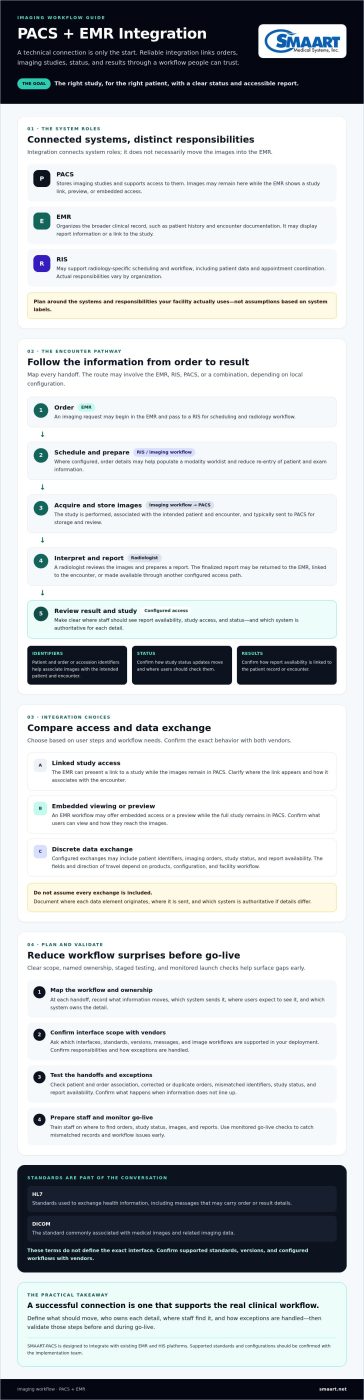
Interfacing PACS with EMR means configuring the systems to exchange or connect relevant imaging information. A technical connection alone, however, doesn’t guarantee a dependable workflow. Staff also need to find the right study for the right patient, understand its status, and access the report where they expect it.
A Picture Archiving and Communication System stores medical imaging studies and supports access to them. The Picture Archiving and Communication System (PACS) overview describes common PACS components and architecture. An EMR, by contrast, organizes a broader clinical record, such as patient history and encounter documentation. Depending on the setup, the EMR may display a study link or report information while the images remain in the PACS. Integration connects these roles without necessarily moving the images into the EMR.
Which information typically moves between PACS and EMR?
Potential exchanges include patient identifiers, imaging orders, study status, and report availability. The exact fields and direction of travel depend on the products, configuration, and facility workflow. An order might pass from the EMR to the imaging workflow, while a status update or completed report may be made available in the EMR. Treat these as possibilities to confirm, not assumptions.
Image storage is a separate consideration. A system may provide a link to a study, a preview, or embedded access to images while the full study remains in PACS. Before implementation, document where each data element originates, where it is sent, and which system is authoritative if details differ.
How PACS, EMR, and RIS divide workflow responsibilities
A representative encounter might look like this:
Order: EMR places or records imaging request → Acquisition: imaging study is performed and managed in the imaging workflow → Interpretation: radiologist reviews images and prepares a report → Result review: report availability and study access are presented through the configured workflow.
At each handoff, confirm what users should see and where they should see it. This helps teams identify missing orders, delayed status updates, or reports that aren’t linked to the expected record before those gaps become routine.
How PACS-EMR Integration Moves Imaging Data Through a Workflow
A reliable interface should support the imaging encounter from request to result, with a clear handoff at each step. The architecture varies: an EMR may communicate with a RIS, PACS, or both. Local configuration determines which system sends each update. Interfacing PACS with EMR therefore starts with mapping the actual workflow, not assuming every site uses the same route.
From imaging order to study availability
An imaging request may begin in the EMR and pass to a RIS for scheduling and radiology workflow. Where configured, order details can also help populate a modality worklist, reducing the need to re-enter patient and exam information. Worklist processes and messages depend on local configuration, so confirm whether they’re part of the proposed interface.
Patient identifiers and order or accession identifiers help associate acquired images with the intended patient and encounter. Test how the workflow handles corrections, duplicate orders, and mismatched identifiers. Even a small discrepancy can make a study harder to locate or associate correctly.
From completed study to report in the patient record
After acquisition, images are typically sent to PACS for storage and review. A radiologist interprets the study, and the finalized report may then be returned to the EMR, linked to the encounter, or made available through another configured access path. The images may remain in PACS while the EMR displays a link or report. Confirm the exact behavior with both vendors.
HL7 refers to standards used to exchange health information, including messages that may carry order or result details. DICOM is the standard commonly associated with medical images and related imaging data. These terms don’t define your exact interface. Ask vendors which standards, versions, and message or image workflows are supported in your deployment.
In a configured workflow, an order is placed, images are acquired and associated with the study, and a report is made available for review in the patient record. A study published through the National Center for Biotechnology Information found that integration decreases the time to access the EMR for radiologists from 52 seconds to 6 seconds, while EMR access among studies rose from 36.7% to 44.9%.
Example data flow: EMR clinician places order → RIS or scheduling team processes request → modality team acquires images → PACS stores study → radiologist interprets → report returns or links to EMR → clinician reviews result. The systems and responsible teams may differ by site.
For a vendor discussion, review SMAART-PACS interface information and confirm current interface scope and configuration with the implementation team.
PACS-EMR Integration Options: Compare Data Exchange, Access, and Workflow
Integration can give clinicians different ways to access imaging information. Some approaches focus on viewing images, while others exchange structured details such as orders, study status, or report text. These patterns can work together, but they aren’t interchangeable. The right mix depends on user needs, system capabilities, and which application should own each piece of information.
| Approach | What users do | Workflow fit and data responsibility |
|---|---|---|
| Embedded viewing | Open images or a viewer within the EMR interface. | Can reduce application switching. Confirm how patient context, prior studies, sign-on, and viewing controls behave. Images may remain stored in PACS. |
| Linked study access | Select a study link in the EMR, then open it in a PACS viewer. | Can provide direct access to the imaging application while keeping the EMR as the entry point. Verify whether the link preserves patient and study context and what extra sign-on steps users face. |
| Discrete data exchange | Review information such as an order, status, or report in the receiving system. | Can make selected details available in the EMR without placing the full image study there. Define which system creates, updates, and corrects each data element. |
Embedded viewing versus launching a linked PACS study
For either viewing pattern, test the actual user journey rather than relying on feature descriptions. Can a clinician open the correct study from the correct encounter? Does the workflow preserve context, display relevant prior studies, and avoid unnecessary sign-on steps? Browser-based viewing has its own design considerations. See this guide to zero-footprint PACS viewers for more context. Viewer behavior and security controls still need product-specific verification.
Standards and interface engines: what to ask vendors
Ask which standards and versions apply to each workflow. HL7 may support exchanges such as orders or reports, DICOM relates to imaging data, and FHIR may be relevant to API-based exchange. A standards label alone doesn’t establish that two systems will exchange the specific data your workflow requires.
- Which messages, resources, or image-access methods are included in the proposed configuration?
- Is an interface engine or custom mapping needed to align fields and identifiers?
- Are additional licenses or vendor approvals required?
- Which application is authoritative when information changes or conflicts?
When interfacing PACS with EMR, compare options by the steps users must take and the responsibilities each system retains. Confirm the details with both vendors before choosing an approach.
How to Implement and Validate PACS-EMR Integration Without Workflow Surprises
Unclear ownership and untested exceptions can turn a connected interface into a source of mismatched records or extra work. Reduce that risk by treating interfacing PACS with EMR as a staged workflow change, with clinical, radiology, and IT stakeholders involved from the start.
- 1. Discovery: Document how orders are placed, studies are acquired, reports are finalized, and results are reviewed today. Identify the systems and teams involved, along with known pain points and downtime procedures.
- 2. Mapping: Agree on the identifiers and status changes used at each handoff. Define which system owns patient details, order information, study association, and report content, and name who resolves discrepancies.
- 3. Testing: Use approved, non-production test data to check expected workflows and exceptions before relying on the interface. Include correct patient matching, duplicate orders, canceled orders, delayed reports, and a downtime scenario. Record expected behavior, actual results, and the person responsible for follow-up.
- 4. Training: Show staff where to find studies and reports, what status indicators mean, and how to report an issue. Explain approved downtime procedures and what users should do when information appears missing or mismatched.
- 5. Monitored go-live: Launch with named contacts for issue triage and escalation. Track interface errors and unresolved exceptions, then agree with stakeholders on a review cadence and criteria for addressing recurring problems.
Build an interface and workflow validation checklist
Before launch, verify that identifiers match across systems, order status changes appear as intended, and each study is attached to the correct patient and encounter. Confirm how report delivery works, what users see when a report is delayed, and who owns each exception. Include routine cases and foreseeable failures in the test plan.
Interface testing must validate both the data exchanged and the user workflow that depends on it. A message can pass a technical check and still leave staff unsure where to click, how to recognize an incomplete study, or whom to contact.
Prepare users and manage go-live exceptions
Assign clinical, radiology, and IT owners before cutover, and make escalation paths easy to find. Agree on who records an issue, who investigates it, and how staff should proceed while it remains unresolved. After launch, review exception logs with stakeholders on the agreed cadence. Use recurring issues to refine training or workflow assumptions.
For related considerations across radiology operations, see this integrated RIS-PACS workflow guide. SMAART-PACS interface capabilities and configuration can be reviewed with the SMAART Medical Systems, Inc. implementation team.
Choosing a PACS-EMR Partner and Planning Your Next Steps
Choose a partner who can explain how the proposed configuration fits your facility’s needs, not just describe a connection. Bring your requirements to vendor discussions and ask for specific answers about workflow scope, accountability, and how changes will be managed over time.
Questions to ask before selecting or upgrading PACS
Use these prompts to compare vendors and clarify expectations before making a decision:
- Workflow coverage: Which EMR workflows and information are supported in the proposed configuration, and what falls outside its scope?
- Responsibilities: How are tasks divided among the PACS vendor, EMR vendor, facility, and any interface-engine provider?
- Ongoing coordination: How are system changes communicated, reviewed, and approved so updates don’t create unexpected workflow impacts?
- Readiness: What testing, user preparation, security review, and support arrangements should the facility plan for?
Request written documentation of assumptions, dependencies, and open questions. It gives stakeholders a shared reference as they evaluate options and prepare for implementation.
How SMAART Medical Systems, Inc. fits the integration conversation
SMAART-PACS is designed to integrate with existing EMR and HIS platforms. SMAART Medical Systems, Inc. also offers radiology software for hospitals and clinics, including SMAART-RIS. Evaluate the fit against your facility’s actual requirements, and confirm supported interface capabilities and configurations with the implementation team.
For more information about the company’s integration offering, see PACS-EMR integration information from SMAART Medical Systems, Inc.
Turn Integration Planning Into a Reliable Workflow
Reliable interfacing PACS with EMR starts with clear decisions: define which system owns each data element, choose an access approach that fits how teams work, and verify information exchange and user steps before go-live. Testing routine cases alongside exceptions helps expose gaps before staff rely on the connection.
SMAART-PACS is designed to interface with EMR and HIS platforms. SMAART Medical Systems, Inc. also offers PACS and RIS software for hospitals and clinics. Since interface scope and configuration depend on your environment, confirm specific requirements with the implementation team.
Ready to discuss your workflow and evaluation questions? Discuss your PACS-EMR integration needs with SMAART Medical Systems, Inc.
Frequently Asked Questions
What does interfacing PACS with EMR mean?
Interfacing PACS with EMR means configuring the systems to exchange or connect relevant imaging information. Depending on the setup, this may include patient and order identifiers, study status, report details, or a link to images. It doesn’t necessarily mean images are stored in the EMR. A reliable interface also needs validation so staff can find the correct study and understand where information is managed.
How do PACS and EMR work together?
PACS typically stores and supports viewing of imaging studies, while the EMR organizes the broader clinical record. An imaging order may start in the EMR or pass through a radiology workflow system. After image acquisition and interpretation, the report may be returned to or linked from the EMR. The exact sequence varies by facility, so teams should verify each handoff and identify which system owns each data element.
What standards are used to connect PACS with an EMR?
Common standards include HL7 for exchanging clinical information, DICOM for medical imaging, and FHIR for API-based health data exchange. Which apply depends on the specific workflow and products. Ask vendors which standards and versions their proposed configuration supports, and what messages, resources, or image-access methods are included. Standards alone don’t guarantee that systems will exchange the right information without configuration and testing.
Can PACS integrate with any EMR?
No single integration should be assumed to work with every EMR. Compatibility depends on the systems’ capabilities, interface options, configuration, and the workflows a facility needs. For outpatient practices and healthcare centers using clinic management solutions such as MediCloud.me, verifying how clinical records interact with imaging archives ensures seamless daily operations. Before selection or upgrade, ask vendors which EMR workflows and data elements are supported, what additional components or mapping may be needed, and how responsibilities are divided. Confirm the specific setup with the implementation team before relying on it in clinical workflows.
How do you test a PACS-EMR interface?
Test both data exchange and the steps users take to complete an imaging encounter. With approved, non-production test data, verify patient matching, order status, study association, and report availability. Include exceptions such as duplicate or canceled orders, mismatched identifiers, and delayed reports. Record the expected outcome, actual behavior, and issue owner. Have clinical, radiology, and IT stakeholders review results before go-live.
What happens if PACS and EMR stop communicating?
If communication stops, information may not appear as expected, such as an order update, study link, or report. Follow the facility’s approved downtime process rather than assuming a failed exchange will resolve itself. Ensure staff know how to report the issue, who investigates it, and how to reconcile affected records after service resumes. Ask vendors and facility IT teams how errors are identified and how pending messages are handled.
Does integrating PACS with an EMR eliminate duplicate data entry?
Integration can reduce some repeated entry when patient, order, or study details pass between systems, but it doesn’t automatically eliminate every manual step. The outcome depends on which data elements are exchanged and how exceptions are handled. During testing, check whether staff still need to re-enter identifiers, correct mismatches, or document information in more than one place. Confirm the intended workflow with users before implementation.