HIPAA Compliant Medical Image Storage: A 2026 Guide to Secure DICOM Archiving
With healthcare data breaches now costing an average of $10.93 million per incident, your choice of HIPAA compliant medical image storage is no longer just a technical detail; it’s a critical shield for your practice’s financial survival. You likely feel the weight of rising on-premise costs and the constant pressure to keep pace with 2026 security mandates, such as mandatory AES-256 encryption and multi-factor authentication. It’s exhausting to balance these rigid safety protocols with the daily need for fast, reliable access to patient studies.
We’re here to show you that security doesn’t have to come at the expense of clinical speed. This guide explores how modern, cloud-based solutions like SMAART-PACS and SMAART-SHARE transform your archive from a bottleneck into a high-performance asset. You’ll discover how to achieve seamless EMR integration, implement zero-footprint viewing to eliminate local data risks, and significantly slash your IT overhead. We’ll break down the latest 2026 HIPAA Security Rule updates and provide a roadmap for scalable, secure DICOM archiving that supports your radiologists instead of slowing them down.
Key Takeaways
- Master the 2026 requirements for protecting DICOM metadata and pixel data to ensure your archive remains fully compliant with updated federal standards.
- Implement mandatory technical safeguards like AES-256 encryption and Role-Based Access Control to secure your imaging data flows from end to end.
- Compare the total cost of ownership between traditional hardware and modern cloud-based HIPAA compliant medical image storage to find significant operational savings.
- Streamline your diagnostic workflow by integrating secure storage with RIS and EMR systems for better data consistency and faster turnarounds.
- Leverage zero-footprint viewing technology in SMAART-PACS to provide radiologists with instant access while keeping sensitive patient data off local workstations.
What is HIPAA Compliant Medical Image Storage?
Defining HIPAA compliant medical image storage requires looking beyond simple file encryption. It’s a comprehensive framework for the secure archiving of DICOM files that satisfies the Department of Health and Human Services (HHS) Privacy and Security Rules. Unlike general document storage, medical imaging involves massive datasets that contain sensitive Protected Health Information (PHI) in both the metadata headers and the actual pixel data. A true Picture Archiving and Communication System (PACS) manages these complexities by ensuring that only authorized personnel can view, share, or modify a study.
Standard cloud storage providers often fail the “Minimum Necessary” standard required for radiology. While they might offer encryption, they lack the specialized tools to manage DICOM headers or provide the granular audit trails needed for a 2026 HIPAA audit. Choosing a partner for HIPAA compliant medical image storage means verifying they offer a Business Associate Agreement (BAA). This legal contract is the backbone of your compliance strategy; it establishes the vendor’s liability and commitment to protecting patient data according to current federal standards.
DICOM Standards and PHI Protection
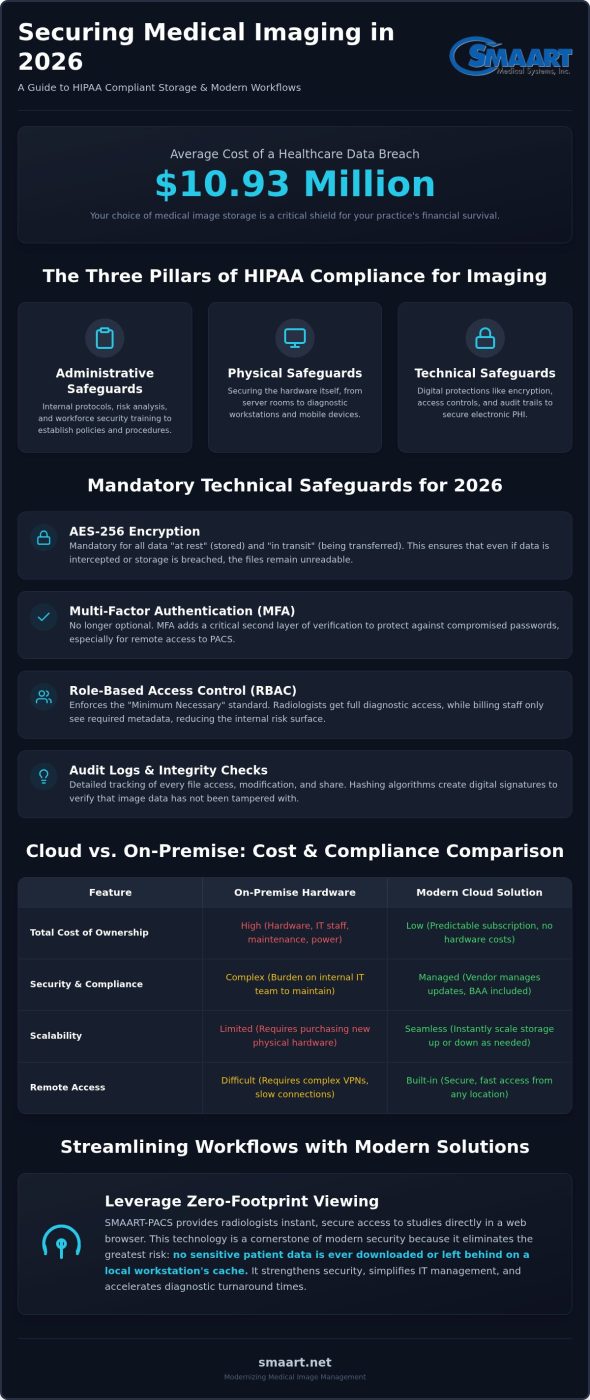
Patient identifiers like names, birth dates, and social security numbers are deeply embedded within DICOM headers. This makes every image a potential liability if it isn’t handled correctly. Certain modalities, such as ultrasound and fluoroscopy, often have PHI “burned-in” directly to the image pixels. This means even if the header is anonymized, the image itself remains a PHI risk. Modern solutions like SMAART-PACS address this by enforcing AES-256 encryption for data both at rest and in transit. This ensures that even if data is intercepted during a transfer, it remains unreadable and secure.
The Three Pillars of HIPAA Compliance for Imaging
Compliance isn’t a one-time setup; it’s an ongoing operational commitment built on three specific pillars. Administrative safeguards focus on your internal protocols, such as conducting annual risk analyses and ensuring your workforce receives updated security training. Physical safeguards involve securing the hardware itself, including server rooms and diagnostic workstations. Technical safeguards are perhaps the most critical for digital workflows. These include robust access controls, detailed audit trails that track every time a file is opened, and integrity checks to ensure images haven’t been altered. Utilizing a zero-footprint viewer further strengthens this pillar by ensuring no patient data is ever left behind on a local workstation’s cache.
Technical Safeguards for Secure Radiology Archiving
Effective HIPAA compliant medical image storage requires a transition from abstract risk assessments to concrete technical barriers. While large hospital systems often have dedicated IT teams to manage these layers, smaller clinics must rely on software that builds these protections into the core workflow. Implementing Role-Based Access Control (RBAC) is your first priority. This ensures that a radiologist has full diagnostic access while a billing clerk only sees the metadata required for a claim. By limiting access based on specific job functions, you drastically reduce the internal surface area for potential data breaches.
Beyond access levels, 2026 standards demand rigorous authentication. Multi-factor authentication (MFA) and automatic session timeouts are no longer optional “addressable” items. They are essential HIPAA Security Rule Safeguards that protect PHI if a workstation is left unattended in a busy clinical environment. These tools provide the relief of knowing that even if a password is compromised, your patient data remains locked behind a second layer of verification.
Encryption and Data Integrity
Securing imaging data flows involves protecting information at every stage of its journey. Use TLS 1.3 to create a secure tunnel for data in transit between your modalities and the PACS. This prevents “man-in-the-middle” attacks during the transfer of large DICOM sets. To maintain data integrity, modern systems employ hashing algorithms. These algorithms create a unique digital signature for every study; if the data is tampered with or corrupted, the signature breaks, alerting your team immediately. In 2026, encryption for data at rest is a mandatory requirement using AES-256 standards to ensure that stored files remain unreadable to unauthorized parties even if the physical or virtual storage is accessed.
Audit Logs and Access Monitoring
Immutable audit trails are the backbone of a successful HIPAA audit. Your storage solution must track every single interaction with an exam, including who viewed it, when they accessed it, and whether it was exported or shared. If you use a platform like SMAART-PACS, these logs are generated automatically and cannot be altered by users. This level of transparency creates a culture of accountability and makes regulatory reporting a simple, one-click process.
Active monitoring goes a step further by using automated alerts. You can configure your system to flag unusual activities, such as bulk downloads or access requests from unrecognized geographic locations. These proactive measures allow you to intercept potential threats before they escalate into full-scale breaches, ensuring your practice remains both compliant and resilient.
Cloud vs. On-Premise: Evaluating Cost and Compliance
Radiology departments face a pivotal choice: maintain physical hardware or move to the cloud. In 2026, the Total Cost of Ownership (TCO) analysis has shifted decisively. On-premise solutions require significant upfront capital for servers, storage arrays, and cooling infrastructure. You also pay for ongoing maintenance and specialized IT staff to manage the hardware. Cloud-based HIPAA compliant medical image storage trades these heavy capital expenses for a predictable monthly subscription. It’s a pragmatic move that provides immediate financial relief and allows you to reallocate budget toward patient care.
Scalability is another critical factor. Modern 3D mammography and PET-CT exams generate massive file sizes that can quickly overwhelm local storage. An on-premise system might run out of space in months, forcing an expensive and disruptive hardware upgrade. Cloud providers offer virtually infinite scalability. You only pay for the storage you actually use, which supports your practice’s growth without the stress of capacity planning or hardware limitations.
Cloud solutions also simplify disaster recovery and contingency planning. The HIPAA Security Rule mandates that covered entities have a data backup and recovery plan. Geo-redundant storage ensures your images exist in multiple physical locations simultaneously. If one data center goes offline due to a natural disaster, your clinical workflow continues without interruption. This level of resilience is nearly impossible to achieve with a single on-site server room.
The Case for Cloud-Based Medical Imaging Storage
Small and medium clinics benefit most from eliminating server room overhead. There’s no hardware to heat, cool, or fix, which drastically reduces operational burdens. These enterprise PACS solutions are now the modern standard for accessibility. They enable radiologists to read from any secure location and allow clinicians to view studies collaboratively in real-time. It’s a faster, more flexible way to manage a diagnostic practice.
When On-Premise Still Makes Sense
Cloud isn’t a universal fix. Hybrid models work best for facilities with limited or unreliable internet bandwidth. If your connection drops, you can’t access patient images from the cloud, which could halt clinical operations. Some practices also choose to leverage existing legacy hardware while they transition to a more modern setup. In these cases, local caching allows for fast, offline diagnostic viewing while the cloud serves as the long-term, secure archive. This approach ensures clinical continuity while you modernize at your own pace.
Implementing a Secure Imaging Workflow in 2026
Modernizing your HIPAA compliant medical image storage isn’t just about the archive; it’s about the movement of data. You must start with a comprehensive risk assessment of every endpoint, from the modality console to the referring physician’s tablet. In 2026, the most significant security leaks often occur at the hand-off points between systems. Transitioning to integrated RIS PACS solutions ensures that patient data remains consistent and encrypted as it moves from scheduling to diagnostic reporting. This integration eliminates data silos that often lead to security gaps.
It’s time to retire physical media like CDs. They are easily lost, difficult to track, and represent a massive HIPAA liability for any practice. Secure patient portals and direct physician-to-physician sharing through platforms like SMAART-SHARE provide a far more secure and efficient alternative. This shift requires ongoing staff training to ensure everyone understands how to handle PHI during sharing events. When your team is confident in the technology, they can focus on clinical outcomes rather than worrying about compliance errors.
Interfacing with EMR and HIS Systems
Unified records rely on seamless HL7 and DICOM interoperability. When your storage system talks directly to your EMR, you eliminate the need for manual data entry. This reduction in human error prevents PHI mismatches that can lead to diagnostic mistakes or billing audits. EMR integration is the #1 way to reduce HIPAA risk. By creating a single source of truth, you ensure that every image is correctly linked to the right patient record every time, providing a clear and defensible audit trail.
Zero-Footprint Viewing for Enhanced Security
Standard software installations often leave behind a trail of data. Every time a clinician views a study, unencrypted image slices might be cached on their local laptop’s hard drive. A zero footprint PACS viewer solves this by running entirely within a secure web browser. No patient data is ever stored on the local device, providing a massive layer of protection if a laptop is lost or stolen. It’s a pragmatic solution that balances high-speed access with the rigorous security standards of modern healthcare.
If you’re ready to modernize your clinic’s data security while boosting efficiency, explore our SMAART-PACS platform to see these secure integrations in action.
Scaling Securely with SMAART-PACS and SMAART-SHARE
Independent clinics often face a steep financial barrier when pursuing high-level HIPAA compliant medical image storage. Traditional enterprise software frequently carries a price tag that is out of reach for smaller facilities. SMAART Medical Systems, Inc. addresses this gap by offering robust security features at a clinic-friendly price point. We provide the relief of automated audit trails and mandatory AES-256 encryption without the heavy capital investment usually required. Every partnership includes a signed Business Associate Agreement (BAA) as a standard protocol, ensuring your legal requirements are met immediately.
Long-term data integrity depends on a unified environment where information moves without friction. By integrating SMAART-RIS with SMAART-PACS, you create a synchronized ecosystem that protects patient records from the initial scan to the final report. This holistic approach eliminates the fragmentation that often leads to PHI mismatches and compliance gaps. Our platform handles the complex backend of DICOM archiving, allowing your clinical team to focus entirely on patient outcomes.
Affordable Compliance for Growing Facilities
Scaling your diagnostic capacity shouldn’t require a constant cycle of hardware refreshes. SMAART-SHARE allows you to eliminate proprietary hardware costs by moving your image distribution and collaborative viewing to our secure cloud. You gain a predictable subscription model that scales directly with your exam volume. This means you only pay for the storage you use, providing significant fiscal relief as your practice expands. Our professional support team acts as a dedicated partner, ensuring your staff remains trained on the latest sharing protocols and security updates.
Future-Proofing Your Imaging Infrastructure
The radiology landscape in 2026 is increasingly defined by AI-driven diagnostics and high-resolution 3D modalities. These technologies generate enormous datasets that can quickly overwhelm traditional archives. Our cloud-native architecture is built to handle these storage demands, providing the bandwidth and processing power needed for modern radiology. You can add new modalities or additional imaging sites to your secure cloud network with minimal configuration, ensuring your infrastructure remains resilient and future-proof.
Modernizing your archive is the most effective way to reduce operational burdens and protect your practice from rising HIPAA fines. If you’re ready to transition to a more efficient, secure, and cost-effective workflow, explore SMAART Medical Systems, Inc.’s compliant storage solutions today.
Secure Your Diagnostic Future
Modernizing your HIPAA compliant medical image storage is a strategic move that pays dividends in both security and operational relief. By moving away from restrictive on-premise hardware, you eliminate the constant cycle of server maintenance and capital expenditure. The shift to cloud-native archiving provides the scalability needed for high-volume 2026 modalities while ensuring your practice remains resilient against evolving data threats. You gain the peace of mind that comes with automated audit trails and robust encryption protocols that protect every patient study.
Achieving this balance doesn’t have to be a complex or expensive hurdle. The HIPAA-ready cloud infrastructure, zero-footprint diagnostic viewing, and seamless EMR/RIS integration provided by SMAART Medical Systems, Inc. are designed to fit your clinical workflow perfectly. It’s time to replace outdated bottlenecks with a system built for speed and absolute compliance. Contact SMAART Medical Systems, Inc. for a Secure PACS Demo and discover how our solutions can streamline your practice today. We’re ready to partner with you for a more efficient, secure, and successful future in radiology.
Frequently Asked Questions
Is all cloud storage HIPAA compliant for medical images?
No, not all cloud storage meets the rigorous standards for HIPAA compliant medical image storage. Many general-purpose providers lack the specialized tools to manage DICOM headers or provide the granular audit trails required by the HHS. To be compliant, a provider must sign a Business Associate Agreement (BAA) and implement specific technical safeguards like AES-256 encryption. Without these radiological-specific protections, using standard cloud storage puts your practice at risk of significant federal fines.
What is a Business Associate Agreement (BAA) and why do I need one for imaging?
A Business Associate Agreement (BAA) is a mandatory legal contract that establishes a vendor’s responsibility for protecting patient data. You need one because any vendor providing HIPAA compliant medical image storage becomes a “business associate” once they handle your PHI. This agreement ensures the vendor is legally liable for security breaches and follows all federal privacy rules. Using a third-party service without a signed BAA is a direct violation of HIPAA regulations, regardless of how secure their encryption is.
How long are we required to store medical images under HIPAA?
HIPAA federal regulations generally require healthcare providers to retain medical records, including images, for at least six years from the date of creation or the date it was last in effect. However, state laws often impose stricter requirements that can extend this period to seven or ten years. It’s vital to check your specific state statutes and medical board guidelines. Modern cloud archives make long-term retention much simpler by providing scalable storage that doesn’t require physical space.
Can I share medical images via encrypted email and remain compliant?
While you can technically share images via encrypted email, it isn’t the most secure or efficient method for radiology. Standard email attachments often fail to meet the “Minimum Necessary” standard and can be difficult to track for audit purposes. A dedicated platform like SMAART-SHARE is a much better alternative. It provides a secure, browser-based environment for collaborative viewing that maintains a complete audit trail of every interaction, which is something traditional email simply can’t provide.
What happens if a medical image storage provider has a data breach?
If a breach occurs, the HIPAA Breach Notification Rule requires you to notify affected individuals, the Secretary of HHS, and sometimes the media. The timeframe for notification depends on the number of records compromised. If the storage provider was at fault, the signed BAA determines their share of the liability. Fines in 2026 are adjusted for inflation and can reach over $2 million annually for willful neglect, making it critical to choose a partner with a proven security track record.
Do I need to de-identify images before storing them in the cloud?
You don’t need to de-identify images if you are using a secure, compliant cloud archive with a signed BAA in place. HIPAA allows the storage and transmission of full PHI between covered entities and their business associates for treatment, payment, and healthcare operations. De-identification is usually only necessary for research or educational purposes where the clinical context of the patient’s identity isn’t required. For daily diagnostic workflows, keeping the PHI intact ensures better data consistency across your EMR.
How does a zero-footprint viewer improve HIPAA compliance?
A zero-footprint viewer significantly improves compliance by ensuring that no patient data is ever cached on a local workstation or laptop. Traditional PACS software often leaves temporary image files in a local folder, which creates a massive security risk if the device is lost or stolen. Browser-based viewers like those in SMAART-PACS keep all data on the secure server. This approach eliminates the physical risk of local data breaches and simplifies your administrative burden during a security audit.
What are the physical safeguard requirements for local DICOM storage?
Physical safeguards require you to control access to the actual hardware where DICOM data is stored or viewed. This includes keeping server rooms locked, positioning diagnostic monitors so they aren’t visible to the public, and implementing “clear desk” policies for workstations. You must also maintain logs of who has physical access to sensitive areas. While cloud storage reduces the need for on-site servers, you still must secure the local computers and tablets used to access the cloud archive.