Remote Radiology Reading Software: The 2026 Guide to Cloud-Based Workflows
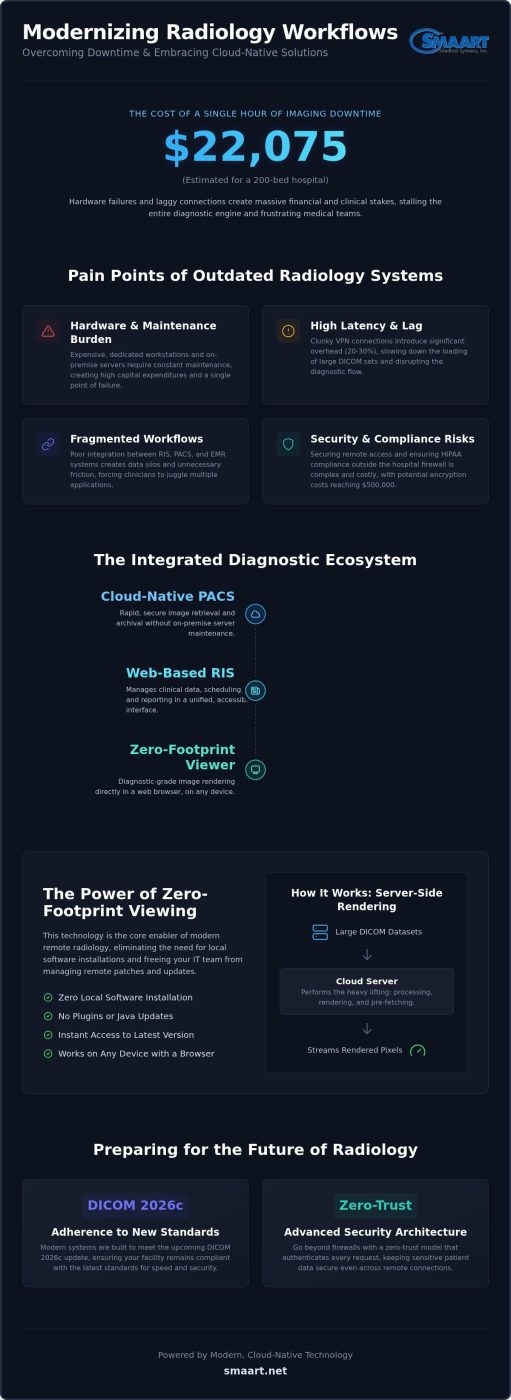
For a 200-bed hospital, a single hour of imaging downtime is estimated to cost $22,075. When your diagnostic engine stalls because of hardware failure or laggy connections, the financial and clinical stakes are massive. You need reliable remote radiology reading software that doesn’t just work; it needs to excel under pressure. It’s frustrating to battle high latency when loading large DICOM sets or to worry about HIPAA security outside the hospital firewall. You deserve a system that feels like a supportive partner, not a technical burden.
We understand that fragmented workflows between your RIS and PACS create unnecessary friction for your medical team. This guide explores how cloud-native, zero-footprint technology decouples diagnostic excellence from physical hardware to restore your operational agility. You’ll discover how to eliminate expensive maintenance costs while improving radiologist morale through seamless software integration. We’ll preview the 2026 standards for DICOM 2026c and show you how to build a secure, high-performance diagnostic environment that scales with your clinic’s needs.
Key Takeaways
- Understand how a modern PACS and RIS integration forms the backbone of a high-performance diagnostic environment.
- Learn why zero-footprint viewers are essential for eliminating local software installations and reducing your team’s hardware maintenance burdens.
- Explore the 2026 security landscape, focusing on zero-trust architectures that keep sensitive patient data secure outside the hospital firewall.
- Get a practical checklist to audit your current EMR/HIS infrastructure before implementing new remote radiology reading software.
- Discover how to achieve full-feature EMR integration and clinical efficiency without the financial strain of proprietary hardware.
What is Remote Radiology Reading Software?
Remote radiology reading software is a specialized suite of cloud-based tools that allow for the secure transmission, viewing, and reporting of medical images from any location. It isn’t just a basic web viewer; it’s an integrated diagnostic ecosystem that bridges the gap between clinical data and expert interpretation. By 2026, the industry has moved away from the clunky VPN connections of the past. Those old methods often introduced high latency and security vulnerabilities that slowed down patient care. Today, facilities use these tools to build internal remote capabilities rather than relying solely on third-party teleradiology firms. Modern standards, including the DICOM 2026c update, require a level of speed and security that traditional on-premise setups struggle to match.
The Essential Tech Stack for Remote Reading
To achieve a seamless workflow, your facility needs three critical components working in harmony. A cloud-native PACS, like SMAART-PACS, ensures rapid image retrieval and archival without the need for on-premise server maintenance. This is paired with a web-based RIS, such as SMAART-RIS, which handles the essential clinical data and patient scheduling. Finally, a diagnostic-grade viewer allows radiologists to render images with full fidelity directly within a standard web browser. This combination eliminates the hardware barriers that used to tether clinicians to a specific desk in a specific building.
Why Facilities are Making the Switch
The primary driver for adopting remote radiology reading software in 2026 is operational relief. Hospitals and clinics are finding that they can significantly reduce their capital expenditure by eliminating the need for expensive, dedicated diagnostic workstations on-site. With infrastructure costs for encryption compliance potentially reaching $500,000 for mid-sized hospitals, cloud-native software offers a much more fiscally responsible path forward. It shifts the financial burden from heavy upfront investments to predictable operational costs.
Beyond the financial benefits, this shift is a powerful recruitment tool. Attracting top-tier radiologist talent is easier when you offer a flexible, high-performance reading environment. Clinicians are no longer forced to choose between a grueling commute and their diagnostic duties. This improved morale directly impacts patient outcomes by reducing turnaround times for critical impressions. When a radiologist can access a study instantly from a secure, zero-footprint interface, the entire diagnostic cycle accelerates, providing the relief your clinical staff needs.
The Power of Zero-Footprint Viewing in 2026
Zero-footprint technology is the primary enabler of modern remote radiology reading software. In 2026, this means your diagnostic tools require zero local software installation. No plugins. No Java updates. No complex configuration on a home workstation. You simply open a secure browser, and you’re ready to work. This architecture provides immediate relief for IT departments by eliminating the cycle of managing remote software patches and versioning conflicts across disparate home offices. When the core system updates, every user receives the latest version instantly. You can find more detail on these specific mechanics in our guide to the zero footprint PACS viewer.
Browser-based technology has evolved to support full diagnostic-quality DICOM rendering through advanced standards like WebGL and WebAssembly. These tools allow the browser to tap into local hardware acceleration without needing a dedicated application. It ensures that window leveling, zooming, and multi-planar reconstruction (MPR) feel as responsive as they do on a local workstation. This shift removes the technical barriers that previously limited remote work to simple review tasks. It empowers radiologists to perform a full diagnostic workup from any location with the same precision they expect in the hospital.
Speed and Performance Optimization
Server-side rendering is the engine behind this performance. Instead of forcing a remote computer to download and process massive 3D datasets, the cloud server does the heavy lifting. It processes the data and streams the rendered pixels directly to the viewer. This approach allows large DICOM sets to load over standard internet connections with minimal lag. Smart pre-fetching and caching strategies further refine the experience. These tools anticipate your next study based on your worklist, ensuring the diagnostic flow remains fluid. By 2026, these cloud architectures have largely replaced traditional VPN setups. Traditional VPNs often introduce a 20-30% overhead on data packets, creating a ‘chatter’ that slows down image rendering. Cloud-native protocols bypass this bottleneck entirely, providing a snappier, more reliable experience.
Device Agnosticism and Flexibility
Device agnosticism is no longer a luxury for modern clinics. Radiologists need the freedom to read from PCs, Macs, or specialized tablets without losing essential functionality. SMAART-SHARE bridges these gaps by providing a collaborative, cross-device environment for image review and consultation. It maintains diagnostic integrity across various screen resolutions, ensuring that clinical impressions are accurate every time. This flexibility allows for a more versatile workforce and reduces the financial strain of purchasing proprietary hardware for every remote reader. If you’re ready to decouple your workflow from physical office space, exploring cloud-based imaging solutions is a pragmatic first step toward operational efficiency.
Security and HIPAA Compliance for Remote Workflows
The security landscape in 2026 has evolved far beyond simple perimeter defense. As hospitals move diagnostic work outside the traditional firewall, the focus has shifted toward zero-trust architecture. This model assumes that every connection request is a potential threat, requiring continuous verification of every user and device. For administrators, this shift provides a massive sense of relief. It replaces the anxiety of “what if” with a robust framework of “always verify.” Modern remote radiology reading software acts as the gatekeeper, ensuring that only authorized clinicians interact with sensitive patient data, regardless of their physical location.
A primary security advantage of cloud-native systems is that Protected Health Information (PHI) never resides on the remote reader’s local hard drive. Because the software operates in a zero-footprint environment, images are streamed, not downloaded. This eliminates the risk of data theft from lost or compromised laptops. If a radiologist’s device is stolen, there’s no patient data to recover from the hardware. Detailed audit trails and user access logs track every interaction with a study, providing a transparent record of who viewed which image and when. This level of visibility is often superior to what traditional on-premise systems offer.
Many facilities still ask if cloud-based storage is actually safer than on-premise servers. In 2026, the answer is a pragmatic “yes.” Maintaining an on-premise environment that meets current encryption standards can cost a mid-sized hospital between $200,000 and $500,000 in infrastructure upgrades. Cloud providers distribute these costs across their entire user base, allowing them to implement elite-level security measures that a single clinic couldn’t afford on its own. It’s a move toward fiscal responsibility that doesn’t compromise on patient safety.
Encryption and Data Integrity
Data integrity is the backbone of any remote diagnostic workflow. SMAART-PACS utilizes end-to-end TLS 1.3 encryption for images both in transit and at rest, protecting data from interception. Multi-factor authentication (MFA) is now a non-negotiable standard for remote access, ensuring that a stolen password isn’t enough to breach the system. These layers of protection ensure that the diagnostic images a radiologist sees are identical to those captured at the modality, maintaining clinical accuracy across national networks.
Regulatory Compliance Standards
Meeting HIPAA and HITECH standards requires more than just good software; it requires a partnership. Choosing a provider that offers a comprehensive Business Associate Agreement (BAA) is essential for shared accountability. Modern systems also simplify the burden of digital audits. Automated reporting tools can generate compliance logs in seconds, saving your IT team hours of manual labor. This streamlined approach to regulation allows your staff to focus on patient care rather than administrative paperwork.
Implementing Remote Reading: A Practical Checklist
Deploying remote radiology reading software requires a structured approach to ensure clinical continuity and operational relief. Your first step is defining the human element of the workflow. Will you rely on internal staff working from home, a dedicated outsourced group, or a hybrid model? A hybrid approach often provides the best balance, allowing you to manage overflow during peak hours without the overhead of additional on-site staff. This decision dictates how you’ll configure your user permissions and worklist distributions within the system.
Next, perform a rigorous audit of your clinical infrastructure. Your current EMR and HIS must talk to your remote PACS without friction. If these systems are siloed, your radiologists will waste valuable time manually entering patient data, which increases the risk of transcription errors. Achieving a seamless, zero-footprint environment is a cornerstone of hospital imaging workflow optimization. When selecting your software, prioritize integration and affordability. You need a partner that eliminates hardware barriers rather than creating new ones. Look for tools that offer intuitive interfaces to minimize the learning curve for your clinical team and reduce the burden on your IT support staff.
The Connectivity Requirement
Latency is often a bigger bottleneck than raw bandwidth for diagnostic tasks. While bandwidth determines how fast a study downloads, latency determines how responsive the viewer feels when windowing, leveling, or scrolling through large stacks. Redundancy strategies are mandatory for maintaining uptime. Remote readers should have a primary fiber connection and a secondary high-speed cellular backup to ensure they never go offline during a critical shift. For 2026 remote radiology, a minimum dedicated connection of 50 Mbps download and 10 Mbps upload per concurrent user is recommended for stable diagnostic performance.
Workstation and Environment Standards
Maintaining diagnostic integrity requires standardized hardware. Radiologists must use calibrated medical-grade monitors that meet current DICOM standards for luminance and contrast. Standard consumer displays simply don’t have the grayscale precision required for nuanced diagnostic impressions. Beyond the screen, consider the physical environment. Ambient lighting should be low and indirect to prevent screen glare, and ergonomic furniture helps maintain focus during long shifts. Integrating speech recognition directly into the RIS accelerates the reporting cycle, allowing impressions to reach the EMR almost instantly. If you’re ready to upgrade your facility’s capabilities without the “big tech” price tag, explore the SMAART-PACS and SMAART-RIS ecosystem today.
SMAART Medical Systems: Streamlining the Remote Workflow
SMAART Medical Systems acts as a modernizer in a traditional field, offering a refreshing alternative to overly complex industry giants. We deliver remote radiology reading software that balances technical authority with pragmatic, cost-effective design. Our SMAART-PACS and SMAART-RIS platforms provide the full feature set your facility needs without the “big tech” price tag or proprietary hardware requirements. We position ourselves as a reliable partner, helping you decouple diagnostic excellence from physical constraints while reducing the financial strain on your organization.
Seamless EMR integration is where many remote systems fail, but it’s where SMAART excels. Our software fits into your existing clinical ecosystem, ensuring that data moves fluidly between your RIS and patient records. SMAART-SHARE further streamlines this process by revolutionizing how you distribute results. It eliminates the outdated practice of burning CDs, providing a secure, cloud-based link for collaborative viewing that requires no special software on the recipient’s end. This shift toward modern efficiency provides immediate relief for both your administrative staff and your patients.
Affordable Excellence for Hospitals and Clinics
Facilities find immediate relief by eliminating the financial strain of on-site server maintenance. By shifting to a cloud-native environment, you trade unpredictable capital expenditures for a predictable, scalable subscription model. This approach ensures your imaging capabilities grow in lockstep with your patient volume. Implementing these integrated RIS PACS solutions allows you to modernize your workflow while maintaining strict fiscal responsibility. It’s a bold move that prioritizes long-term operational health over short-term hardware fixes.
Getting Started with SMAART
Our partnership begins with a detailed consultation to tailor the software to your specific facility needs. Unlike traditional installations that take months, our cloud-based architecture allows for rapid deployment, getting your diagnostic team online in record time. We remain a reliable partner long after the initial setup, providing ongoing support that is elite in its expertise yet humble in its service. We are deeply invested in your ongoing success, ensuring your imaging department remains both technologically advanced and practically efficient. By choosing a partner that understands the specific pressures of the 2026 healthcare landscape, you secure a future defined by streamlined productivity and reduced operational burdens.
Modernizing Your Imaging Infrastructure for 2026
Decoupling your diagnostic excellence from physical hardware isn’t just a trend; it’s a pragmatic strategy for operational relief. By embracing cloud-native architecture, your facility can eliminate the high costs of on-site server maintenance and the IT headaches of managing remote software patches. You’ve seen how zero-footprint viewing and zero-trust security models transform the way clinicians work, providing a secure and responsive environment from any location.
Investing in modern remote radiology reading software ensures your clinic remains agile and competitive in a rapidly evolving landscape. You deserve a partner that understands the financial and clinical pressures of the modern healthcare environment. SMAART Medical Systems is ready to help you achieve seamless EMR/HIS integration and affordable cloud-based storage without the “big tech” complexity.
Request a Demo of SMAART-PACS and See Remote Reading in Action to experience the speed of zero-footprint diagnostic viewing firsthand. We’re here to support your long-term success and provide the technical authority you need to move forward with confidence.
Frequently Asked Questions
What is the difference between teleradiology and remote radiology reading software?
Teleradiology refers to a service where studies are sent to outside physicians for interpretation. In contrast, remote radiology reading software is the technical infrastructure that allows your own facility to manage these workflows. SMAART-PACS provides the tools for your team to read from anywhere, but we don’t provide the diagnostic services themselves. This distinction is vital for clinics looking to maintain internal control while gaining the flexibility of a cloud-based diagnostic environment.
Do I need a VPN to use remote radiology software in 2026?
You don’t need a traditional VPN to use modern cloud-native software in 2026. Clunky VPN connections often introduce significant latency and represent a single point of failure for remote staff. Today’s systems utilize zero-trust architecture and TLS 1.3 encryption to secure data directly within the browser. This shift improves rendering speeds and reduces the IT burden of managing complex network tunnels, providing a much snappier experience for radiologists working from home.
Can remote radiology software integrate with my current EMR?
Yes, SMAART-PACS and SMAART-RIS are specifically engineered to integrate with your existing EMR and HIS platforms. We use industry-standard protocols like HL7 and DICOM to ensure that patient data and diagnostic reports flow seamlessly between systems. This integration eliminates the need for manual data entry, which reduces transcription errors and accelerates your overall clinical workflow. It’s a pragmatic way to modernize your facility without replacing your entire IT stack.
What are the hardware requirements for a radiologist reading from home?
The primary hardware requirement is a high-resolution, medical-grade monitor that is properly calibrated for diagnostic grayscale. While the remote radiology reading software itself is zero-footprint and runs in a standard web browser, the display must meet clinical standards for accuracy. Additionally, a stable internet connection with at least 50 Mbps download and 10 Mbps upload speed is recommended. Most modern PCs or Macs can handle the rendering thanks to server-side processing.
Is browser-based diagnostic viewing actually high-quality enough for impressions?
Modern browser-based viewers provide full diagnostic-quality rendering that meets the same standards as traditional desktop applications. Technologies like WebGL allow the browser to utilize the local computer’s graphics card for windowing, leveling, and 3D manipulation without losing fidelity. This ensures that the clinical impressions made remotely are just as accurate as those made on-site. It’s a high-performance solution that removes the need for local software installations or plugins.
How does remote reading software handle large files like 3D mammography or multi-slice CT?
Cloud-native systems use server-side rendering to handle massive datasets like 3D mammography or multi-slice CT scans. Instead of downloading the entire file to the radiologist’s computer, the server processes the data and streams only the necessary pixels to the viewer. This approach dramatically reduces loading times and prevents local hardware from becoming a bottleneck. It allows clinicians to scroll through thousands of slices with the same fluid responsiveness they’d expect on a local network.
Is cloud-based radiology software HIPAA compliant?
Yes, cloud-based radiology software is fully HIPAA compliant when configured correctly with a Business Associate Agreement (BAA). Modern platforms use AES-256 encryption for data at rest and TLS 1.3 for data in transit. Because zero-footprint viewers don’t store Protected Health Information (PHI) on the local hard drive, they actually reduce the risk of data breaches from lost or stolen devices. These systems provide a secure, audited environment that meets current 2026 security standards.
How much does it cost to implement remote radiology software?
Implementation costs have largely shifted from high upfront capital expenditures to predictable, subscription-based operational expenses. Most facilities pay a recurring fee based on their study volume, which includes cloud storage, software updates, and ongoing support. This model eliminates the need for expensive on-site server hardware and dedicated IT maintenance staff. It’s a fiscally responsible way for hospitals and clinics to access elite-level technology while scaling their costs in direct proportion to their growth.