Checklist for Choosing a PACS Vendor: 2026 Evaluation Guide
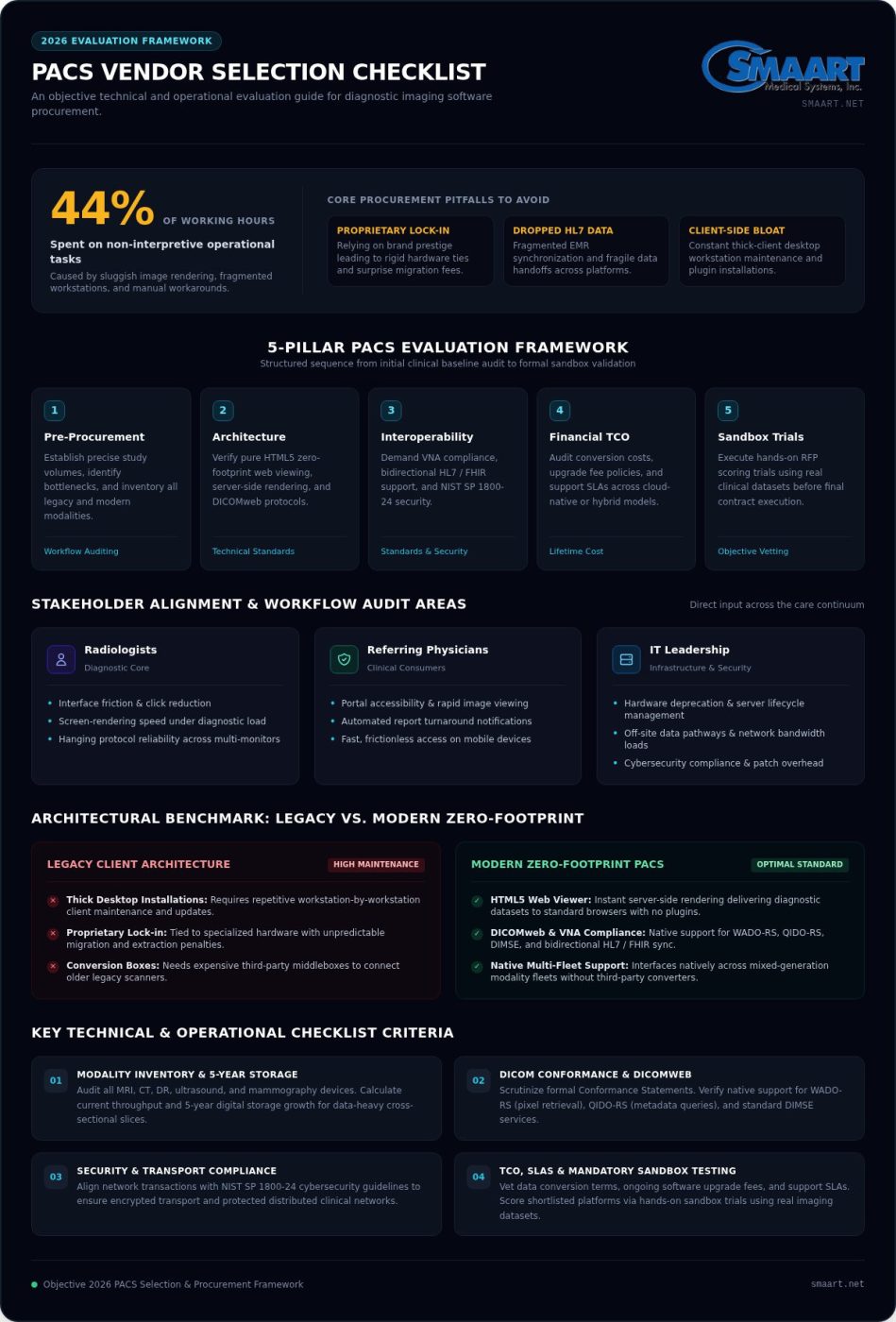
Imaging informatics studies show that radiologists spend up to 44% of their working hours on non-interpretive tasks, largely waiting on sluggish image loads and battling fragmented workstations. Relying on legacy brand prestige often leads straight into proprietary lock-in, endless client-side updates, and surprise migration fees. That is why an objective checklist for choosing a PACS vendor is critical before you sign any software contract.
You already know how exhausting it feels to deal with clunky desktop viewers, dropped HL7 data during EMR synchronizations, or vendor support teams that vanish during an unexpected outage. Diagnostic software should relieve operational friction, not create continuous maintenance headaches for your IT staff.
This 2026 evaluation guide gives you an actionable framework to assess medical imaging software objectively, focusing on zero-footprint web architecture, bidirectional interoperability, and transparent lifetime costs. Below, we provide a structured scoring matrix, key technical benchmarks, and the essential vetting questions needed to choose the right platform with total confidence.
Key Takeaways
- Establish precise daily study volumes and clinical bottleneck baselines across modalities before drafting your procurement specifications.
- Use this technical checklist for choosing a PACS vendor to verify pure zero-footprint web viewing and bidirectional HL7 or FHIR interoperability.
- Insist on Vendor Neutral Archive compliance and flexible cloud-native or hybrid architecture to prevent proprietary hardware lock-in and migration penalties.
- Calculate your genuine total cost of ownership by vetting long-term data conversion terms, ongoing software upgrade policies, and support service level agreements.
- Score competing platforms objectively through structured RFP criteria and mandatory hands-on sandbox trials with your facility’s actual imaging datasets.
Pre-Procurement Assessment: Defining Your Facility Imaging Requirements
Procuring imaging technology without a complete clinical audit invites costly mistakes. Before drafting a formal Request for Proposal (RFP), your organization must establish exact study baselines and map every diagnostic bottleneck. An effective modern Picture Archiving and Communication System (PACS) serves as the central circulatory system for clinical documentation, so clarity at the outset prevents operational drift later.
Every clinical practice presents unique operational strains. Independent outpatient facilities often grapple with rapid report turnaround times and external patient disk ingestion. In contrast, multi-site regional centers struggle with load-balancing studies across disparate reading groups. A comprehensive checklist for choosing a PACS vendor starts by identifying these distinct pain points, separating core diagnostic utilities from costly, non-essential software bloat.
Stakeholder Alignment and Clinical Workflow Audits
Forming a unified procurement team bridges the gap between technical requirements and everyday medical practice. Your committee should gather direct input from across the care continuum:
- Radiologists: Audit daily interface friction, screen-rendering speeds, and hanging protocol reliability across multi-monitor setups.
- Referring Physicians: Detail current obstacles regarding portal accessibility, automated turnaround notifications, and fast image viewing on mobile devices.
- IT Leadership: Review on-premise hardware deprecation schedules, off-site data pathways, and internal bandwidth constraints.
Engaging these clinical leads early prevents the adoption of systems that look impressive during high-level sales presentations but fail under actual diagnostic volume.
Modality Inventory and Throughput Calculation
Map your imaging landscape with precision. Document every active diagnostic modality, including magnetic resonance imaging (MRI), computed tomography (CT), digital radiography (DR), ultrasound, and mammography. Calculate both current annual throughput and projected digital storage growth over the next five years, paying close attention to data-heavy cross-sectional slices.
You also need to audit legacy scanners that rely on older communication gateways. Knowing whether older modalities require specialized hardware bridges helps you select platforms like SMAART-PACS that natively interface across mixed-generation modality fleets without demanding expensive third-party conversion middleboxes.
Building your procurement strategy on hard data protects your capital investment. By grounding your search in verifiable modality counts and clear clinical workflows, you can apply this checklist for choosing a PACS vendor to eliminate unsuitable platforms well before scheduling your first vendor demonstration.
Technical Architecture Checklist: Standards, Interoperability, and Viewer Deployment
Marketing brochures often promise seamless diagnostic viewing, but real-world clinical performance hinges on technical architecture. When building your checklist for choosing a PACS vendor, look past generic feature lists. You need to inspect how the system processes DICOM tags, manages bandwidth, and exchanges data with core healthcare platforms.
Scrutinize the vendor’s detailed DICOM Conformance Statement rather than accepting verbal assurances. The platform should natively support modern DICOMweb RESTful protocols, including WADO-RS for retrieving pixel data and QIDO-RS for querying metadata, alongside standard DIMSE services. Aligning these network transactions with the NIST SP 1800-24 cybersecurity guidelines ensures that your transport layers remain encrypted and protected against unauthorized access across distributed clinical networks.
Zero-Footprint Web Viewers vs. Client Workstations
Legacy thick clients require constant maintenance, workstation by workstation. That model drains IT hours. Modern systems use pure HTML5 zero-footprint web viewers with server-side rendering, delivering diagnostic datasets to any standard browser without client-side plugins.
- Instant Rendering: Sub-second display for multi-gigabyte CT or MRI studies without local file caching.
- Full Toolsets: Diagnostic-grade Cobb angle calculation, calibrated distance measurement, and spine labeling.
- Device Flexibility: Uniform performance across clinical displays and everyday workstations.
Exploring modern approaches like interfacing PACS with EMR architectures shows how zero-footprint designs keep client devices lightweight while maintaining full diagnostic capabilities.
RIS, EMR, and Billing System Interoperability
Dropped data creates billing gaps and care delays. Demand proven, bidirectional HL7 messaging (ORM/ORU) and modern FHIR resource synchronization. When an order updates in your electronic health record, the PACS worklist should reflect that change instantly. Look into modernizing workflow with integrated RIS PACS solutions to ensure diagnostic reports and clinical billing codes transmit seamlessly between clinical teams and back-office revenue cycles.
Custom Hanging Protocols and Diagnostic Efficiency
Every radiologist reads differently. Static display setups waste valuable clinical time. Ensure the viewing environment supports intuitive, automated hanging protocols that instantly orient prior comparisons based on anatomy, series descriptions, and modality type.
The platform must also integrate cleanly with standard speech recognition systems to eliminate manual transcription friction. If your facility wants to streamline routine interpretations while removing hardware maintenance burdens, consider exploring how SMAART-PACS delivers browser-based diagnostic tools tailored for modern imaging teams.
Incorporating these concrete requirements into your checklist for choosing a PACS vendor protects your clinicians from slow rendering speeds and insulates your IT department from perpetual software patching.
Infrastructure and Archiving Checklist: Cloud Agility, Security, and Compliance
Storage architecture determines whether your imaging operations scale smoothly or grind to a halt under mounting data volumes. A robust checklist for choosing a PACS vendor must scrutinize how prospective systems store, protect, and release diagnostic records over multi-year lifecycles. Failing to vet archiving early leaves facilities trapped under hardware replacement cycles and unexpected bandwidth bottlenecks.
Adhering to recognized clinical benchmarks, such as the RCR guidance on PACS procurement, highlights the necessity of planning data storage lifecycles well before deploying new software. Protecting patient records while keeping diagnostic pathways responsive requires an intentional balance of performance, regulatory adherence, and data ownership.
Evaluating Cloud, On-Premise, and Hybrid Models
Deploying heavy on-premise servers introduces relentless overhead: physical room cooling, routine drive swaps, manual patches, and recurring hardware refresh cycles. Pure cloud-native or modern hybrid setups offload that maintenance burden while offering elastic capacity as imaging volumes expand.
- Local Failover: Emergency caching ensures reading continues uninterrupted if external network connections drop.
- Tiered Storage: Automatic routing moves aging studies to secure secondary storage tiers while keeping acute exams immediately accessible.
- Scalable Expansion: Facilities can review cloud based medical imaging storage strategies to eliminate on-site capital server investments.
Data Security, Encryption, and Regulatory Compliance
Medical imaging archives represent high-value targets for cybersecurity threats. Your evaluation matrix should enforce strict safeguards across every pipeline:
- End-to-End Encryption: Mandate TLS protocols for data in motion alongside AES-256 standards for files resting in cold or hot storage.
- Access Auditing: Comprehensive, immutable audit logs track every exam query, export, and transmission to meet HIPAA compliance requirements.
- Role-Based Controls: Fine-grained administrative permissions isolate protected health information across different departments and user groups.
Vendor Neutral Archiving and Exit Strategies
Proprietary image encapsulation is a silent contract hazard. If a provider wraps DICOM files in closed database schemas, migrating your own historical archives later becomes complicated and expensive. Your checklist for choosing a PACS vendor must mandate true Vendor Neutral Archive (VNA) compliance.
Require vendors to maintain standard Part 10 DICOM formatting across all storage layers. In addition, examine exit agreements to verify that data extraction manifests (such as DICOM Supplement 223 inventories) can be pulled without proprietary conversion penalties. Retaining full ownership of your clinical imaging assets ensures your healthcare organization maintains operational autonomy for years to come.
Financial and Operational Checklist: Total Cost of Ownership and Vendor SLAs
Uncovering financial surprises halfway through a five-year software deployment ruins procurement budgets. Traditional healthcare software sales models often disguise ongoing expenditures beneath artificially lowered initial quotes. That makes commercial auditing a crucial component of any comprehensive checklist for choosing a PACS vendor.
A realistic fiscal evaluation tracks the complete Total Cost of Ownership (TCO). You must account for initial deployment, custom interface configuration, hardware lifecycle upgrades, and technical training. Prioritizing platforms designed for architectural simplicity helps keep IT operational overhead predictable over the software lifecycle.
Deconstructing Licensing Models and Uncovering Hidden Fees
Perpetual licensing agreements typically carry punitive annual maintenance contracts, paid version upgrades, and separate costs for each added client workstation. A modern software subscription model offers greater clarity, provided you review the fine print carefully.
- Interface Surcharges: Clarify whether bidirectional HL7 feeds, EMR integrations, or RIS worklist connections incur separate setup charges or annual maintenance fees.
- Volume Scaling: Determine how fees change as study volumes increase so your clinical growth is not penalized.
- Feature Inclusions: Ensure all core software enhancements, security patches, and regulatory updates remain covered under standard support.
Evaluating vendor pricing structures objectively protects administrative budgets from unexpected line items down the road.
Service Level Agreements, Uptime, and Support Reliability
A system outage halts reading lists, backs up emergency departments, and impairs patient care. Contractual Service Level Agreements (SLAs) must include teeth, not just broad assurances. Mandate a contractual 99.9% availability threshold backed by concrete service credits when downtime occurs.
Scrutinize the vendor’s actual support architecture. Will your IT team connect with experienced system engineers during an outage, or will support tickets sit unassigned in an offshore call queue? Clear escalation protocols, rapid response commitments for critical severity issues, and dedicated implementation managers are essential safeguards.
Diagnostic imaging software should create operational relief, not endless overhead. If you are seeking a transparent, modern alternative to legacy imaging vendors, request a personalized platform walkthrough from SMAART Medical Systems to see how our unified software architecture simplifies PACS procurement.
Applying this operational checklist for choosing a PACS vendor ensures your healthcare organization secures dependable, continuous software uptime paired with genuine fiscal transparency.
Vendor Vetting Matrix: From RFP Scoring to Implementation and Go-Live
Selecting software based solely on polished sales presentations often leads to post-signature buyer remorse. A dependable checklist for choosing a PACS vendor demands an objective evaluation matrix that scores clinical usability, technical stability, and vendor responsiveness before anyone signs a contract.
Every facility deserves software that works reliably from day one. You can establish that assurance by structuring a quantitative scoring system, testing platforms with your own diagnostic data, and establishing strict migration accountability.
Designing the PACS RFP and Objective Scoring Matrix
Build a weighted matrix that scores vendors across four primary domains: clinical user experience, system architecture, total lifecycle cost, and operational support. Assign clear percentages to each category to reflect your facility priorities:
- Usability (35%): Evaluates diagnostic tool navigation, worklist filtering, and multi-monitor responsiveness.
- Architecture (25%): Confirms zero-footprint web viewer capabilities, open RESTful APIs, and non-proprietary archiving.
- Support and SLAs (20%): Assesses uptime commitments, live engineering access, and onboarding scope.
- Commercial Terms (20%): Verifies all-inclusive licensing without hidden interface surcharges.
Disqualify any vendor that refuses to address your specific clinical software stack or attempts to hide core integration costs inside vague line items.
Sandbox Usability Testing and Radiologist Acceptance
Have your radiologists count the clicks required to complete standard reporting routines. Check how smoothly remote reading groups access studies over ordinary commercial connections, whether reading on fixed hospital displays or portable diagnostic workstations from Dextro Imaging Solutions. Real-world testing reveals interface lag that sales presentations routinely mask.
Migration Planning, Data Transfer, and Staff Onboarding
A flawless go-live depends on clear data logistics. Establish an enforceable migration protocol that details legacy DICOM extraction, metadata mapping, and study reconciliation to ensure zero data loss. Pair this with role-specific staff onboarding schedules for reading radiologists, modality technologists, and front-desk personnel.
Investing in targeted hospital imaging workflow optimization methods eliminates typical cutover friction and accelerates team proficiency. When supported by responsive technical partners, a structured cutover keeps clinical routines calm and maintains continuous patient throughput.
Following this objective checklist for choosing a PACS vendor transforms procurement from an uncertain gamble into a predictable, confident software transition.
Modernize Your Imaging Workflow With Confidence
Transitioning to a new imaging platform doesn’t have to strain your capital budget or overburden your IT department. By anchoring your procurement process in a thorough checklist for choosing a PACS vendor, you safeguard your practice against proprietary database lock-in, sluggish thick-client viewers, and hidden maintenance fees. Prioritizing pure zero-footprint web viewing with sub-second image loading ensures your reading teams remain efficient, while turnkey bidirectional integration connects your EMR and HIS platforms without workflow disruption.
SMAART Medical Systems holds a trusted national track record delivering affordable, full-featured radiology management solutions designed to eliminate daily operational friction. You don’t have to accept the complexity and ballooning costs of traditional industry giants. Take the next step toward a modernized, scalable imaging environment: schedule a modern SMAART-PACS workflow demonstration today and discover the relief of radiology software built around your clinical needs.
Frequently Asked Questions
What is the difference between a traditional PACS and a zero-footprint viewer?
Traditional PACS relies on heavy client-side desktop software that IT teams must install and maintain on every individual workstation. In contrast, a zero-footprint viewer runs entirely inside standard web browsers using server-side rendering. This architectural shift streams diagnostic displays without downloading bulky raw DICOM payloads to local drives, keeping client endpoints lightweight and simplifying remote interpretation across operating systems.
How long does a typical PACS migration and implementation take?
A standard PACS migration typically takes between three to nine months, depending on historical data volume and modality complexity. The timeline splits across workflow planning, bidirectional interface building, legacy DICOM data extraction, and clinical user training. Establishing clear phased migration milestones inside your checklist for choosing a PACS vendor ensures legacy databases transfer cleanly without disrupting active diagnostic schedules.
Can modern PACS software integrate with our existing EMR and billing systems?
Yes, modern PACS platforms integrate directly with existing EMR, RIS, and billing software using standard HL7 messaging and RESTful FHIR APIs. Turnkey systems like SMAART-PACS receive modality worklists and patient orders while sending diagnostic reports and procedural billing codes back into clinical records automatically. This bidirectional synchronization eliminates manual data entry, prevents dropped patient context, and accelerates reimbursement cycles.
What are the common hidden costs when purchasing a PACS platform?
Hidden expenses frequently surface in third-party interface licensing, unannounced software upgrade charges, and punitive data extraction penalties during contract terminations. Many legacy vendors also charge separately for adding workstation seats, user licenses, or modality connections. Scrutinizing every line item within your checklist for choosing a PACS vendor protects your practice from unexpected support surcharges and non-standard data archiving fees down the line.
Why is Vendor Neutral Archive (VNA) compliance essential when evaluating vendors?
VNA compliance ensures all clinical imaging files remain stored in non-proprietary DICOM formats across every storage tier. Closed, proprietary databases lock healthcare facilities into single-vendor ecosystems by making future migrations prohibitively difficult. Choosing an open, VNA-compliant architecture preserves institutional ownership over diagnostic records, allowing seamless future platform transitions and open data sharing without vendor-imposed conversion hurdles.
How do cloud-based PACS ensure HIPAA compliance and disaster recovery?
Cloud imaging architectures maintain HIPAA compliance through continuous end-to-end encryption, applying TLS protocols for data in motion and AES-256 for resting files. Automated, geo-redundant data replication across isolated data centers protects against physical hardware loss or localized regional disruptions. Granular role-based access controls and detailed access audit logs ensure that protected health information stays secure and readily reviewable for federal compliance audits.
What key performance indicators should we include in our vendor Service Level Agreement?
Your SLA should require at least a 99.9% system availability guarantee coupled with defined financial service credits for unscheduled downtime. In addition, demand strict resolution timeframes for critical diagnostic outages, specifying direct access to senior technical engineers rather than generic intake ticket queues. Clear metrics for image delivery speeds, support response tiers, and scheduled maintenance windows ensure operational reliability across every shift.